
Development

Treefrog logo made of moss
Artificial Intelligence, Augmented & Virtual Reality, Branding & Design, Digital Marketing, Hosting & Infrastructure, IoT, NFC and Beacons, Mobile App Development, Web Application Development, Web Design & Development

What Does Treefrog Do?

Our “Who”

It is not uncommon for a company, country, or an individual to have an annual theme. At Treefrog, our CEO has set one for the company each year, and while most often they have remained internal; this year, we’ve decided to launch a marketing theme along with an internal monologue:

“What does Treefrog do?”

While this might seem like a strange question to be asking after nearly 20-years of business, as a digital agency, we have evolved incredibly over the last two decades; from CD burning to website development, creating a content management system (LEAP), to the additions of search ranking and social, to bleeding edge innovation around AI, AR, and IoT. And throughout all of this change, we hold one common theme: innovation and ideation.

Wall with full of multi coloured adhesive, sticky notes, project planning.

But, we are no longer the people in a basement designing websites by day and coding them by night. We’ve grown into a 40+ team. Our clients have matured and grown, just as the small Town of Newmarket has too.

There comes a time in every organization where you need to step back and ask: Based on our growth, are our clients of yesterday still our clients today? And will they be our clients of tomorrow?

At the end of 2018, we set out to answer this very question.

Let us share how we did this:

Our goal was to identify ten words or fewer that would succinctly recognize who our client is. We began by listing out a variety of clients (both past and present), what types of services they offer, and the successes we’ve had with them. This was followed by a lengthy exercise of identifying attributes of these many customers and how we work with our clients.

During the process, we started to notice patterns in the clients and attributes. While some clients were our long-time partners of 15+ years, others had been working with us for less than two years. Some clients were multi-million dollar organizations, with operations around the world, and others were less than five team members and under half million in revenue.

Fascinating similarities in connection for all clients regardless of size, location, industry or income started to emerge. Attributes such as:

  • Relationship-focused
  • Growth-Oriented
  • Collaborative
  • Curious
  • Patient
  • Experts in their field

We then categorized the attributes, in the hopes of boiling our brainstorming session down into one sentence that was evident in all the clients that we selected, both prosperous and less successful (yes we looked at our failures too).

In all cases, we were dealing with the CEO or lead decision-maker; even in the $80-million company, we had a direct line to the CEO.

However, we also realized that in focusing on our clients, what they asked of us was only part of the equation. How we behave, and our values played an essential role in this process too.

As we mingled our values with the attributes of our clients, we landed on something very close to “who” our ideal client is. This included a definition of each client, and a description that would be lasting regardless of the services that we offer or the ways to which we provide support.

“Courageous, aspirational decision-makers concerned about being digitally underdeveloped who want an invested partner.”

TREEFROG INC.

It’s not marketing speak. It’s not meant to be pretty. It’s an internal dialogue for whom we define as our partner. Let’s unpack this definition:

Courageous

Courage defined as ‘being afraid of something and doing it anyway.’

Starting a company, inheriting a company, or gaining the position of leader in an organization is an act of courage. Sometimes it’s the only act of courage a leader makes (that’s an article for another time). But, taking on that role can be scary. Leading an organization takes courage, on a daily basis.

This word was especially crucial to our team, as many of the clients we looked at need a lot of courage in both their companies and industries. Also, when you think about technologies and the digital industry, there are a lot of unknowns, it’s intimidating to many individuals, yet the courageous person moves forward even in the face of uncertainty.

Aspirational

Aspirational or Aspiration has a dual significance in the hope or ambition to go-after or achieve something paired with the action or process to get it. Aspirational individuals are decisive, visionary, curious, and willing to take risks. At Treefrog, we are aspirational; we take risks, we go after big ideas with curiosity and joy. Our best clients are aspirational, taking risks in business, achieving something beautiful.

Decision-Maker

Let’s be real. We all want to be dealing with the decision-maker, that’s a given. But, this decision-maker is unique, they go after new things, and they embrace or welcome innovation, thinking outside the box. They are not just any decision-maker but one who eagerly craves success.

Concerned

This word is especially significant in our definition. Several businesses in the world are happily digitally underdeveloped or non-existent. These are not our clients. We are not seeking to find these decision-makers.

We have one of these businesses leaders on our team right now, a hired consultant working with us part-time: but she is not our client, as she isn’t concerned about her digital footprint.

We are instead interested in working with (and for) companies and decision-makers who are worried about their place in the digital space, who fear missing out, who recognize they are lagging in the digital arena even though they may be experts in their industry.

Digitally Underdeveloped

What does it mean to be digitally underdeveloped? It is relative to the business, knowledge holders, competitors in the industry, and the company itself. It could mean a variety of status points, having an out-dated website, lagging in social engagements, using antiquated systems such as Excel for essential business functions, and more.

This is the one area we’ve spent the most amount of time on, defining and understanding what this could mean to many businesses including our past, current, and future clients. Stay tuned for part two of this article next month, as we will unpack this even more.

Want

Desire. Need. Want. Again, another impactful word in our definition as it describes the mental state of the decision-maker. They aren’t merely looking to fill a gap; this is something they crave or seek. It’s like breathing or nourishment to them, and they see the importance, they are willing to explore and find more than just the bare minimum.

Invested Partner

Lastly, a partner, yet not just any partner but one who is there for the long journey. At Treefrog, this is one of our strongest values, almost to a fault. We think of our clients and their businesses as if they are our businesses and our families. We pride our relationships with authenticity and love. When we engage in a new project, we look at the contract like that of the full depth and sanctity. For better, for worse, for richer, for poorer, in sickness and in health, to love and to cherish. We are there side-by-side with our clients.

What’s next for Treefrog?

Now that we have a defined a clear path of the types of individuals for whom we have seen through evidence-based work and by aligned values, partnership, and longevity, we can start to examine the ‘what’ in: What does Treefrog do?

We hope you’ve found this article informative as to how we discovered our “who,” a question most businesses struggle to articulate.

At Treefrog, we encourage innovation and thought leadership in all that we do. If you would like help in finding your “who,” we offer no-charge innovation ideation sessions for our clients. We merely ask for a 10-15 minute pre-call to learn about your business and what keeps you up at night.

Interested? Please let us know by emailing info@treefrog.ca.

Close up of an office table covered in brainstorming notes. Several people are leaning over the notes.
Web Design & Development

The Importance of Scoping

“If you don’t know where you’re going, you’ll end up somewhere else”
– Yogi Berra

At Treefrog, we value client success

As a digital transformation agency, our specialty is helping organizations tap into their full potential in the digital space; whether it’s underdeveloped or underutilized resources to drive change in the company or industry space.

Often when we start the conversation, there are so many unknowns that it can be hard to put a plan in place. For example, if you want to take your product or services online to sell, there are several things to consider:

  • What will the shipping be? By Weight? Location?
  • How will you handle taxes?
  • What about International currencies?
  • Inventory Management?
  • Discounts? Specials?

So the list goes on. Having a trusted partner to guide you through the process is essential. Whether it is an e-commerce system, ERP integration, building a customer portal, app development, augment Reality, or otherwise, we know the pain and uncertainty that can come with a project of this magnitude. Thus, we want to help you identify and reduce risk as much as possible.

To help reduce your risk, Scoping is extremely important in leading us in the proper direction. However, have you ever started a project with a plan and realized a stronger approach along the way? Digital projects can never be planned from start to finish, and they have several unknown variables in the early stages.  So, the best option is to prepare for a goal and make changes along the way to produce ample results.

If you have done renovations to your home, you may be familiar with this concept. At the start of the project, you explain to the contractor your vision, and a blueprint is created. However, once the renovations have begun changes must be made for a perfect result.

Most digital agencies will manage projects using a top-down approach (also known as the waterfall method). This fixed approach can cause projects to be unsuccessful as the plan is so set in stone there is no room for improvement along the way. The scope is often made at the start, with little room for change without a high cost. Often clients will be disappointed when great ideas are ignored to adhere to the timeline and budget. We find this is due to the three constraints faced by any project: Budget, Timeline, and Resources.

Typically referred to as the iron triangle, these constraints faced by project managers are the scope, schedule, and cost. They work interdependently together, and none of them can be adjusted without affecting the other.  For example, if the deadline of a project is moved up, the scope will be changed, as goals may not be achieved.

At Treefrog, we believe following a top-down approach often leads to disappointment and a lack of success. These fixed plans at the start of projects lead to distress, as there is a strict goal to maintain a scope, budget, and time constraints. However, like most things in life, it takes getting your hands dirty to figure out the best solution.

We have found that the following method reduces uncertainties based on continuous collaboration. The Scope/Discovery Process is unique to each client and includes some part of:

  •  Understanding the clients business goals
  • Defining the client’s target audience
  • Creating a list of tasks that will assist the client in achieving goals
  • Outlining in detail what we can offer the client

Although the discovery process helps the initial scope, there is always a cone of uncertainty when starting a new project.  This idea emerged from the engineering industry in the 1950s, but it is highly applicable to today’s digital world. The basic premise of this is that all projects have a large number of uncertainties in the early stages. However, as more hours are put in, and great ideas begin to flow masterpieces are created. The reason for this is, no two projects ever have:

  • The same requirements
  • The same people
  • The same technology
  • The same user audience
  • The same priorities & constraints
  • The same business strategy

We have learned to be agile in our creative process. Thus going through the initial scope and wireframing of a project increases the depth of knowledge, available technologies, budgets, and resources. This gives all involved the time to unpack uncertainties, brainstorm on the grand scope of the project, be upfront and honest with the expectations. Much like an actual Treefrog, we are highly adaptable to change. We want our clients to love what we produce for them— and we want to brag about it too.

Do you have an idea or project that you haven’t fully conceptualized yet? Are you looking for some grounded feedback? Give us a call; we’d love to hear about your idea(s).

A man interacts with a touchscreen tablet at home.
IoT, NFC and Beacons

What Is The Internet of Everything? Why Should You Care?

As a leader in innovation and technology, we felt it appropriate to share a recent talk by our CEO, Sean Stephens where he addressed four of the hottest questions in the field:

  1. What is the internet of everything (IoE)?
  2. How is it changing business?
  3. What are common products are we already seeing in this space?
  4. How can it apply to your business?

You may have heard the expression internet of things (IoT) referring to internet enabled products such as appliances, vehicles, wearable and more. What then is the difference between IoT and IoE? That’s an entire other article, but to put it simply:

The difference lies in the intelligent connection. 

An IoT device or product relies on the physical object to communicate, whereas an IoE device relies on network intelligence to bring all of the concepts together into a more united system.

What Is The Internet Of Everything?

As technology evolves, there is a goal to have every single object connect to the internet in some way. This is a significant change in the information age by being connected to all our devices, utilizing machine learning to predict our every wish and desire. Does that freak you out, or excite you?

Before we get into that, let’s look back to see how we got to where we are today. Essentially there have been four revolutionary periods, and we are living in one of them today:

  1. The revolution of steam, the ability to push and drive through waterpower.
  2. The manufacturing revolution.
  3. The birth of technology with inventions such as the telephone, television, cell phones, wireless devices and more.
  4.  Today is the revolution of the internet of everything. From doors and fridges to vehicles and thermostats, almost everything is being embedded with electronics, software, sensors and connectivity, which enable things to connect and exchange data.

You are likely already using IoE and don’t even realize it! Let’s be clear though, cell phones and social media are not IoE. Devices such as thermostats and home cameras that monitor your home, connected cars with Google GPS and traffic tracking, and activity monitors that track your health, are. Soon we will have fully connected lives.

How Is This Changing Business?

It’s affecting our buying decision, to know or not when it’s connected to our personal devices or our businesses. Soon the IoE devices will become as second nature as your cell phones and coffee makers.

What Common Products Are We Already Seeing In This Space?

One of the most common: sensors. The extensibility of a sensor is endless; from knowing the position of something, the movement or displacement of an object and the velocity, to monitoring the temperature or moisture of a space, air quality, presence of chemicals and more.

You can likely think of products that identify with these sensors: smart fire alarms, smart water meters in townships, smart water monitors in basement, and smart carbon monoxide detectors just to name a few.

What makes sensors so special? You might be thinking “simply adding a sensor isn’t IoE” and you’re right! The magic comes when we start to think about changing human behaviour through positive access to information. Really, isn’t that why the sensor is there, for connectivity and access to data? We often think about connectivity being wires hooked up to two objects. Where we start to push the boundaries is when we remove the wires and connect through other options.

Let’s explore some of the technological options, which are pushing everyday devices into the IoE space:

  • Bluetooth – the connecting of devices within a limited space often about 30 meters, such as your speakers or headphones.
  • Radio-Frequency Identification (RFID) –  scanning of devices when passed through an entry point. There are several options of RFID types: paper based, labels, inlayed, buttons, chips, glue, key and more.
  • Near Field Connection (NFC) – This involves a very close connection, for example tapping your visa on a point of sale.


How can we use this data to change behaviour?

Food Industry

In a recent study using sensors and data, researchers found that Canada produced enough food for 52 million people. As our country is home to 32 million, 58 per cent of food produced is wasted. How could IoE make a difference to the food production industry in Canada or the world? It can be used to track where in the food chain spoilage occurs to help reduce the amount of waste and optimize distribution.

That’s one area, now let’s look closer at the consumer level: in a fridge.

Close-up Of A Person's Hand Operating Refrigerator With Mobile PhoneHow many times in the last month have you thrown something out from your fridge that’s expired? 

There are monitor-censored fridges available – but how many of us can afford an $8k fridge? Now imagine if you could make your fridge IoE through the use of a sensor. You would know if the door got left open accidentally, if the temperature drops or if your kids are grazing and opening the door every 5 minutes, causing massive temperature changes.

Gun Control

While this is a larger problem south of border, it’s fascinating the number of accidental deaths due to guns. Imagine if you could monitor the movement of guns, the cupboard door or drawer where it’s stored. You are instantly notified and can act. What effect would that have on the behaviour of others and us?

Water Damage

Water is the most common cause of damage and accounts for 50 per cent of home insurance claims. Imagine how with the use of small sensors, insurance companies could save thousands of dollars in claims by installing sensors in basements, sump pumps, and under sinks to catch leaks before they get out of control.

With these examples, we can see some simple IoE wins:

  • Remote control and monitoring
  • Reduce costs
  • Data collection
  • Theft, spoilage and damage prevention
  • Health monitoring

How Can It Apply To Your Small Business?

Let’s look at a few examples:

  • Asset tracking for your entire business
  • Movement
  • Monitoring supply chain inventory
  • Monitoring door movement to identify how long people stay in certain areas of a restaurant or business
  • Manufacturing – industrial IoE in robotics
  • Storage units and warehousing – monitoring the doors, temperature and humidity levels

The possibilities are endless.

Make it your own. Have you identified a specific problem that you have due to lack of access to regular data? Could you change the flow of work or increase savings in your business by leveraging sensors and data collection?

Where Do You Start?

Having helped several companies across Southern Ontario, we’ve identified the steps to take for bringing your IoE ideas to life:

  • Do you have a problem you are trying to solve? What are the basic function and features?
  • Once the idea is identified, start to sketch it out, create variety of ideas, explore alternatives, foster discussion around the potential or prototyped product, root out bad ideas, identify what you will measure
  • Design & Architecture
    • Mapping the user through use of the tool or device? How will you connect to them?
    • Identify the data to collect
    • Create 3D print or rendering of the concept
    • Prototype
    • Develop
    • Beta-test
    • Go to market

Ten years ago, if you wanted to bring a concept to fruition, it would require thousands of dollars, crowd funding and more to simply get it to market. Now with the use of 3D rendering and technology, your ideas can be birthed with relatively less investment, and in weeks not months or years.

So, what’s your idea? Connect with us; we’d love to hear it!

Resources:

Close up of a keyboard, but instead of a shift key, there is a compliance key
Digital Marketing, Web Design & Development

What Does Compliance Mean For Your Business?

What is compliance? It is where a business adheres to established guidelines and specifications, or is the process of doing so.

Why is this important? The goal of the compliance program is to reduce an organization’s overall risk of violating the standards as set out.

We’ve found there are several governing bodies and compliancies that organizations need to take into consideration when building a digital presence. In this article we are going to cover a few of the top standards. Depending on your location, industry, and whether your website is marketing or informational, an e-commerce site or user specific in gathering details,  there are many regulations that you need to monitor to stay current in your digital space.

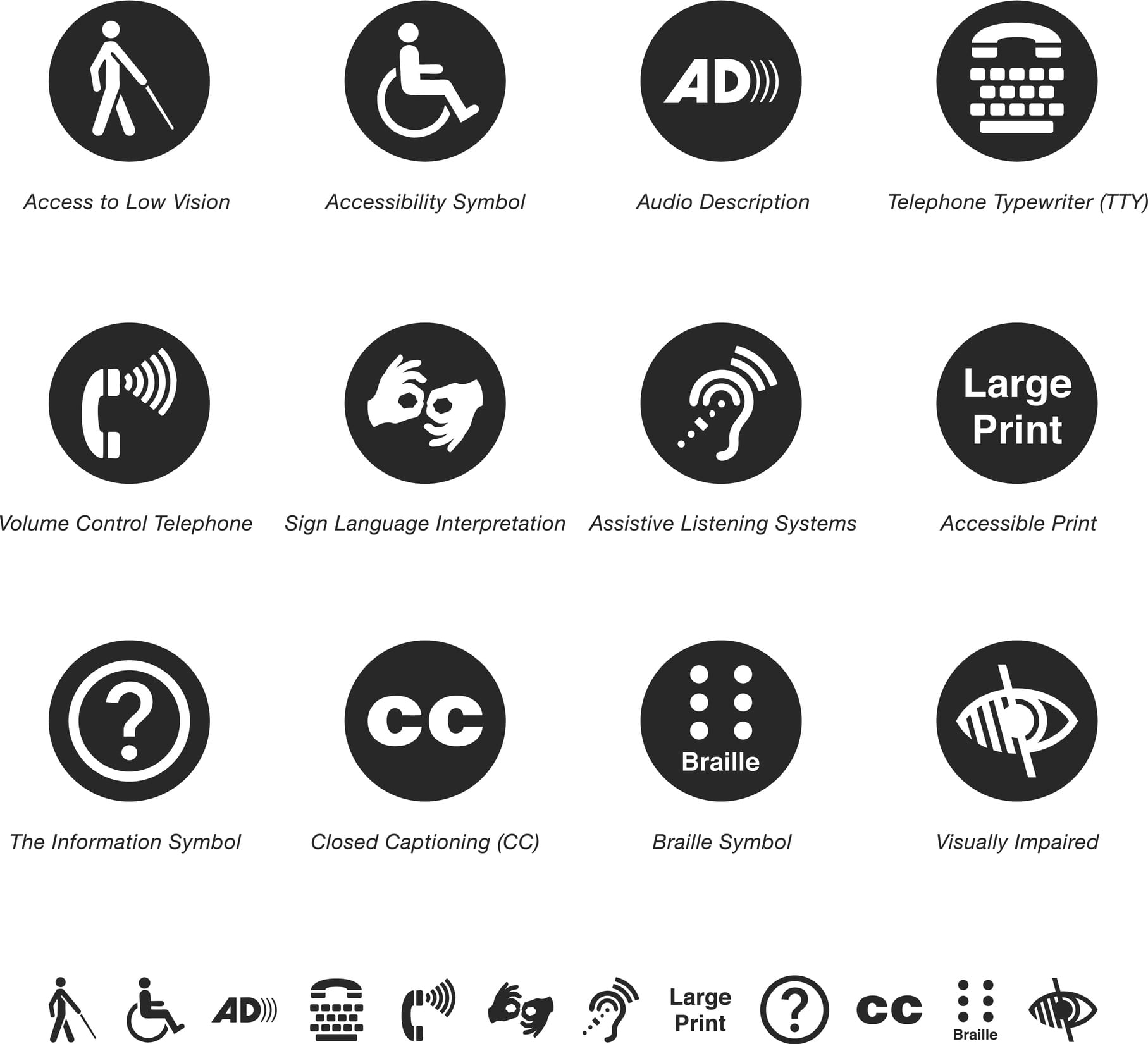
AODA symbols

Accessibility for Ontarian’s with Disabilities Act (AODA)

Since June 2005, Ontario has enforced AODA compliance law. The Accessibility for Ontarian’s with Disabilities Act applies to both the private and public sectors in Ontario, and requires individuals and organizations to follow accessibility standards in five areas:

  1. information and communications
  2. customer service
  3. transportation
  4. employment
  5. design of public spaces

To find out how to be compliant with AODA, all public organizations, non profits and private businesses must complete an AODA compliance report. This report is a tool to ensure all businesses are following AODA guidelines. Businesses with over 20 employees must complete the report.

Some general requirements of AODA include:

  • Providing training to staff and volunteers.
  • Developing an accessibility policy.
  • Creating a multi-year accessibility plan and update it every five years.
  • Considering accessibility in procurement and when designing or purchasing self-service kiosks.

If you’d like to learn more on how to make your website compliant to AODA, check out this previous article.

Cropped shot of a senior woman holding a cane in a retirement home

Health Insurance Portability and Accountability Act (HIPPA)

HIPPA is a federal law that sets national standards to protect medical records and other personal health information. Protected health information can be defined as:

  1. Information that identifies an individual.
  2. Information maintained or exchanged electronically or in hard copy.

This applies to any health care provider, health plans and healthcare clearing houses who transmit health information electronically. Healthcare providers that must comply with HIPPA rules include hospitals, health clinics, nursing homes, doctors, dentists, pharmacies, chiropractors and psychologists. Health plans include health insurance providers, company health plans, government programs such as Medicare and veterans health care programs.

Businesswoman using laptop, searching web, browsing information, having workplace at office

Canada’s Anti-Spam Legislation  (CASL)

CASL is a federal law protecting consumers and businesses from poor digital technology practices such as spam. This law was created in 2014 to ensure best practices in email marketing. Spam has become an issue online and is constituted as any unsolicited email, text message or software. The legal definition of spam according to Canada’s Anti Spam Legislation is:

  • Unauthorized alteration of transmission data.
  • The installation of computer programs without consent.
  • False or misleading electronic representations (including websites).
  • The harvesting of addresses (collecting and/or using email or other electronic addresses without permission).
  • The collection of personal information by accessing a computer system or electronic device illegally.

This law applies to all businesses in Canada who use promotional emails to target audiences. CASL states that all promotional emails must include a working unsubscribe link, the recipient must be able to identify the sender, and brands are only allowed to send emails to those who have agreed to receive them or who have done business together within the last two years.

How to know if someone has given consent to receive promotional emails?

Express consent:  A person has given oral or written consent to receive emails. This form of consent does not expire and is valid until the email recipient unsubscribes from emails.

Implied consent:  If someone has purchased a product from a brand or used a brands service, this is considered implied consent, and the brand can send promotional emails to this recipient. However, this form of consent expires between 6 months to 2 years.

Cropped shot of a mature businessman working on a laptop in an office

General Data Protection Regulation (GDPR)

The European Union’s General Data Protection Regulation came into force in 2018, and has implications on Canadian organizations that control or process personal information in the European Union (EU). The European Union is a political union that is made up of 28 states.  Members of the EU include Austria, Belgium, Bulgaria, Croatia, Cyprus, the Czech Republic, Denmark, Estonia, Finland, France, Germany, Greece, Hungary, Ireland, Italy, Latvia, Lithuania, Luxembourg, Malta, the Netherlands, Poland, Portugal, Romania, Slovakia, Slovenia, Spain, Sweden and the United Kingdom.

This regulation has changed the way European personal data is handled from healthcare to banking information. Examples of personal data include a name, home address, an ID card number, location data, a cookie ID, data held by a hospital or doctor.  The regulation protects EU data privacy and shapes the way organizations approach data privacy.

We have seen an increase in pop-ups on websites to notify users that cookies are being used on sites, and that consent is required if the users is going through the website.

Online payment and shopping concepts

Payment Card Industry Data Security Standard (PCI DSS)

PCI is a set of security standards that ensure all businesses that accept, process, store or transmit credit card information maintain it securely.  This standard applies to any organization that accepts credit cards.  There are four PCI compliance levels that are based on merchants credit card transactions over a 12-month period.

Merchant levels include:

  • Level 1: Any merchant that processes over 6 million credit card transactions per year.
  • Level 2: Any merchant that processes 1million to 6million credit card transactions per year.
  • Level 3: Any merchant that processes 20,000 to 1 million transactions per year.
  • Level 4: Any merchant that process less than 20, 000 transactions per year.

Small to medium-sized businesses include Level 4 merchants and must follow a few steps in order to satisfy PCI requirements.

Did You Know?

Since 90 per cent of breaches impact small businesses. Making sure your e-commerce is compliant may be intimidating, but it is necessary! Want to know if you are protected? Contact us today.

Digital technology lifestyle of school girl child or student using wireless internet for distance learning application and reading e-book app on mobile ipad smart device multimedia computer tablet

Children’s Online Privacy Protection Act (COPPA)

COPPA was formed in 1998 to address issues concerning the privacy of children online. The goal of COPPA is to place parents in control of what information is collected from their children online.  This rule applies to operators of websites and online services, including mobile apps directed to children under age 13 that collect personal information from them.

Personal Information collected from children can include:

  • First and last name.
  • Physical address.
  • Contact information.
  • Telephone number.
  • Social insurance number.
  • Photographs, videos or audio files, that contains a child’s image or voice.
  • Geolocation information that can identify street names cities, or towns.
Protection network security computer and safe your data concept. Laptop working develop coding program with key on keyboard

Secure Sockets Layer (SSL) Certificate

SSL certificates ensure that a website is secure, and should be used by everyone who would like to protect their information.  SSL certificates are small data files that secure connections from the website server.

Why should you add an SSL certificate to your website?

SSL is used to secure confidential information such as credit card transactions, login information, and data transfers. It will also keep your data secure, increase google rankings, build customer trust, as well as improves conversion rates.

When an SSL certificate is installed to your website’s server the application protocol (or HTTP) will change to HTTPS. The ’s’ means the website is now secure. For example, Treefrog is a secure website and will appear as https://www.treefrog.ca.

Group of mid 20's and 30's men and women engaged in application development job. They are seated by long desks back to back, each person in front of dual screen computer. 

Moderator Features

While this is not a compliance, moderators are something that website owners should consider when developing an application that allows users to load their own content, such as a blog. There are different types of moderators that protect the site from issues. Text moderators restrict unwanted text from an application or website, while photograph monitors restrict pictures from being shared (i.e pornographic images).

Did You Know?

If you are found to be non-compliant, you face a possible fine of up to $100,000 per day!

Staying Up to Date with Compliance

Becoming aware of rules and regulations, whether federal, provincial, or industry-wide is an excellent place to start in making sure you are compliant. However, without the proper expertise, it can all be daunting.

By working with Treefrog Inc, we can help you build or update your website to meet your specific requirements so that you never have to worry about data privacy or whether you are compliant. If you would like a complimentary evaluation of your website to learn about what you need to do to ensure compliancy, please let us know.

Don’t forget to subscribe to our monthly Digital Digest Newsletter to get top technology and digital tips and trends for your business. Sign up today!

List all article referenced here:

Business man taps on a computer tablet. Various tech related graphics are superimposed.
Digital Marketing, Web Design & Development

How To Leverage A Digital Presence Analysis – Part 1

Part One: Using SWOT Analysis to Review Your Digital Presence

Having a digital presence once upon a time meant that you had a website. Today, digital presence covers so much more than just a website; it includes your brand’s targeted keywords, strategized content, analytics about your online visitors, e-commerce and lead conversions, engagement on social media, and beyond. The lines are continually blurring between what defines “marketing”, and what defines “digital marketing”. Soon enough, these will be considered the same thing, because any business who is not considering digital as part of their overall marketing mix is missing the boat.

When it comes to understanding your digital presence, it’s important to first evaluate your goals over time by asking a few questions:

  • How do customers research your product?
  • Where can customers buy your product? 
  • What do people think about when they see your brand?
  • What target market are you trying to reach?
  • How does your digital presence measure up against your competitors?

These are just some of the questions you need to be asking. Once we’ve started to establish a clearer understanding of our digital presence, it’s helpful to conduct an assessment of a “where are we now” overview. This can be effectively done by conducting a tried-and-true method: a SWOT analysis.

Let’s dig in: 

SWOT Digital Presence Analysis

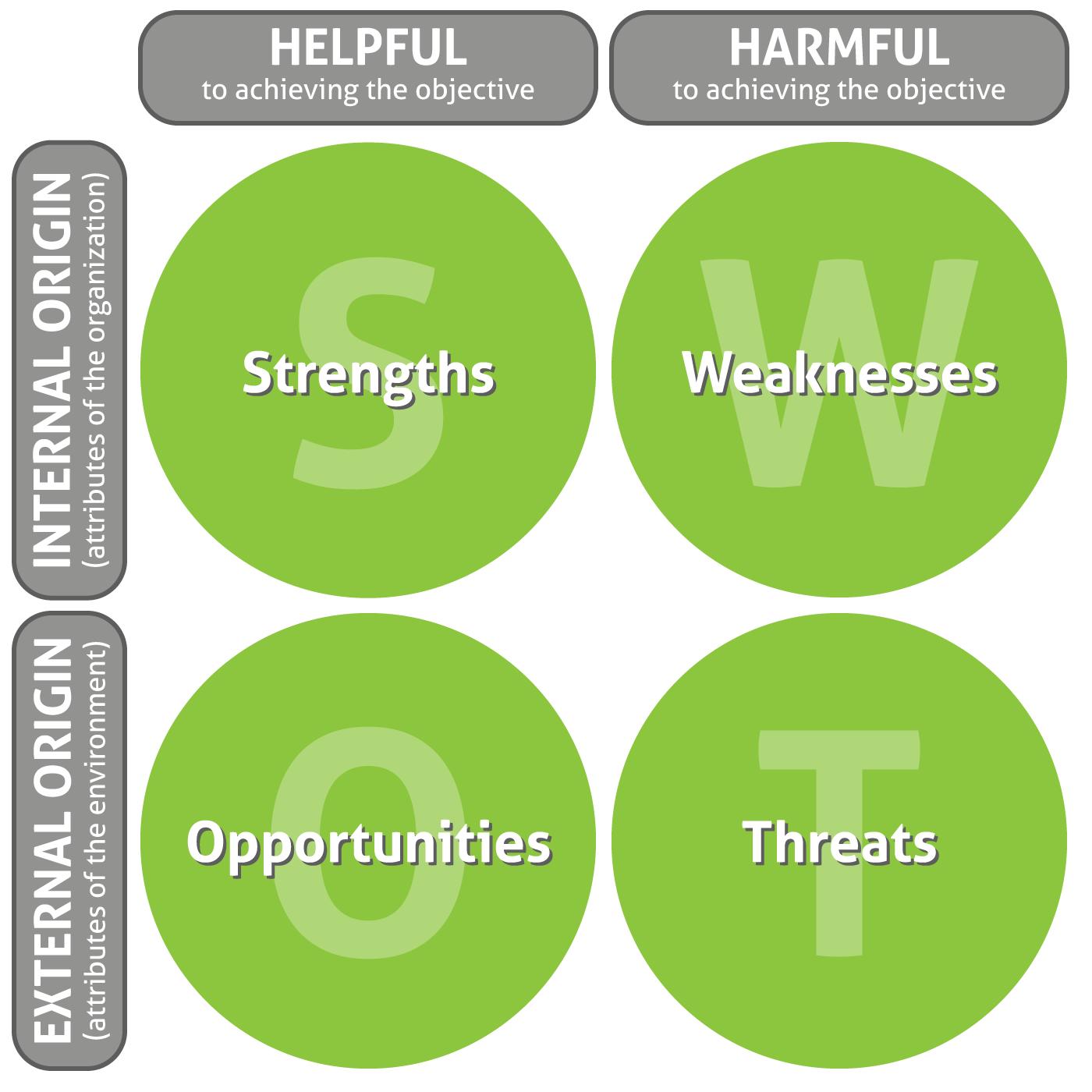
There are a number of ways to approach an assessment of your digital presence, and one insightful approach is to apply SWOT to your digital presence. SWOT stands for:

  • Strengths
  • Weaknesses
  • Opportunities
  • Threats

By leveraging the SWOT analysis method, you’ll be able to take a deeper look into what your brand is doing right online and what your brand is doing wrong. Below we examine some of the items you should consider when analyzing your online presence.

Strengths

What is your digital presence doing well

Odds are your digital presence isn’t completely terrible – unless it simply doesn’t exist or you haven’t touched it in months. To identify your strengths, it’s important to leverage available tools that can help you understand how people are currently using your website, such as Google Analytics. You should also be leveraging your social media account analytics to get a sense of how people perceive your brand. Make an effort to ask both your clients and those who have never interacted with your brand for feedback. It is best to remove your personal bias when examining what works and what doesn’t.

Strength Examples:

  • You have a social media posting schedule and you are engaging your audience.
  • You have a clear budget to make some improvements.
  • You have a marketing resource that can dedicate time to improving your digital presence, whether in-house or a third-party provider.

Weaknesses

What is your digital presence lacking?

Much like your strengths, you’ll be able to gain insight into your weaknesses by reviewing data and asking for external feedback. After years of attachment to your brand, you can become too narrow-minded when it comes to truly understanding the pain points of your presence. By asking outsiders to review your brand for the first time, you’ll have a much clearer understanding of the first impression your company is giving, and also the information that is not being articulated well.

Weakness Examples:

  • Your website is outdated, difficult to navigate, and possibly boring.
  • You can’t remember the last time you added new content to your site. Existing content has poor grammar, broken links, references to events that are years old… in other words, digital cobwebs.
  • You haven’t posted anything on social media in months (or years).
  • You don’t rank well on search engines where you should (yet your competitors do).

Opportunities

What opportunities would have a positive impact on your digital presence?

When it comes to your digital presence, there is always room for improvement. Now that we’ve looked at your weaknesses, we can use them to create a list of opportunities. Companies should never quit looking for new possibilities, even if they think things are just fine. Why be great when you can be innovative and set the bar as high as you can for all other companies in your industry? Not to mention you want to remain top of mind to your customers and be a bright, shining beacon to new prospects. Keep in mind also that digital changes quickly—what works today may just not work tomorrow.

Opportunity Examples:

  • Optimize calls to action on your website will create clear pathways from users to the information they need, and ultimately to you (a.k.a. leads!).
  • Leverage the content you have to connect with clients on social media to build long-lasting relationships and referrals (more leads!).
  • Create new content that answers the questions you hear from clients – let your website and social media be your 24-hour-a-day salesperson (did we mention leads?).
  • Technology is advancing all the time, and there are new channels and features to leverage.

Threats

What factors could threaten the success of your digital presence?

With change comes risk. However, never changing can pose even greater risks. By neglecting your digital presence, you face the threat of becoming irrelevant, stagnant, and forgotten. It is important always to stay ahead of the curve and to take risks and expand capabilities and knowledge to reduce threats.

Threat Examples

  •  Competitors have a better online presence with better brand recognition, more followers, and higher rankings.
  • Your budget for improvement is limited.
  • Your internal team doesn’t have the time or marketing knowledge to build your online presence.
  • You don’t have any metrics to tell you what’s working and what isn’t.

Leveraging SWOT

Once you have identified your company’s strengths, weaknesses, opportunities, and threats, you should then be able to outline appropriate objectives to reach your goals. In other words, you need to know where you are and where you want to go before you can start determining a plan of how to get there.

To learn more about Digital Presence Analysis’ and how to leverage your SWOT findings to achieve your goal, check out ‘Part Two’ of our DPA coverage on Persona’s.

To get your SWOT Analysis started, contact Treefrog Inc. today. By identifying your brand strengths, weaknesses, opportunities, and threats, we’ll help you to identify the areas of your business that require the most attention. Once you have a clear understanding of where you’d like your digital presence to go, we can also help to design and implement a roadmap that will help you to achieve your goals.

Call us at 905-836-4442 to learn more. 

Coworkers sit and stand, looking at a paper held by a woman.
Branding & Design, Digital Marketing, Web Design & Development

How To Strategically Plan Your 2018 Marketing Budget

Marketing budgets vary per company and industry, but what’s true about all businesses, is that having a marketing budget, no matter what size, is necessary.

In this article, we discuss what should be included in your marketing plan, and provide an overview of the below checklist – which covers the action items you’ll need to complete as you head into 2018:

  1. Organize your finances
  2. Identify your needs and goals
  3. Determine your spend
  4. Develop a marketing plan
  5. Decide how to allocate your budget
  6. Action your plan

Organize Your Finances To Identify Your Needs

Before creating your marketing budget for 2018, you need to strategically organize and collect social and financial data that will allow you to:

  • Identify holes or ‘misses’ in past marketing campaigns
  • Identify 2017 gross revenue to predict 2018 gains
  • Reflect upon which areas (social, content, SEO) you are struggling in
  • Identify which areas of your business need attention and larger investment

Identifying Your Needs & Goals

Once your financial plan is in order, you will be in a better position to consider the state of your business and how much focus you will need to give social media, website building, design, SEO, or content marketing in the upcoming year. Having a clear understanding of this data will help you to identify your actionable needs and goals for 2018, such as:

  • Developing a social media campaign around a new fundraiser you’re hosting
  • Increasing SEO to rank higher on search engine results pages (SERPs)
  • Updating out-dated content on your website
  • Designing new marketing material to hand out at a tradeshow you’ll be attending
  • Starting fresh with a new website

What is your biggest priority for 2018?

Determining Your Spend & Plan

Brand New Companies

Companies that are less than a year old are likely limited to a very small marketing budget. They should, therefore, leverage predominantly free social media platforms (Ex. Facebook, Instagram, etc.) and consider attending a comprehensive Social Media Training session to begin generating buzz around their brand. By learning how to strategically publish yourself, you’ll reduce costs.

New Companies

Businesses that have been established for one to five years should consider using a healthy percentage of their gross revenue on print (Ex. brochures at tradeshows) and digital marketing (Ex. website enhancements and blog development). A larger marketing budget will help to launch awareness and boost familiarity amongst new and returning customers.

Established Companies

Companies that have been in business more than five years, and have a secure budget for marketing, should allocate a substantial amount of their gross income to brand marketing (Ex. Email marketing, PPC, and social media/content campaigns). For companies who exist in extremely competitive markets, are in need of brand reputation management, or who are promoting a new service or product, this budget should only continue to increase.

Allocating Your Budget

Branding

Graphic design can transform a boring and stagnant brand into something refreshed, relevant, and captivating. Although branding feeds into SEO, social media, content, and website integration, most branding begins in the design studio – where talented teams research and draft branding materials that reflect the vibe and intent of the company’s messaging.

If your business relies on brochure material, tradeshow booth design, or needs a complete logo and brand overhaul, your marketing budget should be catered towards branded design elements, as well as the integration of those designs – into your social media platforms, web copy, and website.

SEO Management

Companies that find they are in need of more quality leads, improved recognition, and higher visibility within search engines like Google, are in need of quality and consistent SEO management, as well as PPC advertising.

However, SEO relies heavily on quality content to rank and perform ideally. Therefore, if your business is in need of SEO, you’re also in need of new and better content – audited, identified, and strategically improved throughout your website.

61% of marketers say improving SEO and growing their organic presence is their top inbound marketing priority.

Local searches lead 50% of mobile visitors to visit stores within one day. (Google, 2014

78% of local-mobile searches result in offline purchases. (Search Engine Land, 2014

Content Marketing

Web content articulates your visual brand messaging in text. In other words, content backs the intent and messaging that your branding portrays. Content also goes a step further – to provide context, drive actions, present valuable information, help your company to rank well in search engines, and, in most cases, helps users make an informed consumer decision.

While writing words for a webpage may seem easy, content marketing does more than just list details about a product and tell you why it’s great. Content marketing strategically develops copy that will speak directly to a targeted market, tap into their concerns and interests, support SEO, and drive specific conversion goals. This targeted marketing is also effective for email marketing broadcasts.

53% of marketers say blog content creation is their top inbound marketing priority. (HubSpot, 2017

On average, B2B marketers allocate 28% of their total marketing budget to content marketing. (Content Marketing Institute, 2015

Social Media Marketing

For businesses looking to improve brand recognition and to interact with their customers and clients, a new marketing budget should shift primarily to social media engagement, management, and development. With SSPC on the rise, companies need to consider investing money in social media advertising – to convert social media engagement into a potential sale of a product or service. By allocating the rest of your budget towards content development and SEO management, your online profile will continue to flourish.

83% of all marketers actively pursue social media marketing initiatives. (Aberdeen, 2016

Nearly one-third of the world uses social networks regularly. (eMarketer, 2016

Website Design

If your website is out-dated, hard to navigate, and is not serving the purpose it should – it’s time to dig deep and invest in SEO, content, social media, and web design. Working together to achieve the succinct goal of driving brand recognition, leads, and success for your company, each of these marketing sectors can deliver a complete overhaul for your public and online persona.

While a full website build is a major investment, the payoff of refreshing your entire brand at once will ensure the future of your business is on-trend and prosperous.

Investing In End of Year Marketing

Is your online business holiday ready? If your company relies on online sales during the end of year season, your marketing budget should allow for an increase in spend during these months. That means more social media campaigns, a stronger PPC play, content development to drive interest, and graphics to support your initiative.

For more information on re-visiting your end-of-year ecommerce marketing budget, check out our article ‘Now’s The Time To Spruce Up Your Ecommerce’.

81% of shoppers conduct online research before making big purchases.

Actioning Your Plan

With so many options of where to begin, it can be hard to identify which marketing venture your company should be focused on and participating in. That’s where we come in.

Treefrog Inc. – Your Digital Marketing Solutions Specialists

At Treefrog Inc., we understand that the needs of B2B and B2C clients are sometimes different, and our Client Care Advocates are well versed in identifying client needs based on their pain points and industry sector. If you’re not sure where to begin, we can help:

  • Social Media Training
  • Content Development Workshops
  • SEO Training
  • Email Marketing
  • Website Programming
  • Graphic Design
  • Content Marketing
  • Social Media Management
  • SEO

As one of Treefrog’s Marketing Partner’s (MP’s), your business will receive monthly project management, support, strategizing, development, and reporting – across content, SEO, and social media departments (if required).

To learn more about planning your upcoming marketing budget, contact us today or give us a call at 905.836.4442

Close up of a hand holding a mobile phone
Mobile App Development

Driving Your Business Forward With Mobile Apps

Is it just us, or are mobile apps taking over the world? It would certainly seem so.

Gaming apps, dating apps, exercise apps, and more – we’d bet there’s a ton of lifestyle apps cluttering your phone. However, while mobile apps can certainly be entertaining and fun, they can also help with productivity, promotion, and be incredibly beneficial for securing new opportunities for growing companies.

Business-to-Business-to-Consumer Mobile Apps

Here at Treefrog, we’ve noticed a lot of buzz around apps that serve both business-to-business needs and business-to-consumer needs. These dual-focused apps allow companies to manage both their clientele and their business partners/employees – all through the same app!

Why so much buzz? These dual service apps offer innovative solutions to businesses that need fluid communication both internally and with the world. And while most of our clients already have a process for how to manage the two different sides of their business, a customized mobile app can take service and communication from just “good,” to “fantastic”.

Take a mobile app like Foodora for example. Foodora is a food-ordering app that was built to service both restaurants (who need to manage incoming orders, promote their business, and reach new customers), and customers (people wanting to place food orders for quick delivery).

While Foodora could exist exclusively online, fast paced restaurants and on the go customers don’t always have access to their computers. Therefore, a mobile app acts as the perfect custom solution to a previously inconvenient and lengthy food ordering process – all through the click of a few buttons.

Business-to-Employee Mobile Apps

For your business, a customized mobile app can help to ensure your employees have access to the right information, whenever and wherever they require it. An employee-geared mobile app will not only improve workplace satisfaction (as worker mobility is improved and expanded), but with positive user experience, your workers are also destined to become better and quicker at their jobs. This type of app is especially useful for employees who are constantly on the move, such as journalists, recruiters, traveling salespeople, etc. Examples of B-to-E apps include: DocuSign and Evernote.

Business-to-Business Mobile Apps

Business-to-business mobile apps can help to strengthen and build customer relations with industry partners. These apps are especially useful for businesses that want to improve efficiency by tracking analytics, product movement, sales, and project development. Examples of B-to-B apps include the Google Analytics App, the HootSuite app, and Salesforce Mobile.

Business-to-Consumer Mobile Apps

For your clients, a customized mobile app articulates that their satisfaction is a priority. By offering a user-friendly and attractive app to improve their ability to interact with your brand, you’re directly investing in customer loyalty and building the foundation for more business to come your way. With your convenient app downloaded to their phone, we bet they’ll use it again and again! Examples of B-to-C mobile apps include restaurant-specific ordering apps, clothing store apps, and even lifestyle dating apps.

Going Mobile with Your App

The reality is, people are busy, and attention spans are shrinking. Therefore, clients and employees are demanding more comprehensive and efficient ways to consume information and complete tasks that are integral to their jobs and everyday life.

At Treefrog, our Mobile App Development team can design a customized app that solves and addresses your most pressing concerns and process-related issues. By improving user experience and offering better processes that directly help to secure new business, your company will remain competitive in an ever-changing techno-culture.

Call us at 905.836.4442 to learn how we can take your business mobile with a customized Android or native iOS app.

A hand holds a credit card, while the other types on a laptop keyboard
Digital Marketing, Web Design & Development

Now’s The Time To Spruce Up Your Ecommerce

Is your online business holiday ready? Now’s the perfect time to spruce up your ecommerce site before the pre-holiday shopping season sneaks up on you!

You may be shaking your head and saying “Are you crazy! It’s only June!”

But trust us. Fixing, updating, and crafting content takes time, and any company using ecommerce to sell products over the holidays needs to start addressing their site’s pain points now.

“But how do you identify pain points?”

We’re glad you asked!

Common pain points for ecommerce sites can range from too little content to too much content, to terrible photo quality, and beyond. So, to help you to identify all the things needing to be addressed within the framework of your ecommerce site, we’ve developed the following checklist of questions that need answering.

Are you using the right platform for your brand?

As the popularity of ecommerce continues to rise, it can be overwhelming to choose which platform will work best to sell your products. That’s why we at Treefrog meet with our clients to understand their goals, the product(s) they’re selling, and then suggest the platform we know will best match their specific needs.

Should a client want to change their online store from one platform to another, we can help with that too!

Have you lost track of the last time you updated your online store?

In competitive markets, it’s essential to refresh and revitalize your retail offerings, especially as the seasons change. Forgetting to update your site could cause you to oversell products (without having enough stock), or cause fans of your brand to get bored, seeing the ‘same old’ each time they come to your site looking for something new.

At Treefrog Inc., we offer training sessions that teach you how to enter your ecommerce site and edit your material quickly and easily. This knowledge allows you to remove products you no longer sell and add new ones that you’d like to feature. We can also provide guidance on what to write in your descriptions, how to position your content messaging, and how to leverage social media to create brand awareness!

Is your content helpful and clear?

Strong and descriptive content can be the push an interested customer needs to follow through with their purchase. Without helpful details about sizes, or materials, or product quality, potential customers may feel they don’t have enough information to commit to their order, especially when having to pay for shipping.

How can we help? Our content marketing team uses their expertise to conduct content audits on websites that need improving. By analyzing each page of your site, including every image and description, we develop a detailed document that provides suggestions for growth, editing, and expansion. Should a client then hire us to work on developing their content, we’ll collaborate with them to apply the suggestions we made, update content that needs to be refreshed, and improve the message they’re articulating.

Are your pictures professional?

If your pictures are outdated and blurry, odds are your user experience is being tainted. The modern customer values professionalism, and to stay competitive, your images need to not only sell your products but also needs to communicate the value of your brand.

Our department of graphic designers and photographers can help. With professional equipment and a key eye for lighting, balance, and detail, our team ensures the images our clients use are consistent and brand appropriate.

Have you thought about SEO?

While the above items are important steps in ensuring your website is ready for the holiday rush, they’re irrelevant unless people are able to find your site! This is where our SEO team comes in.

Our team of Search Engine Optimization Specialists make sure that navigation links are accessible, that webpages have unique titles, URLs, and meta descriptions, that page headings are appropriate (in terms of keyword searching), and more. Each of these additions naturally increases success by enhancing site visibility to new and existing customers online. So, while we know it’s hard to start thinking about the holidays already, we can promise you’ll thank us for giving you this little push to start working on improving and updating your site now. Getting a head start will reduce your holiday stress and will undoubtedly help you to secure more sales from happily returning customers.

Once your site is polished to perfection, it will be time to think about how you want to promote it, via social media, email marketing, and other viable channels.

For more information on how our team can help ensure that your ecommerce site is holiday ready, give us a call today at 905.836.4442!

Woman typing on a laptop that has excel open
Web Application Development

Stop Living in Excel!

Excel. It’s the most popular software application of all time, but is it the best tool for tracking critical information for your business?

It’s staggering to learn that approximately 88% of spreadsheets have errors or 1 in 5 businesses have suffered financial loss from spreadsheet errors.

As Forbes reported in their article, Microsoft’s Excel Might Be The Most Dangerous Software On The Planet, trillions (yes, TRILLIONS) of dollars are dependent on Excel – every day. And while spreadsheets can be helpful for small businesses with limited data to organize, when it comes to high value companies, Excel is starting to seem more and more like an enemy not to cross.

Why? Let’s explore.

Tedious

You’ve heard the groans from people in your office, “Ugh, I hate Excel”, and there’s a reason they do. Aside from being ‘dangerous’, Excel spreadsheets can be difficult, tedious, and frankly annoying to organize. Spreadsheets also require a lot of focus, attention to detail, and a lot of time. These sheets can be effective when organizing small data, but when your spreadsheet quickly fills up, the information can become overwhelming, and you’re likely to lose sight of what data is even important.

Limited

Progress within an Excel document is extremely hard to track. Unfit for growing businesses, Excel spreadsheets are outdated when it comes to organizing big data and collaborating with a team. This is largely because Excel documents cannot be updated live, and important information is bound to be lost as different versions are handed from person to person. In result, Excel limits a company’s ability to plan, budget, and keep track of essential project reporting.

Excel is also limited as the creators of these documents typically set up the spreadsheet according to their own personal needs, and organize the data in a way that makes sense to them and not necessarily to anyone else who may need to access it. This can cause miscommunication, lengthy explaining, and in some cases, cause for double entry during reorganization.

Vulnerable

Excel is also incredibly vulnerable to fraud and manipulation. Should anyone hack into your system, they could delete data, alter values, and as a result, damage the accuracy of your document. What’s worse is that without checking every single row and column to a master copy, you may never detect that any changes were made!

Prone To Human Error

Lastly, and the most alarming reason Excel may be harming your company, is that the system is extremely prone to human error. You may not even realize it, but with the slip of your hand, in a moment of distraction, you could delete or alter critical information in your spreadsheet. Just ask JP Morgan; their 6 billion dollar loss was the result of improper manual entry from copying and pasting from other Excel spreadsheets!

The Solution? Customized Databases

While Excel has served its original purpose; agile companies need to reconsider the ways in which the tool may now be working against them. As technologies advance, it’s time to look ahead and discover new ways to improve efficiency, security, and to expand capabilities. With customized business solutions, designed to cater to your specific needs as a company, each of the above concerns will begin to fade away.

Created to address your pain points and largest vulnerabilities, a custom database provides a system and interface for collaborative entry, support more effective workflow, create easy to follow reporting, improve the security of your system, and reduce the potential for error.

Treefrog has provided a number of local businesses with tailored business solutions for everything from Membership Management Systems and Content Management Systems, to Event Booking, Email Marketing, Internal Training Systems, Product Displays and Online Retail Systems.

A rocky waterfall
Digital Marketing, Web Design & Development

Increase Your Google PageSpeed Score Part 2: Web Development & Optimization

For the second part of our Google PageSpeed blog post series, we’ll be taking a look at more advanced techniques to adhere to Google’s recommendations. If you haven’t had a chance to read the first part to increasing your Google PageSpeed score, start now! Recalling on the Google PageSpeed insight rules, the speed rules include the following:

  • Avoid Landing Page Redirects
  • Enable Compression
  • Improve Server Response Time
  • Leverage Browser Caching
  • Minify Resources
  • Optimize Images
  • Optimize CSS Delivery
  • Prioritize Visible Content
  • Remove Render-Blocking JavaScript
  • Use Asynchronous Scripts

We’ve already covered avoiding landing page redirects, enabling compression, optimizing CSS delivery and removing render-blocking JavaScript in our first part. In this blog post, we’ll be taking a look at prioritizing visible content, minifying resources and optimizing images.

Note: The following recommendations below assume you fully understand web development best practices as well as server software programming, HTML, JavaScript and CSS programming. If you aren’t too sure of these techniques described, give us a shout and we’ll help you out!

1. Prioritize Visible Content

Putting an emphasis on giving users a high quality mobile experience, Google states “having a mobile-friendly website has become a critical part of having an online presence”. As such, they recommend ensuring that the above-the-fold content of the page is rendered quickly and efficiently.

Above-the-fold is the portion of the webpage that is visible without the need to scroll down. Ensuring the above-the-fold content displays quickly, prevents waiting time for the user. However, if the data exceeds the initial congestion window (a self-imposed variable that limits the amount of data that can be sent), then additional back and forth data transmission between your server and the user’s browsers will occur. This in turn creates a slower and delayed page load for the user.

In other words, if the above-the-fold content isn’t loading quickly enough, users are more likely to leave. The above-the-fold content is the first touch point for most users and they are less likely to stick around for the rest of the webpage to load if the above-the-fold content can’t even load quickly and properly.

What to do:

  • Structure your HTML to load the critical content first:
  1. Identify the critical content of your webpage. For example, if the page is an article, the body text and images are the most critical content. Third-party widgets may fall as secondary items that can be deferred.
  2. Ensure the critical content of your webpage loads first. Structure your HTML such that the critical content is rendered immediately. For example, you may want to inline a portion of the CSS into the HTML file to ensure the styling of the critical content is rendered first, while the rest of the page is styled after the CSS file is rendered later.
  • Reduce the amount of data used by enabling compression and/or minifying resources:
  1. Reduce the size of your HTML, CSS and JavaScript files by enabling compression. As discussed in our previous post, to enable compression you will need to make updates to your .htaccess file.
  2. Minify your HTML, CSS and JavaScript files, which is discussed in detail below

2. Minify Your Resources

Ensure the sizes of your resources are reduced to allow faster transferring of data. Reducing the size of your files will require less data to be transferred from your server to the user’s browser, thereby making the above-the-fold as well as the entire page load much quicker.

What to do:

After writing your HTML, CSS and JavaScript code, you can look at ways to reduce the file size by removing unnecessary or redundant code, unused code and applying shorter variable and function names. Although it may be against code-writing best practices, you can also remove commenting, formatting and removing whitespace altogether. For example, the following CSS code is 953 bytes and has commenting, formatting, whitespace as well as redundant code:

/* ## Headings

——————————————— */

h1 {

      font-size: 36px;

      font-size: 3.6rem;

      color: #333;

      font-family: Lato, sans-serif;

      font-weight: 400;

      line-height: 1.2;

      margin: 0 0 10px;

}

h2 {

      font-size: 30px;

      font-size: 3rem;

      color: #333;

      font-family: Lato, sans-serif;

      font-weight: 400;

      line-height: 1.2;

      margin: 0 0 10px;

}

h3 {

      font-size: 24px;

      font-size: 2.4rem;

      color: #333;

      font-family: Lato, sans-serif;

      font-weight: 400;

      line-height: 1.2;

      margin: 0 0 10px;

}

h4 {

      font-size: 20px;

      font-size: 2rem;

      color: #333;

      font-family: Lato, sans-serif;

      font-weight: 400;

      line-height: 1.2;

      margin: 0 0 10px;

}

h5 {

      font-size: 18px;

      font-size: 1.8rem;

      color: #333;

      font-family: Lato, sans-serif;

      font-weight: 400;

      line-height: 1.2;

      margin: 0 0 10px;

}

h6 {

      font-size: 16px;

      font-size: 1.6rem;

      color: #333;

      font-family: Lato, sans-serif;

      font-weight: 400;

      line-height: 1.2;

      margin: 0 0 10px;

}

This code can be significantly reduced to 311 bytes by removing the redundant code, comments, formatting, and white space:

h1,h2,h3,h4,h5,h6{color:#333;font-family:Lato,sans-serif;font-weight:400;line-height:1.2;margin:0 0 10px}h1{font-size:36px;font-size:3.6rem}h2{font-size:30px;font-size:3rem}h3{font-size:24px;font-size:2.4rem}h4{font-size:20px;font-size:2rem}h5{font-size:18px;font-size:1.8rem}h6{font-size:16px;font-size:1.6rem}

It may become taxing to minify all your resources manually, especially if you have a large website. Luckily, there are free tools available online to minify your resources for you. A simple search for “HTML minify”, “CSS minify” or “JavaScript minify”, will result in various tools you can use. The fall back with using these tools as well as minifying these resources yourself is that the code needs to be minified again whenever you make any updates or changes. As an alternative and depending on the CMS you use, you can automate the process by leveraging plugins. For WordPress and Drupal sites, there are many minify plugins available that can minify HTML, CSS and JavaScript individually or all at once.

As a last alternative, you may also want to use Google’s PageSpeed Module if your server is Apache or Nginx. There are various filters that help optimize your website’s page speed inclusive of reducing resources sizes such as Minify JavaScript. Take a look at their mod_pagespeed documentation for more information.

3. Optimize Images

Ensure the file size of images is reduced without significantly impacting their visual quality. Reducing the size of your image files will require less data to be transferred from your server to the user’s browser, thereby making the above-the-fold as well as the entire page load much quicker.

This may require its own blog post in the future since there are plenty of best practices and image optimization checklists to do. It also really depends on how your website is structured: if your website is highly visual than a much more thorough optimization strategy is required. However, if your website has some images here and there, there are quick and easy things you can do.

What to do:

  • Ensure the images are served at their native dimensions and specify the width and height in the img tag to prevent “popping” when the page is loading
  • Compress your images to reduce file size. Try using PNG files as they are lossless formats and do not make any visual modifications to the image.
  • If you’re using JPEG files and are compressing the images, try to reduce the quality below 85. Past the quality of 85, the file size becomes larger but doesn’t improve visually. Compress the image as low as possible without losing visual quality.

Develop With File Size in Mind or Use Tools To Optimize

These recommendations are best executed during the designing and development stage of building the website. Arranging the structure of the content beforehand can prioritize and serve the critical content to users right from the start. Programming HTML, CSS and JavaScript and optimizing the images with the file size in mind ensures a quicker page load right when the website goes live.

In most cases however, these items may be overlooked or unnoticed during the development stage. To act on these recommendations long after a website has been live, we can leverage: enabling compression, minifying resources and image compression.

As noted in Part 1, every website is different and there are little nuances that make your website unique. It’s very important you test these recommendations first before implementing them.

As always, if you have any questions or comments regarding these recommendations, feel free to comment below. We’d love to hear your thoughts, feedback and/or grievances. Thanks for reading!

Resources

Scroll to Top