
Digital Marketing

Close up of woman holding mobile phone, with her partner cropped on the left.
Digital Marketing

10 Ways To Get Your E-Newsletter Opened

Open rates are arguably the most important stat you need to be tracking when it comes to marketing emails. Sure, your CTR (click-through-rate) is important, but if people aren’t opening your emails at all, they don’t even have the chance to click through!

These days it seems as though everyone is using emails as part of their marketing strategy; thus, audiences are receiving more emails each day than they ever have. In fact, globally there are approximately 269 billion emails sent each day! To help with the mass amount of email people are receiving Gmail has even started auto-segmenting emails into different inboxes: Primary, Social, Promotions, and Spam. This can make it even harder to get in front of the eyes of your target audience.

Fortunately, there are a few things you can do to make your e-marketing stand out! 

Here are 10 ways to improve your email marketing open rate:

1. Send Time

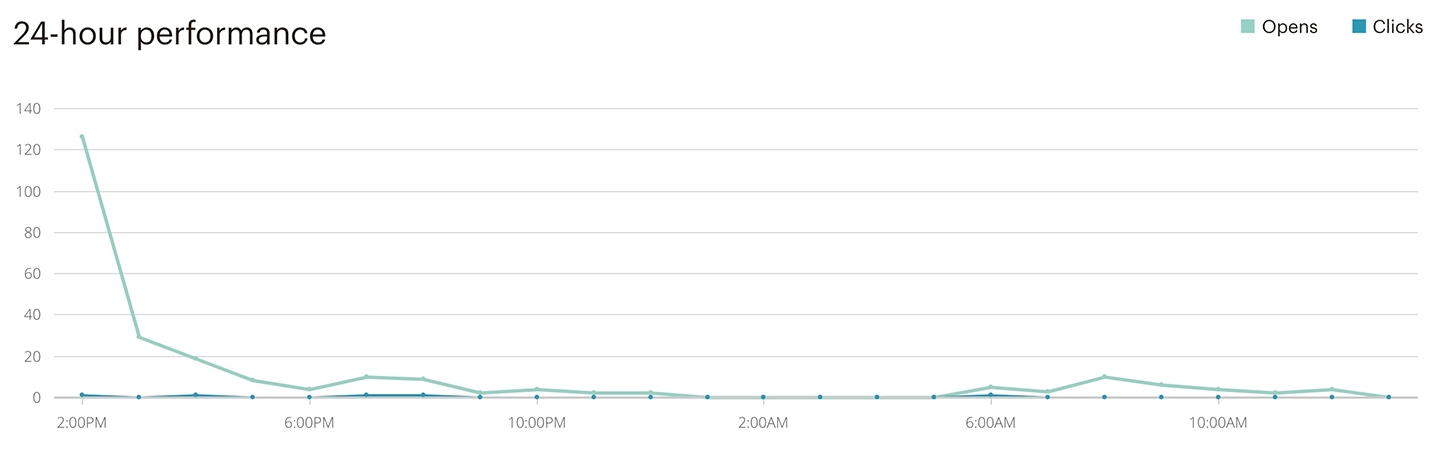
Wouldn’t it be great if you could email subscribers at the exact moment, they were looking at their devices? Investigating the open times of your emails can give you incredible insight not only on the days your emails are seeing the most traffic, but also the time of day your audience is choosing to open them.
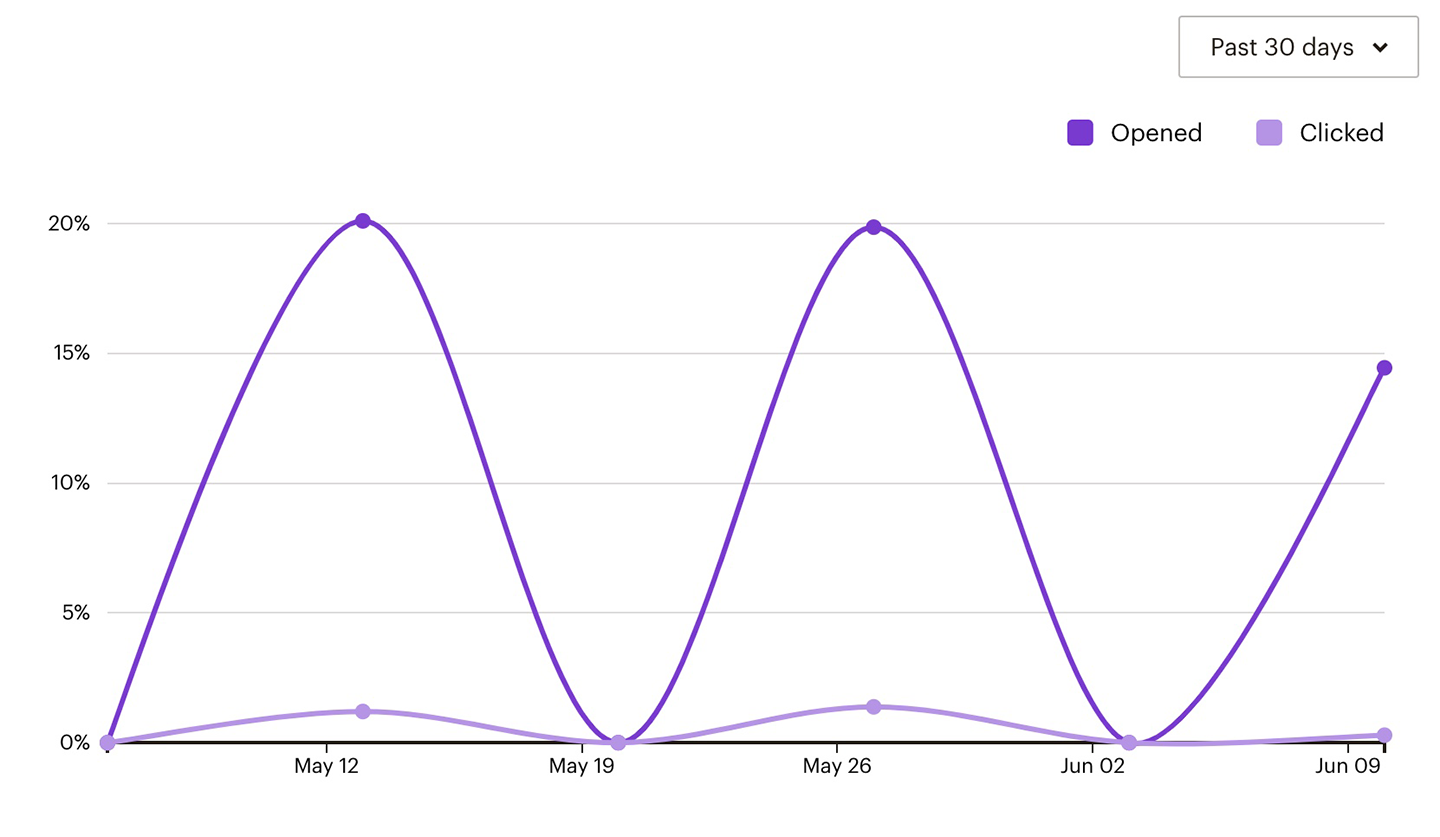
Every email list will have a unique send day and time and it’s important to use the data you have at your fingertips to help you discover your optimal send time. If you’re not sure where to start, most people check their emails in the morning when they wake up, at lunch, or in the evening before bed.
2. Engaging Subject Lines

Subject lines are the most prominent piece of information your subscriber has to make their decision on whether to open your email or not. This makes it highly important to use the space provided efficiently and effectively. Putting a special offer, an intriguing question, or creating urgency early in the subject line are all proven ways to increase your email open rates.

According to MailChimp’s email subject lines best practices there are a number of faux pas you should avoid when writing your subject lines. As tempting as these words may be to encourage a sense of urgency, words like “Help”, “Percent Off”, and “Reminder” have been found to be the most common to be caught by spam filters; avoid using them to ensure your email has a chance to get into your audiences inbox.

3. Personalization

With the amount of mass email we receive daily, when we get something that is more personalized it usually sets itself apart, like receiving a letter. Adding tags into your subject lines to include your subscribers name, city or country location can give the added pop to your emails to really catch your readers eye and encourage them to open your e-newsletter.

4. Preheader

The preheader text is the summary text that follows the subject line in the preview in the inbox. This helps the reader have more context about the email before they decide whether to open it or not. The preheader is the perfect place to put a promotional offer or to extend your subject line.

Another way to utilize the preheader is to help your email appeal to a wider audience. If your subject line only applies to a certain group of people, the preheader is the perfect time to pull in those readers that might not normally open an email about the content mentioned in the subject line.

5. Mobile First

Did you know that over half of emails are read on mobile devices now? If you are not optimizing your emails for mobile, you are hurting its chances of being opened before you even send it. To be truly mobile optimized not only does your email content need to be designed to fit and be readable on a smaller screen but your subject line and preheader need to as well.

In a mobile email service provider, you may only have 50 characters to sell your e-newsletters content with your subject line and preheader! This means placing your CTA (Call-to-Action), or keywords at the beginning of the subject line to ensure they aren’t missed.

6. Segmentation

List segmentation is arguably the best way to improve your email marketing open rate, while simultaneously reducing your unsubscribe rate.

If you send a lot of emails on various different topics you may want to consider splitting your email list into different segments depending on demographics and interests when trying to find your optimal send time and day.

7. A/B Test

A/B testing is a great way to see which parts of your email are working and which parts need to be optimized. Understanding how your audience interacts with your email, which trigger words they respond to the most, and which CTA’s get your readers to open your emails are just a few ways A/B testing can help improve your e-newsletter open rates.

Do you get more opens from questions or lists in your subject lines? Here are some other things you can A/B test to improve your open rates are:

  • Your call to action
  • Your preheader
  • Personalization: name vs. location vs. none
  • The sender name

8.  Personalize the Sender Line

Most of the emails people receive are mass marketing emails that have very little personalization and are strictly from companies trying to sell something. Readers are becoming much better at screening these emails based on the sender alone.

If you want to connect with your readers on a more personal level and have them trust that you are only sending them high-quality content, avoid using no-reply emails or generic info@. Instead use your actual name, or a pseudonym if you don’t feel comfortable handing out your actual name on the email.

9. Clean Your Email List

One really easy way to improve your open rate is to stop sending your email marketing to subscribers who don’t open your emails!

It sounds so simple, yet many marketers are more concerned with losing the potential open from someone who hasn’t opened their email in months. The size of a subscriber list is often something email marketers hold near and dear to their heart. Many have a hard time scrubbing the list of unengaged subscribers. You have worked hard at getting those people to even subscribe to your list in the first place, why should you delete them from your database altogether!? After all, they may not be opening your email-marketing right now, but they did at one point and they might again soon, right!? RIGHT!? (wrong!)

10. Stick to a Schedule

As mentioned in tip #1, finding the right send time and day is important to improving your open rate. Once you find that right day and time, stick to a consistent schedule. This helps build recognition with your readers, they are expecting your email at this point and hopefully, they’re looking forward to it! Don’t let them down or confuse them by sending at random intervals.

Now that you have the information to improve your email marketing, where do you start?

If you already have an email marketing software account such as MailChimp or Constant Contact but are unsure how to pull the data for the right day and time, A/B test, or segment your markets, we can help!

If you don’t have any email marketing software, do not be sending mass emails from your personal email, this will not only cause your personal email to be blacklisted but also is against CASL compliancy. Let us start you on the path to email marketing with a branded email template, list curating strategy and content optimization. Call today 905-836-4442 or email.


Closeup of a woman using a mobile phone with a search input field graphic above the phone
Digital Marketing

What to Look for When Picking a Digital Partner

Managing a business is hard

Sometimes, you may feel like you are getting pulled in a multitude of directions.  Because of this, your online presence or digital marketing may have taken a backseat to all of the other obligations you have on your plate.  If that’s the case, it may be a good idea to consider hiring a digital agency to assist you in all of your digital marketing needs.

At Treefrog, we understand that digital marketing isn’t one-size-fits-all. No matter what sort of business you have, a digital agency could help you in many areas. But, with so many agencies around, how do you choose which one will best fit your business?


Here are some questions to ask yourself when you are choosing a digital partner

Do They Have A Great Website?

First impressions are everything. In a digital age, a website is usually the first thing we look at to get a feel of what an organization does, and who they are. Digital agencies should be masters of creating an awesome digital presence, and you will be able to see this by taking a peek at their website.

Tip: Before even considering them as a digital partner, make sure their website checks all the boxes: 

  • It is easy to navigate.
  • You can clearly understand what it is they do.
  • The site gives you an inside look at their company culture.
  • You can view profiles of the agency’s team members.
  • The website provides client testimonials and past project examples.

Are They A Credible Digital Partner?

Make sure that you can trust the agency you are partnering with. Determine the agency’s credibility and experience before jumping into a partnership. You can start by reading through client testimonials. If you wish to go a step further, it will not hurt to ask the agency for client references.

Tip: A successful agency with great client relationships will be happy to give you some references to contact. 

Do They Understand Your Needs?

When first meeting with the agency, make sure they offer what you need. Can they offer you many different services that will be unique to your business? Full-service digital agencies should be professionals in:

  • Web design and development
  • Digital marketing (social media, content marketing and search engine optimization)
  • Branding and design
  • Hosting and infrastructure
  • Mobile app development
  • Web application development
  • IoT and Artificial Intelligence
  • Product development

Digital agencies should be able to create a plan that best fits your business, and sticks to your budget and guidelines. Do not settle for cookie cutter advice. The digital agency should create a plan unique to your business.

Tip: Some questions to ask when looking for your next marketing partner: 

  • What happens if my business changes focus? How agile is the plan?
  • How is my budget allocated?
  • How will I know what you are doing?
  • What type of reporting can I expect?
  • What is my level of involvement?
  • Are phone calls and emails billable?
  • How quickly will I see results?
  • How often will I meet or hear from you?

How Is Their Customer Service?

Do you value positive relationships with those you do business with? Absolutely. Nobody wants to simply be a number, having to give your name and account number each time you call in. You want a partner that knows you by name and delivers you great customer service. Should an emergency arise in the business, you want someone to turn to who knows you, your business and the history of your marketing. 

Think Ahead

A digital agency will help you create success for your business online. It is important that they provide value to your business and can work to your unique needs. Pulling a page for our website, here are a few case studies on how digital-marketing isn’t one-sized-fits-all:

Bradley Homes Case Study Reset Zone Case Study

At Treefrog, we understand each and every business has different values, goals and visions, and that a digital partner should be able to represent that. Nobody knows your business better than you do, so it’s important to choose the best digital partner to represent your business.

If you would like to learn more about how we customize our services to your business, please get in touch with us!

Resources:

A green potted plant near a laptop on a wooden table
Artificial Intelligence, Augmented & Virtual Reality, Branding & Design, Digital Marketing, Hosting & Infrastructure, IoT, NFC and Beacons, Mobile App Development, Web Application Development, Web Design & Development

Why The Frogs Are Green

Here at Treefrog, we like to look at the bigger picture. Instead of thinking about the here and now, we see far into the future and understand that the decisions we make today, can greatly impact the next generation of Frogs.

We must share our beautiful world with everyone, and everything that resides here. While we might only live in a small pond we’ve found that a few simple changes can make a BIG difference.

At Treefrog, we are constantly looking for ways to reduce our carbon footprint.

Here are a few little changes that have made a big impact:

We Are Paperless

Saving trees starts with ditching paper. Once upon a time our entire project management office was run from coloured folders and stapled dockets. Moving the team away from the colour folder project system and into project management software was no small task. Our design team moved from sketchbooks and carbon pencils to a Wacom for digital mind mapping. Our Sales team moved to virtual notes directly in our CRM software (Salesforce), ditching the spiral Hilroy’s. Our cleaning team moved from paper towels to washable cloths, and we changed our washrooms to compostable towels.

The production and distribution of paper has a significant impact on the environment. Paper production poses issues on air, water and land. And as frogs, we dislike when deforestation destroys our homes. So we ask… why use paper when we have a virtual environment that can help us produce and deliver documents? And who likes paper cuts anyways? We do not.

We Started a Recycle and Compost Program

When we made the move from 12 Vincent to 567 Davis, we didn’t realize this change would mean giving up the ability to recycle and compost as we moved from a zoned-commercial/residential location to a pure commercial location. Unfortunately, the Town of Newmarket doesn’t offer pick up service for businesses.

Recyclable and non-recyclable garbage can indoors.

We were faced with an issue of how to maintain our recycling and composting habits – since throwing out cans just didn’t seem like an option for the frogs. For the first few months, frogs would boomerang their lunches until we were able to convince the town to offer us curbside services too.

As Bill Nye the Science Guy would say: “To leave the world better than you found it, sometimes you have to pick up other people’s trash.” But, this was not enough.

The frogs lobbied for these services, and won! We are one of the only businesses in Newmarket with this opportunity, so we do our very best to ensure we are properly recycling and composting.

We Smart Commute

Commuting to work sucks. Especially when you are stuck sitting in traffic. And hello, the prices of gas are crazy!  Speaking of gas, it is extremely harmful to our planet.

That is why Treefrog has implemented a Smart Commute Program. Before Smart Commute opened its doors to under 50 employee employers, we offered our Frogs cash bonuses when they choose to smart commute. This included carpooling, taking public transportation, walking to work (some frogs prefer hopping), or even skipping the drive and working from home1.

We Buy and Grow Locally

You can catch flies with honey. And frogs love flies. So, we go through lots of honey. However, we only buy locally sourced honey for our office. There are many environmental benefits in supporting local honey farmers. Farm-raised bees help to pollinate plants, which is beneficial to local wildlife. In addition, buying local supports honey farmers who are properly caring for and raising the endangered bees.

We also love to grow fruits and vegetables in our Treefrog garden. While having a garden may seem like a small impact, it has huge environmental benefits. Growing your own food can reduce carbon emission and waste. Food travels long distances to arrive at the grocery store, on average it takes over 1500 miles of travel before the fruits and veggies we love get placed in our carts. In addition, growing food can reduce waste as it eliminates the need for packaging such as plastic and cardboard. So, if you are ever passing Davis Drive in the summer, feel free to enjoy a tomato (or two) from our garden2.

We Only Drive Electric

Our Frogs are always on the go, whether we have a meeting with a client, a networking event or one of us is speaking at a workshop or conference; we have an electric car that will get us where we need to go. We invested in two fully electric cars to reduce our carbon footprint and protect our planet. While this might require some extra planning on our part when navigating to and fro, it’s worth the effort knowing that in the last five years we’ve reduced our carbon footprint by 130,000 km through the use of electric vehicles.

Vehicles that run on gas emit toxic greenhouse gases into the environment and pollute our air. Greenhouse gas emissions are the leading cause of climate change.

We Made Small Changes Around the Office

Change starts with the low hanging fruit, and at Treefrog, those are the simple things like batteries and lights.

As a digital marketing agency, it’s no surprise that we go through a lot of battery power. We recently started a new tactic with the goal of minimizing our environmental impact through battery conditioning. We converted all our batteries to brand new, top-of-the-line Eneloop batteries with a life of 2100 charges. So, no more one-time use batteries, only rechargeable!

A pair of rechargeable batteries.

Apart from the batteries, we also have a Nest Learning Thermostat that programs itself and helps save energy. Not only does it save us money on our heating bill, but it also helps us avoid running the air when no one’s home. We also use a combination of compact fluorescent lamp (CFL) lights and LEDs, which are more energy efficient.

These small things make a big difference in saving our planet.  We want Treefrog to live on for many generations, and we hope you do too.

What are you doing in your space to reduce your footprint? We’d love to hear from you!

Resources

https://www.worldwildlife.org/threats/deforestation-and-forest-degradation
https://www.tomsofmaine.com/good-matters/natural-products/the-amazing-benefits-of-local-honey

1 Smart commute bonus is only for in-office commuters.
2 Garden options tend to change from year to year.

Internet search input textbox with a mouse pointer
Digital Marketing

What Changes Google Has Already Made This Year

Generally speaking, Google rolls out 500 to 600 changes to its search algorithms each year. However, many of these changes are minor and the average web user wouldn’t even notice that changes have taken place. When it comes to major updates and algorithm changes, Google is more conservative with its changes.

So what’s changed already in 2019?

That’s for Google to know and us to find out. This age old question plagues webmasters and search engine optimizers. As a digital agency with a focus on lead generation, we make it our job to not only help our clients rank but stay in front of figuring out what the change may have been and how it affects them, since Google isn’t very good at telling us what the changes are we keep a close ear to the ground.

The following are a few things that we have seen already change this year:

Google+ Is Dead, Sort Of?

If you didn’t already know Google announced in 2018 it was de-commissioning of Google+, as of January 29, 2019 users could no longer create accounts followed by the disallowing of creating circles, and commenting on websites. However there was a twist to this master plan that Google released an update to the android app version of Google+ on Feb 22, 2019 – Google why?

March 2019 Core Update

In early March, Google announced they made a core search ranking change. If this change affected your website it would be noticed in a drop to your organic ranking. But how do you go about re-gaining ranking? There “is nothing you can do to change this”, according to Google. What is the core change? Google doesn’t say specifically, we simply need to monitor ranking. This change however was targeted more towards websites in the health and medical space. The fix? Continue to build great content, over time; the content may rise relative to the other pages that are winning the rank game.

Charts and analytical data on the tablet screen with a cup of coffee on a wooden vintage table.

Google DE indexing Bug

Early in April, Google, caught a spring cold, with a DE indexing bug. This caused 4% of Google’s overall index to fall off of organic ranking. While this wasn’t an algorithm change, yet more a technical oops on Google’s part; it definitely damaged some website ranking as they slowly restored the indexing. Today, indexing rates ‘appear to have returned to normal’, and we suspect that the worse is over in this tiny Google hiccup, but you can never really be sure.

Speed Update

What is this? Google announced they would be ranking websites lower that were slower to load. While this isn’t a change from 2019, Google has shared details on the speed update change that took place in July 2018.

Why does this matter?

While the impact initially affected very few websites, we are continuing to see a drop in ranking by slow loading websites. While you don’t need a perfect score, according to PageSpeed Insights you should look to improving and continuing to improve the load speed time of your website pages.

Knowing the health of your website is an important step in making sure you don’t get caught up by any of the algorithm changes by Google. At Treefrog, our SEO team are certified Google experts; they are passionate about organic search ranking and optimization. While helping our clients increase leads and ranking it’s also important to make sure that you are following SEO best practices, so that when changes take place your website is impacted as little as possible.

We offer a variety of SEO packages, from a one-time clean up, to monthly monitoring & active management. If you would like a free website report to know what you can do to get more leads and increase your website health, email us today with your website, we promise to respond within one-business day.

Sources:

Close up of a keyboard, but instead of a shift key, there is a compliance key
Digital Marketing, Web Design & Development

What Does Compliance Mean For Your Business?

What is compliance? It is where a business adheres to established guidelines and specifications, or is the process of doing so.

Why is this important? The goal of the compliance program is to reduce an organization’s overall risk of violating the standards as set out.

We’ve found there are several governing bodies and compliancies that organizations need to take into consideration when building a digital presence. In this article we are going to cover a few of the top standards. Depending on your location, industry, and whether your website is marketing or informational, an e-commerce site or user specific in gathering details,  there are many regulations that you need to monitor to stay current in your digital space.

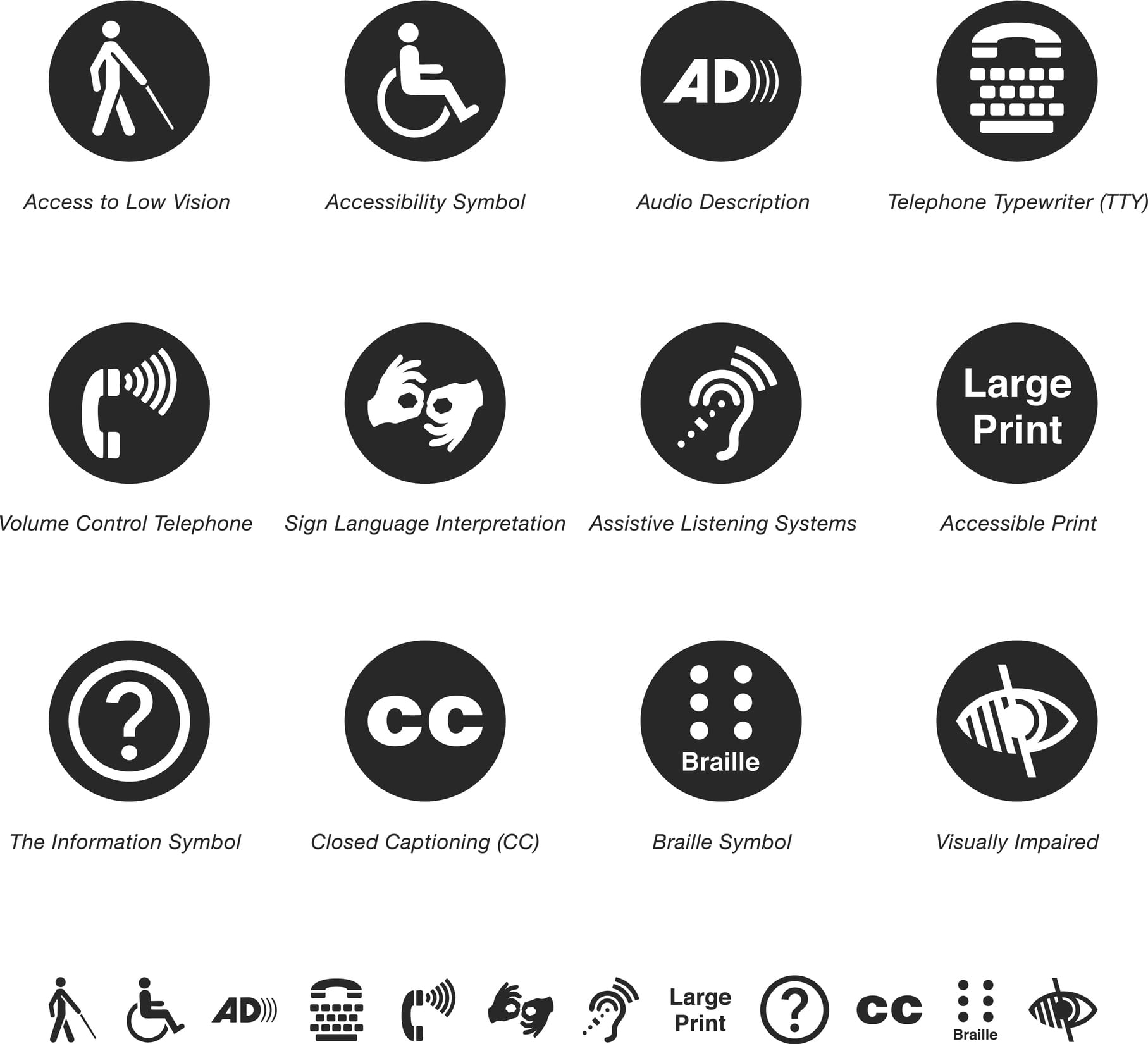
AODA symbols

Accessibility for Ontarian’s with Disabilities Act (AODA)

Since June 2005, Ontario has enforced AODA compliance law. The Accessibility for Ontarian’s with Disabilities Act applies to both the private and public sectors in Ontario, and requires individuals and organizations to follow accessibility standards in five areas:

  1. information and communications
  2. customer service
  3. transportation
  4. employment
  5. design of public spaces

To find out how to be compliant with AODA, all public organizations, non profits and private businesses must complete an AODA compliance report. This report is a tool to ensure all businesses are following AODA guidelines. Businesses with over 20 employees must complete the report.

Some general requirements of AODA include:

  • Providing training to staff and volunteers.
  • Developing an accessibility policy.
  • Creating a multi-year accessibility plan and update it every five years.
  • Considering accessibility in procurement and when designing or purchasing self-service kiosks.

If you’d like to learn more on how to make your website compliant to AODA, check out this previous article.

Cropped shot of a senior woman holding a cane in a retirement home

Health Insurance Portability and Accountability Act (HIPPA)

HIPPA is a federal law that sets national standards to protect medical records and other personal health information. Protected health information can be defined as:

  1. Information that identifies an individual.
  2. Information maintained or exchanged electronically or in hard copy.

This applies to any health care provider, health plans and healthcare clearing houses who transmit health information electronically. Healthcare providers that must comply with HIPPA rules include hospitals, health clinics, nursing homes, doctors, dentists, pharmacies, chiropractors and psychologists. Health plans include health insurance providers, company health plans, government programs such as Medicare and veterans health care programs.

Businesswoman using laptop, searching web, browsing information, having workplace at office

Canada’s Anti-Spam Legislation  (CASL)

CASL is a federal law protecting consumers and businesses from poor digital technology practices such as spam. This law was created in 2014 to ensure best practices in email marketing. Spam has become an issue online and is constituted as any unsolicited email, text message or software. The legal definition of spam according to Canada’s Anti Spam Legislation is:

  • Unauthorized alteration of transmission data.
  • The installation of computer programs without consent.
  • False or misleading electronic representations (including websites).
  • The harvesting of addresses (collecting and/or using email or other electronic addresses without permission).
  • The collection of personal information by accessing a computer system or electronic device illegally.

This law applies to all businesses in Canada who use promotional emails to target audiences. CASL states that all promotional emails must include a working unsubscribe link, the recipient must be able to identify the sender, and brands are only allowed to send emails to those who have agreed to receive them or who have done business together within the last two years.

How to know if someone has given consent to receive promotional emails?

Express consent:  A person has given oral or written consent to receive emails. This form of consent does not expire and is valid until the email recipient unsubscribes from emails.

Implied consent:  If someone has purchased a product from a brand or used a brands service, this is considered implied consent, and the brand can send promotional emails to this recipient. However, this form of consent expires between 6 months to 2 years.

Cropped shot of a mature businessman working on a laptop in an office

General Data Protection Regulation (GDPR)

The European Union’s General Data Protection Regulation came into force in 2018, and has implications on Canadian organizations that control or process personal information in the European Union (EU). The European Union is a political union that is made up of 28 states.  Members of the EU include Austria, Belgium, Bulgaria, Croatia, Cyprus, the Czech Republic, Denmark, Estonia, Finland, France, Germany, Greece, Hungary, Ireland, Italy, Latvia, Lithuania, Luxembourg, Malta, the Netherlands, Poland, Portugal, Romania, Slovakia, Slovenia, Spain, Sweden and the United Kingdom.

This regulation has changed the way European personal data is handled from healthcare to banking information. Examples of personal data include a name, home address, an ID card number, location data, a cookie ID, data held by a hospital or doctor.  The regulation protects EU data privacy and shapes the way organizations approach data privacy.

We have seen an increase in pop-ups on websites to notify users that cookies are being used on sites, and that consent is required if the users is going through the website.

Online payment and shopping concepts

Payment Card Industry Data Security Standard (PCI DSS)

PCI is a set of security standards that ensure all businesses that accept, process, store or transmit credit card information maintain it securely.  This standard applies to any organization that accepts credit cards.  There are four PCI compliance levels that are based on merchants credit card transactions over a 12-month period.

Merchant levels include:

  • Level 1: Any merchant that processes over 6 million credit card transactions per year.
  • Level 2: Any merchant that processes 1million to 6million credit card transactions per year.
  • Level 3: Any merchant that processes 20,000 to 1 million transactions per year.
  • Level 4: Any merchant that process less than 20, 000 transactions per year.

Small to medium-sized businesses include Level 4 merchants and must follow a few steps in order to satisfy PCI requirements.

Did You Know?

Since 90 per cent of breaches impact small businesses. Making sure your e-commerce is compliant may be intimidating, but it is necessary! Want to know if you are protected? Contact us today.

Digital technology lifestyle of school girl child or student using wireless internet for distance learning application and reading e-book app on mobile ipad smart device multimedia computer tablet

Children’s Online Privacy Protection Act (COPPA)

COPPA was formed in 1998 to address issues concerning the privacy of children online. The goal of COPPA is to place parents in control of what information is collected from their children online.  This rule applies to operators of websites and online services, including mobile apps directed to children under age 13 that collect personal information from them.

Personal Information collected from children can include:

  • First and last name.
  • Physical address.
  • Contact information.
  • Telephone number.
  • Social insurance number.
  • Photographs, videos or audio files, that contains a child’s image or voice.
  • Geolocation information that can identify street names cities, or towns.
Protection network security computer and safe your data concept. Laptop working develop coding program with key on keyboard

Secure Sockets Layer (SSL) Certificate

SSL certificates ensure that a website is secure, and should be used by everyone who would like to protect their information.  SSL certificates are small data files that secure connections from the website server.

Why should you add an SSL certificate to your website?

SSL is used to secure confidential information such as credit card transactions, login information, and data transfers. It will also keep your data secure, increase google rankings, build customer trust, as well as improves conversion rates.

When an SSL certificate is installed to your website’s server the application protocol (or HTTP) will change to HTTPS. The ’s’ means the website is now secure. For example, Treefrog is a secure website and will appear as https://www.treefrog.ca.

Group of mid 20's and 30's men and women engaged in application development job. They are seated by long desks back to back, each person in front of dual screen computer. 

Moderator Features

While this is not a compliance, moderators are something that website owners should consider when developing an application that allows users to load their own content, such as a blog. There are different types of moderators that protect the site from issues. Text moderators restrict unwanted text from an application or website, while photograph monitors restrict pictures from being shared (i.e pornographic images).

Did You Know?

If you are found to be non-compliant, you face a possible fine of up to $100,000 per day!

Staying Up to Date with Compliance

Becoming aware of rules and regulations, whether federal, provincial, or industry-wide is an excellent place to start in making sure you are compliant. However, without the proper expertise, it can all be daunting.

By working with Treefrog Inc, we can help you build or update your website to meet your specific requirements so that you never have to worry about data privacy or whether you are compliant. If you would like a complimentary evaluation of your website to learn about what you need to do to ensure compliancy, please let us know.

Don’t forget to subscribe to our monthly Digital Digest Newsletter to get top technology and digital tips and trends for your business. Sign up today!

List all article referenced here:

Bearded senior using mobile phone outdoors
Digital Marketing

What is SEO or Social Without Content Marketing?

It would be cliché to suggest that the digital marketing landscape is becoming increasingly complex. Marketing and advertising have always been faced with the often-complex problem of knowing what will resonate with potential customers. Digital marketers face the same problem but unlike “traditional” marketing we have access to unprecedented levels of data about our intended audience. Learning as we go, we’re often able to craft content (blogs, articles, images, graphics) that users find valuable. Understanding that value is a nuanced and completely subjective concept, we try to gather and analyse multiple data sets before we ever put pen to paper.

What is contemporary content marketing?

Traditional marketing—think of a television commercial, for example—is based on the concept of interruption. A commercial diverts the viewer’s attention and interrupts them from viewing the “valuable” television program they were watching. Content marketing, in contrast, is based on the idea that trust is garnered through a genuine attempt to offer something that the reader or viewer will want to read, view, watch, or best yet—share.  Content marketing talks “to” them rather than “at” audience.  Depending on the product or service, thoughtful content marketing will help move a potential prospect through the digital funnel towards purchase and beyond towards becoming an advocate.

Unlike traditional advertising, content marketing is a persuasive soft sell and seeks to help the buyer make an informed decision. Sometimes, as digital marketers we attempt to create social proof of a product or service’s benefit through relying on the endorsement of key opinion leaders, or “influencers” in a particular industry. Think about it, it is far more effective if someone you trust endorses that new widget or gadget. This type of content, a kind of digital word-of-mouth, is as traditional as traditional gets—it’s just been given a new lease via content marketing.

The photo was taken indoors in a domestic room by photographing over the model's shoulder.

Traditional Marketing vs Content Marketing

Let’s explore an example: If you’re in the floral business, getting a certain amount of walk-in traffic to your business would be expected if your business is centrally located in town. If you want to reach more customers, you might take out an ad in the local paper and maybe send out some direct mail postcards. Perhaps you decide to exhibit in the annual bridal show and home show. But how do you attract customers outside of these moments?  How do you provide value for the user, even when they are not looking for your services? How will you keep them engaged and your business top-of-mind between purchases?

This could take a variety of forms:

  1. Beautiful images on your social media of recent work
  2. A bi-weekly blog with articles on relevant content such as “Best Flower Arrangements for a Winter Wedding” or “Easy, DIY Flower Arrangements for Your Next Dinner Party.”
  3. A weekly newsletter with a DIY home décor activity
  4. A monthly contest to encourage social media engagement
  5. A monthly donation of flowers to an important local cause

Content like this provides your audience with something they see value in and ensures you’re in front of them long before they are at the point of purchase. And, importantly, it provides an opportunity to build a connection to your brand.

You can’t go wrong creating content of various kinds that your customers see value in. If they see value, likely so will Google. If your content can be the answer to a searched question, you will likely rank higher in search results. Again, it’s about creating something that your customers see value in before you ever ask for the sale.

The beauty of it all?

Your content will sell for you while you’re asleep. It works even when you’re not.

Getting started!

When it comes to producing content, it can be a daunting task. You might have no idea where or how to get started. Remember: quality content, produced frequently will have the greatest effect on your business. To start, explore the topics that resonate with your prospective audience, consider why your audience works with you, what pain points to address or problems you solve, be creative, take a different approach, and have fun.

Today, we are more connected and more engaged than ever with digital media. Creating a space for your customer (and potential customer) to interact with your brand and develop trust at their own pace, will have lasting effects on your business. It is critical to continue to provide this opportunity, even after the sale is complete. Creating opportunity to further the dialogue with your customers will help lead to long-lasting brand loyalty and repeat business.

And if you are to take one thing away from this article…remember: providing something of value takes time and effort but can yield huge returns!

Photo of businesswoman presenting new project
Digital Marketing

Innovation Isn’t Just For Start-Ups

“The day we stop learning is the day we die.”
– Michael Scott

This all too common quote can also be applied to our businesses; the day we stop innovating in our business, is the day we die. But, how can you innovate when you’re in a classic or very structured industry?

There are many reasons to incorporate innovation as a regular part of your business. Perhaps though, you just don’t have the time to ‘think ahead’ due to working on and in your company all at the same time.

So, to provide some insight into how you can get your creative juices running, we’ve put together a list of five simple and practical suggestions to help you:

1. Host a lunch-and-share with your entire team.

Ask:

  • What could make them more efficient in their jobs?
  • What is one thing they have stopped doing manually as they’ve accessed new tools?
  • What is something that could be automated that would increase productivity?

Collect all of the ideas and don’t discard any, regardless of how crazy or wild it might be or seem. Wait 24 hours and then return to the list and see which one(s) you could act on.

Cropped shot of a group of business colleagues in the office having a meeting and discussing plans for the future

2. Create an innovation team/committee.

Taking a page from a company known for its innovation, Apple has an innovation committee. Anyone can take an idea to the innovation committee and present it. The idea can be in the embryo stage or fully thought through and fleshed out. The committee then has a budget (time & money) to commit to innovation.

In your workplace, you could create an innovation committee out of your team lunch-and-share, with the first task of vetting the ideas already put forward.

3. Give your team one day a month (or quarter) to work on whatever project or task they want.

You will be amazed by what comes out of these sessions. Did you know this is how some of Google’s greatest inventions where born, like AdSense?

Shot of office workers in a meeting in a boardroom

4. Start following Entrepreneurs who are known for being Innovative.

Some Ontarian Entrepreneurs include:

5. Spend 10 minutes twice a week reading articles or blogs on Innovation.

Some suggested websites are:

Diversity startup business team working together. They are sitting by the desk. Selective focus to man with beard talking to coworkers.

Time To Get Ideating!

We hope you’ve found this list of ideas for injecting innovation into your workplace helpful. If you know of any other entrepreneurs or websites that you think should be on this list, we would love to hear from you!

At Treefrog, we encourage innovation and thought leadership in all that we do; we even have innovation ideation sessions for our clients. If you would like a complimentary 60-minutes session, please let us know.

Young woman using a laptop computer.
Digital Marketing

Why Are There Suddenly Fewer Image & Video Boxes in Google Search Results?

Have you noticed a difference in the way Google is displaying videos and imagery when delivering search results?

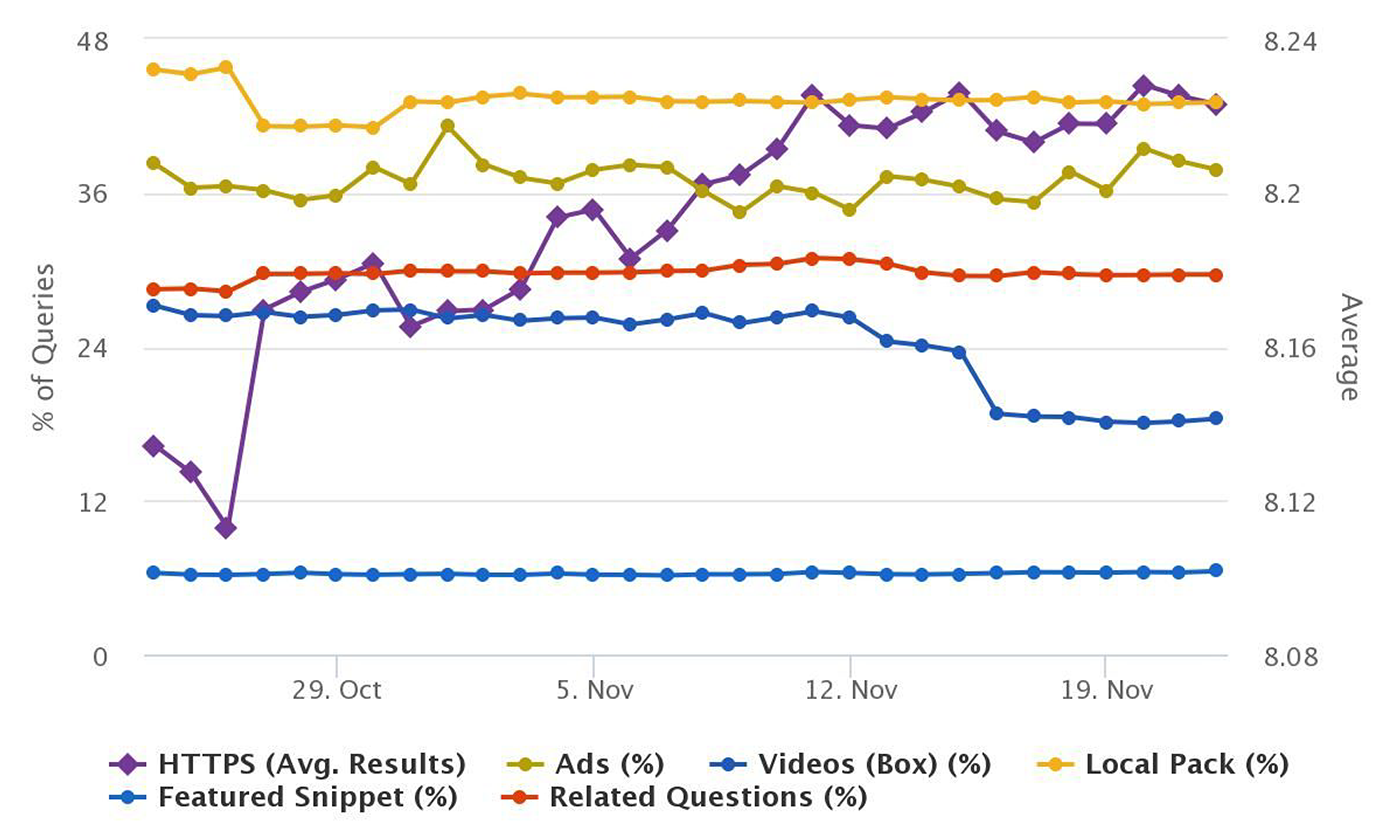
According to Search Engine Land and RankRanger, Google has begun deprioritizing imagery and video search results, lessening the percentage of time that these resources are featured on both mobile and web.

As noted by RankRanger, video carousel results began to drop around November 13th or 14th, 2018 (see dark blue), and have remained consistently low over the past few days.


Source: www.rankranger.com/google-serp-features

At Treefrog, we found this change quite interesting. It also begets the all-important question for us: why are they doing this?

There’s always a data-driven motive behind a decision like this. Here are a few of our theories:

Theory 1: Video and Image Engagement is Declining

Perhaps fewer people are clicking on image and video results.

According to a report by Buffer and BuzzSumo, this is true, at least, for Facebook. In their report, Buffer and BuzzSumo analyzed more than 43 million posts from the top 20,000 brands on Facebook and determined that average engagement per image dropped from 9,370 per post in Q1 2017 to 3,454 per post in Q2 2018.

Although, we haven’t seen any significant data on the types of queries where this is becoming a reality. For example, are images and video being scaled back for informational queries, like “where do I put my brake fluid in a 2011 Hyundai Elantra”? Or are the results affected mostly for commercial-type queries? It’s still rather unclear.

Theory 2: This is a New Strategy to Increase Ad Impressions

Perhaps Google is moving back to having people “dig” for video/image results so it can show more ads when the SERP refreshes.

In other words, instead of showing the thumbnails in universal search, users are expected to click again to specify “Images” or “Videos”. Although this seems uncharacteristic for Google—they’re usually in the habit of lessening clicks rather than adding them.

With recently improved Expanded Text Ads, Google has given us more room to play with as digital marketers (see screenshot) – allowing for extra headlines (^140%) and more descriptive text (^14%). These changes were designed to maximize brand presences on mobile specifically, in response to today’s mobile-first world.

And as our mobile devices have grown in size, we have to ask ourselves, would Google rather replace prime search result real estate with ad space over videos and images? We wouldn’t be at all surprised.

Theory 3: Google Is Refining Video Previews

Perhaps Google is refining the video “preview” feature in SERPs, and they removed the image and video results temporarily to work on them.

We’re not sure if you agree, but the video previews are algorithmically driven at the moment, and not quite ideal. Google is not in the habit of keeping something alive if it isn’t widely adopted. So it could be that they are tinkering with the experience so that people get more use out of the preview feature.

Or, maybe they’re revising it so that it can better determine when to show a video box, when to show an image box, and when to show both (or neither).

Photo sign made by human hands on blurred sunset sky as background

Conclusion

We predict Google will return these results with some enhanced capabilities.

Google is unlikely to remove SERP features completely unless there is indeed a massive decrease in click-throughs from image and video SERP results. It would be strange to do this, given that video and images, especially for informational queries, are still extremely useful.

Another possibility is… maybe they just love messing with people!

Woman using a laptop to browse facebook
Digital Marketing

How Facebook’s Newsfeed Change Will Affect Your Marketing Efforts

Mark Zuckerberg, the creator of Facebook, recently announced changes to Facebook’s newsfeed algorithm – specifically how it decides what posts to show people. With these changes, posts from personal profiles will now be shown more, and content from brands and news outlets less. Therefore, users should expect to see less passive reading material in their newsfeed and more posts about their friend’s vacation or what they ate for lunch.

Why is this happening?

Zuckerberg is trying to put the “social” back in social media. That is, he wants Facebook to foster relationships between people rather than act as a content source. The logic behind this, as Zuckerberg put it, is that, “time spent connecting with people leads to overall feeling of decreased loneliness and overall wellbeing”. He went on to also state that, on the other hand, “passively reading articles or watching videos — even if they’re entertaining or informative — may not be as good”.

So, how will this affect you and shape your efforts to connect with your audience on Facebook? Here are a few things to expect:

1. Your Organic Reach Will Probably Decline

Organic reach is the number of unique Facebook users that see a social media post without the publisher having paid for an ad. For brands, this has actually been declining over the last few years as they have become more competitive and newsfeeds have become overcrowded with brand content, prompting Facebook to respond by decreasing the visibility of this content. With this new algorithm change, you can expect your organic reach to decline even more.

How can you soften this blow for your brand? Read on…

2. The Quality of Your Content Will Become More Important

If your brand shares curated content that you think your audience will enjoy, you’re going to have to rethink your content strategy. According to Zuckerberg, public content posted by brands will be held to the same standard as private content and should “encourage meaningful interactions between people.”

What does this content look like? Well, live videos tend to spark the most amount of conversation on Facebook compared to blog articles, which are generally consumed passively without generating many comments, likes, or shares.

Our advice is to try creating live videos or to encourage comments on your posts by posing questions. The more engagement your post gets, the more likely it is to show up in someone’s newsfeed.

3. Influencer Marketing May be the Key to Staying Relevant on Facebook

Influencer marketing has long been a popular tactic for brands to get in front of a larger audience by leveraging people that their followers love. Although Facebook is penalizing content distributed by brands, they haven’t announced any intention of doing the same to content posted by influencers.

With this in mind, now might be a good time to start creating a killer influencer marketing strategy

4. Your Ads are Going to Need to be Really, Really Good

These Facebook newsfeed changes mean that users are likely to spend less time on Facebook since there will be less passive content for them to consume. This then suggests that brands will have less screen time to get in front of their target audience with ads, which means that industries that rely on Facebook ads may need to spend more to be seen.

How can brands get around this? The best way to be seen without spending too much is to make sure that your ads are interesting to your target market and are only shown to people who would click on them. The more optimized the ad, the better ‘bang for your buck’ you can expect.

5. You’re Actually Going to Need to Engage on Facebook

While Facebook will be making posts distributed by brands less visible, this won’t affect comments that brands make on other people’s posts. Therefore, if brands engage more in real time with their audience (commenting on posts, posting in groups), they will foster relationships with users and give themselves a new way to become visible on Facebook – regardless of these changes.

For more tips and tricks on how to improve your social strategy, check out our blog, “Don’t Do Social, Be Social”.

Not sure where to begin? Our Social Media team is made up of experts that keep up to date with these changes as they happen. Contact us today to learn more about Facebook and all of the other platforms you should be leveraging!

Request a free quote or give us a call at 905.836.4442 today!

An asian woman concentrating on a touch screen display. The point of view is from behind the screen, looking through the data and images to the woman's face as she manipulates the windows of information.
Branding & Design, Digital Marketing

The Science Behind Engaging Visuals

One of the fundamental ways to make sure your social media posts are getting engagement is to include visuals. Images, infographics, and videos are more likely to capture a person’s attention when compared to text. If your post doesn’t include visual content, it risks getting lost in people’s timelines amidst all of the posts that do include visuals. To illustrate this point, let’s explore the facts (yay, statistics!)

  • According to Buffer, Tweets with images are retweeted 150% more than Tweets without.
  • 74% of social media marketers use visual assets in their social media marketing, ahead of blogs (68%) and videos (60%).
  • Eye tracking studies performed by Nielsen Norman Group suggested that when people find images relevant, they spend more time looking at them on a webpage than reading the text.
Group of multicultural friends using smartphone outdoors - People hands addicted by mobile smart phone - Technology concept with connected men and women - Shallow depth of field on vintage filter tone

Bottom Line: Visuals. Use Them. Whether it’s a photo, an infographic, a video, or anything else!

But keep in mind, all visuals are not created equal, and there are things that make certain visuals more engaging than others. While these will differ depending on your industry (different audiences react differently to images), here are some general tips that are crucial when selecting visuals to include in your post:

1. Include Eyes

A tried and true method of getting people to stop at your image when scrolling through their newsfeeds is to include images where people appear to be staring at the viewer. Eye contact is a super engaging visual, and if your image draws eyes to your post, the viewer is more likely to stop, stare, and read your content.

This is a perfect example of an image where the entire visual appeal is based on eye contact.

woman's eyes

2. Include a Lot of Colours, when Appropriate

We generally recommend sticking to a similar colour scheme (preferably your brand colours) when creating images – in order to make sure people are able to quickly connect the visuals to your brand. However, visuals that include a variety of colours are more eye-catching than those with few colours. So, whichever colour scheme you choose, at the very least, avoid images with only shades or dark colours.

Good:

The picturesque Spirit Island is a world famous Canadian Rockies landmark on Maligne Lake, Jasper National Park, Alberta, Canada. In the background is part of the Hall of the Gods, with Mount Warren, Valad Peak, Mount Henry MacLeod, Coronet Glacier and Mount Mary Vaux visible.

Bad:

Residential buildings and the favela in the background

3. Design them for Easy Comprehension

Because the brain is able to quickly determine relationships between objects, people can create connections more quickly by looking at visuals than reading text. In the clever image below, Coke uses this idea to quickly teach people a new way of making iced tea – all without using a single word of text. Talk about taking advantage of the human brain!

4. Try Incorporating Humour

If you’re ever struggling to figure out how to connect with your audience, try using humour! Different types of people like different things, but a sense of humour is innate (we laugh even before we learn to talk).

Old Spice is a master at creating visuals that catch people’s eyes by using humour that’s immediately noticeable. This image is simple, creative, and effective!

5. Guide the Eyes with Lines

Using lines can help guide people’s eyes to sections of images that you want them to see. For example, try using lines to guide people’s eyes to an image labelled “call now” (or similar) – to direct their attention where you’d like it to be.

In the post below, we used arrows to encourage people to swipe left and see the next image in the post. This is perfect for Instagram, where you can include multiple photos in one post.

Treefrog Tip: When you are absolutely out of ideas for what visuals to include, or simply don’t have the resources to generate ones, use royalty-free image websites like Pixabay or PEXELS to search for images relevant to your post.

Keep in mind, you can’t always Google image search photos to include in your posts, as someone else may own the rights to them, and you may end up in trouble if you use them.

Need help creating eye-catching visuals that get noticed? Our graphic design and social media teams are made up of experts who understand the power of captivating imagery.

Request a free quote or give us a call at 905.836.4442 today!

Scroll to Top