With over 2 billion active users, popular social media platforms have become marketing giants, offering businesses valuable data about their customers. However, with so many options, how do you figure out which social media platforms are right for your business?
Here are a few tips to help you get started:
Facebook
Facebook is the biggest social network on the web, with nearly 2 billion active users! Considering that Facebook has a wealth of options for any organization, it’s a great starting point for your business, regardless of your industry. Facebook can be thought of as the “social hub” of your business, where people can go to leave messages, browse through products and photos, or chat with you online.
Twitter
Twitter averages about 328 million active users worldwide and is an effective channel for marketing your business and handling customer service. With Twitter, you can share short text updates (of 140 characters or fewer), along with videos, images, links, polls and more. As with Facebook, Twitter is more effective when it is a two-way platform in which you respond to and engage with followers.
LinkedIn
LinkedIn is right for you if you are B2B or are in another industry or role in which you can provide useful insights to people who are thinking about their work, looking to make business connections, or who are exploring their next career move. Most users are in work mode on LinkedIn, so it is optimal for peer networking and industry-specific information.
Instagram
Instagram is a mobile-only visual social media platform based entirely on photo and video posts. The Facebook-owned network has more than 700 million active users, many of whom post about food, art, travel, fashion, and similar subjects. More artistic niches tend to excel on Instagram, so it’s important that the person running your account has a good eye for detail and some basic photography skills, so the photos and videos posted to your account are high quality.
Pinterest
Pinterest, another highly visual platform, is popular among women, so it is the place to be if that is your target audience. Every pin includes an image or video, and it is fairly low-maintenance in terms of post frequency. However, keeping your boards organized and search-friendly can be time-consuming. Popular categories on the site are DIY projects, fashion, exercise, beauty, photography, and food.
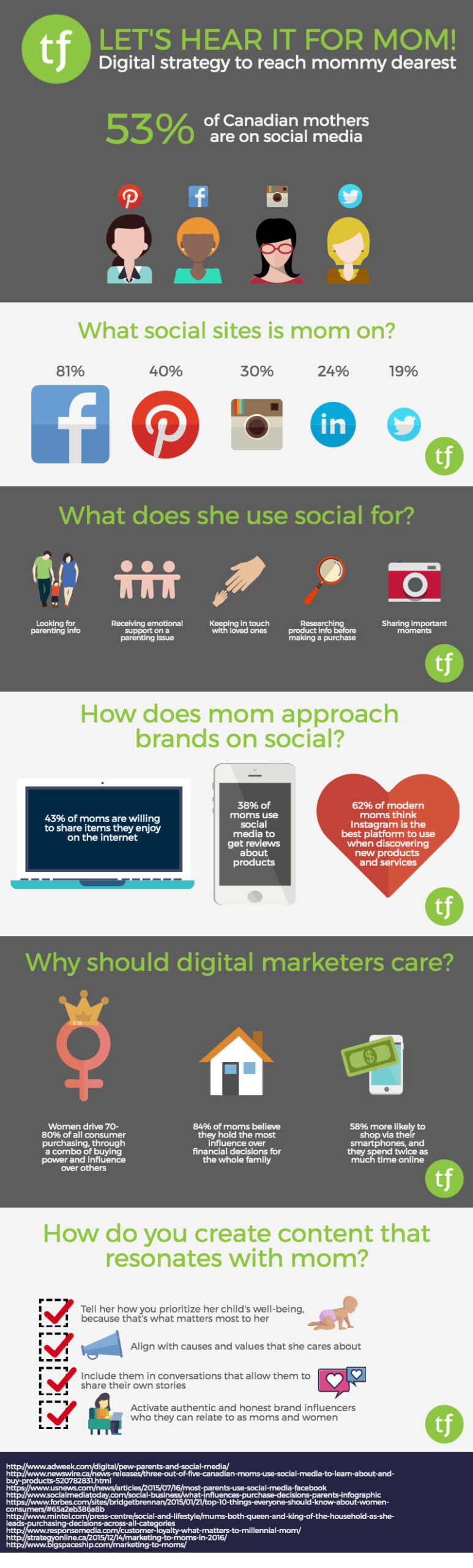
This past Mother’s Day got us thinking about what it means to connect with mom on social media. Much to the dismay of her kids, mom is part of a growing audience of parents on social, proving every day that no one will ever be truly free from the watchful eye of mother. Keeping tabs on her children isn’t the only thing mom is doing online though; social media continues to open up new and exciting opportunities for mom to get on board with brands she likes, and join the online parenting conversations taking place worldwide. Check out our infographic for some highlights on mom as your consumer on social media.
For the second part of our Google PageSpeed blog post series, we’ll be taking a look at more advanced techniques to adhere to Google’s recommendations. If you haven’t had a chance to read the first part to increasing your Google PageSpeed score, start now! Recalling on the Google PageSpeed insight rules, the speed rules include the following:
Avoid Landing Page Redirects
Enable Compression
Improve Server Response Time
Leverage Browser Caching
Minify Resources
Optimize Images
Optimize CSS Delivery
Prioritize Visible Content
Remove Render-Blocking JavaScript
Use Asynchronous Scripts
We’ve already covered avoiding landing page redirects, enabling compression, optimizing CSS delivery and removing render-blocking JavaScript in our first part. In this blog post, we’ll be taking a look at prioritizing visible content, minifying resources and optimizing images.
Note: The following recommendations below assume you fully understand web development best practices as well as server software programming, HTML, JavaScript and CSS programming. If you aren’t too sure of these techniques described, give us a shout and we’ll help you out!
1. Prioritize Visible Content
Putting an emphasis on giving users a high quality mobile experience, Google states “having a mobile-friendly website has become a critical part of having an online presence”. As such, they recommend ensuring that the above-the-fold content of the page is rendered quickly and efficiently.
Above-the-fold is the portion of the webpage that is visible without the need to scroll down. Ensuring the above-the-fold content displays quickly, prevents waiting time for the user. However, if the data exceeds the initial congestion window (a self-imposed variable that limits the amount of data that can be sent), then additional back and forth data transmission between your server and the user’s browsers will occur. This in turn creates a slower and delayed page load for the user.
In other words, if the above-the-fold content isn’t loading quickly enough, users are more likely to leave. The above-the-fold content is the first touch point for most users and they are less likely to stick around for the rest of the webpage to load if the above-the-fold content can’t even load quickly and properly.
What to do:
Structure your HTML to load the critical content first:
Identify the critical content of your webpage. For example, if the page is an article, the body text and images are the most critical content. Third-party widgets may fall as secondary items that can be deferred.
Ensure the critical content of your webpage loads first. Structure your HTML such that the critical content is rendered immediately. For example, you may want to inline a portion of the CSS into the HTML file to ensure the styling of the critical content is rendered first, while the rest of the page is styled after the CSS file is rendered later.
Reduce the amount of data used by enabling compression and/or minifying resources:
Reduce the size of your HTML, CSS and JavaScript files by enabling compression. As discussed in our previous post, to enable compression you will need to make updates to your .htaccess file.
Minify your HTML, CSS and JavaScript files, which is discussed in detail below
2. Minify Your Resources
Ensure the sizes of your resources are reduced to allow faster transferring of data. Reducing the size of your files will require less data to be transferred from your server to the user’s browser, thereby making the above-the-fold as well as the entire page load much quicker.
What to do:
After writing your HTML, CSS and JavaScript code, you can look at ways to reduce the file size by removing unnecessary or redundant code, unused code and applying shorter variable and function names. Although it may be against code-writing best practices, you can also remove commenting, formatting and removing whitespace altogether. For example, the following CSS code is 953 bytes and has commenting, formatting, whitespace as well as redundant code:
It may become taxing to minify all your resources manually, especially if you have a large website. Luckily, there are free tools available online to minify your resources for you. A simple search for “HTML minify”, “CSS minify” or “JavaScript minify”, will result in various tools you can use. The fall back with using these tools as well as minifying these resources yourself is that the code needs to be minified again whenever you make any updates or changes. As an alternative and depending on the CMS you use, you can automate the process by leveraging plugins. For WordPress and Drupal sites, there are many minify plugins available that can minify HTML, CSS and JavaScript individually or all at once.
As a last alternative, you may also want to use Google’s PageSpeed Module if your server is Apache or Nginx. There are various filters that help optimize your website’s page speed inclusive of reducing resources sizes such as Minify JavaScript. Take a look at their mod_pagespeed documentation for more information.
3. Optimize Images
Ensure the file size of images is reduced without significantly impacting their visual quality. Reducing the size of your image files will require less data to be transferred from your server to the user’s browser, thereby making the above-the-fold as well as the entire page load much quicker.
This may require its own blog post in the future since there are plenty of best practices and image optimization checklists to do. It also really depends on how your website is structured: if your website is highly visual than a much more thorough optimization strategy is required. However, if your website has some images here and there, there are quick and easy things you can do.
What to do:
Ensure the images are served at their native dimensions and specify the width and height in the img tag to prevent “popping” when the page is loading
Compress your images to reduce file size. Try using PNG files as they are lossless formats and do not make any visual modifications to the image.
If you’re using JPEG files and are compressing the images, try to reduce the quality below 85. Past the quality of 85, the file size becomes larger but doesn’t improve visually. Compress the image as low as possible without losing visual quality.
Develop With File Size in Mind or Use Tools To Optimize
These recommendations are best executed during the designing and development stage of building the website. Arranging the structure of the content beforehand can prioritize and serve the critical content to users right from the start. Programming HTML, CSS and JavaScript and optimizing the images with the file size in mind ensures a quicker page load right when the website goes live.
In most cases however, these items may be overlooked or unnoticed during the development stage. To act on these recommendations long after a website has been live, we can leverage: enabling compression, minifying resources and image compression.
As noted in Part 1, every website is different and there are little nuances that make your website unique. It’s very important you test these recommendations first before implementing them.
As always, if you have any questions or comments regarding these recommendations, feel free to comment below. We’d love to hear your thoughts, feedback and/or grievances. Thanks for reading!
We bet you’re totally stressed out about boxes, and moving trucks, and how your employees are handling the change.
How do we know?
We’ve been in your shoes. We feel you.
However, more than just our sympathies, we at Treefrog Inc. want to pass on a more valuable ‘moving message’ – a PSA of sorts – to not neglect your online presence during this time.
Trust us, we get it, you’ve got a lot going on. But local profiles don’t optimize themselves when you move, and any change at all creates some risk for your business.
So, to help protect and guide you through this transition, we’ve developed some localized SEO tips you can’t afford to ignore.
1. Build Trust By Providing Detail
In our modern landscape, customers are more likely than ever to search the location, hours, and phone number of a store (from their mobile device) before visiting – especially if it’s for the first time.
If this information is not readily available online, or it is confusing by showing both your old and new locations, customers may choose not to visit the storefront. It becomes a hassle to locate, they’re unable to determine if the store is open, and they’re unsure if the business will serve their needs.
This is especially true for moving businesses that are entering new territory.
If you haven’t already claimed your business and its location on Google Places, (or on other online search engines such as Bing’s Local Listing Center, or Yahoo! Local), it’s crucial that you make this a priority.
However, don’t stop at just providing your address and phone number. If applicable, include as much information as you can. This includes an email, hours of operation, photographs of your new store, your business’ social media accounts, appropriate keywords, and more.
Allow customers to get to know you, and as a result, learn that they can trust you.
2. Collect Reviews & Testimonials
When starting up shop or moving into a new area, it’s critical to build an online persona you can be proud of.
Curious potential customers are likely to not only Google who you are and what you offer, but also what others are saying about you and your service.
This is why it becomes essential to collect positive reviews and testimonials online – whether it be on Facebook, or Glassdoor, or Yelp.
Reviews can be the difference between securing a new client, and not securing a new client, as reviews from real people bring comfort and assurance to other potential customers.
Search engines like Google also rely on reviews to determine the value of your business, website, and online platform. When you receive numerous positive reviews, Google will notice and reward you with better SEO page ranking!
But how do you collect reviews during a transition period?
Capitalize on your big move by launching some creative social media campaigns! For example, you could invite customers to an open house and offer incentives in exchange for tweets, Facebook posts, and reviews! A little buzz goes a long way!
“Just attended company X’s open house at their new location! The store looks amazing! Be sure to check them out! #CompanyX”
3. Develop Quality Content
If you’re a company that is submitting a local online profile for the first time, creating a well-developed persona will help you to instantly build credibility as a business. A great profile will also showcase your professionalism and dedication to attracting potential customers – and that’s the goal, right?
If you’re a business that is simply moving locations and needs to update their profile, now’s the perfect time to reflect and focus in on the new demographic (and geographic area) you’re serving.
Ask yourself: What’s changed? What’s stayed the same? How can you cater to your new audience?
By incorporating geo-specific keywords into your content, search engines will identify proximity and relevance, bringing your profile forward to those in your area.
For example, if your new location is in Richmond Hill, mentioning Richmond Hill specific services in your blog, and including ‘Richmond Hill’ in your ‘about us’ web page, will naturally boost your relevance in that area.
4. Build Your External Links
Want to build even more credibility in your new local area? Connect with in-town associations, your local chamber of commerce, and residents’ social media pages, to acquire backlinks to your website.
For example, if you own company X, and company Y carries one of your products in-store, you could request that company Y will back-link to your website, or tag your social media handles, when they feature said product on any online platform.
This partnership will then contribute to company X’s quality score, as search engines will recognize that company Y has vouched for company X’s credibility as a resource.
The same goes for customers who willingly post on social media about your products, and then also tag you, and your business, in their posts.
Networking and capitalizing on local partnerships will bring more potential customers to your website, and will also help to spark interest in your community, encouraging people to check out your business, and your new location, in person.
Don’t have time to manage all of these SEO localized changes on your own? We’re here to help.
At Treefrog Inc, we can manage every step of your move online, including producing new advertising content and materials, updating your social media platforms, adding new features to your website design, actively working to improve your conversion rates, and more.
How efficient is your website at turning visitors into customers?
If you could turn more of your website visitors into leads, you’d jump at the chance. Unfortunately this doesn’t just magically happen—there are several factors to consider. That’s why we’ve taken the time to break down the value in conversion rate optimization.
What is Conversion Rate Optimization?
Before we ask this question, let’s first define what a conversion is. A conversion happens when a user performs a desired action on your website.
Common conversions include:
Someone clicking your phone number to call you.
Someone signing up for your email newsletter.
Someone completing a form for a free download or to get in contact.
Someone making a purchase on your website.
Someone filling out a ‘request a quote’ form.
Conversion Rate Optimization is a strategic approach to digital marketing that seeks to optimize the ratio of traffic to leads on your website.
Obviously everyone wants more leads, and in a perfect world every person that ends up on your website will convert. But the world doesn’t work that way. People are very finicky about whether or not they will commit to a desired action online. What Conversion Rate Optimization (CRO) aims to do is to present a user with a scenario where they will have the highest likelihood of taking that action, whatever it may be.
Normally, CRO is carried out on dedicated landing pages. Often, these landing pages are designed to take all of the external distraction away, so the user is channeled towards the main conversion point, or desired action. It’s kind of like the old velvet rope maze in the bank—it clearly screams “LINE UP HERE!” We don’t want to give users a lot of options with these dedicated landing pages, we want to guide them towards the goal as efficiently as possible.
Again, the world works in mysterious ways, because it’s full of people. And people are funny. No one knows exactly what the right recipe is for conversions, just the same as advertising through one medium does not appeal to all audiences. What we’re left to work with at that point is data.
In other words, how much traffic is getting to our landing page, and of that traffic, how many people are filling out our request a quote form? Let’s say it’s 1%. Obviously we want that number to improve. So, we need to go through the process of iteratively changing our landing page so that it gets more forms filled out.
The nature of CRO is not to throw the baby out with the bathwater. We don’t want to completely scrap our landing page and start again. We want to make slight changes that we can prove have made a positive effect. Sometimes that can mean changing the colour of an element, like the button people click to submit the form. Maybe we want to try paring down the text on the page, if we feel like there’s too much, and people are seeing it as a distraction. Maybe the form itself has too many fields to fill out and it’s scaring people off. Maybe the main website navigation is leading people off the page and away from our conversion point.
When websites are not architected with these conversion points in mind, and when pathways to conversions are not re-visited and adjusted over time, you run the risk of leaving money on the table. Someone hopping off your website without taking your desired action is the same as someone walking out of a store without buying anything.
How to Test Conversions
Analytics Matter
Many businesses make the mistake of assuming they do not need to use tools like Google Analytics to track their online conversions. We’ve run into several cases where clients aren’t sure what marketing initiative led to what leads. But our thought is: all of this data is trackable! What do you have to lose by tracking it? Collecting and analyzing your website’s data is critical to understanding your business, and in identifying growth areas.
Think about it.
The beauty of digital is that it allows us the ability to accurately track whether our marketing is working or not. As an accompaniment to analytics, CRO allows us the ability to test and tweak specific pages to ensure they are converting (selling) as well as they possibly can.
Make Calculated Changes
CRO also lends into a practice called A/B testing, or multi-variant testing. This means showing one version of a webpage to some visitors, and a variant to others. You can then monitor engagement on both variations. In other words, which one is getting more people to fill out the form? Do people fill out the form more often when it has a big red arrow pointing to it? Yes? Then welcome to our landing page, big red arrow!
Most businesses are unaware that you can conduct these experiments right within Google Analytics. You just need a bit of coding chops to set it up.
While positive analytics are great, negative analytics can be just as informative and helpful.
For example, you may choose to change the main “Get a Quote” button on your home page from red to blue, and track this for four months. If after that time you notice your conversion rate went down, then switch back to blue. Maybe the next test will involve making the button green. The point is, we should always strive to increase our conversion rate through data-driven, incremental optimization.
While these tests take time, the pay off of small-calculated changes can be hugely profitable.
Knowing What To Change
The process of identifying which elements of your site should be tested begins with identifying which parts of your business are under-performing.
You must ask yourself:
What are my key performance indicators?
What are my defined goals?
What are the major problems I am facing?
What are the specific needs of each of my web pages?
Which pages are most critical?
Am I tracking the right data?
Is my SEO set-up properly?
Is my website easy to navigate and useful to my audience?
Data-driven tests will help you to get into the mind of the customer and truly understand where your website is missing the mark.
In terms of how long you should track an experiment, that depends. Do you get sufficient traffic to the page you want to test? Are there seasonal aspects that will affect your data? How long the CRO experiment runs should be driven by what you’re testing, and whether you can expect to get a large enough data set to make an informed decision.
For example if you plan to track conversions from a landing page for a month, and after the month ends we still don’t have enough data, then perhaps we need to keep the experiment running a while longer.
Be sure to also test only one conversion at a time. Changing multiple aspects of a landing page at one time will really muddy the waters for your data. You need to be able to determine exactly what change led to the increase in conversions at the end of the experiment.
With detailed analytics data, honing in on specific areas of a website has been made substantially easier. However, without the guidance of a professional, who can truly work to unravel and take the time to absorb and understand your specific data, identifying these pain-points, as well as which conversion points to test, can be overwhelming.
To consult with our in-house SEO specialists about evidence base conversion optimization, and what our team can do to test various components of your website, contact Treefrog Inc. today.
If you’re like me, you lean more to the creative side. I came from a world of content, constantly creating fresh new ideas for the readers of an educational trade publication. In 2013, I was drawn into the world of SEO. That may seem like a drastic shift, but not entirely, when you think about it.
The lines of content and SEO intersect quite frequently. In fact, some bloggers go as far as to say that SEO is only about content, and that everything else is “window dressing”.
Well, I completely disagree and I’ll tell you why. SEO as a skill set is very broad. There’s a lot of overlap when it comes to content and SEO, because after all, content is what’s being optimized for search.
However websites also need to be technically proficient in order to appear consistently in search results for associated keywords and phrases. Google is pretty snobby when it comes to the standard of perfection it expects for technical website optimization. If you’re doing everything right, you get a pass. Do it wrong, and you could have a hard time appearing.
It all comes down to user experience. If your site is full of broken links and slow-to-load elements, no one is going to want to stick around.
As marketers, we need to have at least a fundamental understanding of the technical side of things. If our content is not ranking for the phrase we’re targeting, we need to see the bigger picture—over and above the possibility that the text itself is not adequate. Maybe the blog post or article we wrote is fantastic, but the website is plagued with technical errors. This causes users to lose faith, and that’s a very strong signal to Google that the website in question is low quality.
If any aspects of your site are technically unstable, Google’s assumption is that you have not done your due diligence and obviously you’re not a good answer to the question.
Now, I’m not talking about having to delve too far into overly technical SEO. The extremely technical SEO stuff interests me, but I’m more inclined to leave it to our skilled engineers and programmers.
What I am truly interested in is teaching clients about how they can leverage the data at their fingertips, and turn it into something real.
So in this series of posts I want to show you a few tricks to uncover information about your website that you may not know existed.
We’re going to start basic.
Quick Search Console Trick: Finding 404 Errors
Let’s do a quick tutorial. I’ll assume you have access to Google Search Console and that it’s installed and running properly on your website.
You know what 404 errors are, right? The content is inaccessible because of a few possible reasons:
Someone changed the webpage URL, so all links going to it are broken
Someone linked something incorrectly on the site and now it’s returning a “page not found” error
Someone took down a webpage, and did not forward the old link properly
Did you know that Google crawls your site from time to time and has a list of most of the places where 404 errors occur?
How to Find Them:
Open Search Console and select your website
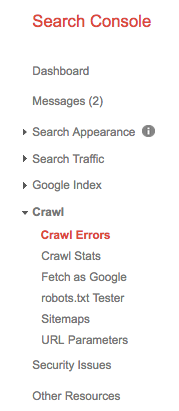
Select “Crawl” from the left-hand menu, and select “Crawl Errors”
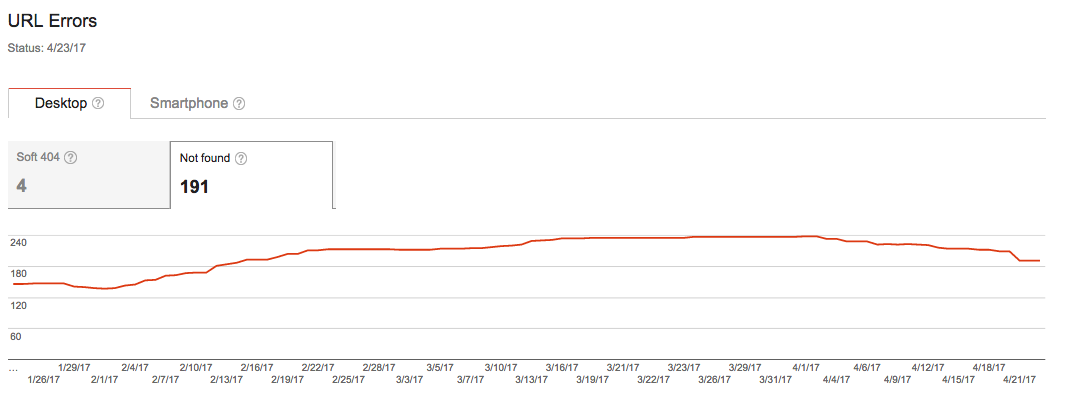
Select the “Not found” tab
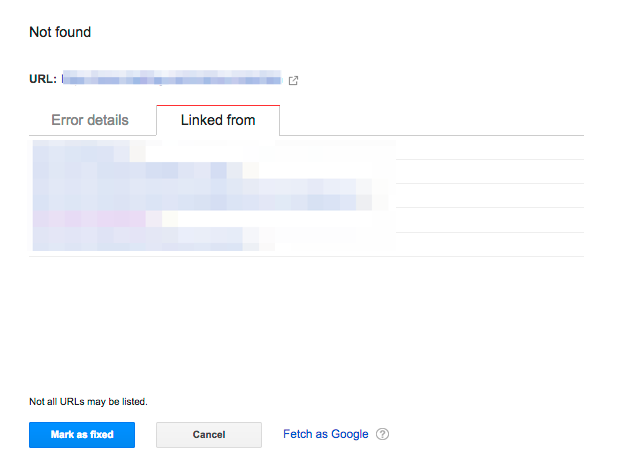
Click on one of the links in the found set, and then click on the “Linked from” tab
You now have a list of places on the site where the broken link appears. If the list of pages is massive, it could be that the broken link is part of a menu item or something site-wide.
Now, you need to seek out the place where the link exists and fix it, or remove the link.
Keep in mind that 404 errors on their own are not inherently detrimental to ranking on Google. At least that’s what Google tells us. The caveat to this is user experience. If you have a number of links from search results leading users to inaccessible pages on your website, Google will eventually stop displaying your results. The likelihood of users sticking around the website after they arrive at a 404 error is pretty low. So, the tendency is to “bounce” or “pogo-stick” back to the search result to find a better answer to our question. If enough of this activity is going on, it could be detrimental to your SEO.
The above exercise is a good way to do some spring cleaning on your website. Maybe you’ve been adding webpages over the past few years, changing links, taking pages down. Unless you’ve kept a very detailed record of all this activity, and maintained a process for fixing these things, you may have a bunch of dangling 404 errors haunting you.
Search Console is a good way to keep on top of this. There’s also a ton of other features it offers that most content marketers are unaware of. And the best thing is, it’s a free tool.
If you have questions about anything you’ve come across in Search Console or other SEO tools, let us know!
What if I told you that there is a social networking website that could potentially get you 20x the reach of Facebook, Instagram, or Twitter? It sounds too good to be true, right? Wrong! The website I’m talking about is called Reddit.
So what is Reddit?
By definition, Reddit is an “American social news aggregation, web content rating, and discussion website” where members can submit content such as text posts, photos, videos, or direct links into sub-categories of Reddit with specific themes and topics (these are called subreddits). The content posted to these subreddits by members is then voted up (up-votes) or down (down-votes) by other members, determining the position of the post. Posts with more up-votes stay at the top of the subreddit, while posts with less up-votes, or posts with lots of down-votes are pushed down towards the bottom of the subreddit. Essentially, just like any social networking and discussion website, posting high quality content will result in more shares, likes, comments, and maybe even conversions.
Numbers Don’t Lie
So far in 2017, Reddit has been bringing in approximately 542 million monthly visitors, 234 million of them being unique visitors, making it the 7th most visited website in America, and 22nd in the world. If that wasn’t enough, in 2015 Reddit reached 82.54 billion pageviews, 73.15 million submissions, and consisted of 853,824 subreddits.
Now that we know what Reddit is, and why it has such great potential from a marketer’s point of view, I am going to share with you my favourite tactics for leveraging Reddit for organic and paid advertising.
Paying For Targeted Ads
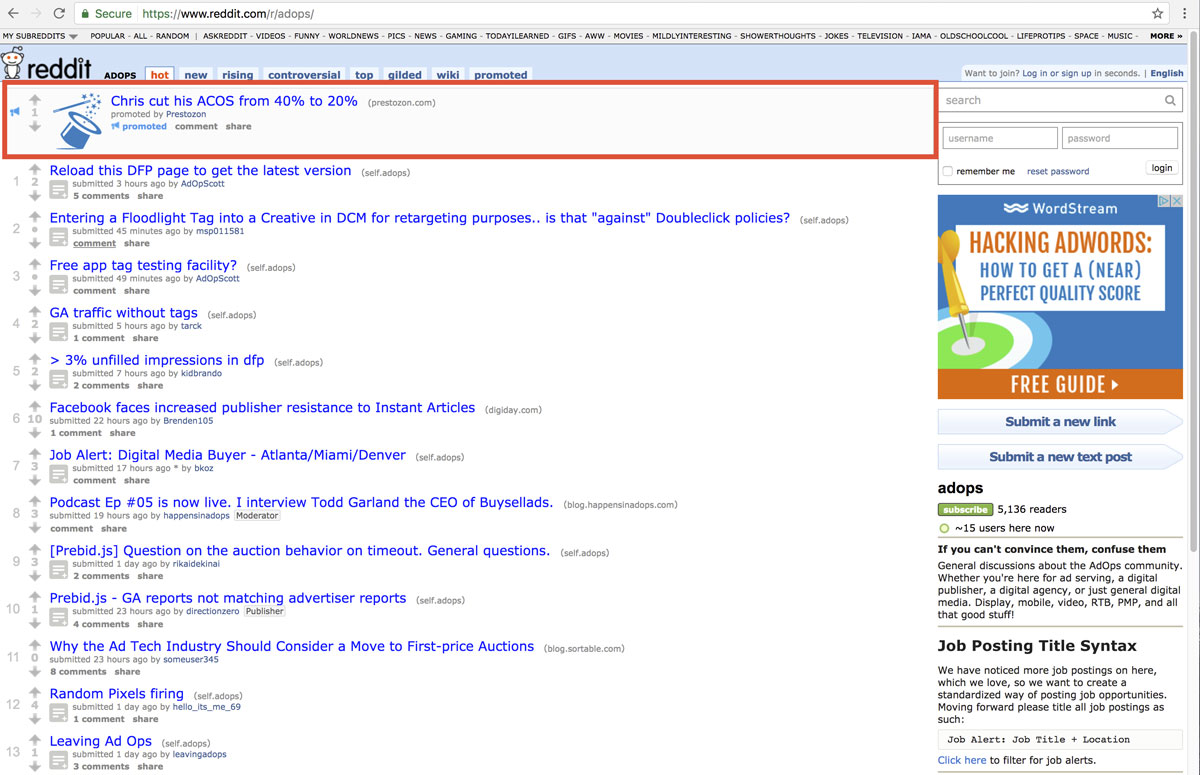
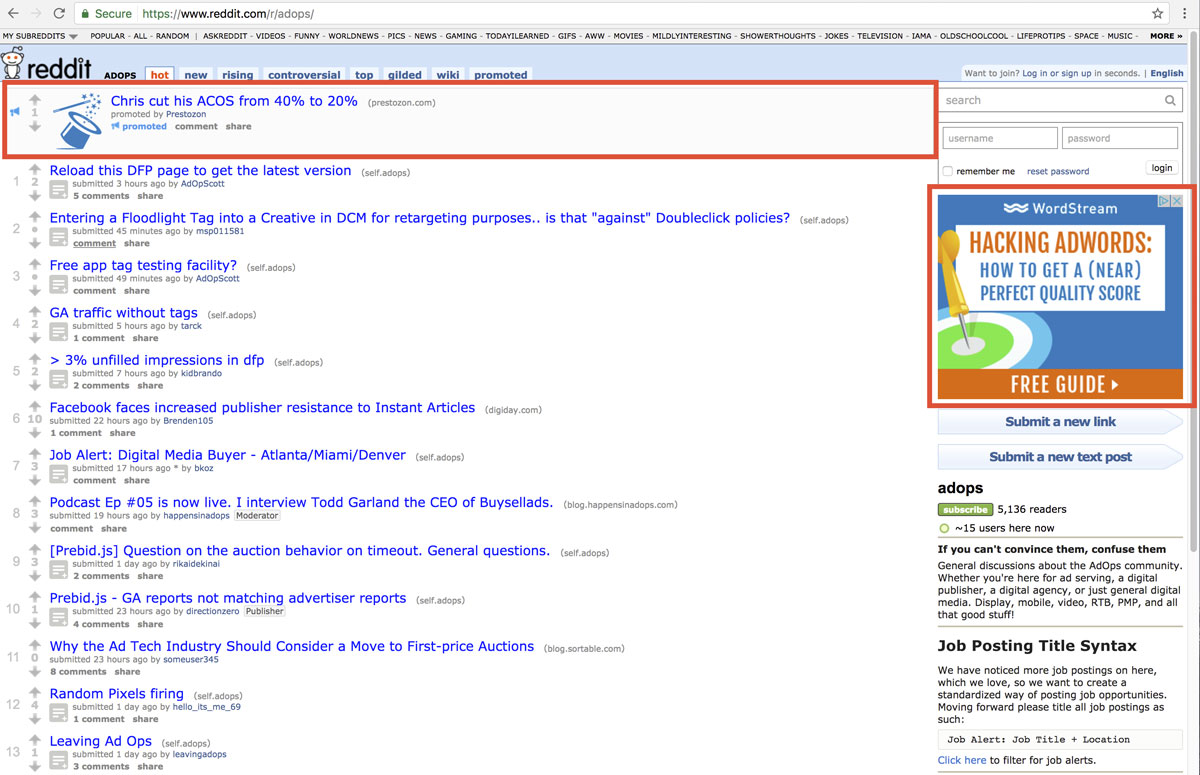
Although I don’t have actual experience with targeted ads on Reddit, I’ve seen them in action and I know they work. Reddit offers advertising options where you can actually advertise in specific subreddits, giving the advertiser an opportunity to target specific users with a super relevant ad. This is great because when a user sees a relevant ad in a relevant place, they are more likely to click through and convert. For example, when I was on the /r/adops/ subreddit earlier today, I found two paid ads that would be very relevant to the /r/adops/ community.
The first is a native looking ad at the top of the subreddit, disguising itself as a normal post:
The second ad, featured on the right side of the webpage is not a native ad. It is still however a high quality ad that is very relevant to just about anyone visiting the /r/adops/ subreddit:
How Much Does It Cost?
In order to advertise on Reddit, advertisers must be willing to spend a minimum of $5 per campaign, and a $0.75 charge per thousand pageviews. Currently, Reddit only offers CPM (cost per thousand impressions) as a cost model, and like Adwords, the CPM price you pay depends on a variety of factors, like targeting, bid, and competing ads. Reddit also allows advertisers to purchase up to 3 months prior to a campaign, so plan ahead!
Organic Marketing
Another form of advertising that I like on Reddit, and one that I have personal experience with, is organic marketing. One tactic that is arguably the easiest is to position yourself as a thought leader within the subreddit you are trying to advertise on. Let’s say that you are working for a landing page optimization company, and come across a user in the ad operations subreddit looking for information on landing page optimization. You could answer the user’s question and also provide a backlink to the company you work for. Doing this (well) would provide you with authority within the subreddit, which will benefit you should you decide to keep posting, and will drive traffic back to the website you have just linked to.
Organic marketing is trickier to pull off successfully than paid advertising, because like most people on social networking websites, people on Reddit hate ads, even more so when the ads are low quality, intrusive, aren’t relevant, or are ads disguised as regular posts. Failing to follow the rules, or “reddiquette”, you may find your content getting downvoted, and you getting banned. Having said that, there are a number of ways to organically market on Reddit without pissing off all of the people who could be potentially clicking on your ad.
Things To Avoid
As I mentioned above, Reddit users hate ads and being deceived into clicking on them. There are some things that every company should avoid doing, whether you’re marketing for Starbucks or a local coffee shop.
The big no-no is posting memes. Just don’t do it. If this is the only take away you have from this article, you’ll have still learned something valuable. It’s a risky move that few brands (if any) have managed to pull off without looking incredibly desperate.
One cringe-worthy example that demands a discussion is when Pilot posted a series of memes to various social networking sites in an effort to try to promote their new line of pens. The memes featured slogans like “The only pen that matters” and “I will not lose any of these” that make you want to put your head in your hands. Once they found their way to Reddit, users weren’t happy, and felt betrayed by the user who originally posted the memes, and maybe even by Reddit as a whole. One user even went on to say “Even if he’s [the poster] not paid by the company or an advertising agency, I don’t really want people who are just fans of some brand making accounts just to post about that product. What would Reddit be then?”
I’ve managed to track down a few of the original memes, and have attached my personal favourites. I truly hope you find them as horrible as I did.
In conclusion, marketing on Reddit is not easy or for the faint at heart. It’s a lively community that offers a huge potential for marketing. If you aren’t afraid of criticism, and are targeting certain niches – there’s really no better place to be. If done correctly, you could be on your way to tapping into a valuable goldmine of targeted traffic directly to your website, while increasing brand awareness at the same time.
With Google putting an emphasis on high quality content for users in the last few years, there’s been a big push to focus strictly on content marketing. Where the first optimizers started off by taking advantage of search engine algorithms through pure coding, nowadays, producing high quality content has been the primary goal.
And absolutely…content really is important. A website without high quality content is just an empty shell with no pearls. However, as search engine optimizers, it is essential that we don’t lose focus on the technical aspects either and that we also give this side of SEO the attention it deserves.
…which brings us to PageSpeed.
Speedy Content
Part of producing high quality content includes delivering it to users with lightning speed. No one likes clicking on a link only to wait for more than 5 to 10 seconds for the page to load in full. By then, they would probably have left your site: increasing your bounce rate, reducing time on site and affecting your overall user engagement. All these things can impact your keyword ranking.
There are many page speed test tools out there that can help ensure your website performs optimally in speed. Tools such as KeyCDN, pingdom and GTmetrix are great for really analyzing and optimizing your website. But for the purposes of this blog post, we’ll be taking a look at Google PageSpeed Insights.
There are various differences to how Google PageSpeed Insights work versus other page speed tools. For one, it doesn’t actually measure loading time. Rather Google PageSpeed analyzes several different components of your page and gives recommendation on how to improve its performance based on time to above-the-fold load and time to full page load.
As such, there is much debate within the SEO community on whether or not it’s even worth achieving a high PageSpeed score. Some trade offs may occur when trying to achieve a high score (i.e. certain techniques to decrease render time can actually decrease your PageSpeed score). We’ll save the usability and reliability of Google PageSpeed Insights for a later post as this topic requires a much more thorough discussion.
Having said that, Google has the largest market share in search engines. It’s still a good idea to consider these recommendations in conjunction with using other speed tools to compare loading/rending and server response time measurements.
Google PageSpeed Insights Rules
Google PageSpeed Insights is split into two rules: speed rules and usability rules. Since our focus is on speed, we’ll take a look at the speed rules exclusively. The speed rules include the following:
Avoid Landing Page Redirects
Enable Compression
Improve Server Response Time
Leverage Browser Caching
Minify Resources
Optimize Images
Optimize CSS Delivery
Prioritize Visible Content
Remove Render-Blocking JavaScript
Use Asynchronous Scripts
Some of these recommendations will require their own blog post as there are many factors to consider before implementing. For example, improving server response time requires a much more thorough thought process. So we’ll be highlighting the items that are fairly simple to complete.
1. Avoid Landing Page Redirects
Ensure your landing page is not a redirected page. Landing page redirects can hamper the user experience if its takes too much time redirecting to multiple pages. This is especially important for ads, links, and social links pointing to a specific landing page.
What to do:
The best and easiest thing to do in this case is to update all your ads, links and social links so that they are pointed to the correct landing page (i.e. their final destination).
Note: The following recommendations below assume you fully understand server software programming, HTML, JavaScript and CSS programming. If you aren’t too sure of these techniques described, give us a shout and we’ll help you out!
Most web servers in the world use Apache as their server software. There are others such as nginx and IIS. I personally have only had to deal with Apache servers so far and you are likely dealing with it too. (Tip: One way to check is to use Google Search Console’s Fetch as Google tool and look at the fetch details)
Assuming your server uses Apache, to enable gzip compression, you’ll need to use the Apache Module mod_deflate. Depending on the file types you want to compress, insert the following into your .htaccess file:
3. Remove Render Blocking JavaScript
Ensure there are no HTML references to external JavaScript files in the above-the-fold portion of your page. When your browser sees a script in the document, it pauses DOM construction and executes the script before proceeding. Therefore, your above-the-fold content can not be rendered without waiting for the JavaScript resources to load. In other words, avoid placing any JavaScript in the header as it may cause a delay in rendering your page.
What to do:
If the JavaScript resource is fairly small in code, you can inline the script contents into the HTML document. The drawback however is that you are now making the HTML document larger in size with extra JavaScript code.
You can apply asynchronous JavaScript to avoid parse blocking the DOM construction. To achieve this, mark your JavaScript with async
You can also avoid the JavaScript from running altogether until the DOM construction is complete by deferring the script. To achieve this, mark you JavaScript with defer.
Another way to defer, is to simply put your JavaScript in the footer of the HTML
4. Optimize CSS Delivery
In the same manner as removing render-blocking JavaScript, ensure there are no HTML references to external stylesheet files in the above-the-fold portion of your page. Similar to JavaScript, CSS are render-blocking resources. Therefore, your above-the-fold content cannot be rendered without waiting for the CSS resources to load.
Unlike JavaScript, defer and async do not work on CSS files.
What to do:
If the CSS resource is fairly small in code, you can inline the script contents into the HTML document. The drawback however is that you are now making the HTML document larger in size with extra JavaScript code.
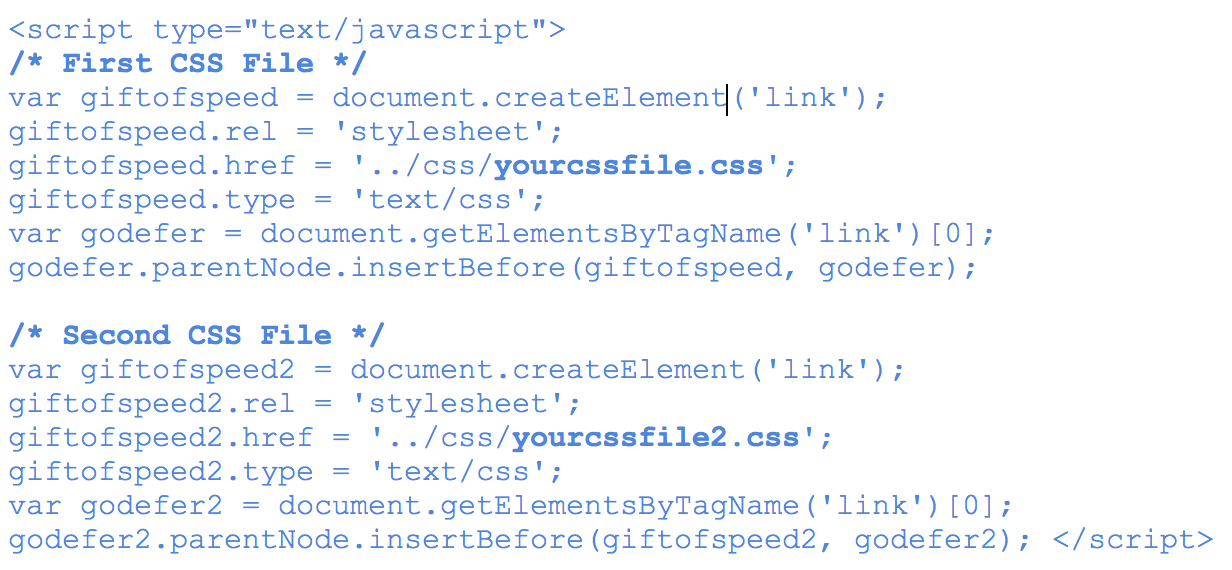
The one solution that’s worked for me so far is using JavaScript to defer CSS from loading. Courtesy of www.giftofspeed.com, insert the following code into your HTML footer (replace yourcssfile.css with your actual CSS file).
Place the following snippet within your HTML header. This ensures browsers that don’t support JavaScript can still load CSS files.
What Are You Waiting For? Get Started!
I’ll be saving the rest of the recommendations for a next blog, since they require a little more context and discussion. But these four recommendations are a good place to start optimizing for Google’s PageSpeed Score …assuming you have a good understanding of servers, HTML, CSS and JavaScript.
In the tests we’ve conducted, enabling compression alone increased our PageSpeed Score by 22 points for mobile and 24 for desktop – quite a big jump. Even with trying out these four recommendations, you could significantly increase your PageSpeed score right now.
As a last note, every website is different and there are little nuances that make your website unique, so its very important to test these recommendations first before implementing them right away. With that being said, try testing these recommendations and let us know how it worked out for you!
Thanks for reading! If you have any questions or comments, feel free to comment below! We’d love to hear your thoughts, feedback and/or grievances!
“I made a post on Facebook. Why don’t I have 1000 Likes?”
Have you ever walked into a room full of people and whispered your name, hoping for everyone to turn and flock to you? It seems that many business owners believe that, because their business is unique, it will auto-magically stand out in the crowded sea of social media ships. The timeline goes as such: they register their social media profiles, make a few posts, and sit back and wonder why no one is following, liking or otherwise engaging with them.
3 Key Misconceptions
There are three key misconceptions many businesses are making when they realize they should be leveraging social media to grow their business.
We’ll call the first misconception the “illusion of presence”.
There is a widely held misconception that being present on social media is enough. As this misconception goes, the assumption is that businesses get points just for showing up (on social media). Not to be platitudinous, but being successful as a business takes commitment and hard work; social media, like any digital marketing, also takes planning, creativity, and dedication. Showing up is not good enough.
The second misconception is that businesses often feel that when they do start to build an audience, they should talk only about themselves and how great they are.
Have you ever known someone like that? At first it’s fine, but after a while it becomes intolerable and alienating when they appear uninterested in what you like, want, feel, or care about. On social media, this manifests as businesses posting only about what they are doing, selling, or interested in without the understanding that social media, like walking into a crowed room, requires that they engage, talk, query, and generally appear interested in others. This two-way communication is the distinction between being social, rather than doing social (media).
The third misconception is the most pernicious. Some people believe that social media influencers are quietly guarding the secret social media button that once pushed causes likes and followers to fall from the sky. For most industries, the social media landscape is crowded. You are not a unique snowflake, until you can provide value to your audience. Moreover, and more importantly, these platforms (Facebook, Twitter, LinkedIn, Instagram) are advertising platforms. They are a means to reach greater numbers of people in a more cost effective manner than traditional advertising. Just because it is free to create an account does not mean it’s not pay-to-play for (most) businesses.
There is no magic button, no single recipe that defines success; there is no mysterious formula that social media influencers have cooked up and are unwilling to share. Doesn’t exist. Research, dedication, monitoring, planning, and experimentation are the answer.
These misconceptions are the albatross hanging around the neck of your social media success. But, you ask, how can I be successful on social?
Top three recommendations
1. Provide value
Give your audience something engaging, interesting, and relevant to them. How can you tell which types of content resonate with your audience? Check out your analytics and monitor the engagement (Likes, Comments, Shares) on your content to discern potential new content development opportunities.
2. Distinguish yourself from your competitors
Try video, be creative, and experiment. Have you ever tried Instagram Memories or Facebook Live? If not, maybe you should. They are a great way to generate live content and provide a look “behind-the-scenes”. If you are not sure what Memories or Facebook Live are or how to use them, we can help.
3. Increase your reach and presence using ads
Using Facebook, Instagram, or Twitter ads can accelerate your profile growth and visibility. They can draw users back to your website or lead them to your profile. They are highly customizable, trackable, and editable, on-the-fly.
Want to learn more about how social media can help your business grow? Let’s chat!
As part of the social media team here at Treefrog, conducting social media analyses when receiving a new client has become second nature to me. What’s a social media analysis, you ask? Well, truth be told, you’ve probably conducted a few yourself. That time you found the Instagram account of that cute Starbucks barista and spent a few more minutes than you’d like to admit scrolling down their feed, creeping their photos, and praying to the thumb gods for no accidental double-tap…you were kind-of conducting a social media analysis.
Social media competitive analyses are a great way to get information. Questions like, “What is this brand’s personality?”, “Who is their target audience?”, and “Is cute Barista Alex single?” can be answered through each post, each photo, and each comment.
After having done a number of these analyses, something very disturbing has become clear to me: many companies seem to think it’s okay to talk only about themselves on social. Post after post it’s “Hey, check out OUR website!”, or, “This is what WE sell! Buy it now!”, or, “Here’s OUR phone number to learn more about US!”
To put this into perspective, imagine stumbling on Cute Barista Alex’s Facebook page and finding the only thing Alex shares are selfies and statuses about what he’s currently doing. In your eyes, Alex might start looking a little self-absorbed and a lot less cute. In contrast, imagine finding Alex’s Facebook page and seeing he’s shared information about upcoming local volunteer opportunities, posted links for “Study Time” playlists for fellow students during exam week, and has commented on every “Happy Birthday!” post he received to say thank you and wish each person well. Suddenly your interest is further peaked; he’s into music, he’s involved in a great community, he has plenty of meaningful relationships in his life…and you already know your wedding photos are going to be SO Pinterest-worthy. Companies need to be the Alex we want to marry! They need to show us they care about more than just themselves. So if you’re a brand reading this and wondering how you can make sure your audience falls in love with you, this is what we tell all our clients during social media training: Follow the Rule of Thirds.
The Rule of Thirds states that the content you share on your company’s social channels should be evenly divided as such: 1/3 of it should be promotional, 1/3 should be valuable, and 1/3 should be engaging.
Promotional
This is the one that most companies already have a firm grasp on. This is the content that overtly pushes your goal, such as selling your newest product, or getting people to attend your upcoming event. This content is important because, first and foremost, you are a business and conversions are what keep you up and running. Sharing links to your website’s products and services page or e-flyers for in-store promotion helps your audience find out vital information they need to make a transaction (e.g. Where? How?).
Something to keep in mind is that this content, if done excessively, can come off as too pushy, too self-motivating, and too corporate (something consumers are turning their noses up at nowadays).
Valuable
This content will help balance out your promotional content and ensure your company doesn’t look too “Me, me, me!” That’s because this content revolves around your viewer and what’s important and meaningful to them, whether it’s a news article that they might be interested in, or links to exciting events in their city. A clever way to still tie this kind of content to your brand so it doesn’t seem random and out-of-place is to think about themes around your brand and share content with similar themes. For example, an auto shop in a suburban area populated with new families could share a magazine article about road trip tips for parents with young children.
Engaging
This content will also help to make sure your feed doesn’t come off as too promotional. Similar to valuable content, engaging content takes a step back from “Me, me, me!” and instead says, “We”. Through this type of content, you create an opportunity for two-way interaction between your viewer and your brand. A fashion brand might tweet, “Seems like suede pants are making a comeback. Is this a fashion YAY or NAY to you?”, inviting their followers to tweet back at them and participate in discussion on the topic. It’s a great way to show your audience that you care about what they have to say, solidify meaningful relationships, and gain loyal fans.
So, next time you’re trying to decide what to post on your company’s social media page, scroll down and see what type of content you could use some more of. Use the Rule of Thirds to even things out and make your audience swoon…we hear the cash registers dinging and the wedding bells ringing already.