
Digital Marketing

Illustration of interconnecting points
Digital Marketing, Web Design & Development

Why Your Business Should Always Renew Your Domain Name With a Reputable Company

A cautionary tale in domains

You wake up in the middle of the night with a fabulous new business idea. You now need a website! First things first, you look for a domain name. The domain name is an essential piece of your brand and may involve your keywords, your company’s name or is possibly is just memorable by the name itself.

As the months pass and your website is live, your business is running and you are now working 18-hour days running your business. The small little thing, like a domain name, is farthest from your mind now thinking of what’s it’s doing or how it’s working for you. Until it happens…the renewal!

Have you ever thought of what happens if you don’t renew you domain name?

If you own a domain (unless you have purchased it for 5 or 10 year increments) you will receive an annual renewal notice, they are typically sent out at 90 days, 60 days, and 30 days, depending on your registrar. The desire is that this will prompt you to renew with adequate notice. But should you miss the renew date it does expire and enters a grace period.

For 0 – 40 days, depending on the kind of domain name you have (.com, .ca, .uk etc.), past that expiry date your domain name sits waiting for you to change your mind. All in the hopes that it was possibly a mistake and you will pay the fee and return it to its former glory, housing your website!

During this grace period all services associated with your domain name stop working. That means, all of your email addresses associated with that domain name will no longer receive email, and your website on that domain name will be inaccessible.

After the grace period has come and gone the domain name finally does one of two things. It either enters a redemption period where you can still get your domain name back one more time (for an additional fee on top of the renewal), or it fully expires. Finally, it’s then publicly listed with other “to be released” domains and sold to the highest bidder. There are a lot of people out there reading those lists of domains in search of domains to purchase, but that’s a whole other subject for another time.

Can you imagine if your domain name was sold off to the highest bidder?

For an example, let’s take the current mayor of Toronto who owned robford.ca. This domain housed the website which was home of everything Rob Ford when he was city councillor before becoming mayor. He would update it with council votes, council expenses and the site held information for you to contact him. But since becoming mayor, someone along the way either forgot to renew it  (possibly wherever he was hosting the domain, or they never let him know?). Or possibly just deemed robford.ca not necessary anymore and let it completely, totally expire.

It sat for the 0 – 40 day grace period and was then released back into the pool and sold off to the highest bidder. Now Mr Mayor Rob Ford’s domain name is in the hands of someone else, who’s having it re-direct to the Toronto Star, or posting “Rob Ford (January 31, 1862 – June 8, 1892) was an American outlaw best known for killing his own gang leader Jesse James in 1882” and now taking suggestions on what to do next. Who knows the eventual fate now of robford.ca, but whatever happens now isn’t controlled by Rob Ford.

The Mayor Rob Ford now uses http://www.robfordformayor.ca and http://www.toronto.ca/mayor_ford, but to let a domain he was using for years lapse is a costly move for him, and would be a costly move for any business.

If your business is online, then you have a domain name! It’s connected to your website and possibly your email. It’s how you tell prospective clients and current clients where you are, how they get in contact with you and is part of your brand. Your business is important and your domain is the most important piece to that online identity.

Ensure your domain name is renewed yearly or better yet purchase it for 10-years, show stability to the search engines and put your mind at ease.

One of the best practices at Treefrog is that we renew every domain in our account for our clients and each domain is checked over by trained staff who know the value of keeping that domain. Even if you do finally choose to let your domain go, we follow up with you personally to ensure this is what you want. So make sure your domains are with a reputable company and are renewed so, unlike Rob Ford, you will control your  domain for many years to come.

Decorative illustration of "#Hashtag"
Digital Marketing

Instagram Hashtags 101

Is your brand on Instagram? Your answer should be a big ‘Yes!’ Otherwise, you’re missing out on the chance to potentially reach up to 700 million monthly users!

Instagram is a photo-sharing mobile platform that allows users to share photos and videos, individually or as a set. Getting ahead on Instagram involves following some common best-practices which include posting high-quality visual content, making a list of accounts to @mention and tag that relate to your content, and creating the perfect schedule to post.

However, one aspect of Instagram that arguably isn’t being used to its full potential is hashtags.

Instagram hashtags are one of the best ways to grow your account. Did you know that posts with at least one hashtag average 12.6% more engagement than posts without any hashtags.

PetaPixel words it best: “Think of hashtags as a pipeline to the rest of the world.”

Using the right combination of hashtags in the captions of your Instagram posts (and Instagram Stories) can help you expose your brand to large and targeted audiences. In fact, your chances of attracting new followers, gaining more likes, and increasing engagement are massively improved by the use of hashtags! However, if you’re not choosing your hashtags strategically, your posts will not get in front of the right people.

How Instagram Hashtags Work

Every Instagram post can be accompanied by a caption and up to 30 hashtags. These hashtags help categorize photos and videos, which supports the process of content discovery and optimization.

For example, Luxy Hair, a hair extensions brand, posts images of intricate hairstyles with hashtags like #hairideas, #hairgoals, #hairtutorial, etc.

Due to these hashtags, any user searching for hashtags about #hairideas, #hairgoals, or any of the other hashtags used, may come across this post.

Branded Vs. Community Hashtags

There are two types of hashtags that are commonly used in conjunction with regular content-related hashtags: Branded Hashtags and Community Hashtags.

Having a general understanding of the different types of hashtags (and their corresponding audiences) can help you develop a more effective Instagram strategy.

Branded Hashtags

Branded hashtags are unique to a brand or campaign. It could be as simple as your company’s name, tagline, or the name of one of your products or campaign. These hashtags can also communicate your brand identity or lifestyle messaging.

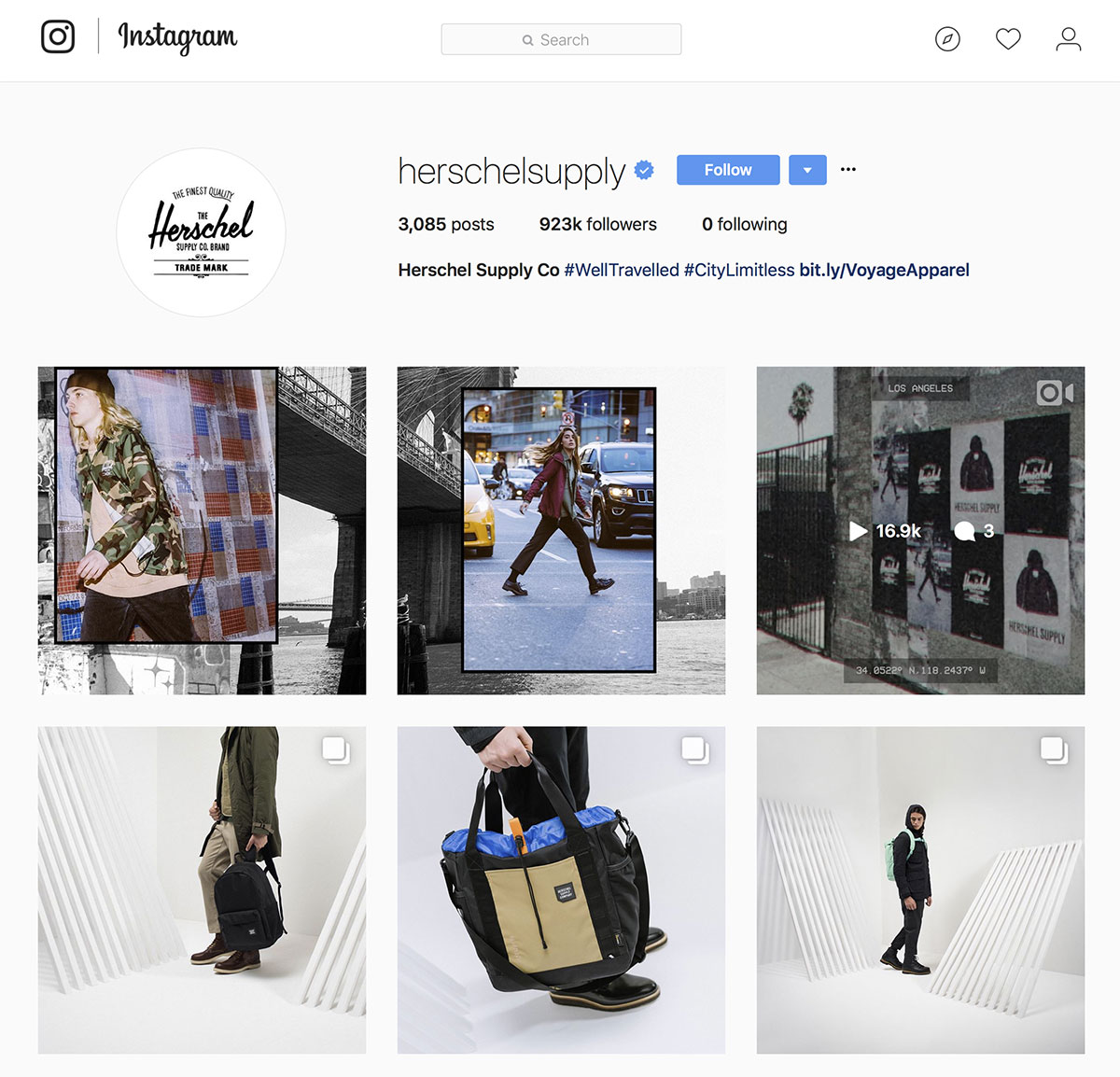
For example, Herschel Supply Co. uses a few branded hashtags, including #HerschelSupply, #WellTravelled and #CityLimitless. The hashtag #WellTravelled was created for a campaign to encourage customers to share travel photos featuring Herschel products. Now tagged in more than 2.57 million posts, it is often cited as one of the most popular travel hashtags on Instagram.

Like Herschel, you can create a branded hashtag for a specific campaign, contest, or to simply showcase your company’s culture, products, or services.

If you’re running an Instagram campaign or contest, having a brand hashtag will help drive participation and engagement. It will also organize all the posts that are tagged with it on a hashtag page. This is helpful if you’re using the hashtag to collect entries for a promotion or contest submissions, or looking for content to ‘re-post’ onto your brand’s account.

Use branded hashtags to get your most loyal followers and customers to engage, and to improve your overall online brand awareness.

Community Hashtags

Community hashtags connect like-minded users around a specific topic. These hashtags are more general and don’t necessarily have anything to do with your company or brand.

Some examples include #instafood or #dogsofinstagram. These hashtags are widely used and aren’t specific to any one person or brand.

For example, the photo above from @white_coffee_cat_ uses multiple community hashtags including #catsofinstagram, #catstagram and #weeklyfluff.

The benefit of community hashtags is that people actively search for these common word sets, so, if your brand’s photos and videos show up in the search results, you’ll get instant exposure to a new audience.

However, you need to make sure the community hashtags are relevant to the content you’re posting. If @white_coffee_cat had used hashtags like #instafood or #ootd in the photo, it wouldn’t have made sense.

The best way to figure out which community-oriented hashtags are right for your brand is by researching which hashtags your audience or competitors are already using.

How to Find The Best Hashtags For Your Account

If you are not being strategic with which hashtags you are using, your posts will not get in front of the right people. The first step to figuring out which hashtags are best for your brand is to put yourself into the shoes of your ideal audience.

For example, if you are a real estate agent serving the city of Hamilton, you ideally want to target potential homebuyers looking to move into a house in the Hamilton area. Logically, some keywords that the target group may search for include #HamiltonHomes and #HamiltonLiving. It is then important to further develop this list and to investigate what else the target market may be interested in.

Next, create a list or home buying hashtags that are directly relevant to your company, brand, and include the location that you serve. For example, if your company is called ‘Hamilton House Hunters’, one of your hashtags could be #HamiltonHouseHunter.

As a real estate agent, the obvious industry hashtag is #RealEstate, but you can narrow it down further to the specific location that you are serving: #HamiltonRealEstate. Some other hashtags could include #RentalProperties, #Hamilton, #GTAHomes, and #HouseHunter.

Finally, make a list of the hashtags that your top competitors and ideal audiences are using. This involves some research, but it is well worth it if it means you’ll be attracting potential clients to your business.

Once you have your list of hashtags, do a search of each hashtag on your list to ensure that the content that pops up is relevant to your brand, is appropriate, and has a good amount of users using the hashtag.

Additional Tips

  • Instagram currently limits the number of hashtags you can use per post to 30. Many users avoid using more than 5-10 hashtags simply because it looks like spam. One way to avoid the unprofessional, ‘spammy’ look of using many hashtags is to post your main brand hashtags in your main caption, and the rest of the hashtags as a comment. This will ensure that your post still falls under each of your hashtags, but avoids viewers from seeing all the hashtags at first glance.
  • Keep your main hashtags typed out in a note on your phone, which you can easily copy and paste into your Instagram posts without having to re-type them each time. This will save you a ton of time!
  • Make sure you update your hashtags every 3-6 months! Hashtag trends are always changing, and some may become blocked by Instagram due to inappropriate content.

Using the tips and strategies you’ve learned here, you’ll be well on your way to growing your audience on Instagram.

Want to learn more about how your business can leverage the benefits of Instagram and other social media platforms? Give us a call at 905.836.4442 and let our social media specialists strategize your next Instagram campaign!

An open sketch book on a table with social media related illustrations.
Digital Marketing

Why Social Media Works

Many business owners enter the world of social media marketing believing that it will immediately take their business from zero to 100 in just a few clicks. However, this expectation isn’t realistic. Social media marketing takes time, effort, and a well-developed strategy. Enough momentum also needs to be kick-started and maintained to start seeing a notable increase in ROI.

So, if you’re wondering if you should be leveraging social media marketing for your business, the short answer is ‘yes’. No matter what industry your business is a part of; here are five reasons why social media will work for you:

1. Sophisticated Targeting

The biggest advantage to social media marketing is the ability to target your ideal audience – much more accurately when compared to traditional marketing tactics.

Through Facebook Ad Campaigns, you can target individuals based on age, gender, location, household income, interests, education, workplaces, languages, relationship status, parenting status, and so much more! Sophisticated targeting has proven to be an incredibly valuable tool for getting your ads in front of the right people. Almost 90% of marketers say their social marketing efforts have increased exposure for their business, and over 50% of marketers who have been implementing social media marketing tactics for two years have reported improved sales.

2. Real-Time Feedback

Social media marketing allows businesses to receive feedback on their products and services in real-time.

When you put out a new product or service, you can immediately start tracking how well it’s doing based on how many people are talking about it, what is being said, and what comments and concerns people are leaving. This provides a great foundation for businesses to decide what changes or improvements to make.

In addition, real-time feedback provides great insight into ad campaigns. In traditional marketing, once you put out an ad in a newspaper, there is no way for you to stop the ad from running or to make any changes. However, with social media marketing, you can pause or completely stop the ad campaign if you notice that it is not doing as well as you hoped. You can then make changes to the ad or create a new ad campaign. Being able to edit your posts will save you a ton of money and will ensure that your marketing dollars are being spent wisely.

3. Build Relationships with Customers

Social media has the power to transform big companies into organizations of everyday people through humanization.

Through social media, you are able to share the ‘real’ side of your company, from photos and videos of company events or employee milestones, to simply having a conversation with a customer in the comment section of a Facebook post. Not only will this make your brand more relatable, it will also improve customer loyalty.

Loyal customers who feel valued, listened to, and appreciated are typically more willing to share what they love about your company online. Loyal customers are also more likely to try out new products or services (when you release them) and leave a positive review – which will help to build your brand awareness.

4. Brand Awareness

Brand awareness refers to the extent of which customers are able to recognize a brand – which is central to purchasing decision-making.

Creating brand awareness is one of the key steps in promoting a product, and social media gives your business the perfect opportunity to show off your brand to the right people. Through sophisticated targeting and real-time feedback, you’ll get an idea of what type of content works best for your target audience. By building brand awareness using this knowledge, you are also able to increase brand loyalty and build better relationships with your customers.

5. Know Your Competitors

If you analyze the social media efforts of other businesses, you’ll find insights to improve your own social media marketing.

Chances are, your competitors are on social media. This is your opportunity to directly see what types of content they are posting and what’s working and not working for them. You can search the interests of people who like your competitors Facebook pages, analyze their twitter audiences, monitor keywords, identify industry influencers that your competitors are taking advantage of, and discover the best hashtags to use with your posts.

Are you ready to use social media to your advantage?

Request a free quote or give us a call at 905.836.4442 today!

Man's hand circling several floating icons with a red marker
Digital Marketing

It’s Time To Get On Board With Facebook Advertising

With 40% of users actively deciding what to buy based on what they have seen on social media platforms, Social Pay-Per-Click (S-PPC) advertising is now more important than ever!

Get a Free Social Pay-Per-Click Quote

Ever researched something on Google and then, while using Facebook or Instagram, you suddenly see advertisements for the exact thing you had been searching for prior?

Ahhhh… the power of social media advertising. It seems to just follow you everywhere, doesn’t it?

Facebook and Google are the two key players in marketing and advertising today, and as Social Media Manger Laurie Baker puts it, “Anyone that’s doing PPC, should also be doing SPPC”.

Social Pay-Per-Click Facts

  • Facebook advertising grew by 50% between 2015-2016.
  • Facebook has more than 3 million active advertisers and over 50 million business pages.
  • Social network ad spending is expected to reach $36 billion in 2017.
  • Social advertising represents 16% of total digital ad spending worldwide.

“40% of users are actively deciding what to buy based on what they have seen on social media platforms, including reviews and recommendations, and this is only set to grow”.Stuart Kerr

It may seem overwhelming to wrap your mind around how this new wave of advertising is designed and implemented, but in the ever-changing landscape of social media and SEO, it’s time to get on board with social advertising.

What is SPPC?

PPC stands for pay-per-click, an advertising model in which marketers use the Internet to get the word out about a service or product. What’s different about PPC advertising is that marketers must pay a fee each time one of their ads is clicked on by a potential online customer. In other words, you’re paying for successful leads.

S-PPC stands for social pay-per-click; pay-per-click with a focus on placing ads through social media platforms like Facebook and Instagram. The ‘S’ is for social – get it?

To break down the reasons why it’s time for your business to start investigating options for Facebook and social advertising, we sat down with our very own Social Media Anthropologist, Dr. Laurie Baker, to get the full SPPC scoop.

What We Learned About Social Pay-Per-Click Advertising

Leveraging The Personal

Facebook is unlike any other advertising platform in that the advertising you produce leverages your friends and personal Facebook connections for dissemination and visibility. Facebook also uniquely receives different types of queries than Google.

For example, someone on Facebook is more like to search specific products they’ve heard about and then engage with the company by liking or following them – an action that cannot be performed on a basic website.

These actions generate a following and help to build your social brand awareness as your connections can “share”, “like”, and help to promote your brand to their own friends.

Social Proofing Is On The Rise

More than ever before, having a lively social profile is extremely important when securing a lead. No longer do consumers just Google a company to find their website or location. Consumers now also want to check out brands on Facebook, Instagram, and Twitter – to see if their own interests and values align with a product they’re interested in. If potential customers like what they see, they’re more like to make a purchase, follow your accounts, and interact with you across multiple social platforms.

Online Marketing Is Editable

Unlike print advertising, online marketing is editable on-the-fly. Should you place a Facebook ad online and not receive the results you were hoping for, you can simply alter the message and re-visit your strategy, or just turn it off. Designed with business success in mind, SPPC marketing allows for seasonality, flexibility, adaptability, and peace of mind (that you can fix your message or adjust your budget) – just in case!

Advanced Target Marketing

Social advertising surpasses all other forms of advertising in its advanced targeting capabilities. For example, Facebook allows marketers to target their ads to extreme specifics in the following categories:

  • Gender
  • Marital Status
  • Age
  • Political Leanings (specific regions)
  • Location
  • Occupation
  • Income (specific regions)
  • Interests
  • Upcoming Celebrations

An example of how specific you can really get with Social Media Advertising:

Newly married parents, between the ages of 30-35, who have a newborn child, both work in IT, make a combined salary of $120,000, live on Davis Drive, like French bulldogs, shop at Walmart, and have a relative or friend with an upcoming birthday.

Crazy, huh?

Advanced targeting is also cost effective, as these ads don’t just show up on Facebook; they can be seen on various apps (such as Instagram), and on websites!

Consult The Social Advertising Experts

Lost? Our specialized Treefrog Social Media team has strategized and executed countless successful social media ad campaigns for businesses just like yours. By completing a full competitive analysis and identifying what other key players in your industry are doing, our team can design an SPPC strategy that can take your online social presence to the next level.

Ready to get started with Social Pay-Per-Click Advertising? Request a free quote or give us a call at 905.836.4442 today!

Woman pointing a camera at the viewer
Branding & Design, Digital Marketing

8 Tips for Improving Your Photos

Improve your Photos!

In today’s digital world, everyone’s head seems buried in their devices, scrolling through Facebook and double tapping on Instagram. Naturally, you would then expect that your content would get in front of many eyes and be liked and shared by your followers. Unfortunately, this doesn’t happen often. People end up scrolling right past your content without a second glance. In fact, the average attention span is now only around 8 seconds! So how do you get someone to stop and pay attention to your posts? Eye-catching visual content.

With today’s technology, you can take impressive photos without spending a fortune on fancy equipment. Whether you have a high-end full-frame DSLR, a standard point-and-shoot, or a smartphone, these tips will help you get more creative with your photography and create visual content that speaks to your viewers:

1. Try New Angles/Perspectives

The average person takes a photo by standing directly in front of their subject and by taking the photo from eye-level. Now, there is nothing necessarily wrong with taking a picture this way, but it’s become extremely commonplace – there’s nothing unique or interesting about this angle unless the subject itself is interesting or unique.

The next time you pick up your camera, force yourself to shoot from a different angle. Get low to the ground and aim your camera upwards, or stand above your subject and aim your camera down. Shoot from the side, shoot from below, or find interesting perspectives upside down! Giving your viewers a new perspective will immediately draw some interest.

TIP: When shooting children or animals, get down to their eye-level rather than shooting from above. This can create a sense of intimacy in the picture – making the image feel more personal.

2. Follow the Light

The word ‘photography’ literally means ‘drawing with light’! Lighting makes a huge difference in the quality of your images, especially if you’re shooting with a smartphone. Before you raise your camera, look around you and notice where the light is coming from, as well as what type of light it is. If you’re shooting outdoors, acknowledge the position of the sun and the direction of the shadows that it casts. Shooting against the sun can create amazing sun flares and a warm, soft glow on your subject. Shooting in the direction of sunlight can create a bold look with harsh contrasts. You can position your subject so that the light only hits one side, or you can look for trees and buildings that create interesting shadows. If you’re working with artificial light, try positioning the lights in different places and see what kind of effect it gives you. The possibilities are endless!

3. Colours

Colours are often associated with different emotions: oranges are warm and inviting, while greens and blues tend to be calm. You can play around with different colours to get the mood that you are looking for in your image. You can also add that extra ‘pop’ to your pictures by looking for contrasting colours such as a green leaf against a red brick wall, or a white sail boat on blue waters. You can choose to look for strong, bold colours, subtle, pastel colours, or you can avoid colour all together and shoot monochrome images in black and white or sepia. Each of these options has its own way of bringing out different elements of an image. It’s up to you to decide what you think portrays your picture, and your message, in the best way. If you need some inspiration, take a look at the works of Ernst Haas, a master of colour photography.

4. Leading Lines

A great way to improve your photo composition is with leading lines. Lines create a path for the eye to follow along your picture and can have different effects depending on their orientation and direction. Horizontal lines invoke a sense of restfulness and peace, whereas vertical lines create a sense of power, and diagonal lines suggest movement.

Before you shoot, take a moment to look at the scene in front of you and identify if there are any prominent lines that your eyes are naturally drawn to, such as roads, fences, buildings, rivers, or rows of trees. Once you identify your strongest lines, think about how you can use it to your advantage. You can create depth by positioning a strong line that leads from the foreground to the background, or you can place your subject at a point where several lines converge, giving your subject more importance in the frame and causing the viewer’s eyes to be naturally drawn there.

Leading lines can be used to tell a story, to place emphasis, or to draw a connection between two objects. Use them creatively!

5. Patterns

The world is filled with patterns, but many of them are overlooked in our day-to-day lives. And while patterns may seem boring, capturing them in a picture can create an image with real impact.

Look for repeating patterns or interesting textures when you are composing your next image. Patterns can be found everywhere – in nature and man-made constructions. You can use a pattern as the focal point of your picture, or you can use it as a backdrop. A great way to add interest to a picture is to break a pattern, such as a row of blue flowers with one red flower. This pop of inconsistent colour will immediately draw eyes to the object that doesn’t belong and this method can be quite impactful if used creatively.

6. Rule of Thirds

The Rule of Thirds is a composition technique that helps you to position your subject in the best spot when taking a picture. When you are taking your picture, imagine the frame as being split up into a grid of four lines as shown below.

The points where the lines intersect identify the four important points of your frame. According to the rule of thirds, you will want to position your main subject at one of these points so that the image becomes more balanced and easier for the eye to roll over naturally. Studies have shown that your eyes tend to naturally go towards one of the four points when looking at an image, rather than the centre.

 7. Show Depth

A picture that shows a sense of depth is much more interesting and engages the viewer, inviting them to explore the scene rather than just to observe.

There are a number of different ways that you can add depth to your shots. You can add foreground interest by adding an object closer to the camera and a secondary object farther away. You can also use foreground objects to create a natural frame around your main subject. Photographing with a wider angle also creates a sense of depth by naturally exaggerating the perspective of a scene.

Another great way of showing depth is by layering objects in the frame. By overlapping objects, you help the viewer reconstruct the 3-D view in their mind, allowing them to mentally be ‘in’ the scene, rather than just seeing a photo of it.

8. Negative Space

Negative space is the ‘emptiness’ that surrounds the subject of interest, and making use of this space is a great way to add more emphasis on a subject and to evoke different moods. Negative space can provide context, it can create a sense of lightness or airiness, or it can emphasize the emotions of your subject.

Negative space is also important if you are planning on adding text to your image before posting it. You should always have a general idea of what you want your final post to look like before taking the image. Prepare ahead of time and be sure to leave enough space around your subject for texts and other graphic elements.

A couple takes a selfie in front of mountains
Digital Marketing

Dear Snapchat, You’re Losing Influencers

Dear Snapchat,

You’re losing influencers.

Fostering long-lasting relationships is an important aspect of any brand or business’ long-term success. This is especially true for mobile apps, which rely on consumers to keep using their product.

When it comes to social media, many brands and businesses have turned to leveraging ‘influencers’ for their marketing, rather than traditional ads. They’ve also turned to social media platforms such as YouTube and Instagram to reward their top influencers with special features and assistance to further their careers. These popular platforms thoroughly understand that interesting individuals with large followings and content creation skills can attract more consumers and keep them on the network longer.

Unfortunately, the same cannot be said for Snapchat.

When Instagram released their stories feature, the social media realm was filled with memes and articles ridiculing the fact that the platform had copied Snapchat. Yet, according to TechCrunch, Snapchat Story views dipped by 15-40% after Instagram Stories launched.

To add to the fire, Snapchat did nothing to foster relationships with their influencers. In fact, many influencers expressed feeling like they had received a cold shoulder when attempting to reach out. Instagram on the other hand, invited influencers in with open arms and enthusiastically helped them out with whatever they needed.

Snapchat’s disregard of influencers may stem from a business decision that aims to maintain control over advertising by having companies pay them directly, rather than paying influencers. Unfortunately, this technique may not be doing Snapchat a favour. It’s no surprise that influencers began moving their audiences to other platforms like YouTube and Instagram. And where influencers go, brands may follow.

In fact, MediaKix, an influencer agency, tracked Snapchat’s top 12 influencers (all of whom have close to 100 million followers), for 30 days, to see how often they posted on various platforms. The agency found that the top Snapchat influencers posted 25% more on Instagram Stories than on Snapchat, an intriguing result.

So why are influencers leaving Snapchat?

  1. An influencer’s primary goal is to grow their audience. This requires them to be able to be found. Unfortunately, Snapchat’s search function makes it much harder to find and follow someone when compared with Instagram.
  2. Another advantage that Instagram has over Snapchat is the ability to share links, use searchable hashtags, and tag people in their stories. The ability to link viewers to their YouTube channel, website, or store is a MUST for influencers!
  3. With more than 700 million monthly active Instagram users, the potential reach on Instagram is much higher than on Snapchat, which only has around 300 million monthly active users. Snapchat also lacks the robust analytics features that Instagram and other networks offer, which has proved to be an incredibly useful tool for influencer marketing.

So, the question is:

Will we see Snapchat wither away like Vine?

Or will we see them make a comeback in the tech world with new and exciting products?

Only time will tell.

Using a mobile phone to take a photo of a forest
Digital Marketing

5 Tips for Instagram Success

Instagram. Odds are you’re using it, your kids are using it, and heck – maybe even your mother is using it. With over 500 million active monthly users, Instagram has grown out of humble beginnings into one of the most popular mobile apps of all time.

According to Forbes, an average of 95 million photos and videos are shared on Instagram per day, and there are now 8 million business profiles and 1 million advertisers leveraging the social platform. These numbers sound impressive, but if you’re a new brand just starting out on Instagram, it might also be a bit intimidating.

Providing your audience with quality content is just the tip of the social media iceberg. Other questions you need to be asking yourself are: How will you stand out and get noticed? And how will you attract new clients to engage with you?

To help you get started on your Instagram journey, check out Treefrog’s five tips for improving your Instagram presence and building a loyal following:

1. Post Regularly

For optimal results, you need to keep your account active. No matter how great your content is, if you are not actively posting on a regular schedule, your followers are likely to lose interest. Try posting at least 2-3 times a week, and no more than 1-2 times a day. Consistency is key.

2. Mentions & Tags

According to a study performed by SproutSocial, Instagram posts with @mentions in their captions earned 56% more engagement. In addition to mentions, you can also tag other users in your photos. However, you should not mention or tag accounts that are completely unrelated to your posts. This action is considered spam and can get you blocked.

3. Hashtags

So, you’ve made a list of accounts to @mention and tag that relate to your content, and you’ve created the perfect schedule to post. Great! But how do you get your content seen by new people? Hashtags. 

PetaPixel words it best: “Think of hashtags as a pipeline to the rest of the world.”

When choosing which hashtags to use in your post, ensure that they relate directly to your content and what you do. Put yourself into the shoes of the people you want to reach and think about what they would most likely search to arrive at your content. Instagram allows you to add a maximum of 30 hashtags per post – chose strategically.

4. Engage

Interact with your followers and the people you are following through comments and likes. If someone leaves a comment on your post, reply to it. Even if it’s just a short thank you or an emoji, your response shows that person that you are paying attention to their comments. Also, keep in mind that people love getting comments. So leave messages on other people’s posts and make them genuine. Find something interesting to say that relates to their post rather than the generic “nice photo” or a thumbs up emoji. Not only will they appreciate your comment, but they might also click through to take a look at your profile, and if they like what they see, you might get a new follower!

5. Instagram Stories

Instagram Stories is a feature that allows you to publish a photo or video that lasts for only 24 hours. It’s a great feature for businesses and brands because it allows you to get personal with your followers. You can use Instagram Stories to make short vlogs, live Q&As, promo videos, behind-the-scenes footage, process footage, show off your office/team/workplace, or simply take a selfie to say ‘hi.’ Your options are endless, and the best part is that it’s gone in 24 hours. So take risks and be creative!

Want to learn more about how your business can leverage the benefits of Instagram and other social media platforms? Give us a call at 905.836.4442 and let our social media specialists strategize your next Instagram campaign.

Two people working and pointing at a laptop.
Digital Marketing

4 Email Marketing Faux Pas

Email marketing is one of the most effective tools when it comes to keeping in direct contact with your customers, business partners, and suppliers. Moreover, professionally crafted and informative emails can generate new and repeat business from happy readers.

Your business can use email broadcasts to share company-related news, provide loyal customers with special offers, inform your audience of new educational or thought-provoking content, and ultimately, drive traffic to your website and increase revenue.

However, there are four major email marketing faux pas that many businesses are unknowingly committing each time they send out their broadcast:

Sending Without Strategy

When it comes to email marketing, creating a pre-launch strategy is essential. In addition to design, knowing your demographic, and creating a targeted email list, it’s also important to investigate all of the factors that make a strategy succeed:

  1. Know the best time to send your email. By understanding your ideal client, you’ll begin to identify the times in which they’re more likely to see, open, and have a moment in their day to read your email. Based on user behaviour, some data collecting systems will even make send-time suggestions for you.
  2. Know the goal and intent of your email. What are you trying to achieve? Leads? Awareness? Sponsorship? Craft an email with that goal consistently in mind.
  3. Be sure to offer plenty of opportunities for people to subscribe to your email list. Add multiple sign-up forms on your website, promote a sign-up sheet at your front desk, and also offer an easy way for people to unsubscribe – if they determine the information isn’t of interest to them after all. The reality is, not everyone will be motivated to interact with your brand, and by allowing people to unsubscribe, you are increasing the quality of the addresses on your targeted email list.
  4. Ensure you’re providing email content that has value to your subscribers. This information could take shape as a helpful blog post (that links back and drives traffic to your site) or you could provide promotional discount codes (encouraging sales). What do your readers want most out of their electronic relationship with you?
  5. Ensure you have a straightforward call to action that invites your readers to take the next step should they be interested in learning more about your offerings. CTA’s allow the reader to connect with you (while it’s fresh in their mind) and can provide you with a potential sales lead.

Lazy Subject Lines

A creative subject line can be the difference between your email being opened/read and being sent straight to the trash box. Think about it – what types of emails are you more likely to open? For the most part, friendly subject lines are much more effective than pushy sales pitches as readers don’t typically respond to anything that feels intense or threatening.

It’s important to also think about the vibe your brand wants to articulate and the ideal audience you want to reach. Is your business of a serious nature? Can you incorporate some humour into your message? What demographic is receiving your emails? What interests your subscribers? Consider these types of questions to ensure your subject line is speaking to the right kind of audience.

Poor Design

A common misconception is that email marketing is too technical and too difficult. Because of this, many companies choose to send out simpler, less organized, and less visually appealing emails. However, email marketing, when done right, can pay off, and therefore requires more attention and a deeper strategy.

High-quality images, a healthy use of brand colour, and template consistency can go a long way. When images are pixelated, or too small, and text is not formatted correctly, your email is more likely to get deleted. Why? Because unprofessional emails can come across as “spam,” even if they aren’t.

The same goes for emails that are too busy and chaotic – they scare your subscribers away! We know you want to catch your reader’s attention, but flashing GIFs and too many calls to action can be overwhelming (and annoying). Professionalism and consistency is key.

Sending Without Permission

Canada’s anti-spam legislation (CASL) has made it mandatory to have permission to send electronic messages to your list of recipients unless you have an existing business relationship with them. The CASL legislation, which came into effect on July 1st, 2014, aims to protect Canadians from spam, electronic threats, and to instill confidence in digital technology.

As a Canadian business that utilizes email marketing, it is your responsibility to ensure your broadcasts are only sent to individuals who have agreed to receive them. Should your email list include those who have not verified consent, it is wise to remove them in preparation for stricter laws and potential lawsuits.

Update: While July 1, 2017, had been scheduled to mark the day Canadian citizens would gain the legal right to sue organizations that committed CASL violations, the Canadian Government, as of June 7th, 2017, has suspended this action, pending review.

“Canadians deserve to be protected from spam and other electronic threats so that they can have confidence in digital technology. At the same time, businesses, charities and other non-profit groups should have reasonable ways to communicate electronically with Canadians. We have listened to the concerns of stakeholders and are committed to striking the right balance.”
– The Honourable Navdeep Bains, Minister of Innovation, Science and Economic Development

Sending an email without intent is never a good idea. By going through the checklist above, and ensuring you have a strategic view of your audience and the mission of your email, your business has a much better shot at securing new subscribers and new business through email marketing.

Have more questions about how to execute a top-notch email marketing campaign? Call Treefrog Inc. today at 905.836.4442.

Pen drawing a digital line
Digital Marketing

How To Create An “images_sitemap.xml” File

Part One: What They Are, The Benefits, and Building with Screaming Frog

When having a conversation about XML sitemaps (it’s more exciting than you think), it’s pretty common to think about a style-less page within a website containing all relevant links on it so that search engine robots can more intelligently “crawl” the site, making it easier for them to include you in SERPs. This is an integral part to search engine optimization, as sitemaps serve as a way to communicate directly with search engines, notifying them of new or changed website content to ensure that it is indexed correctly, and timely.

So we know the benefits of having an XML sitemap for web pages, but what about images? Another important part of SEO is optimizing images with appropriate alt text and file names, so shouldn’t we make sure that the same robots that are crawling our website and helping show up in search engines are doing the same for our images in image search engines (ex. Google Images)?

Well, that’s where image XML sitemaps come into play.

What Is an XML Image Sitemap?

Much (exactly) like sitemaps for web pages, sitemaps for images are style-less web pages that live on a site with several links listed on it. However, instead of showing information like a URL, the last modification date, the crawl frequency and priority like on traditional sitemaps, image sitemaps can communicate to robots:

  • The type of image
  • The subject matter
  • Image alt text
  • An image title
  • A geographic location
  • Etc.

Images can be added to an existing sitemap, or you can create a specific sitemap for the images on your site – the choice is entirely up to you. Personally, I prefer to go with the latter because there is an abundance of free third-party software that you can easily use to generate several kinds of sitemaps.

The Benefits of an Image XML Sitemap

Image sitemaps are incredibly useful if you want your images to show up in Google Image search results, and you do want this. Google receives hundreds of millions of image-related search queries every day. Now, if you own a plumbing, construction, or a kind of business where lots of images might not be found on your website, this fact might not mean a lot to you. If on the other hand, you own an e-commerce or other business where images are a key part of your website, I probably just caught your attention.

E-commerce companies are known for having websites that are especially image-rich. If this sounds like you and the images on your website are a) not optimized for organic search and/or b) not included in an XML image sitemap, there is a very good chance that you’re missing out on valuable traffic that you deserve. Not good!

If images make up a large portion of your website, either from product galleries or other resources, I strongly recommend incorporating an image XML sitemap.

Creating An Image XML Sitemap

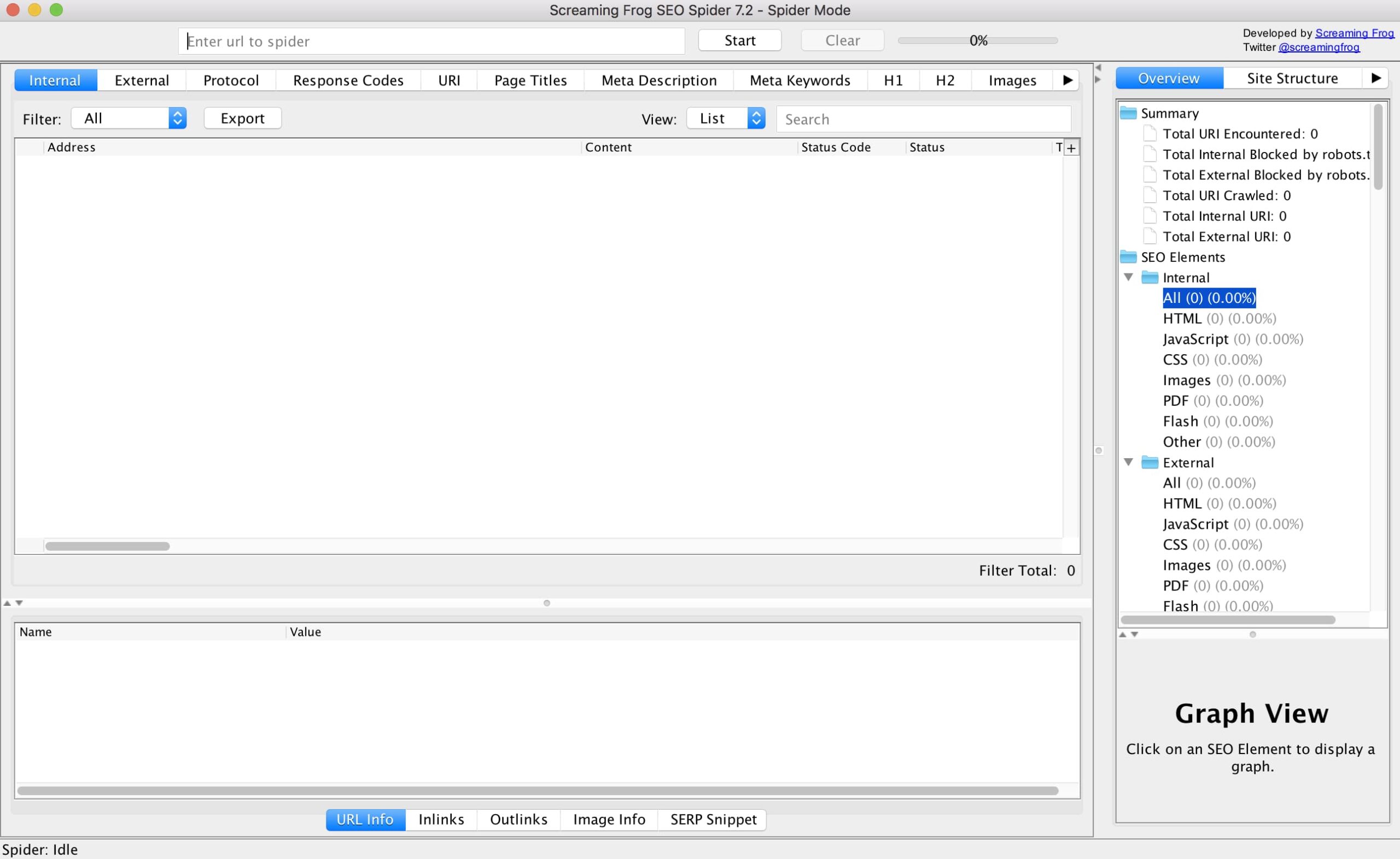
Here at Treefrog, we use Screaming Frog SEO Spider, a tool provided by Screaming Frog that collects website data and identifies technical issues that could be detrimental to your SEO efforts. To follow along, I recommend you download a free copy of Screaming Frog SEO Spider.

Step One: Getting Comfortable with Screaming Frog

At first glance, the Screaming Frog SEO Spider dashboard can be somewhat intimidating, but not to worry because creating XML sitemaps doesn’t take more than a few clicks of the mouse.

Start getting familiar with the software by doing some exploring. Look at the various aspects of a website that Screaming Frog SEO Spider has access to.

Once you feel comfortable, copy and paste the full URL of the website you would like to crawl into the search bar at the top of the dashboard. As an example, I’ll crawl our company website. Click the “start” button to begin crawling.

Step Two: Creating The Sitemap File

Depending on the size of the website you are trying to crawl, this may take a matter of seconds or minutes. It’s worth mentioning that the free version of Screaming Frog SEO Spider has a 500 URL crawl limit.

Once Screaming Frog SEO Spider has finished crawling the website, make your way to the top menu and look for “Sitemaps”. Hover over it, and then select “create images sitemap”.

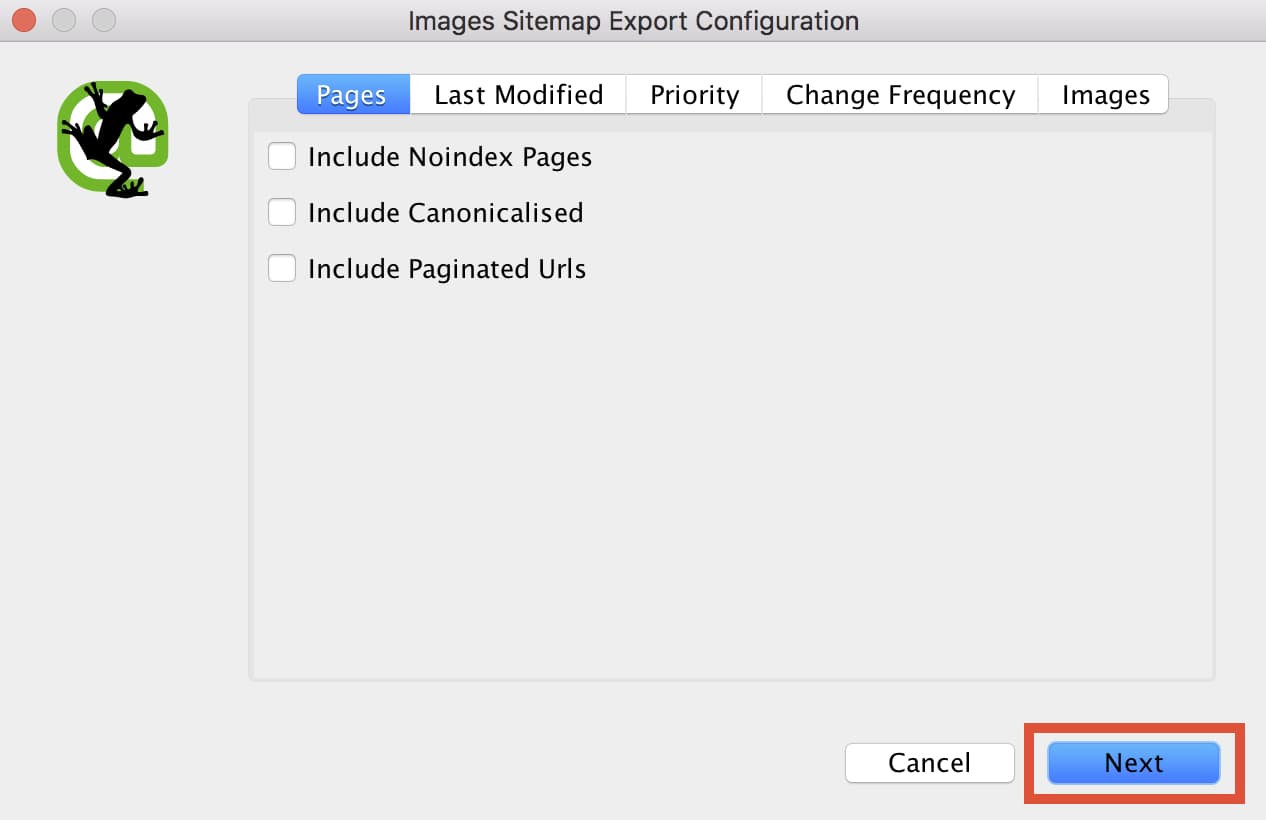
Next, a series of windows labeled “Images Sitemap Export Configuration” will appear. This is to help you set up the sitemap. You will be able to control what pages get included, the priority of the pages, and finally what images to include on the sitemap.XML file. As a default, only internal HTML pages with “200” status codes will be included in the sitemap file. Typically I leave these settings alone, but it’s always good to double check. Once you are happy with the settings, click “next” to generate the sitemap file (Seriously, it’s that easy).

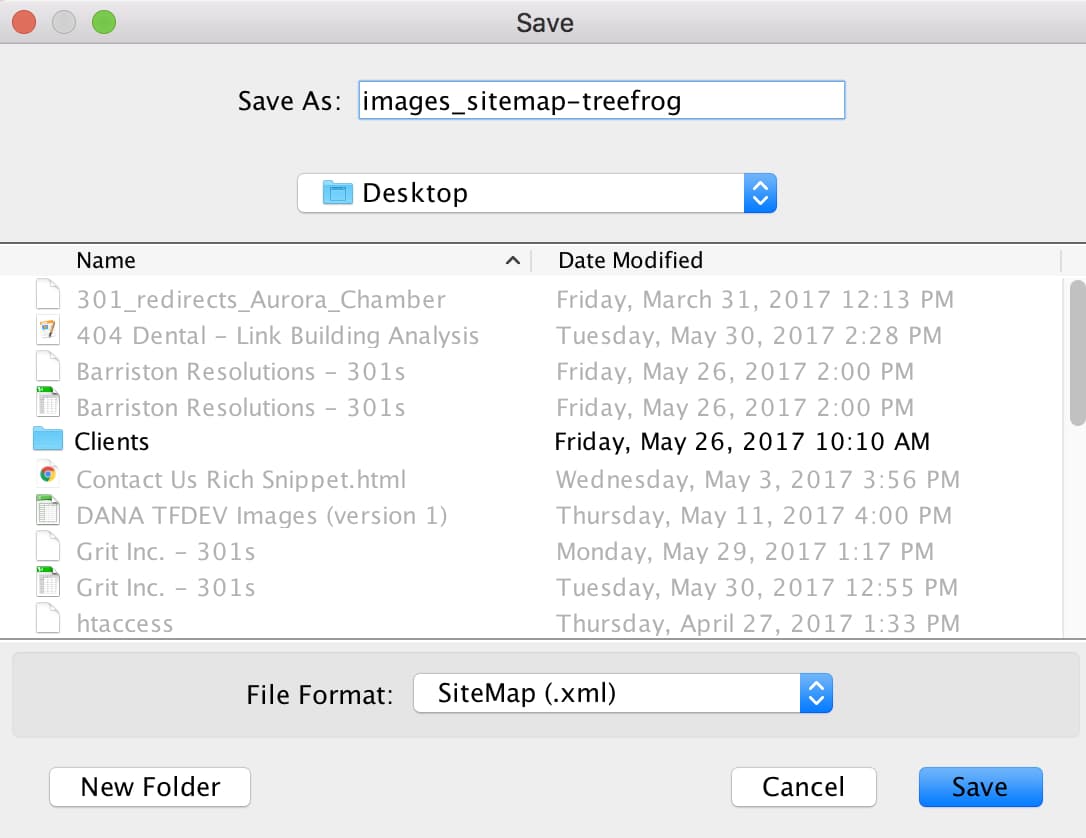
Rename your file to “images_sitemap-(client name).xml and simply save it to your desktop.

… And you’re done! You have just successfully created an images_sitemap.xml file that you can easily upload to your server to get noticed by search engines. In my next post, I’ll go over how to upload your sitemap.xml file to your server using FileZilla, and how to submit it to Google Search Console for proper indexing. If you have any questions about image XML sitemaps or SEO in general, feel free to contact the SEO Team!

A hand holds a credit card, while the other types on a laptop keyboard
Digital Marketing, Web Design & Development

Now’s The Time To Spruce Up Your Ecommerce

Is your online business holiday ready? Now’s the perfect time to spruce up your ecommerce site before the pre-holiday shopping season sneaks up on you!

You may be shaking your head and saying “Are you crazy! It’s only June!”

But trust us. Fixing, updating, and crafting content takes time, and any company using ecommerce to sell products over the holidays needs to start addressing their site’s pain points now.

“But how do you identify pain points?”

We’re glad you asked!

Common pain points for ecommerce sites can range from too little content to too much content, to terrible photo quality, and beyond. So, to help you to identify all the things needing to be addressed within the framework of your ecommerce site, we’ve developed the following checklist of questions that need answering.

Are you using the right platform for your brand?

As the popularity of ecommerce continues to rise, it can be overwhelming to choose which platform will work best to sell your products. That’s why we at Treefrog meet with our clients to understand their goals, the product(s) they’re selling, and then suggest the platform we know will best match their specific needs.

Should a client want to change their online store from one platform to another, we can help with that too!

Have you lost track of the last time you updated your online store?

In competitive markets, it’s essential to refresh and revitalize your retail offerings, especially as the seasons change. Forgetting to update your site could cause you to oversell products (without having enough stock), or cause fans of your brand to get bored, seeing the ‘same old’ each time they come to your site looking for something new.

At Treefrog Inc., we offer training sessions that teach you how to enter your ecommerce site and edit your material quickly and easily. This knowledge allows you to remove products you no longer sell and add new ones that you’d like to feature. We can also provide guidance on what to write in your descriptions, how to position your content messaging, and how to leverage social media to create brand awareness!

Is your content helpful and clear?

Strong and descriptive content can be the push an interested customer needs to follow through with their purchase. Without helpful details about sizes, or materials, or product quality, potential customers may feel they don’t have enough information to commit to their order, especially when having to pay for shipping.

How can we help? Our content marketing team uses their expertise to conduct content audits on websites that need improving. By analyzing each page of your site, including every image and description, we develop a detailed document that provides suggestions for growth, editing, and expansion. Should a client then hire us to work on developing their content, we’ll collaborate with them to apply the suggestions we made, update content that needs to be refreshed, and improve the message they’re articulating.

Are your pictures professional?

If your pictures are outdated and blurry, odds are your user experience is being tainted. The modern customer values professionalism, and to stay competitive, your images need to not only sell your products but also needs to communicate the value of your brand.

Our department of graphic designers and photographers can help. With professional equipment and a key eye for lighting, balance, and detail, our team ensures the images our clients use are consistent and brand appropriate.

Have you thought about SEO?

While the above items are important steps in ensuring your website is ready for the holiday rush, they’re irrelevant unless people are able to find your site! This is where our SEO team comes in.

Our team of Search Engine Optimization Specialists make sure that navigation links are accessible, that webpages have unique titles, URLs, and meta descriptions, that page headings are appropriate (in terms of keyword searching), and more. Each of these additions naturally increases success by enhancing site visibility to new and existing customers online. So, while we know it’s hard to start thinking about the holidays already, we can promise you’ll thank us for giving you this little push to start working on improving and updating your site now. Getting a head start will reduce your holiday stress and will undoubtedly help you to secure more sales from happily returning customers.

Once your site is polished to perfection, it will be time to think about how you want to promote it, via social media, email marketing, and other viable channels.

For more information on how our team can help ensure that your ecommerce site is holiday ready, give us a call today at 905.836.4442!

Scroll to Top