
Author name: Treefrog Editorial Team

Insights from the senior strategists at Treefrog Inc., a full-service marketing agency founded in 1989 in Newmarket, Ontario. We write about marketing strategy, pipeline, revenue operations and AI for growing companies.

Top down view of designers brainstorming a brand around a wooden table
Brand Strategy

4 Signs You Need A Brand Overhaul

Great brands resonate with customers through the strategic execution of look and feel, reputation management, and by telling a great story. And while some brands like Pepsi and Instagram can take things to the next level by making small adjustments to their brand, other companies may require a full brand overhaul to revitalize their presence.

How do they do it?

They hire professionals who can help to identify when their brand identity is becoming stagnant and mature their logo, website, packaging, and messaging – seamlessly and according to trends identified in the marketplace.

How do you know when it’s time to contact the professionals?

1. You’re Making Too Many Excuses

Are you at the point where you’re making up excuses for updating your branding? You know, saying things like, “We’ve just been too busy,” “It’s not that bad,” and, “Maybe next year”?

If this sounds like you, it’s time to take the necessary steps towards a brand overhaul. Think about it, if you, (a person who is biased towards your brand) is noticing that you’re falling behind, imagine what your potential customers and clients are thinking.

We know your brand may have sentimental value, but it’s important that over time, it still appeals to your audience. Revitalize your business by contacting a digital marketing agency that can begin to strategize and action your creative and innovative comeback.

2. You’re In Need Of Reputation Management

If your business is looking for ways to overcome a series of bad reviews or some sort of scandal; a brand overhaul and reputation management may be able to save your company from losing momentum. Re-branding is the perfect way to articulate that improvement and change are being made to rectify the concerns of your customers.

Creative re-branding is also helpful in distracting customers from the ‘bad’ and getting people excited about the ‘good’ that’s to come as you turn a new leaf. Take fast food giant McDonald’s for example:

When American filmmaker Morgan Spurlock released his documentary Supersize Me, McDonald’s, unsurprisingly, panicked. While customers knew that McDonald’s wasn’t necessarily healthy, the negative press and shocking results of the documentary turned into a massive scandal for the brand.

To minimize the hit, McDonald’s quickly went to the drawing board to try to change the way people were thinking about their food. Since then, McDonald’s has re-designed their restaurants, ordering experience, and promotes sophisticated McCafe coffee and smoothies, Happy Meal apple slices, salads, snack wraps, Angus burgers, and shows no signs of slowing down – a brand overhaul well done.

3. Your Business Is Growing Rapidly

Start-ups typically launch with one service or product, but as they develop a following and identify consumer interests and needs, they are likely to expand their offerings – potentially changing their target market and brand messaging. Therefore, when growth develops outside of the scope of an original business plan, a brand overhaul may be necessary – to target and appeal to a wider audience.

In the beginning days of a start-up, it’s also not uncommon to try to save money by building your own basic website, designing your own print materials, and crafting your own logo. However, as your business begins to grow, you may want to consider consulting print, web, design, and content professionals who can mature the logo and promotional materials you started with, making them more sophisticated, versatile, and professional.

4. Your Brand Is Losing Interest & Customers

Over time, audience preferences change, and it’s your responsibility to keep up. This is especially true for brands that have been around for decades and must launch new campaigns to remain fresh and relevant with changing trends and target markets. Take men’s deodorant brand Old Spice for example:

Before launching their 2010 campaign featuring athlete Isaiah Mustafa, Old Spice had become stagnant, dated, and boring. However, through their successful commercial campaign, Old Spice rebranded with humour, connected with a younger demographic, and became a key creative player in the marketplace. They even went viral with ‘The Man Your Man Could Smell Like’.

Other successful re-brands include Keds partnership with Taylor Swift, Burberry’s innovative use of technology and personalization, and The Bay’s shift back to their original name, ‘Hudson’s Bay’.

How Treefrog Can Help

Need professional guidance on how to execute your brand overhaul or logo maturation? That’s our specialty. Our Treefrog team of content marketers, social media gurus, kick ass designers, and programmers, can help to deliver a brand refresh that will keep your business moving forward.

Contact us today at 905.836.4442 to learn more.

Colour swatches
Marketing Strategy

Trade Show Booth: Get Results!

From concept to print and everything in between

Trade shows are an engaging opportunity to build your brand, meet with new prospects and strengthen your relationships with established clients. Often it is not taken into consideration the amount of time it takes to complete the process of conceptualizing, designing and printing of trade shows booths.

Because most industry trade shows are just that: a gathering of the industry, it is important to consider the competition and how to distinguish your business from them in such close quarters. Trade shows can play an extremely pivotal role in your business’ networking if you are able to make the right connections.

Remember it is imperative to think about your target audience and ask yourself if you are effectively communicating with them.

  • How can you best reach your target market?
  • What is the desired action of your target market?
  • How is your presence at the trade show going to affect your target market?
  • Does your booth coordinate with your branding & other marketing efforts?

A compelling, custom booth is a sure-fire way to stand out on the floor and increase foot traffic at a crowded trade show.

In order to achieve this goal, it all has to start weeks earlier in the planning stage. Better yet, let’s say plan months earlier, or as early as you can. This way you will be able to handle any unexpected hiccups or hurdles that are all too common on projects like this.

It all begins with a deadline. When is the booth needed? From there you begin communication with a printer to determine their requirements. Accordingly your design or marketing team work backwards from this date, if left too late and they only have a week, you are likely to be limited in our options. However if you have planned appropriately, there are a variety of innovative alternatives to explore, and you are able to create the right message and invest wisely.

Put simply; people are attracted to booths that look good. Investing some time and money into an appealing design will serve you well when you arrive at the show. You need to communicate visually to any potential visitors what your brand stands for and the message you are expressing. This result is not created plainly with a slogan printed on a 7-foot piece of vinyl but communicated through engaging colour, composition and typography in tandem with a solid marketing message.

There is a multitude of options and booth alternatives to explore and consider, including:

  • iPad stands
  • Video/TV displays
  • Presentation equipment
  • Furniture

How will visitors interact with you and the space?

This interaction is another important component to consider, as you want to make an impression not only immediately in person, but also when everybody returns home from the trade show and has time to reflect on the many choices they have to digest.

To ensure a lasting impact you may want to examine something tangible to send back with all of your new connections, such as:

  • Takeaway pieces
  • Business cards
  • Brochures
  • Giveaways

Even once you have your artwork finalized, the project is not complete.

It is then time to return to the printer in order to turn these digital files to a functioning exhibit. But this too, is not an overnight process. Just how long does it take to get a booth printed? This information varies from printer to printer, as well as depending on the time of the year. However, you could be looking at anywhere from one week to four weeks depending on the size and complexity of the booth as well as shipping times. Remember if you are looking to get a booth printed, it is likely that many other businesses in your industry are as well. You wouldn’t want to miss out on an effective booth because the printer couldn’t find the time to complete your job!

When time and finances are budgeted appropriately, an appearance at a trade show can often be a momentous networking opportunity, and exhibit a great return on your investment.

Need a hand determining a strategy for success at your upcoming trade show?

Treefrog is in the business of helping your business in situations just like this. Contact us today; we’re here to help!

Two people working and pointing at a laptop.
Marketing Strategy

4 Email Marketing Faux Pas

Email marketing is one of the most effective tools when it comes to keeping in direct contact with your customers, business partners, and suppliers. Moreover, professionally crafted and informative emails can generate new and repeat business from happy readers.

Your business can use email broadcasts to share company-related news, provide loyal customers with special offers, inform your audience of new educational or thought-provoking content, and ultimately, drive traffic to your website and increase revenue.

However, there are four major email marketing faux pas that many businesses are unknowingly committing each time they send out their broadcast:

Sending Without Strategy

When it comes to email marketing, creating a pre-launch strategy is essential. In addition to design, knowing your demographic, and creating a targeted email list, it’s also important to investigate all of the factors that make a strategy succeed:

  1. Know the best time to send your email. By understanding your ideal client, you’ll begin to identify the times in which they’re more likely to see, open, and have a moment in their day to read your email. Based on user behaviour, some data collecting systems will even make send-time suggestions for you.
  2. Know the goal and intent of your email. What are you trying to achieve? Leads? Awareness? Sponsorship? Craft an email with that goal consistently in mind.
  3. Be sure to offer plenty of opportunities for people to subscribe to your email list. Add multiple sign-up forms on your website, promote a sign-up sheet at your front desk, and also offer an easy way for people to unsubscribe – if they determine the information isn’t of interest to them after all. The reality is, not everyone will be motivated to interact with your brand, and by allowing people to unsubscribe, you are increasing the quality of the addresses on your targeted email list.
  4. Ensure you’re providing email content that has value to your subscribers. This information could take shape as a helpful blog post (that links back and drives traffic to your site) or you could provide promotional discount codes (encouraging sales). What do your readers want most out of their electronic relationship with you?
  5. Ensure you have a straightforward call to action that invites your readers to take the next step should they be interested in learning more about your offerings. CTA’s allow the reader to connect with you (while it’s fresh in their mind) and can provide you with a potential sales lead.

Lazy Subject Lines

A creative subject line can be the difference between your email being opened/read and being sent straight to the trash box. Think about it – what types of emails are you more likely to open? For the most part, friendly subject lines are much more effective than pushy sales pitches as readers don’t typically respond to anything that feels intense or threatening.

It’s important to also think about the vibe your brand wants to articulate and the ideal audience you want to reach. Is your business of a serious nature? Can you incorporate some humour into your message? What demographic is receiving your emails? What interests your subscribers? Consider these types of questions to ensure your subject line is speaking to the right kind of audience.

Poor Design

A common misconception is that email marketing is too technical and too difficult. Because of this, many companies choose to send out simpler, less organized, and less visually appealing emails. However, email marketing, when done right, can pay off, and therefore requires more attention and a deeper strategy.

High-quality images, a healthy use of brand colour, and template consistency can go a long way. When images are pixelated, or too small, and text is not formatted correctly, your email is more likely to get deleted. Why? Because unprofessional emails can come across as “spam,” even if they aren’t.

The same goes for emails that are too busy and chaotic – they scare your subscribers away! We know you want to catch your reader’s attention, but flashing GIFs and too many calls to action can be overwhelming (and annoying). Professionalism and consistency is key.

Sending Without Permission

Canada’s anti-spam legislation (CASL) has made it mandatory to have permission to send electronic messages to your list of recipients unless you have an existing business relationship with them. The CASL legislation, which came into effect on July 1st, 2014, aims to protect Canadians from spam, electronic threats, and to instill confidence in digital technology.

As a Canadian business that utilizes email marketing, it is your responsibility to ensure your broadcasts are only sent to individuals who have agreed to receive them. Should your email list include those who have not verified consent, it is wise to remove them in preparation for stricter laws and potential lawsuits.

Update: While July 1, 2017, had been scheduled to mark the day Canadian citizens would gain the legal right to sue organizations that committed CASL violations, the Canadian Government, as of June 7th, 2017, has suspended this action, pending review.

“Canadians deserve to be protected from spam and other electronic threats so that they can have confidence in digital technology. At the same time, businesses, charities and other non-profit groups should have reasonable ways to communicate electronically with Canadians. We have listened to the concerns of stakeholders and are committed to striking the right balance.”
– The Honourable Navdeep Bains, Minister of Innovation, Science and Economic Development

Sending an email without intent is never a good idea. By going through the checklist above, and ensuring you have a strategic view of your audience and the mission of your email, your business has a much better shot at securing new subscribers and new business through email marketing.

Have more questions about how to execute a top-notch email marketing campaign? Call Treefrog Inc. today at 905.836.4442.

Pen drawing a digital line
Marketing Strategy

How To Create An “images_sitemap.xml” File

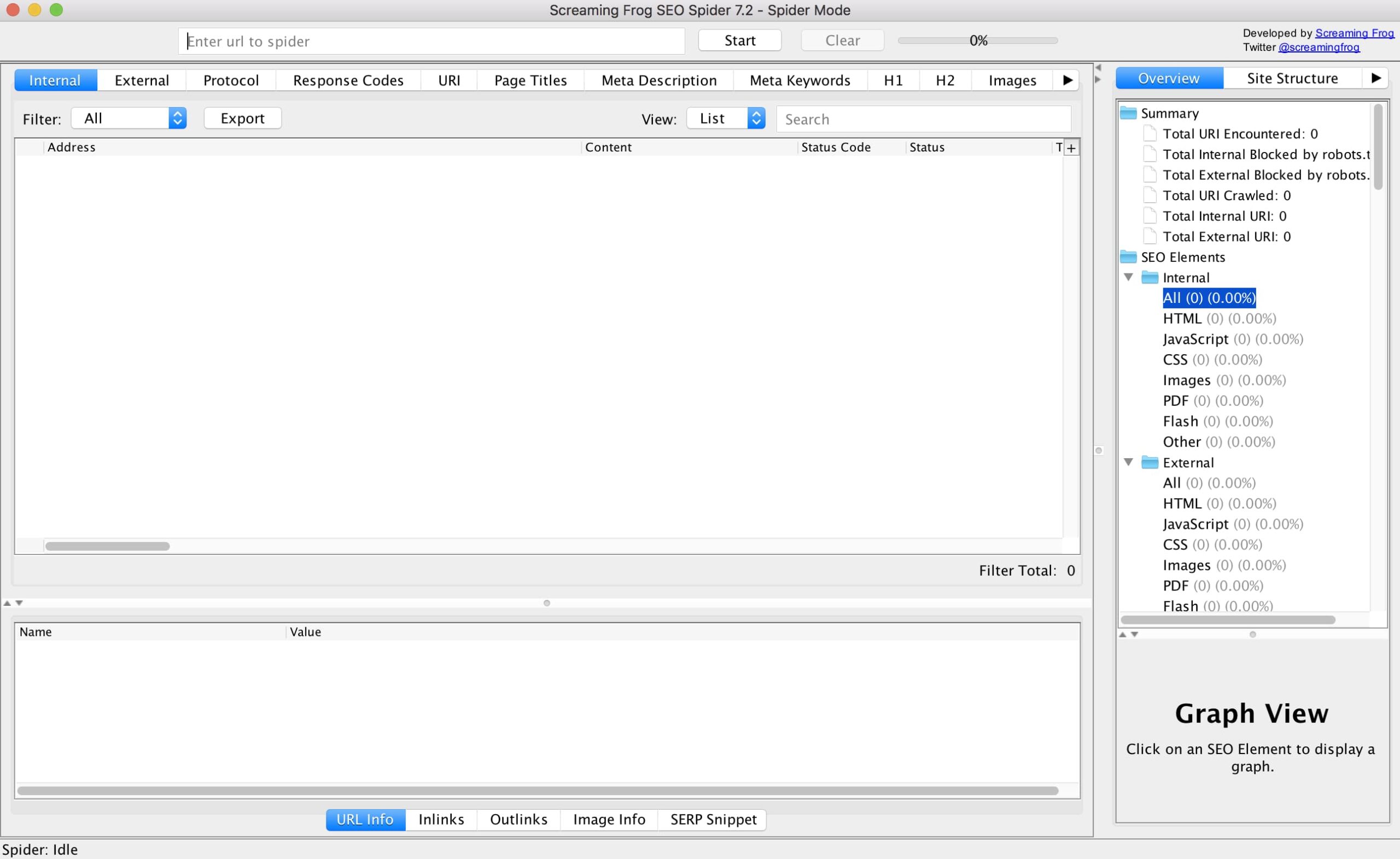
Part One: What They Are, The Benefits, and Building with Screaming Frog

When having a conversation about XML sitemaps (it’s more exciting than you think), it’s pretty common to think about a style-less page within a website containing all relevant links on it so that search engine robots can more intelligently “crawl” the site, making it easier for them to include you in SERPs. This is an integral part to search engine optimization, as sitemaps serve as a way to communicate directly with search engines, notifying them of new or changed website content to ensure that it is indexed correctly, and timely.

So we know the benefits of having an XML sitemap for web pages, but what about images? Another important part of SEO is optimizing images with appropriate alt text and file names, so shouldn’t we make sure that the same robots that are crawling our website and helping show up in search engines are doing the same for our images in image search engines (ex. Google Images)?

Well, that’s where image XML sitemaps come into play.

What Is an XML Image Sitemap?

Much (exactly) like sitemaps for web pages, sitemaps for images are style-less web pages that live on a site with several links listed on it. However, instead of showing information like a URL, the last modification date, the crawl frequency and priority like on traditional sitemaps, image sitemaps can communicate to robots:

  • The type of image
  • The subject matter
  • Image alt text
  • An image title
  • A geographic location
  • Etc.

Images can be added to an existing sitemap, or you can create a specific sitemap for the images on your site – the choice is entirely up to you. Personally, I prefer to go with the latter because there is an abundance of free third-party software that you can easily use to generate several kinds of sitemaps.

The Benefits of an Image XML Sitemap

Image sitemaps are incredibly useful if you want your images to show up in Google Image search results, and you do want this. Google receives hundreds of millions of image-related search queries every day. Now, if you own a plumbing, construction, or a kind of business where lots of images might not be found on your website, this fact might not mean a lot to you. If on the other hand, you own an e-commerce or other business where images are a key part of your website, I probably just caught your attention.

E-commerce companies are known for having websites that are especially image-rich. If this sounds like you and the images on your website are a) not optimized for organic search and/or b) not included in an XML image sitemap, there is a very good chance that you’re missing out on valuable traffic that you deserve. Not good!

If images make up a large portion of your website, either from product galleries or other resources, I strongly recommend incorporating an image XML sitemap.

Creating An Image XML Sitemap

Here at Treefrog, we use Screaming Frog SEO Spider, a tool provided by Screaming Frog that collects website data and identifies technical issues that could be detrimental to your SEO efforts. To follow along, I recommend you download a free copy of Screaming Frog SEO Spider.

Step One: Getting Comfortable with Screaming Frog

At first glance, the Screaming Frog SEO Spider dashboard can be somewhat intimidating, but not to worry because creating XML sitemaps doesn’t take more than a few clicks of the mouse.

Start getting familiar with the software by doing some exploring. Look at the various aspects of a website that Screaming Frog SEO Spider has access to.

Once you feel comfortable, copy and paste the full URL of the website you would like to crawl into the search bar at the top of the dashboard. As an example, I’ll crawl our company website. Click the “start” button to begin crawling.

Step Two: Creating The Sitemap File

Depending on the size of the website you are trying to crawl, this may take a matter of seconds or minutes. It’s worth mentioning that the free version of Screaming Frog SEO Spider has a 500 URL crawl limit.

Once Screaming Frog SEO Spider has finished crawling the website, make your way to the top menu and look for “Sitemaps”. Hover over it, and then select “create images sitemap”.

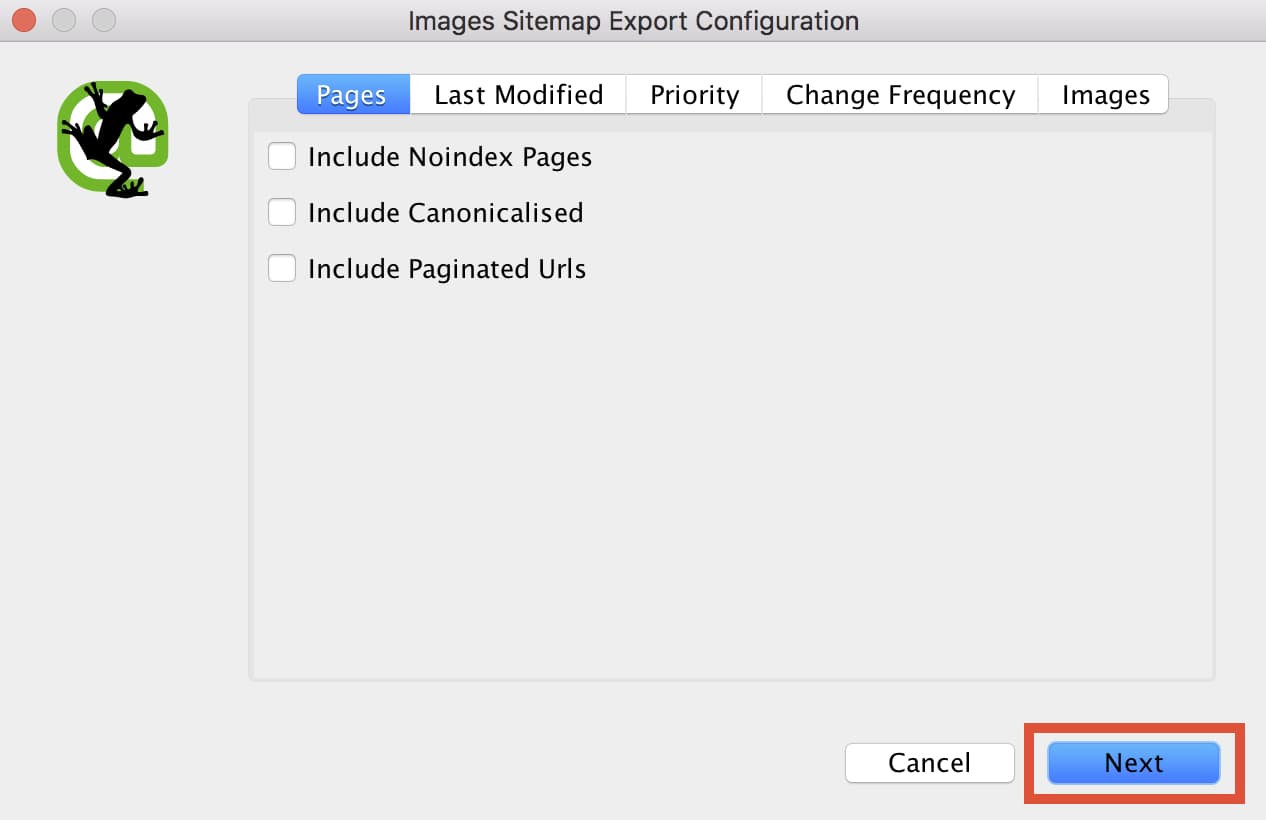
Next, a series of windows labeled “Images Sitemap Export Configuration” will appear. This is to help you set up the sitemap. You will be able to control what pages get included, the priority of the pages, and finally what images to include on the sitemap.XML file. As a default, only internal HTML pages with “200” status codes will be included in the sitemap file. Typically I leave these settings alone, but it’s always good to double check. Once you are happy with the settings, click “next” to generate the sitemap file (Seriously, it’s that easy).

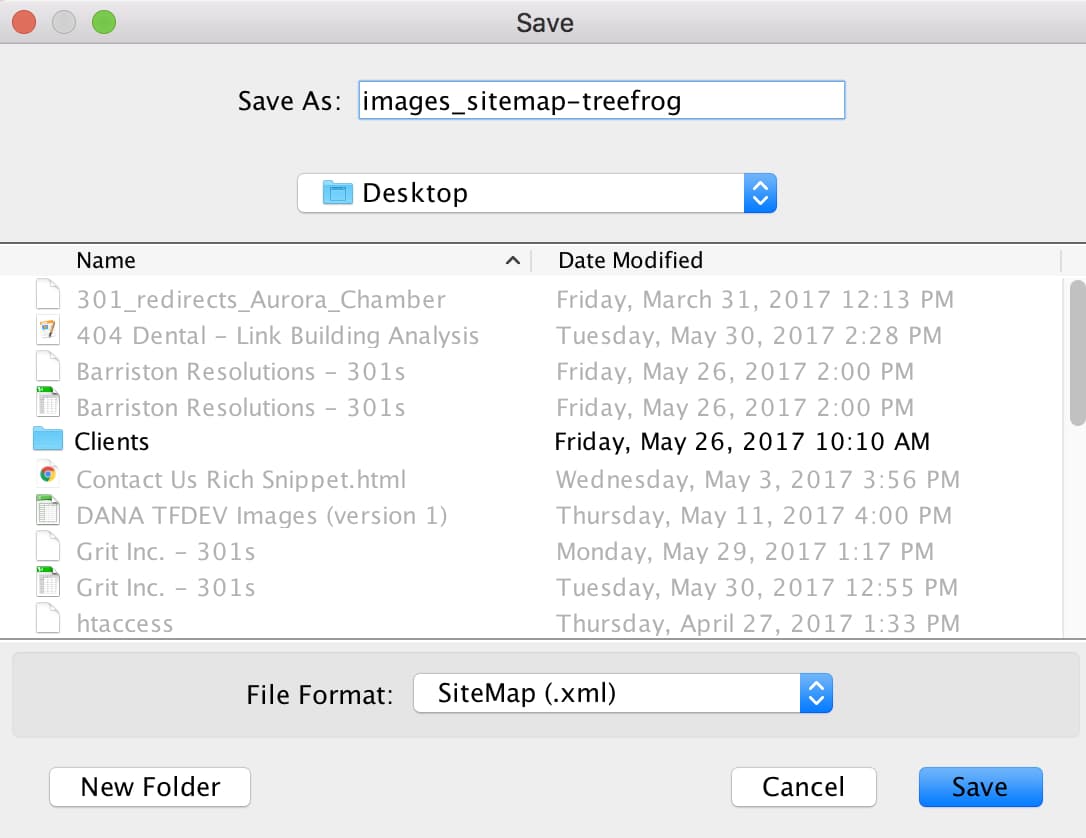
Rename your file to “images_sitemap-(client name).xml and simply save it to your desktop.

… And you’re done! You have just successfully created an images_sitemap.xml file that you can easily upload to your server to get noticed by search engines. In my next post, I’ll go over how to upload your sitemap.xml file to your server using FileZilla, and how to submit it to Google Search Console for proper indexing. If you have any questions about image XML sitemaps or SEO in general, feel free to contact the SEO Team!

A hand holds a credit card, while the other types on a laptop keyboard
Technology Strategy

Now’s The Time To Spruce Up Your Ecommerce

Is your online business holiday ready? Now’s the perfect time to spruce up your ecommerce site before the pre-holiday shopping season sneaks up on you!

You may be shaking your head and saying “Are you crazy! It’s only June!”

But trust us. Fixing, updating, and crafting content takes time, and any company using ecommerce to sell products over the holidays needs to start addressing their site’s pain points now.

“But how do you identify pain points?”

We’re glad you asked!

Common pain points for ecommerce sites can range from too little content to too much content, to terrible photo quality, and beyond. So, to help you to identify all the things needing to be addressed within the framework of your ecommerce site, we’ve developed the following checklist of questions that need answering.

Are you using the right platform for your brand?

As the popularity of ecommerce continues to rise, it can be overwhelming to choose which platform will work best to sell your products. That’s why we at Treefrog meet with our clients to understand their goals, the product(s) they’re selling, and then suggest the platform we know will best match their specific needs.

Should a client want to change their online store from one platform to another, we can help with that too!

Have you lost track of the last time you updated your online store?

In competitive markets, it’s essential to refresh and revitalize your retail offerings, especially as the seasons change. Forgetting to update your site could cause you to oversell products (without having enough stock), or cause fans of your brand to get bored, seeing the ‘same old’ each time they come to your site looking for something new.

At Treefrog Inc., we offer training sessions that teach you how to enter your ecommerce site and edit your material quickly and easily. This knowledge allows you to remove products you no longer sell and add new ones that you’d like to feature. We can also provide guidance on what to write in your descriptions, how to position your content messaging, and how to leverage social media to create brand awareness!

Is your content helpful and clear?

Strong and descriptive content can be the push an interested customer needs to follow through with their purchase. Without helpful details about sizes, or materials, or product quality, potential customers may feel they don’t have enough information to commit to their order, especially when having to pay for shipping.

How can we help? Our content marketing team uses their expertise to conduct content audits on websites that need improving. By analyzing each page of your site, including every image and description, we develop a detailed document that provides suggestions for growth, editing, and expansion. Should a client then hire us to work on developing their content, we’ll collaborate with them to apply the suggestions we made, update content that needs to be refreshed, and improve the message they’re articulating.

Are your pictures professional?

If your pictures are outdated and blurry, odds are your user experience is being tainted. The modern customer values professionalism, and to stay competitive, your images need to not only sell your products but also needs to communicate the value of your brand.

Our department of graphic designers and photographers can help. With professional equipment and a key eye for lighting, balance, and detail, our team ensures the images our clients use are consistent and brand appropriate.

Have you thought about SEO?

While the above items are important steps in ensuring your website is ready for the holiday rush, they’re irrelevant unless people are able to find your site! This is where our SEO team comes in.

Our team of Search Engine Optimization Specialists make sure that navigation links are accessible, that webpages have unique titles, URLs, and meta descriptions, that page headings are appropriate (in terms of keyword searching), and more. Each of these additions naturally increases success by enhancing site visibility to new and existing customers online. So, while we know it’s hard to start thinking about the holidays already, we can promise you’ll thank us for giving you this little push to start working on improving and updating your site now. Getting a head start will reduce your holiday stress and will undoubtedly help you to secure more sales from happily returning customers.

Once your site is polished to perfection, it will be time to think about how you want to promote it, via social media, email marketing, and other viable channels.

For more information on how our team can help ensure that your ecommerce site is holiday ready, give us a call today at 905.836.4442!

Pensive woman looks at floating social media platform icons
Marketing Strategy

Picking The Right Social Media Platforms for Your Business

With over 2 billion active users, popular social media platforms have become marketing giants, offering businesses valuable data about their customers. However, with so many options, how do you figure out which social media platforms are right for your business?

Here are a few tips to help you get started:

Facebook

Facebook is the biggest social network on the web, with nearly 2 billion active users! Considering that Facebook has a wealth of options for any organization, it’s a great starting point for your business, regardless of your industry. Facebook can be thought of as the “social hub” of your business, where people can go to leave messages, browse through products and photos, or chat with you online.

Twitter

Twitter averages about 328 million active users worldwide and is an effective channel for marketing your business and handling customer service. With Twitter, you can share short text updates (of 140 characters or fewer), along with videos, images, links, polls and more. As with Facebook, Twitter is more effective when it is a two-way platform in which you respond to and engage with followers.

LinkedIn

LinkedIn is right for you if you are B2B or are in another industry or role in which you can provide useful insights to people who are thinking about their work, looking to make business connections, or who are exploring their next career move. Most users are in work mode on LinkedIn, so it is optimal for peer networking and industry-specific information.

Instagram

Instagram is a mobile-only visual social media platform based entirely on photo and video posts. The Facebook-owned network has more than 700 million active users, many of whom post about food, art, travel, fashion, and similar subjects. More artistic niches tend to excel on Instagram, so it’s important that the person running your account has a good eye for detail and some basic photography skills, so the photos and videos posted to your account are high quality.

Pinterest

Pinterest, another highly visual platform, is popular among women, so it is the place to be if that is your target audience. Every pin includes an image or video, and it is fairly low-maintenance in terms of post frequency. However, keeping your boards organized and search-friendly can be time-consuming. Popular categories on the site are DIY projects, fashion, exercise, beauty, photography, and food.

A rocky waterfall
Technology Strategy

Increase Your Google PageSpeed Score Part 2: Web Development & Optimization

For the second part of our Google PageSpeed blog post series, we’ll be taking a look at more advanced techniques to adhere to Google’s recommendations. If you haven’t had a chance to read the first part to increasing your Google PageSpeed score, start now! Recalling on the Google PageSpeed insight rules, the speed rules include the following:

  • Avoid Landing Page Redirects
  • Enable Compression
  • Improve Server Response Time
  • Leverage Browser Caching
  • Minify Resources
  • Optimize Images
  • Optimize CSS Delivery
  • Prioritize Visible Content
  • Remove Render-Blocking JavaScript
  • Use Asynchronous Scripts

We’ve already covered avoiding landing page redirects, enabling compression, optimizing CSS delivery and removing render-blocking JavaScript in our first part. In this blog post, we’ll be taking a look at prioritizing visible content, minifying resources and optimizing images.

Note: The following recommendations below assume you fully understand web development best practices as well as server software programming, HTML, JavaScript and CSS programming. If you aren’t too sure of these techniques described, give us a shout and we’ll help you out!

1. Prioritize Visible Content

Putting an emphasis on giving users a high quality mobile experience, Google states “having a mobile-friendly website has become a critical part of having an online presence”. As such, they recommend ensuring that the above-the-fold content of the page is rendered quickly and efficiently.

Above-the-fold is the portion of the webpage that is visible without the need to scroll down. Ensuring the above-the-fold content displays quickly, prevents waiting time for the user. However, if the data exceeds the initial congestion window (a self-imposed variable that limits the amount of data that can be sent), then additional back and forth data transmission between your server and the user’s browsers will occur. This in turn creates a slower and delayed page load for the user.

In other words, if the above-the-fold content isn’t loading quickly enough, users are more likely to leave. The above-the-fold content is the first touch point for most users and they are less likely to stick around for the rest of the webpage to load if the above-the-fold content can’t even load quickly and properly.

What to do:

  • Structure your HTML to load the critical content first:
  1. Identify the critical content of your webpage. For example, if the page is an article, the body text and images are the most critical content. Third-party widgets may fall as secondary items that can be deferred.
  2. Ensure the critical content of your webpage loads first. Structure your HTML such that the critical content is rendered immediately. For example, you may want to inline a portion of the CSS into the HTML file to ensure the styling of the critical content is rendered first, while the rest of the page is styled after the CSS file is rendered later.
  • Reduce the amount of data used by enabling compression and/or minifying resources:
  1. Reduce the size of your HTML, CSS and JavaScript files by enabling compression. As discussed in our previous post, to enable compression you will need to make updates to your .htaccess file.
  2. Minify your HTML, CSS and JavaScript files, which is discussed in detail below

2. Minify Your Resources

Ensure the sizes of your resources are reduced to allow faster transferring of data. Reducing the size of your files will require less data to be transferred from your server to the user’s browser, thereby making the above-the-fold as well as the entire page load much quicker.

What to do:

After writing your HTML, CSS and JavaScript code, you can look at ways to reduce the file size by removing unnecessary or redundant code, unused code and applying shorter variable and function names. Although it may be against code-writing best practices, you can also remove commenting, formatting and removing whitespace altogether. For example, the following CSS code is 953 bytes and has commenting, formatting, whitespace as well as redundant code:

/* ## Headings

——————————————— */

h1 {

      font-size: 36px;

      font-size: 3.6rem;

      color: #333;

      font-family: Lato, sans-serif;

      font-weight: 400;

      line-height: 1.2;

      margin: 0 0 10px;

}

h2 {

      font-size: 30px;

      font-size: 3rem;

      color: #333;

      font-family: Lato, sans-serif;

      font-weight: 400;

      line-height: 1.2;

      margin: 0 0 10px;

}

h3 {

      font-size: 24px;

      font-size: 2.4rem;

      color: #333;

      font-family: Lato, sans-serif;

      font-weight: 400;

      line-height: 1.2;

      margin: 0 0 10px;

}

h4 {

      font-size: 20px;

      font-size: 2rem;

      color: #333;

      font-family: Lato, sans-serif;

      font-weight: 400;

      line-height: 1.2;

      margin: 0 0 10px;

}

h5 {

      font-size: 18px;

      font-size: 1.8rem;

      color: #333;

      font-family: Lato, sans-serif;

      font-weight: 400;

      line-height: 1.2;

      margin: 0 0 10px;

}

h6 {

      font-size: 16px;

      font-size: 1.6rem;

      color: #333;

      font-family: Lato, sans-serif;

      font-weight: 400;

      line-height: 1.2;

      margin: 0 0 10px;

}

This code can be significantly reduced to 311 bytes by removing the redundant code, comments, formatting, and white space:

h1,h2,h3,h4,h5,h6{color:#333;font-family:Lato,sans-serif;font-weight:400;line-height:1.2;margin:0 0 10px}h1{font-size:36px;font-size:3.6rem}h2{font-size:30px;font-size:3rem}h3{font-size:24px;font-size:2.4rem}h4{font-size:20px;font-size:2rem}h5{font-size:18px;font-size:1.8rem}h6{font-size:16px;font-size:1.6rem}

It may become taxing to minify all your resources manually, especially if you have a large website. Luckily, there are free tools available online to minify your resources for you. A simple search for “HTML minify”, “CSS minify” or “JavaScript minify”, will result in various tools you can use. The fall back with using these tools as well as minifying these resources yourself is that the code needs to be minified again whenever you make any updates or changes. As an alternative and depending on the CMS you use, you can automate the process by leveraging plugins. For WordPress and Drupal sites, there are many minify plugins available that can minify HTML, CSS and JavaScript individually or all at once.

As a last alternative, you may also want to use Google’s PageSpeed Module if your server is Apache or Nginx. There are various filters that help optimize your website’s page speed inclusive of reducing resources sizes such as Minify JavaScript. Take a look at their mod_pagespeed documentation for more information.

3. Optimize Images

Ensure the file size of images is reduced without significantly impacting their visual quality. Reducing the size of your image files will require less data to be transferred from your server to the user’s browser, thereby making the above-the-fold as well as the entire page load much quicker.

This may require its own blog post in the future since there are plenty of best practices and image optimization checklists to do. It also really depends on how your website is structured: if your website is highly visual than a much more thorough optimization strategy is required. However, if your website has some images here and there, there are quick and easy things you can do.

What to do:

  • Ensure the images are served at their native dimensions and specify the width and height in the img tag to prevent “popping” when the page is loading
  • Compress your images to reduce file size. Try using PNG files as they are lossless formats and do not make any visual modifications to the image.
  • If you’re using JPEG files and are compressing the images, try to reduce the quality below 85. Past the quality of 85, the file size becomes larger but doesn’t improve visually. Compress the image as low as possible without losing visual quality.

Develop With File Size in Mind or Use Tools To Optimize

These recommendations are best executed during the designing and development stage of building the website. Arranging the structure of the content beforehand can prioritize and serve the critical content to users right from the start. Programming HTML, CSS and JavaScript and optimizing the images with the file size in mind ensures a quicker page load right when the website goes live.

In most cases however, these items may be overlooked or unnoticed during the development stage. To act on these recommendations long after a website has been live, we can leverage: enabling compression, minifying resources and image compression.

As noted in Part 1, every website is different and there are little nuances that make your website unique. It’s very important you test these recommendations first before implementing them.

As always, if you have any questions or comments regarding these recommendations, feel free to comment below. We’d love to hear your thoughts, feedback and/or grievances. Thanks for reading!

Resources

Woman looking at a laptop in a meeting room
Marketing Strategy

Leveraging Reddit for Paid and Organic Advertising

What if I told you that there is a social networking website that could potentially get you 20x the reach of Facebook, Instagram, or Twitter? It sounds too good to be true, right? Wrong! The website I’m talking about is called Reddit.

So what is Reddit?

By definition, Reddit is an “American social news aggregation, web content rating, and discussion website” where members can submit content such as text posts, photos, videos, or direct links into sub-categories of Reddit with specific themes and topics (these are called subreddits). The content posted to these subreddits by members is then voted up (up-votes) or down (down-votes) by other members, determining the position of the post. Posts with more up-votes stay at the top of the subreddit, while posts with less up-votes, or posts with lots of down-votes are pushed down towards the bottom of the subreddit. Essentially, just like any social networking and discussion website, posting high quality content will result in more shares, likes, comments, and maybe even conversions.

Numbers Don’t Lie

So far in 2017, Reddit has been bringing in approximately 542 million monthly visitors, 234 million of them being unique visitors, making it the 7th most visited website in America, and 22nd in the world. If that wasn’t enough, in 2015 Reddit reached 82.54 billion pageviews, 73.15 million submissions, and consisted of 853,824 subreddits.

Now that we know what Reddit is, and why it has such great potential from a marketer’s point of view, I am going to share with you my favourite tactics for leveraging Reddit for organic and paid advertising.

Paying For Targeted Ads

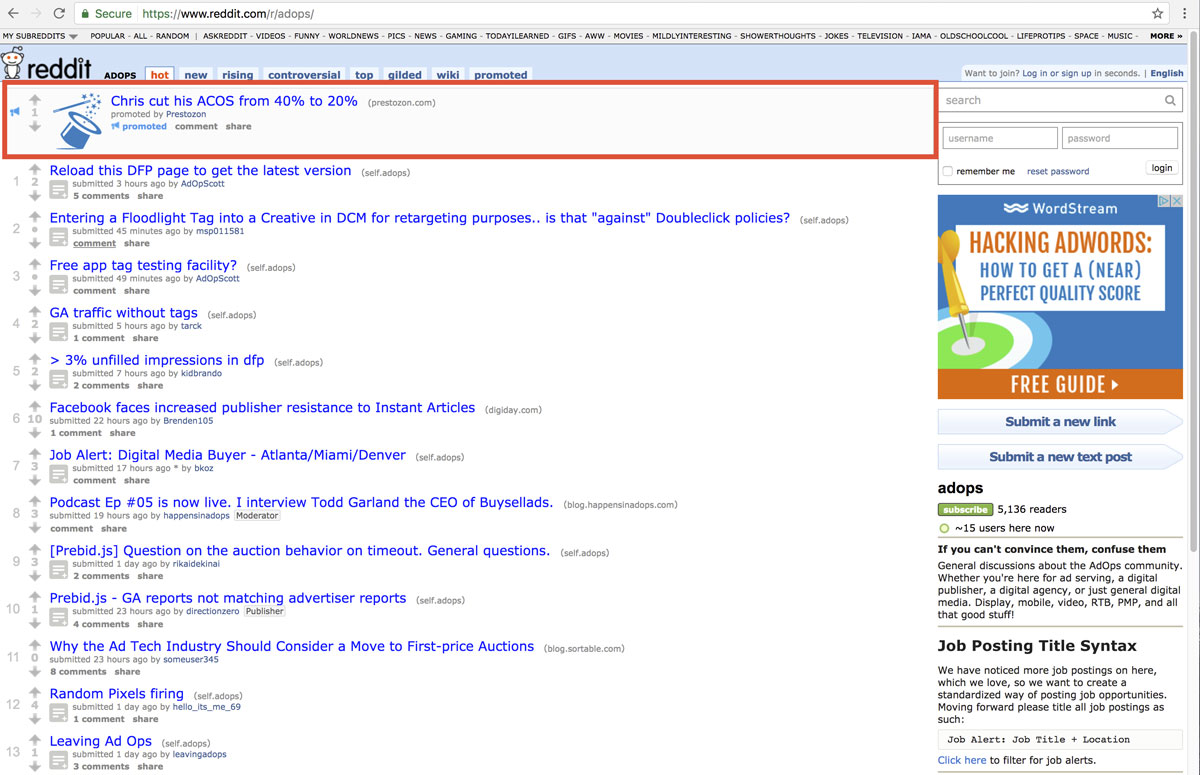
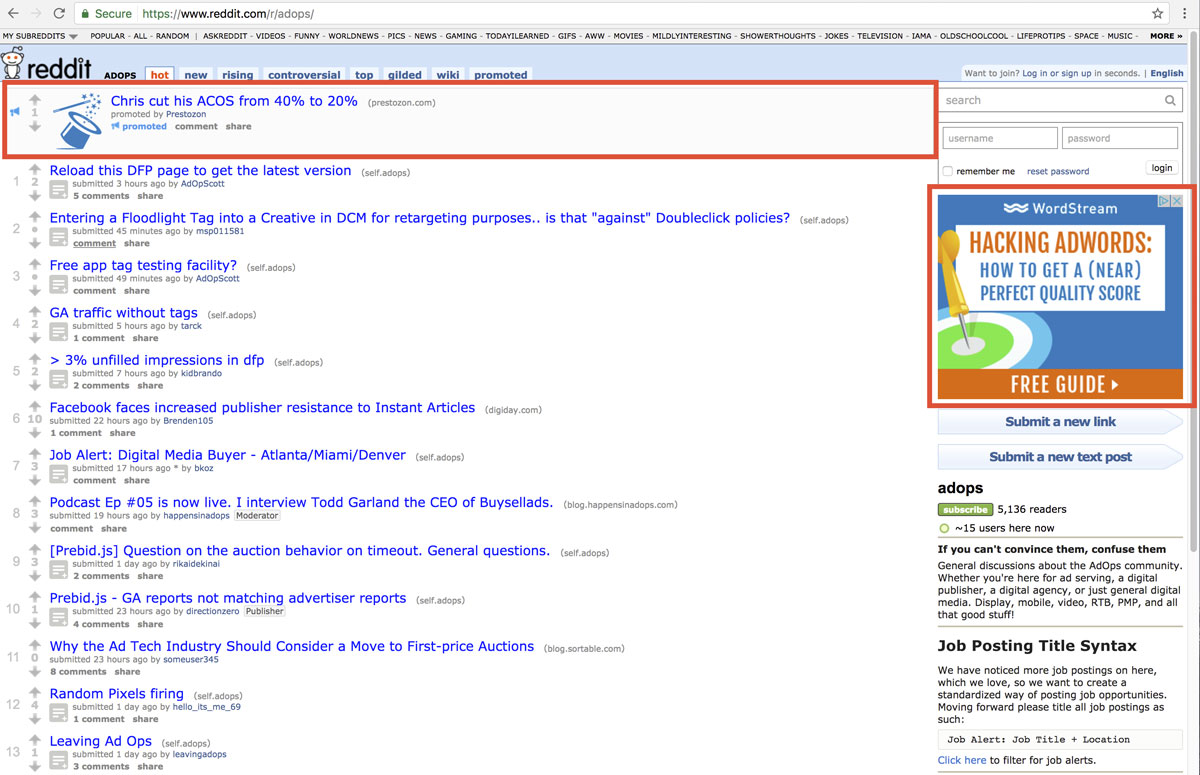
Although I don’t have actual experience with targeted ads on Reddit, I’ve seen them in action and I know they work. Reddit offers advertising options where you can actually advertise in specific subreddits, giving the advertiser an opportunity to target specific users with a super relevant ad. This is great because when a user sees a relevant ad in a relevant place, they are more likely to click through and convert. For example, when I was on the /r/adops/ subreddit earlier today, I found two paid ads that would be very relevant to the /r/adops/ community.

The first is a native looking ad at the top of the subreddit, disguising itself as a normal post:

The second ad, featured on the right side of the webpage is not a native ad. It is still however a high quality ad that is very relevant to just about anyone visiting the /r/adops/ subreddit:

How Much Does It Cost?

In order to advertise on Reddit, advertisers must be willing to spend a minimum of $5 per campaign, and a $0.75 charge per thousand pageviews. Currently, Reddit only offers CPM (cost per thousand impressions) as a cost model, and like Adwords, the CPM price you pay depends on a variety of factors, like targeting, bid, and competing ads. Reddit also allows advertisers to purchase up to 3 months prior to a campaign, so plan ahead!

Organic Marketing

Another form of advertising that I like on Reddit, and one that I have personal experience with, is organic marketing. One tactic that is arguably the easiest is to position yourself as a thought leader within the subreddit you are trying to advertise on. Let’s say that you are working for a landing page optimization company, and come across a user in the ad operations subreddit looking for information on landing page optimization. You could answer the user’s question and also provide a backlink to the company you work for. Doing this (well) would provide you with authority within the subreddit, which will benefit you should you decide to keep posting, and will drive traffic back to the website you have just linked to.

Organic marketing is trickier to pull off successfully than paid advertising, because like most people on social networking websites, people on Reddit hate ads, even more so when the ads are low quality, intrusive, aren’t relevant, or are ads disguised as regular posts. Failing to follow the rules, or “reddiquette”, you may find your content getting downvoted, and you getting banned. Having said that, there are a number of ways to organically market on Reddit without pissing off all of the people who could be potentially clicking on your ad.

Things To Avoid

As I mentioned above, Reddit users hate ads and being deceived into clicking on them. There are some things that every company should avoid doing, whether you’re marketing for Starbucks or a local coffee shop.

The big no-no is posting memes. Just don’t do it. If this is the only take away you have from this article, you’ll have still learned something valuable. It’s a risky move that few brands (if any) have managed to pull off without looking incredibly desperate.

One cringe-worthy example that demands a discussion is when Pilot posted a series of memes to various social networking sites in an effort to try to promote their new line of pens. The memes featured slogans like “The only pen that matters” and “I will not lose any of these” that make you want to put your head in your hands. Once they found their way to Reddit, users weren’t happy, and felt betrayed by the user who originally posted the memes, and maybe even by Reddit as a whole. One user even went on to say “Even if he’s [the poster] not paid by the company or an advertising agency, I don’t really want people who are just fans of some brand making accounts just to post about that product. What would Reddit be then?”

I’ve managed to track down a few of the original memes, and have attached my personal favourites. I truly hope you find them as horrible as I did.

In conclusion, marketing on Reddit is not easy or for the faint at heart. It’s a lively community that offers a huge potential for marketing. If you aren’t afraid of criticism, and are targeting certain niches – there’s really no better place to be. If done correctly, you could be on your way to tapping into a valuable goldmine of targeted traffic directly to your website, while increasing brand awareness at the same time.

Resources

A rocky waterfall
Technology Strategy

Increase Your Google Page Speed Score Part 1: Start With The Basics!

With Google putting an emphasis on high quality content for users in the last few years, there’s been a big push to focus strictly on content marketing. Where the first optimizers started off by taking advantage of search engine algorithms through pure coding, nowadays, producing high quality content has been the primary goal.

And absolutely…content really is important. A website without high quality content is just an empty shell with no pearls. However, as search engine optimizers, it is essential that we don’t lose focus on the technical aspects either and that we also give this side of SEO the attention it deserves.

…which brings us to PageSpeed.

Speedy Content

Part of producing high quality content includes delivering it to users with lightning speed. No one likes clicking on a link only to wait for more than 5 to 10 seconds for the page to load in full. By then, they would probably have left your site: increasing your bounce rate, reducing time on site and affecting your overall user engagement. All these things can impact your keyword ranking.

With more “Google searches taking place on mobile devices”, ensuring your website operates with lightning speed is essential.

Google PageSpeed Insights

There are many page speed test tools out there that can help ensure your website performs optimally in speed. Tools such as KeyCDN, pingdom and GTmetrix are great for really analyzing and optimizing your website. But for the purposes of this blog post, we’ll be taking a look at Google PageSpeed Insights.

There are various differences to how Google PageSpeed Insights work versus other page speed tools. For one, it doesn’t actually measure loading time. Rather Google PageSpeed analyzes several different components of your page and gives recommendation on how to improve its performance based on time to above-the-fold load and time to full page load.

As such, there is much debate within the SEO community on whether or not it’s even worth achieving a high PageSpeed score. Some trade offs may occur when trying to achieve a high score (i.e. certain techniques to decrease render time can actually decrease your PageSpeed score). We’ll save the usability and reliability of Google PageSpeed Insights for a later post as this topic requires a much more thorough discussion.

Having said that, Google has the largest market share in search engines. It’s still a good idea to consider these recommendations in conjunction with using other speed tools to compare loading/rending and server response time measurements.

Google PageSpeed Insights Rules

Google PageSpeed Insights is split into two rules: speed rules and usability rules. Since our focus is on speed, we’ll take a look at the speed rules exclusively. The speed rules include the following:

  • Avoid Landing Page Redirects
  • Enable Compression
  • Improve Server Response Time
  • Leverage Browser Caching
  • Minify Resources
  • Optimize Images
  • Optimize CSS Delivery
  • Prioritize Visible Content
  • Remove Render-Blocking JavaScript
  • Use Asynchronous Scripts

Some of these recommendations will require their own blog post as there are many factors to consider before implementing. For example, improving server response time requires a much more thorough thought process. So we’ll be highlighting the items that are fairly simple to complete.

1. Avoid Landing Page Redirects

Ensure your landing page is not a redirected page. Landing page redirects can hamper the user experience if its takes too much time redirecting to multiple pages. This is especially important for ads, links, and social links pointing to a specific landing page.

What to do:

The best and easiest thing to do in this case is to update all your ads, links and social links so that they are pointed to the correct landing page (i.e. their final destination).


Note: The following recommendations below assume you fully understand server software programming, HTML, JavaScript and CSS programming. If you aren’t too sure of these techniques described, give us a shout and we’ll help you out!


2. Enable Compression

Ensure your compressible resources are served with gzip compression. “This can reduce the size of the transferred response by up to 90%”, reducing the download time for users when they visit your page.

What to do:

Most web servers in the world use Apache as their server software. There are others such as nginx and IIS. I personally have only had to deal with Apache servers so far and you are likely dealing with it too. (Tip: One way to check is to use Google Search Console’s Fetch as Google tool and look at the fetch details)

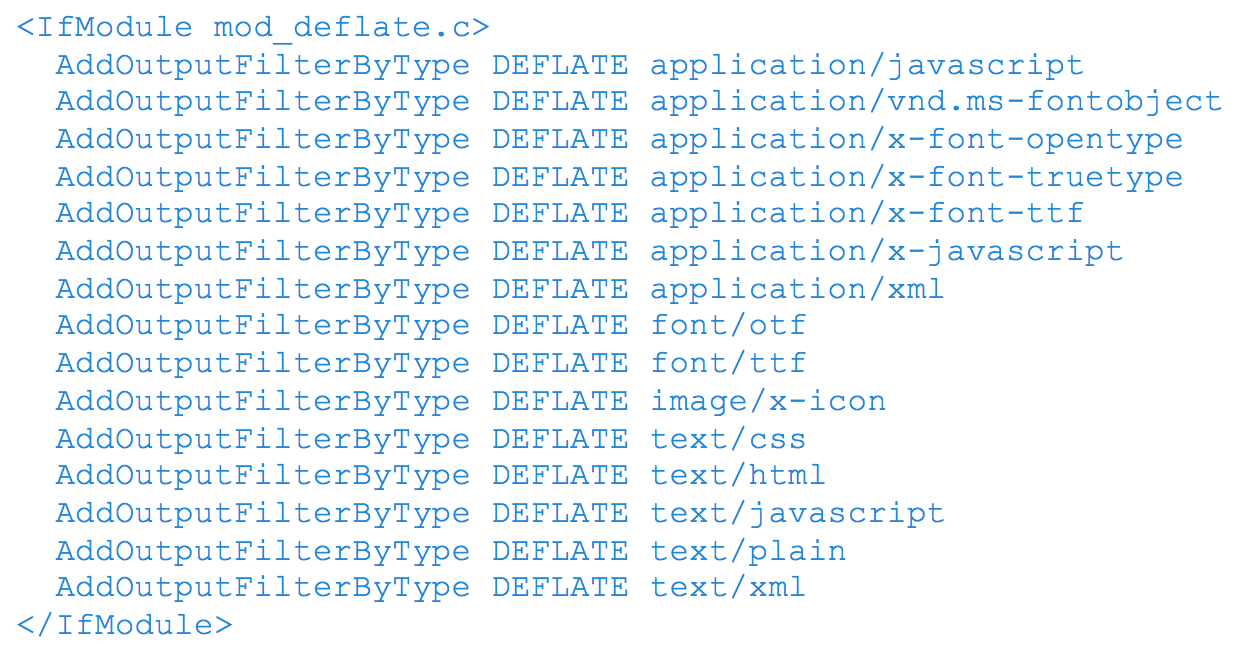
Assuming your server uses Apache, to enable gzip compression, you’ll need to use the Apache Module mod_deflate. Depending on the file types you want to compress, insert the following into your .htaccess file:

3. Remove Render Blocking JavaScript

Ensure there are no HTML references to external JavaScript files in the above-the-fold portion of your page. When your browser sees a script in the document, it pauses DOM construction and executes the script before proceeding. Therefore, your above-the-fold content can not be rendered without waiting for the JavaScript resources to load. In other words, avoid placing any JavaScript in the header as it may cause a delay in rendering your page.

What to do:

  • If the JavaScript resource is fairly small in code, you can inline the script contents into the HTML document. The drawback however is that you are now making the HTML document larger in size with extra JavaScript code.
  • You can apply asynchronous JavaScript to avoid parse blocking the DOM construction. To achieve this, mark your JavaScript with async

You can also avoid the JavaScript from running altogether until the DOM construction is complete by deferring the script. To achieve this, mark you JavaScript with defer.

Another way to defer, is to simply put your JavaScript in the footer of the HTML

4. Optimize CSS Delivery

In the same manner as removing render-blocking JavaScript, ensure there are no HTML references to external stylesheet files in the above-the-fold portion of your page. Similar to JavaScript, CSS are render-blocking resources. Therefore, your above-the-fold content cannot be rendered without waiting for the CSS resources to load.

Unlike JavaScript, defer and async do not work on CSS files.

What to do:

  • If the CSS resource is fairly small in code, you can inline the script contents into the HTML document. The drawback however is that you are now making the HTML document larger in size with extra JavaScript code.
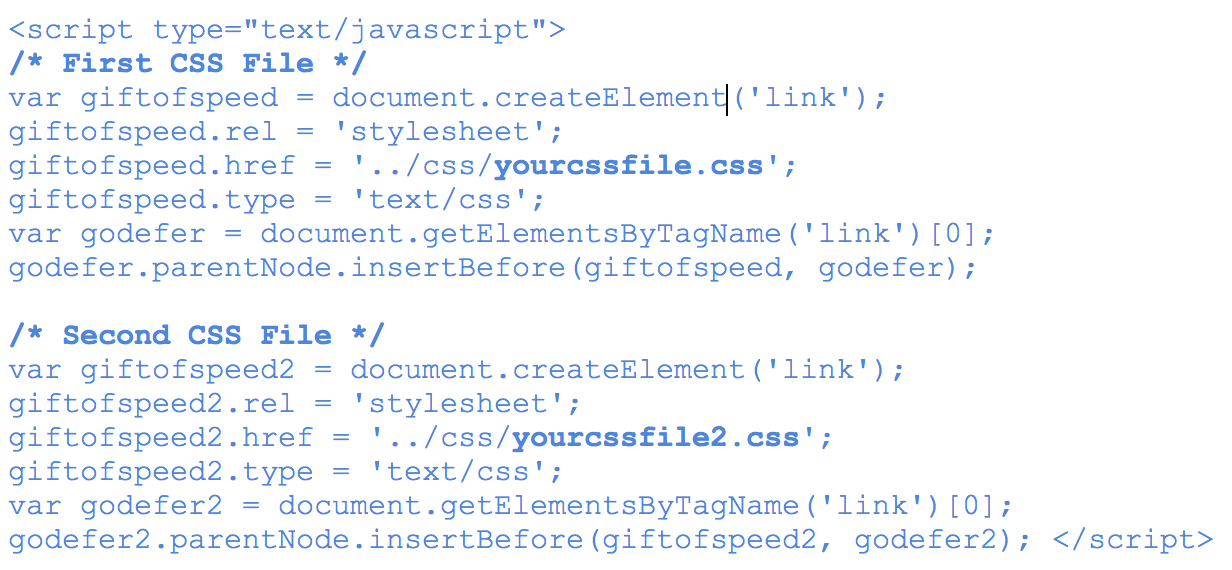
  • The one solution that’s worked for me so far is using JavaScript to defer CSS from loading. Courtesy of www.giftofspeed.com, insert the following code into your HTML footer (replace yourcssfile.css with your actual CSS file).

Place the following snippet within your HTML header. This ensures browsers that don’t support JavaScript can still load CSS files.

What Are You Waiting For? Get Started!

I’ll be saving the rest of the recommendations for a next blog, since they require a little more context and discussion. But these four recommendations are a good place to start optimizing for Google’s PageSpeed Score …assuming you have a good understanding of servers, HTML, CSS and JavaScript.

In the tests we’ve conducted, enabling compression alone increased our PageSpeed Score by 22 points for mobile and 24 for desktop – quite a big jump. Even with trying out these four recommendations, you could significantly increase your PageSpeed score right now.

As a last note, every website is different and there are little nuances that make your website unique, so its very important to test these recommendations first before implementing them right away. With that being said, try testing these recommendations and let us know how it worked out for you!

Thanks for reading! If you have any questions or comments, feel free to comment below! We’d love to hear your thoughts, feedback and/or grievances!

Resources

Water drops on a long leaf
Marketing Strategy

The Duplicate Content Penalty

Be warned: if Google finds duplicate content, a spike will come out of the internet and impale your website horribly.

Frightened? Many are. But they shouldn’t be.

Duplicate Content Is Necessary

Let’s consider for a moment that Google, or at least some of the higher ups that hold sway at Google such as this guy, state that every website in the universe has some form of duplicate content on it. Think of press releases, blog quoting, product descriptions between manufacturers and dealers… some duplicate content is just natural. If Google were to drop the hammer on all of this content—i.e. implement a “duplicate content penalty” for any duplicate content it came across—it would make a whole lot of content syndicators really grumpy. Google often doesn’t care about making people grumpy—what it does care about is user experience, because users are the ones who click on ads.

On that note, it’s frustrating for a user to see a bunch of webpages in a search result with exactly the same content. Users like to see diverse angles and opinions on a given topic.

It comes back to user experience. We have to think of why the content is duplicated. Is there a logical and justifiable reason? If so, Google will most likely understand. Google has also given us a number of tools to use to properly outline why the content is duplicated.

The Duplicate Content Penalty

A myth that needs to be cleared up is this: there is no “duplicate content penalty”. Although in extreme situations, websites with a ton of duplicate content (hundreds of pages) have been the victim of a manual action. If Google thinks your site is trying to hone in on ranking by posting myriad pages all about the same topic, with identical content, then the skies may open up and Google will smite thee.

If you have content on your website that is the same as other pages on the same site—a paragraph or two let’s say—then you needn’t worry. As long as there is a clear and logical reason for that content to exist, you’ll be fine.

That being said, Google provides us with the necessary tools to identify and categorize our content so there’s no question about why it exists. I’ve listed some examples of these tools below.

Where Canonicalization Fits In

What the blue hell is “canonicalization”? Well, let’s say you have a product that comes in various colours. Your website may have a different webpage for that product in each colour available, which would make for several pages with the same text (describing the product) with minor differences. To keep this organized, it makes sense to define one solitary page that you wish to show up in a Google search for that product. In this case, it is best to use a practice that no one can pronounce, called “canonicalization”. N.B. I’ve actually heard this term referred to as “chocolization”, and I didn’t have the heart to correct the client.

Canonicalization basically means picking a leader. Consider a clone army. You have a bunch of clones (webpages with the same content, only minor differences, like colour red versus blue) and you only want one to step up to the plate and represent. So, you’d canonicalize all those other peon clones towards the leader. The leader will get all the authority, and she’ll be the one putting herself out there in a search result for the world to see. You’ll need to go through the leader in order to get to all of the other clones. If Google has to choose between too many webpages as the authority, it will just get bored and go acquire another company.

Point being, canonicalization will help define for Google the reason for the duplication. You have a better shot of ranking with the one authoritative leader than with several identical pages all competing for the same keywords.

Canonicalization for Pagination

Let’s say you have an article on your website that spans multiple pages. There’s a tag you can implement to tell Google that you want the first page of the article to rank, not all of the subsequent pages.

The tag is used to signal to Google that there’s a logical sequence to the order of the content.

Users wouldn’t benefit from seeing all the internal pages of an article in a search result; why would you want to start reading an article on page 3? The pagination tag allows you to indicate to Google that you’re aware the article has multiple pages, but you only need page one (the leader) to show up in a search result.

301 Redirects?

We’re not going to get into explaining 301 redirects here, but I mention them simply to point out that canonicalization and redirects are two very different things.

Put simply, you use a redirect if you want to route users and search engines to a new location for the content (a change of address). You use canonicalization when you need all the pages to still be accessible by users. The canonical tag is meant to indicate to search engines that you’re aware the content is very similar across those pages, and you only want the “leader” to show up in a search result.

Key things to remember

We need to keep in mind that canonical tags are a recommendation to Google. Whether Google actually follows this recommendation or not is another story. In other words, I can recommend that a train not hit me if I’m standing in the middle of the tracks, but there’s no guarantee it will listen. In Google’s own words, these tags are used as “hints”, not absolute directives.

Is there a good reason for the duplication? If you’re asking whether something will be perceived as duplicate content, put yourself in the mind of the user. Would someone expect the content to be there? If there’s a good reason for the duplicate content to exist, then we should be in good shape. Where we can apply one of the above tags as a hint to Google, then let’s do that.

There is no duplicate content penalty. Google will not shoot your website in the face if it crawls duplicate content. Will SEO tools pick up on duplicate content as a potential negative ranking signal? Sure. But again, let’s think of why the content is duplicated in the first place. If there’s a perfectly good reason for it to be there, then we should be good.

Unique, original content is always best. There are some cases where you may feel compelled to duplicate content. I’ve seen some clients copy and paste text from a source and use it on their own site. I would not ever recommend you do this. Best case scenario is to write your own version of that content so it’s original. Cite the original source of the content with a genuine link. That’s far more natural than simply copying the content.

Thanks for reading! Let me know if you have any questions.

More quality reading about canonicalization

More about duplicate content:


More about chocolization:

Scroll to Top