
Resource

The outside window of Treefrog showing circular window decals
Branding & Design, Digital Marketing, Web Design & Development

2020 Foresight

Your 2020 Marketing Calendar

2020 is almost upon us. At this time of year, we see many articles reflecting on the year that’s just past. We know what happened in 2019 – but are we prepared for 2020?

The definition of “foresight” is: “the ability to predict or the action of predicting what will happen or be needed in the future.” And yet, we often forget, when planning for our business success in the coming year, what drives sales and interest in our product or services: marketing strategy.

Towards this end, we have decided this year to share one of our most valuable tools for planning upcoming marketing with our “Marketing Partners” (i.e. people who use us for their outsourced marketing needs). After your Christmas Turkey has settled and your gifts have been unwrapped and stowed away – this is the perfect time to reflect on what worked last year and what actions you should take next year to grow your business.

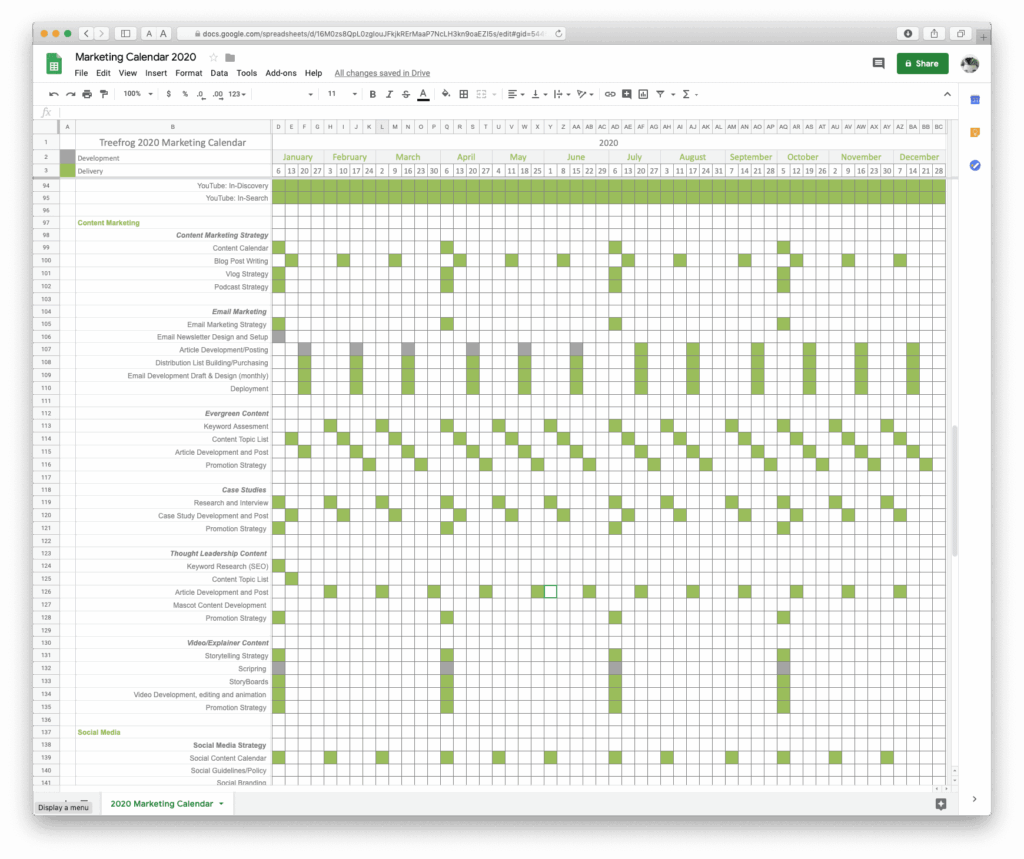
The Treefrog 2020 Marketing Calendar Worksheet

This worksheet is an easy-to use spreadsheet of various marketing activities to stimulate your brain into thinking about how to gear up over the coming year for growth. If you are a CEO or business owner, you should have this plan in front of you. If you are a marketing person, you should be creating and customizing this plan based on a budget or what you already know works.

At the very least, it’s certainly a lot easier to decide what marketing activities aren’t part of your plan for 2020, so you don’t waste any energy wondering what could have been.

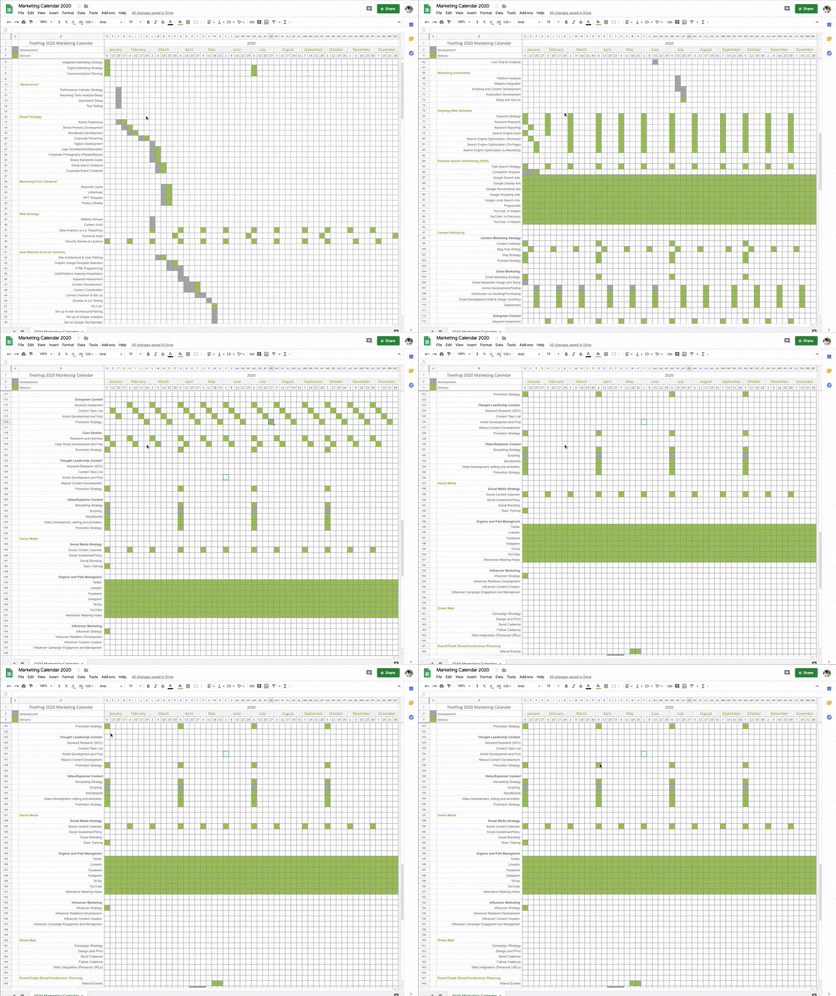
 Here is an example of it in action;


If we can help you with your strategy or with any of the tactics in 2020, let us know! We can help you design, build and execute your strategy once it’s been intelligently reviewed and lined up with your budget and business goals for the next decade.

At least, with a little elbow grease in the coming week or so, you’ll know what you are doing to grow your business going into the new year.

Happy Holidays!

How to Use this Document

It’s easy. Go through the document, line by line. Decide what week you would or should be working on components of your marketing. Color in the weeks that you believe you should be doing a marketing activity of that type (each square represents the Monday of a new week).

This document contains an example of how a marketing strategy should look. You might start by erasing it all and starting again! Or perhaps just edit from the example input already in the document.

We at Treefrog take these draft strategies and put them into a professional project management tool (we use Wrike) – but this document is a perfectly good substitute to get your mind engaged and get your creative and strategic juices flowing.

Enjoy!
 

Fill out the form below and your copy of the 2020 Marketing Calendar Worksheet will be emailed to you

"*" indicates required fields

This field is for validation purposes and should be left unchanged.
This field is hidden when viewing the form

Not sure where to start? Or Don’t you have time as you work in the business to work on your marketing? Let’s chat. We can offer a complimentary 30-minute consult to get you started, and help you design, build and execute your strategy once it’s been intelligently reviewed and lined up with your budget and business goals for the next decade.

Macro of purple flower petals
Digital Marketing

Reaching Moms on Social Media

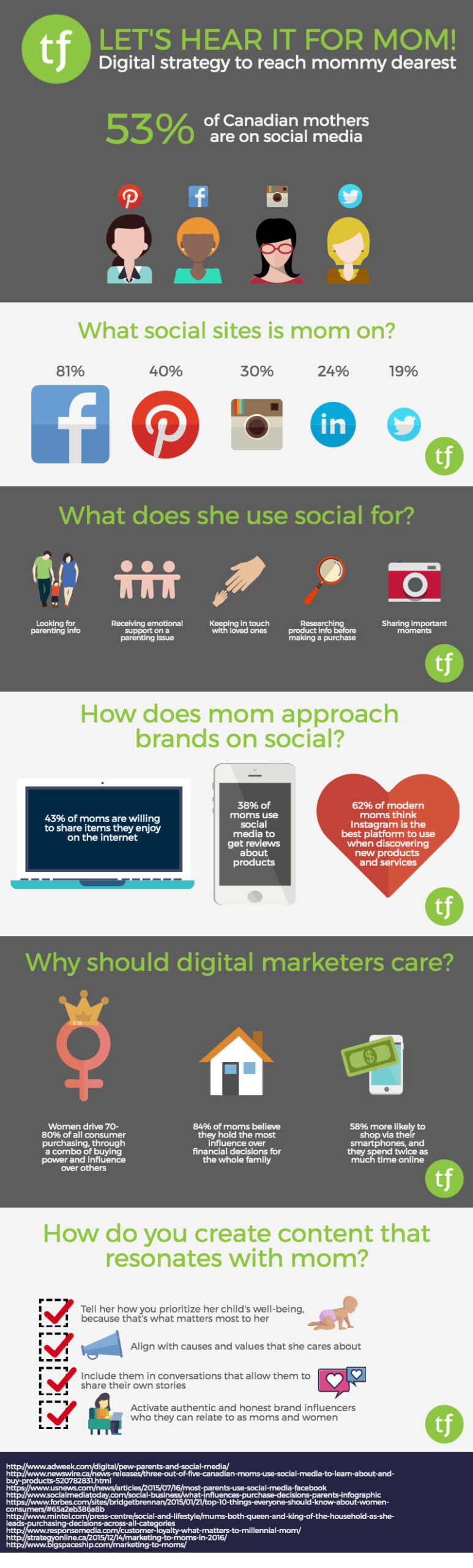
This past Mother’s Day got us thinking about what it means to connect with mom on social media. Much to the dismay of her kids, mom is part of a growing audience of parents on social, proving every day that no one will ever be truly free from the watchful eye of mother. Keeping tabs on her children isn’t the only thing mom is doing online though; social media continues to open up new and exciting opportunities for mom to get on board with brands she likes, and join the online parenting conversations taking place worldwide. Check out our infographic for some highlights on mom as your consumer on social media.

Push pins on a map
Digital Marketing

6 Things to Do before You Relocate Your Business

Changing business locations demands thorough preparation in both the physical and digital worlds

Businesses relocate for a multitude of reasons including the need to accommodate more employees as a company grows, to save money on the cost of a lease, and to serve their customers more efficiently. But what if your customers can’t easily find your new office online, and as a result, in your community?

While relocating your business can be exciting, a successful move requires a lot of planning including making sure Google, Bing, and other search engines aren’t serving up outdated or duplicate location information about your company. Unfortunately, search engines don’t make it easy to sort out such matters.

With local search being a vital driver of new and repeat business, there’s a lot at risk if search engines and your digital properties have incorrect information. Improper or outdated location information can also be a detriment to your website’s search ranking.

The Office Relocation Checklist

There are six important things you should do in advance of your company’s moving day, including:

  1. Change your physical address online including on your site’s “Contact Us” page and anywhere else your former address appears
  2. If possible, maintain your current business phone number
  3. Ensure all your digital and printed marketing collateral are updated
  4. Notify your customers, business partners, and suppliers
  5. Switch the addresses on your social media profiles
  6. Inform your bank and credit card providers of your new address

It’s also critical to know what former business was occupying your new office location, and ensure Google knows that the former business has closed. And don’t forget to update your office address listing on your Google My Business account.

Don’t let the excitement associated with moving to a new office become a frustrating experience because your customers can’t find you online or on the street. Treefrog’s digital moving package eliminates the risk of missing any necessary steps across all of your web properties and with all search engines.

Dew on spider silk
Digital Marketing

What is Search Engine Optimization (SEO)?

101 Information

Search Engine Optimization (SEO) is essential for having a prominent web presence and attracting more visitors to your website. People primarily use search engines to find what they need on the web, including your products and services. You need to be visible on search result pages in order to be found by prospective clients.

SEO is about maximizing the quality of your web pages on multiple levels so that they can be properly indexed by search engines. Search engines have a variety of criteria they look for in a website. Google’s search ranking algorithm changes over 500 times a year, to give you an indication of its complexity.

Ultimately, search engines are looking for the best answer to a searcher’s question. If your site provides the best answer, and it is also technically sound, and if several other websites are linking to it as an authority on a given subject, your changes of ranking will be higher than a site that has none of these things going for it.

The SEO Process

There’s no way to summarize all the intricacies of SEO in a single post. That would be like fitting War and Peace onto one piece of foolscap. The following general tips can help you to attain higher organic search engine raking and maximize traffic to your website.

Determine the best keywords to win relevant traffic. Keywords are the words and phrases that people use to search for information, so you want to select terms that are specific to your business, and write content to reflect those terms so that people can find your pages.

Create original, quality, useful content for all web pages. Use your keywords naturally and with an appropriate density (i.e. use them in a meaningful way; search engines don’t like overstuffed keywords). Including keywords in page titles can also be advantageous to your ranking. If your content is good enough, then other sites may even link to it, and these backlinks can be beneficial to search engine ranking.

Continuously add new and fresh content. Encourage visitors to come back again and again by giving them something new to read. Post multiple articles offering information about your products in a way that informs and educates. This content increases your site’s depth and expands potential visibility of your primary keywords.

Don’t forget the Metadata. Create unique, informative Meta Tags and Meta Descriptions for each page, so that you entice searchers to click on your page from search results.

Create on-site links. Make sure you have sufficient links from your content text to relevant pages throughout your website. This helps users find pages they may not have seen otherwise, and it helps crawlers identify authoritative pages on your site that are linked to often.

Navigation matters! Have a solid architecture to facilitate easy understanding and navigation, so that visitors and search engines can easily move around your site and find what they are looking for with as few clicks as possible. Adding a site map to your website is also recommended.

You should also submit the site map for your content-rich site to search engines or directories to make them aware of your site.

Professional search engine optimization (SEO) strategists use various tools to monitor ranking performance. As the search engines keep changing their search algorithms, SEO strategists have to be on their toes all the time, constantly monitoring the keywords and reworking the information, analyzing your website to keep it competitive in ranking results.

Among all other forms of marketing, search engine optimization (SEO) is integral in getting traffic to your website. Combining SEO engineering and quality content is the best path to ranking success.

Close up of a plant
Web Design & Development

Retail Rule Applied To Websites

3:30:3

You’re walking through the mall (perhaps looking for something specific, but maybe not). You come across a compelling storefront with a nice green tie in the window. You decide to pop your head in and take a quick walk around. As you walk around, your experience is great. You are not harassed by a sales associate, the store is neat and tidy and you are drawn all around the store and finally find that table of green ties. You commit and buy one.

This good old retail rule applies much the same to websites:

1) Grab Their Attention

Compelling graphic design and a professional look and feel makes all the difference in the next step of actually getting someone to commit to come dig in deeper and spend the next 30 seconds. You have 3 seconds to catch their attention and make them find something that they want to click on. For this, Site Architecture and proper navigation is key.

2) Give Them Something Of Value

Have information of value to your target audience that draws them to spend the next 30 seconds finding some areas that they wan to commit to. Caution against putting too much fuzzy “about us” content front and centre. Give people calls to action that answer the things that they need.

3) Have Them Commit

If you’ve done the job of giving them something to chew on, your site visitors will spend another 3 minutes exploring through the site. This critical path and end result will lead to your goal on the website, whether that is making a call, donating now, making a purchase, posting a comment or more…

How do you know that the 3:30:3 rule is in effect on your website?

Check your Google Analytics reports. If your bounce rates are high, that is usually an indicator that people are not finding what it is that they need off of your homepage and some work may be required. In addition, check and see the average time spent on your site. It should be greater than 3 minutes.

water drops on leaf
Hosting & Infrastructure, Web Design & Development

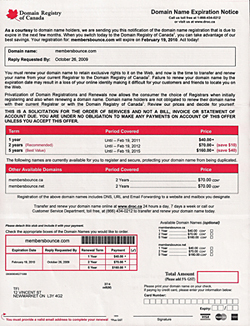
Domain Registry of Canada

We receive calls from customers every few months asking if the letter they received from the “Domain Registry Of Canada” is a legitimate registrar… and they are!

But they prey on anyone Canadian who owns a domain name out there and hope that the customer will take their service over their current registrar and ten times out of ten you shouldn’t go through with it honestly.

We understand it looks like an official document from even the government, but it is not – this is just a registar out there preying on customers who may be unaware of this scam.

It’s very expensive alternative and they provide no service, and gives away the control of your domain to them and we’ve heard it gets even more difficult to make changes to your domain once in their control – be very careful!

If you receive a letter and have your domain with Treefrog call us immediately, do not fill out their form. Once you do we are unable to assist you and you’ll be out the cash (although we have saved a few domains because we were the admin contact and just cancelled their transfer).

This is a warning! Be careful!

(We’re not linking to them, they don’t deserve the link but you can Google their name if you’re that inclined or have received a letter – contact them, or shred the letter and burn the pieces)

pen drawing digital lines
Digital Marketing

Five Essential Parts of SEO

What is SEO?

SEO (Search Engine Optimization) is a magical art, created in the center of an active volcano by a colony of friendly yet mischievous gnomes.

SEO can’t be seen, it’s hard to quantify, it’s not altogether tangible, and it’s constantly shifting and moving around like the smoky essence of the universal ether.

SEO has had a tainted history. In the past few years, snake oil salespeople have been pulling their wagons into town and offloading their wares on the unassuming villagers. SEO was packaged and sold as the way to get to number one on Google. In the past, there were some questionable ways of making this happen. Evil SEOs of old employed backlinking magic, keyword stuffing, and various other wayward tactics to fool the poor Google. And it worked. But then the Google woke up, and it was angry.

With the release of several major upgrades to its algorithm, Google changed the rules for SEOs everywhere. Instead of ranking well for using dark tactics, sites were penalized. Some companies woke up one morning to find their websites had completely fallen off the radar. Since these major shifts in the industry, the world of SEO has become a completely different place.

The Google Effect

You may be aware of the fact that Google changes its algorithm over 500 times a year. Let me put that in perspective. Think of doing something 499 times this year. Google changes its algorithm more than that. That’s more often than some people shower. Every time this happens, the SEO industry feels it. Sometimes the changes are subtle. Sometimes they are major. Either way, a big part of SEO is ensuring your website makes the grade—that is, stays in line with Google’s ranking criteria. There are forums on the Internet where SEO engineers do nothing but debate what Google is going to do next, and what it means. Deciphering Google is a full time job.

Google gets over 60% of search engine traffic

Also, let me clarify. I use the term “Google”, but what I really mean is “search engine”. Everyone knows there are other search engines out there. I think. There’s also Bing, and there’s… Bing. Fact: Google gets over 60% of the search engine traffic on the web, so for the purpose of expedience, I’ll probably just keep saying Google when referring to search engines.

As for the explanation of SEO, I have come to think of it in five distinct sections.

Technical

Technical SEO deals with applying attributes to web pages which happen on the back end, where most mild-mannered content creators choose not to venture. Technical SEO changes can include improving page load times, applying microformatting, validating the W3C markup, and various other techniques.

Search engines acknowledge the effectiveness of a website from a technical perspective, so it’s an important aspect to improved SEO. But once those technical changes are applied, they don’t keep awarding your site points with Google. Even though these updates are important, the SEO work is really only just beginning.

Content/Creative

This is the most important part of SEO. Content should be at the core of your SEO strategy. Whether it’s articles, images, videos, infographs or a collection of all of these, the more relevant and helpful your content is, the better your chances of it being found on the web.

Tactical

Tactical SEO refers to optimizing websites on a page-by-page basis, in order to ensure they make the grade for popular search engines.

Tactical SEO involves the effective insertion of keywords into on-page content throughout a website. This may sound simple enough, but keywords are different for every industry, every company, and every individual.

The wrong keywords will draw the wrong kind of traffic to a website. If the keyword is too broad, you’ll get tire-kickers. If it’s too specific and exclusionary, you may be cutting out part of your audience. Keywords use a balance, and it’s ongoing. Basically, tactical SEO involves strategic content insertion on a continual basis.

Social

Social is a great way to pull traffic to your website organically. It stems from having great content and staying engaged with your audience. Ideally your audience will share your content, comment about it, and give you feedback. All of this activity drives traffic and calls attention to your web presence.

Reporting

This is the science of SEO. Through custom reporting, SEO managers can determine whether a strategy is working. Because one client’s goals are different from the next, SEO strategies should be tailored to fit specific needs. It isn’t all about getting to number one on Google (something we’ll cover more in depth soon), it’s about identifying a client’s key performance indicators and doing everything you can to meet expectations.

As SEO Manager at Treefrog, this will not be the only article I write about SEO. It’s such an involved topic, there are hundreds of angles to cover. In fact, many of the topics brought in this article are grounds for more explanation, which I plan to provide as we go forward. In the meantime, please feel free to email your questions or flag me down on Facebook/Twitter/LinkedIn and I’ll be happy to help however I can.

I hope that you will enjoy following along this incredible journey as we learn and experience together. In the meantime, I’ll be hanging’ with the gnomes.

Close up of a keyboard, but instead of an enter key, there is a green accessibility key
Digital Marketing, Web Design & Development

AODA: Making Your Website Accessible to People with Disabilities

You may already be aware of the Accessibility for Ontarians with Disabilities Act. But are you aware that it will have an effect on how websites are developed?

The goal of the Accessibility for Ontarians with Disabilities Act (AODA) is to make Ontario and Ontario-based organizations fully accessible to people with disabilities, and that includes websites and digital content.

According to Statistics Canada, 13.7% of Canadians aged 15 or older have a disability. Additionally, the Canadian population is aging. StatsCan found seniors accounted for a record high of 14.8% of the Canadian population in 2011, up from 13.7% in 2006.

AODA states all privately held or non-profit organizations in Ontario with more than 50 employees must ensure their websites and digital content conform to World Wide Web Consortium’s Web Content Accessibility Guidelines (WCAG) 2.0. There are three levels of the WCAG 2.0 – Level A, Level AA, and Level AAA. Your organization’s site needs to be WCAG 2.0 Level A-compliant today.

By January 1, 2021, all public organizations and companies with more than 50 employees must meet WCAG 2.0 Level AA. WCAG 2.0 Level AA includes captioning for both live and pre-recorded video and audio available online.

Find Out How AODA Relates to Your Business

The timeline for your organization to be AODA-compliant depends on the size and nature of your business or non-profit entity.

The timeline for implementation is complex because the law deals with many facets of business, of which website accessibility is one. To give you an idea, here’s a PDF created by the Government of Ontario that gives a timeline detailing requirements and compliance deadlines.

The Government of Ontario website features a wizard you can use to find out what category your organization belongs in, and which gives you a sense of the deadlines that directly affect your business.

What You Can Do Now

When you’re developing your website strategy, consider implementing the following functionality:

  • Write your content in clear language that is easy to understand
  • Use strong contrast for text on backgrounds to make it easier to read
  • Provide alternate text for images and captions
  • Mark decorative images — images that have no direct relevance to an article — as null text Tag: (alt=“”)
  • Ensure that your website is navigable with a keyboard
  • Provide text transcriptions for audio recordings
  • Provide text transcriptions and captions for videos
  • Avoid blinking images or potential seizure-inducing visual elements
  • Use clear link text (instead of “click here”, describe the link and its content)

WCAG 2.0 Accessibility Will Improve Your Site SEO

Search Engine Optimization (SEO) is the practice of making your site discoverable on the web via search engines. It’s an involved process that involves leveraging your content so that Google takes notice of your site.

Complying with WCAG standards ties in with good SEO practices. For example, alternative text tags should describe images in the context of the article in which they are placed. The description shouldn’t just be a bunch of keywords stuffed into a text field at random. These tags are read aloud by screen readers. They need to make sense. Plus, Google likes it better when they do.

The more you make your site accessible, user-friendly and transparent, the higher your rankings will be. In other words, the more accessible you make your website to people with disabilities, the more Google will acknowledge your credibility.

AODA is Already Law: The Time is Now

If you factor in accessibility measures to your site at the outset of the project, the process will be far easier. There are guidelines and accessibility checklists available you can use to test your site’s compatibility.

AODA will encourage businesses to make their websites more accessible to potentially millions of additional users, making the internet a much more accommodating place for the millions of people with disabilities in Canada, and around the world.

For more information about AODA-compliant websites and how Treefrog can help, get in touch with us.

PLEASE NOTE THAT THIS IS NOT A LEGAL DOCUMENT, AND SHOULD NOT BE RELIED UPON FOR LEGAL ADVICE.

More Resources:

Web Content Accessibility Guidelines (WCAG) 2.0

WebAIM’s WCAG 2.0 Checklist for HTML documents

WebAIM Introduction to Web Accessibility 

Scroll to Top