
web platform

Laptop with analysis of sales onscreen, on a table with blurred warehouse cargo in the background.
ERP-Web Integration

10 Reasons to Integrate your ERP with your Web Platform

One of Treefrog’s special sauces is our experience and skill integrating ERPs with web technologies. We have experience with numerous ERPs (for example, SAP, Epicor, SYSPRO, etc.) and many web platforms (for example, Magento, Shopify, WordPress, etc.).

What benefits to closing the gap between your ERP data and your web platform look like?

Here are some examples;

1. Synchronize Inventory

Inventory levels that are accessible to your customers, along with stocking dates for out of stock products, photos and specifications that are always accurate empowers your customers to plan, to make decisions and to take action whenever and however it suits them, whether you’re selling B2C or B2B.  Combine this information with web analytics can help you gain visibility into what products your customers are browsing, what items they’re purchasing together and what products they’re searching for that you don’t yet have.

2. Synchronize Pricing

Synchronizing your web information with your ERP data means making pricing changes once and only once.  Customer-specific pricing, even on a product-by-product level, becomes much more manageable through customer portals and logins.  Pricing levels can even be time-based for a specific category of customer for the duration of a marketing campaign or seasonal promotion. 

3. Ditch Data Entry 

Are your users manually re-entering web data into your ERP?  Sales Orders? Quotes requests?  Your manual processes, wherever they exist, are completely unnecessary!  They are compensating for the inability of your systems to move data between them.  This makes room for error, is an unproductive use of your people’s time and makes it difficult to capture customer information and track sales analytics.  Every company we work with is finding it harder to fill key positions.  Why not leverage the time of your best people toward high-value activities?  By automating those that don’t require their judgment and intellect, you free up capacity and make their work experience more fulfilling.

4. Know What’s Happened (Revenue analytics) 

Capturing your web data and ERP data in one place means more visibility into monthly, quarterly and annual revenues, quoting activity and browsing activity.  Not only does integration enable more accurate and detailed revenue reports, you can now combine this revenue data with other customer data to help you understand what your customers are thinking and doing.  Now, you can understand what’s working for your customers and what isn’t, enabling to you respond.

5. Know What’s Coming (Revenue Forecasting)

When a customer requests a quote from you today, where does that information go?  More importantly, when a customer sends a quote to their customer for one of your products, do you even know about it?  Our ERP-web integrations bring visibility to the entire sales channel, not just the first link in the chain (your direct customer).  When you know what kind of activity your customers are up to with their customers, you can more reliably anticipate what’s coming for your business.  

6. Notify Customers

If you asked your customers what they’d like to be notified of in real-time what would they say?  In-stock notifications? Shipping notifications?  Price changes? Quote responses? New products?  Notifications can significantly impact the experience of your customers, and with web-ERP integration, you have options.  You can notify them on almost any change in data that you choose, as long as it exists in either your web data or your ERP data. 

7. Help your Customers Help their Customers

In the B2B world, the most impactful difference you can make in the life of your customer is enabling them to positively impact their customers.  What if your B2B customer could take a quote you’ve given them and convert it into a quote for their customer, by adding their own materials, labour and markup?  Simplifying the quoting process for your customers means faster turnaround for their customers.  What if you could directly tie-in to the distribution systems of your customers?

8. Support Growth

Once you’ve automated processes and put key information directly in the hands of your customers, you’ve created an infrastructure that enables growth without creating additional demands on your people – to answer questions, enter orders or pull together data from multiple sources to answer key questions.  

9. Be Flexible

With the integration of your ERP and web data, you create flexibility.  Your have the flexibility to add new online or traditional sales channels, add new product lines, new markets (local or international) or any combination of these three opportunities without sacrificing operational efficiency or overall performance.

10. Be Future Ready

Technology is changing at an increasing pace.  Creating the infrastructure for your front-end and back-end data to work together enables you to leverage other emerging technologies for even more opportunities – with IoT, big data predictive analytics, AI, VR.  Once a central reservoir is in place, capturing all your key data, we can leverage that data to make use of other forms of technology.

11. Leverage your Legacy ERP

ERP upgrades are hard.  Hard on cash flow, hard on your people, and hard on your customers and suppliers.  They are the change that every business dreads, but cannot avoid.  Integrating data between your web and ERP can buy you time by putting the data you already have to work for you…while you plan for the upgrade you know you ultimately need.

If you are unsure where to start with integrating your ERP into your digital platform, we would love to chat. We have helped several organizations identify gaps and solve major issues in your company’s efficiency and growth opportunities. Contact us today. We’d love to chat!


Female owner of a small business packing her product in boxes, and preparing it for delivery.
Digital Marketing, Web Design & Development

Don’t Make These 5 E-commerce Business Mistakes

Owning an e-commerce business can be challenging (to say the least), as many factors that can damage a reputation, a brand, and an end product.

If you wish to be successful online, look like a credible business, and be known worldwide, it is important to avoid making these five e-commerce business mistakes:

1. Under Researching Your Competition

Research, research, and more research is key to starting any business. Understanding the market and studying up on your competition will get you one step closer to owning a successful online brand.

Reading case studies on other e-commerce businesses in your market to see what you may want to do better or differently is a good start. In this process, we suggest that you learn how to conduct a competitive analysis.

What is a competitive analysis?

A competitive analysis is an evaluation of what makes you unique when compared to other competing brands. This process will allow you to more clearly differentiate yourself from the competition and make more informed decisions in your marketing strategy.

How To Conduct A Competitive Analysis

2. Avoiding SEO

Search Engine Optimization helps to generate more organic traffic to your website. Before building an online store, you should understand how search engine optimization works and how to use it to your advantage.

When a website is created with Google and other search engines in mind, it is more successful. In other words, it will have a better chance of being found, viewed, and enjoyed.

The higher your website appears organically on a Google results page, the better and more relevant it has been ranked.

Learning how to use the right keywords for your site is a good start when studying and writing for SEO. At Treefrog, we can help you to improve your SEO with a suite of strategies and best practices. We will also help you create, organize, and optimize your web content so that you will be visible when it matters – when your potential customers are looking for services you provide.

3. Choosing The Wrong Web Platform

When starting a business, it is often confusing which website platform to use. If you use a website platform that fits with your business requirements, it must also be reputable and good quality.

The landing page of a website is the first thing users will see when they enter your site. Some elements a website should have to keep potential customers on your site include:

  • Appealing Design: This will ensure your e-commerce business looks like a professional store, as some web users feel uneasy when shopping online.
  • Easy Navigation
  • Category Pages: If you sell a large variety of products in your e-commerce business, this will organize the items so users can find exactly what they are looking for

At Treefrog, we work in many platforms to ensure our clients receive the best website for their specific needs. Some of these include; WordPress, Shopify, Wix, Magento, Drupal, Leap, and custom systems.

4. Neglecting To Optimize Your Site For Mobile Users

Many people have ditched desktop and laptop computers for their mobile devices, which are easier to handle and use on the go. Therefore, it should be of no surprise that mobile commerce is vastly growing.

A research study conducted through Think with Google states that if people have a negative online experience from a mobile device, they are 62% less likely to purchase from your e-commerce store in the future.

As more people are using their phones or tablets when looking to order furniture, clothing, or the latest gadget, it is essential to make sure your website is responsive (mobile-friendly). Mobile optimization will create a more frictionless buyer’s experience.

5. Settling For Slow

We live in an age where everyone is in a rush; we can now order coffee from our phone, we can choose a self checkout lane at the grocery store, and we expect packages to be shipped in a day.

The quickness of technology may be convenient at times, but we’d argue it has created some very impatient people. This is especially true when it comes to your website.

For example, if someone is waiting more than three seconds for your website’s page to load, it is highly likely they will close the page and look for information elsewhere. Therefore, a slow loading page can profoundly impact a website’s conversion rate, engagement, and brand reputation.

Why is page speed so critical?

It is vital to have a fast-loading page so users can get to where they want to go quickly.

Amazon stated that just one second of leg load time on their website would cause a loss of $1.6 billion in sales each year. That’s billion with a B!

Google has the same issue, stating an addition of 0.5 seconds of loading to its search pages causes traffic to drop by 20%.

The Importance of Page Speed

Connect With Treefrog Inc. Today!

At Treefrog Inc., we understand that starting an e-commerce business is hard and we want to help! Our Frogs are experts in many fields that can be beneficial to your online marketplace.

Visit our website at www.treefrog.ca for more information, or give us a call at 905-836-4442.

Illustration of interconnecting points
Digital Marketing, Web Design & Development

Why Your Business Should Always Renew Your Domain Name With a Reputable Company

A cautionary tale in domains

You wake up in the middle of the night with a fabulous new business idea. You now need a website! First things first, you look for a domain name. The domain name is an essential piece of your brand and may involve your keywords, your company’s name or is possibly is just memorable by the name itself.

As the months pass and your website is live, your business is running and you are now working 18-hour days running your business. The small little thing, like a domain name, is farthest from your mind now thinking of what’s it’s doing or how it’s working for you. Until it happens…the renewal!

Have you ever thought of what happens if you don’t renew you domain name?

If you own a domain (unless you have purchased it for 5 or 10 year increments) you will receive an annual renewal notice, they are typically sent out at 90 days, 60 days, and 30 days, depending on your registrar. The desire is that this will prompt you to renew with adequate notice. But should you miss the renew date it does expire and enters a grace period.

For 0 – 40 days, depending on the kind of domain name you have (.com, .ca, .uk etc.), past that expiry date your domain name sits waiting for you to change your mind. All in the hopes that it was possibly a mistake and you will pay the fee and return it to its former glory, housing your website!

During this grace period all services associated with your domain name stop working. That means, all of your email addresses associated with that domain name will no longer receive email, and your website on that domain name will be inaccessible.

After the grace period has come and gone the domain name finally does one of two things. It either enters a redemption period where you can still get your domain name back one more time (for an additional fee on top of the renewal), or it fully expires. Finally, it’s then publicly listed with other “to be released” domains and sold to the highest bidder. There are a lot of people out there reading those lists of domains in search of domains to purchase, but that’s a whole other subject for another time.

Can you imagine if your domain name was sold off to the highest bidder?

For an example, let’s take the current mayor of Toronto who owned robford.ca. This domain housed the website which was home of everything Rob Ford when he was city councillor before becoming mayor. He would update it with council votes, council expenses and the site held information for you to contact him. But since becoming mayor, someone along the way either forgot to renew it  (possibly wherever he was hosting the domain, or they never let him know?). Or possibly just deemed robford.ca not necessary anymore and let it completely, totally expire.

It sat for the 0 – 40 day grace period and was then released back into the pool and sold off to the highest bidder. Now Mr Mayor Rob Ford’s domain name is in the hands of someone else, who’s having it re-direct to the Toronto Star, or posting “Rob Ford (January 31, 1862 – June 8, 1892) was an American outlaw best known for killing his own gang leader Jesse James in 1882” and now taking suggestions on what to do next. Who knows the eventual fate now of robford.ca, but whatever happens now isn’t controlled by Rob Ford.

The Mayor Rob Ford now uses http://www.robfordformayor.ca and http://www.toronto.ca/mayor_ford, but to let a domain he was using for years lapse is a costly move for him, and would be a costly move for any business.

If your business is online, then you have a domain name! It’s connected to your website and possibly your email. It’s how you tell prospective clients and current clients where you are, how they get in contact with you and is part of your brand. Your business is important and your domain is the most important piece to that online identity.

Ensure your domain name is renewed yearly or better yet purchase it for 10-years, show stability to the search engines and put your mind at ease.

One of the best practices at Treefrog is that we renew every domain in our account for our clients and each domain is checked over by trained staff who know the value of keeping that domain. Even if you do finally choose to let your domain go, we follow up with you personally to ensure this is what you want. So make sure your domains are with a reputable company and are renewed so, unlike Rob Ford, you will control your  domain for many years to come.

Pen drawing a digital line
Digital Marketing

How To Create An “images_sitemap.xml” File

Part One: What They Are, The Benefits, and Building with Screaming Frog

When having a conversation about XML sitemaps (it’s more exciting than you think), it’s pretty common to think about a style-less page within a website containing all relevant links on it so that search engine robots can more intelligently “crawl” the site, making it easier for them to include you in SERPs. This is an integral part to search engine optimization, as sitemaps serve as a way to communicate directly with search engines, notifying them of new or changed website content to ensure that it is indexed correctly, and timely.

So we know the benefits of having an XML sitemap for web pages, but what about images? Another important part of SEO is optimizing images with appropriate alt text and file names, so shouldn’t we make sure that the same robots that are crawling our website and helping show up in search engines are doing the same for our images in image search engines (ex. Google Images)?

Well, that’s where image XML sitemaps come into play.

What Is an XML Image Sitemap?

Much (exactly) like sitemaps for web pages, sitemaps for images are style-less web pages that live on a site with several links listed on it. However, instead of showing information like a URL, the last modification date, the crawl frequency and priority like on traditional sitemaps, image sitemaps can communicate to robots:

  • The type of image
  • The subject matter
  • Image alt text
  • An image title
  • A geographic location
  • Etc.

Images can be added to an existing sitemap, or you can create a specific sitemap for the images on your site – the choice is entirely up to you. Personally, I prefer to go with the latter because there is an abundance of free third-party software that you can easily use to generate several kinds of sitemaps.

The Benefits of an Image XML Sitemap

Image sitemaps are incredibly useful if you want your images to show up in Google Image search results, and you do want this. Google receives hundreds of millions of image-related search queries every day. Now, if you own a plumbing, construction, or a kind of business where lots of images might not be found on your website, this fact might not mean a lot to you. If on the other hand, you own an e-commerce or other business where images are a key part of your website, I probably just caught your attention.

E-commerce companies are known for having websites that are especially image-rich. If this sounds like you and the images on your website are a) not optimized for organic search and/or b) not included in an XML image sitemap, there is a very good chance that you’re missing out on valuable traffic that you deserve. Not good!

If images make up a large portion of your website, either from product galleries or other resources, I strongly recommend incorporating an image XML sitemap.

Creating An Image XML Sitemap

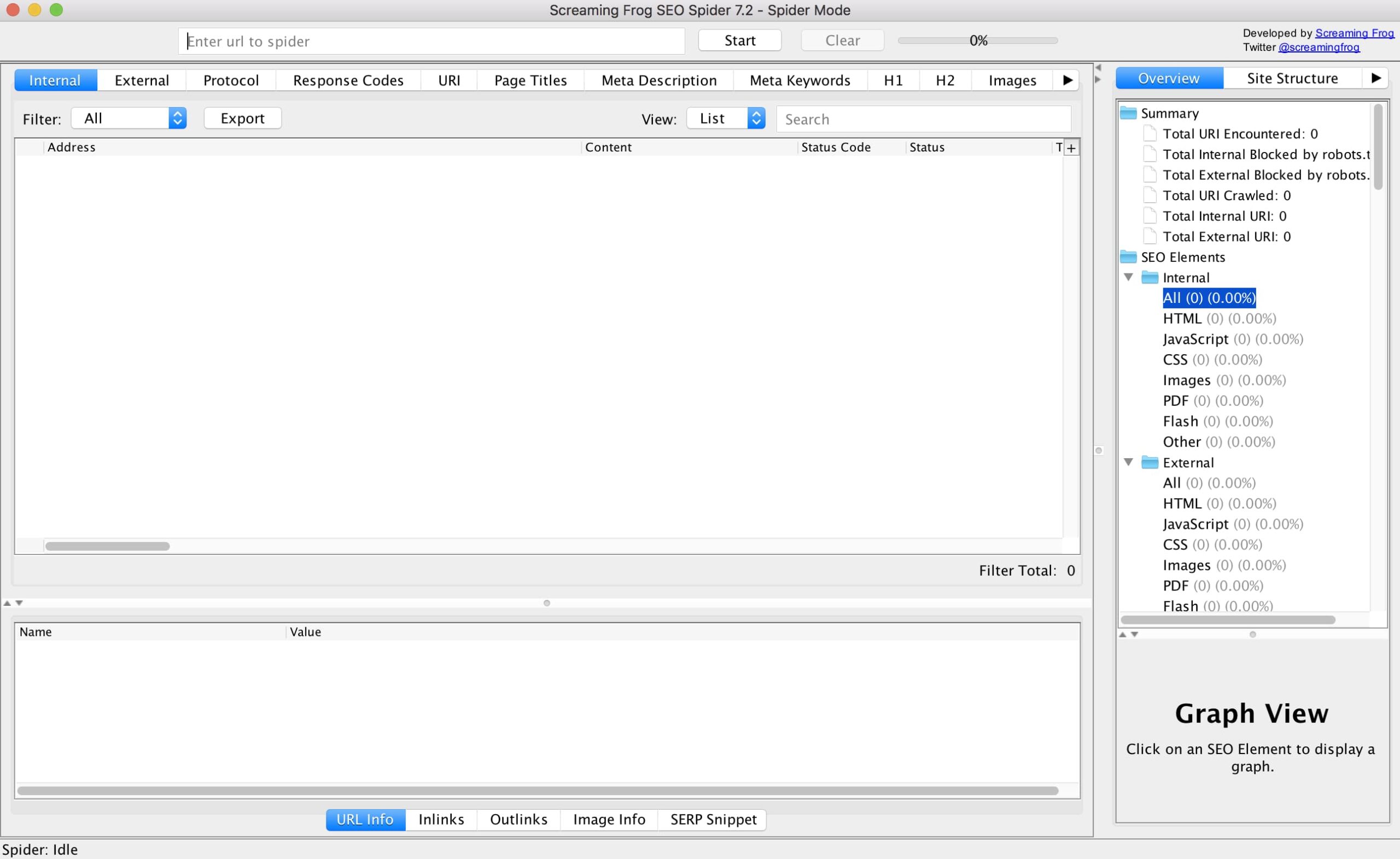
Here at Treefrog, we use Screaming Frog SEO Spider, a tool provided by Screaming Frog that collects website data and identifies technical issues that could be detrimental to your SEO efforts. To follow along, I recommend you download a free copy of Screaming Frog SEO Spider.

Step One: Getting Comfortable with Screaming Frog

At first glance, the Screaming Frog SEO Spider dashboard can be somewhat intimidating, but not to worry because creating XML sitemaps doesn’t take more than a few clicks of the mouse.

Start getting familiar with the software by doing some exploring. Look at the various aspects of a website that Screaming Frog SEO Spider has access to.

Once you feel comfortable, copy and paste the full URL of the website you would like to crawl into the search bar at the top of the dashboard. As an example, I’ll crawl our company website. Click the “start” button to begin crawling.

Step Two: Creating The Sitemap File

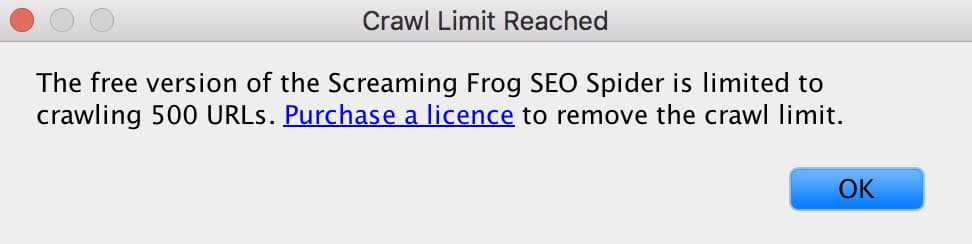
Depending on the size of the website you are trying to crawl, this may take a matter of seconds or minutes. It’s worth mentioning that the free version of Screaming Frog SEO Spider has a 500 URL crawl limit.

Once Screaming Frog SEO Spider has finished crawling the website, make your way to the top menu and look for “Sitemaps”. Hover over it, and then select “create images sitemap”.

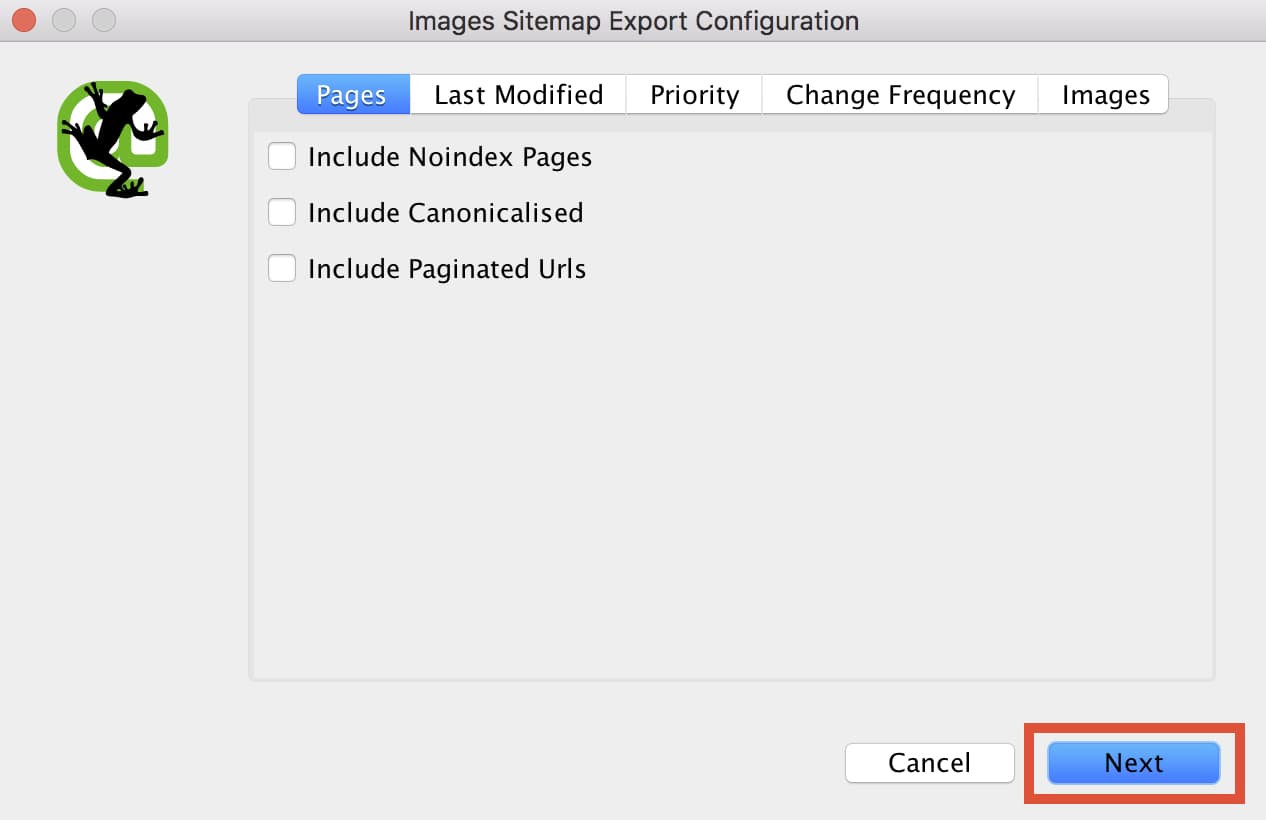
Next, a series of windows labeled “Images Sitemap Export Configuration” will appear. This is to help you set up the sitemap. You will be able to control what pages get included, the priority of the pages, and finally what images to include on the sitemap.XML file. As a default, only internal HTML pages with “200” status codes will be included in the sitemap file. Typically I leave these settings alone, but it’s always good to double check. Once you are happy with the settings, click “next” to generate the sitemap file (Seriously, it’s that easy).

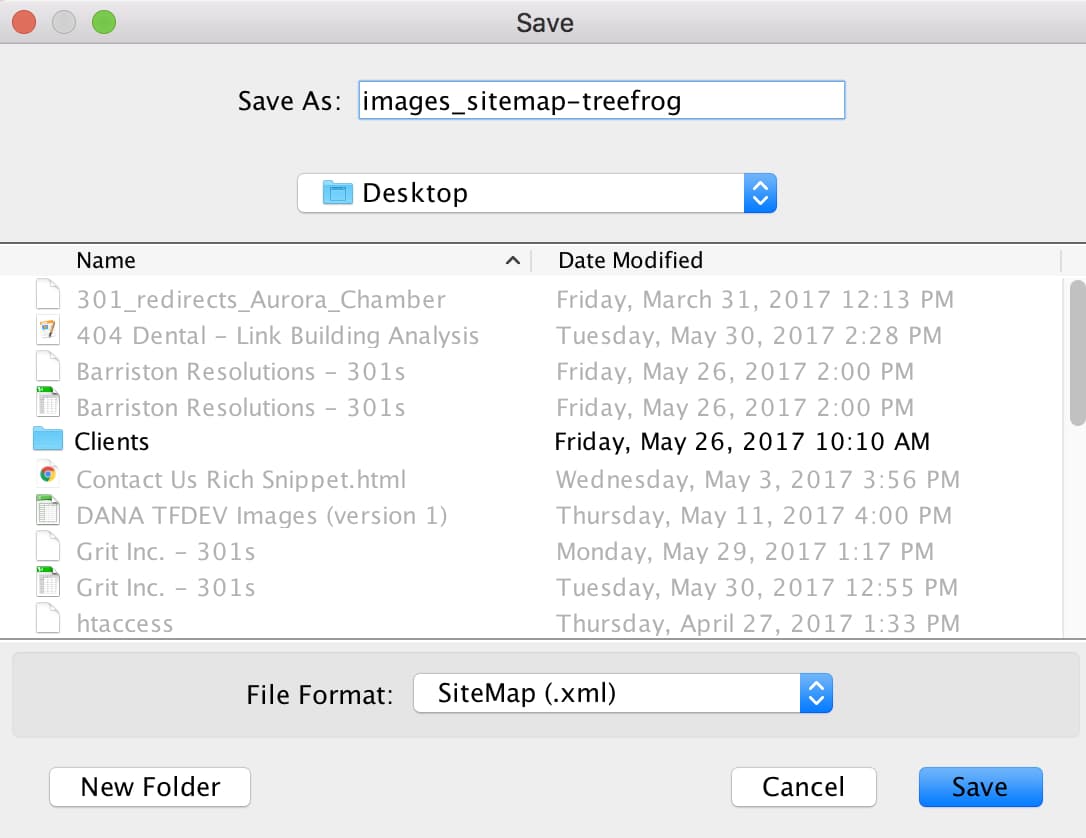
Rename your file to “images_sitemap-(client name).xml and simply save it to your desktop.

… And you’re done! You have just successfully created an images_sitemap.xml file that you can easily upload to your server to get noticed by search engines. In my next post, I’ll go over how to upload your sitemap.xml file to your server using FileZilla, and how to submit it to Google Search Console for proper indexing. If you have any questions about image XML sitemaps or SEO in general, feel free to contact the SEO Team!

A hand holds a credit card, while the other types on a laptop keyboard
Digital Marketing, Web Design & Development

Now’s The Time To Spruce Up Your Ecommerce

Is your online business holiday ready? Now’s the perfect time to spruce up your ecommerce site before the pre-holiday shopping season sneaks up on you!

You may be shaking your head and saying “Are you crazy! It’s only June!”

But trust us. Fixing, updating, and crafting content takes time, and any company using ecommerce to sell products over the holidays needs to start addressing their site’s pain points now.

“But how do you identify pain points?”

We’re glad you asked!

Common pain points for ecommerce sites can range from too little content to too much content, to terrible photo quality, and beyond. So, to help you to identify all the things needing to be addressed within the framework of your ecommerce site, we’ve developed the following checklist of questions that need answering.

Are you using the right platform for your brand?

As the popularity of ecommerce continues to rise, it can be overwhelming to choose which platform will work best to sell your products. That’s why we at Treefrog meet with our clients to understand their goals, the product(s) they’re selling, and then suggest the platform we know will best match their specific needs.

Should a client want to change their online store from one platform to another, we can help with that too!

Have you lost track of the last time you updated your online store?

In competitive markets, it’s essential to refresh and revitalize your retail offerings, especially as the seasons change. Forgetting to update your site could cause you to oversell products (without having enough stock), or cause fans of your brand to get bored, seeing the ‘same old’ each time they come to your site looking for something new.

At Treefrog Inc., we offer training sessions that teach you how to enter your ecommerce site and edit your material quickly and easily. This knowledge allows you to remove products you no longer sell and add new ones that you’d like to feature. We can also provide guidance on what to write in your descriptions, how to position your content messaging, and how to leverage social media to create brand awareness!

Is your content helpful and clear?

Strong and descriptive content can be the push an interested customer needs to follow through with their purchase. Without helpful details about sizes, or materials, or product quality, potential customers may feel they don’t have enough information to commit to their order, especially when having to pay for shipping.

How can we help? Our content marketing team uses their expertise to conduct content audits on websites that need improving. By analyzing each page of your site, including every image and description, we develop a detailed document that provides suggestions for growth, editing, and expansion. Should a client then hire us to work on developing their content, we’ll collaborate with them to apply the suggestions we made, update content that needs to be refreshed, and improve the message they’re articulating.

Are your pictures professional?

If your pictures are outdated and blurry, odds are your user experience is being tainted. The modern customer values professionalism, and to stay competitive, your images need to not only sell your products but also needs to communicate the value of your brand.

Our department of graphic designers and photographers can help. With professional equipment and a key eye for lighting, balance, and detail, our team ensures the images our clients use are consistent and brand appropriate.

Have you thought about SEO?

While the above items are important steps in ensuring your website is ready for the holiday rush, they’re irrelevant unless people are able to find your site! This is where our SEO team comes in.

Our team of Search Engine Optimization Specialists make sure that navigation links are accessible, that webpages have unique titles, URLs, and meta descriptions, that page headings are appropriate (in terms of keyword searching), and more. Each of these additions naturally increases success by enhancing site visibility to new and existing customers online. So, while we know it’s hard to start thinking about the holidays already, we can promise you’ll thank us for giving you this little push to start working on improving and updating your site now. Getting a head start will reduce your holiday stress and will undoubtedly help you to secure more sales from happily returning customers.

Once your site is polished to perfection, it will be time to think about how you want to promote it, via social media, email marketing, and other viable channels.

For more information on how our team can help ensure that your ecommerce site is holiday ready, give us a call today at 905.836.4442!

Cropped close up of graphs on a laptop screen
Digital Marketing

Conversion Rate Optimization & What It Can Do For You

How efficient is your website at turning visitors into customers?

If you could turn more of your website visitors into leads, you’d jump at the chance. Unfortunately this doesn’t just magically happen—there are several factors to consider. That’s why we’ve taken the time to break down the value in conversion rate optimization.

What is Conversion Rate Optimization?

Before we ask this question, let’s first define what a conversion is. A conversion happens when a user performs a desired action on your website.

Common conversions include:

  • Someone clicking your phone number to call you.
  • Someone signing up for your email newsletter.
  • Someone completing a form for a free download or to get in contact.
  • Someone making a purchase on your website.
  • Someone filling out a ‘request a quote’ form.

Conversion Rate Optimization is a strategic approach to digital marketing that seeks to optimize the ratio of traffic to leads on your website.

Obviously everyone wants more leads, and in a perfect world every person that ends up on your website will convert. But the world doesn’t work that way. People are very finicky about whether or not they will commit to a desired action online. What Conversion Rate Optimization (CRO) aims to do is to present a user with a scenario where they will have the highest likelihood of taking that action, whatever it may be.

Normally, CRO is carried out on dedicated landing pages. Often, these landing pages are designed to take all of the external distraction away, so the user is channeled towards the main conversion point, or desired action. It’s kind of like the old velvet rope maze in the bank—it clearly screams “LINE UP HERE!” We don’t want to give users a lot of options with these dedicated landing pages, we want to guide them towards the goal as efficiently as possible.

Again, the world works in mysterious ways, because it’s full of people. And people are funny. No one knows exactly what the right recipe is for conversions, just the same as advertising through one medium does not appeal to all audiences.  What we’re left to work with at that point is data.

In other words, how much traffic is getting to our landing page, and of that traffic, how many people are filling out our request a quote form? Let’s say it’s 1%. Obviously we want that number to improve. So, we need to go through the process of iteratively changing our landing page so that it gets more forms filled out.

The nature of CRO is not to throw the baby out with the bathwater. We don’t want to completely scrap our landing page and start again. We want to make slight changes that we can prove have made a positive effect. Sometimes that can mean changing the colour of an element, like the button people click to submit the form. Maybe we want to try paring down the text on the page, if we feel like there’s too much, and people are seeing it as a distraction. Maybe the form itself has too many fields to fill out and it’s scaring people off. Maybe the main website navigation is leading people off the page and away from our conversion point.

When websites are not architected with these conversion points in mind, and when pathways to conversions are not re-visited and adjusted over time, you run the risk of leaving money on the table. Someone hopping off your website without taking your desired action is the same as someone walking out of a store without buying anything.

How to Test Conversions

Analytics Matter

Many businesses make the mistake of assuming they do not need to use tools like Google Analytics to track their online conversions. We’ve run into several cases where clients aren’t sure what marketing initiative led to what leads. But our thought is: all of this data is trackable! What do you have to lose by tracking it? Collecting and analyzing your website’s data is critical to understanding your business, and in identifying growth areas.

Think about it.

The beauty of digital is that it allows us the ability to accurately track whether our marketing is working or not. As an accompaniment to analytics, CRO allows us the ability to test and tweak specific pages to ensure they are converting (selling) as well as they possibly can.

Make Calculated Changes

CRO also lends into a practice called A/B testing, or multi-variant testing. This means showing one version of a webpage to some visitors, and a variant to others. You can then monitor engagement on both variations. In other words, which one is getting more people to fill out the form? Do people fill out the form more often when it has a big red arrow pointing to it? Yes? Then welcome to our landing page, big red arrow!

Most businesses are unaware that you can conduct these experiments right within Google Analytics. You just need a bit of coding chops to set it up.

While positive analytics are great, negative analytics can be just as informative and helpful.

For example, you may choose to change the main “Get a Quote” button on your home page from red to blue, and track this for four months. If after that time you notice your conversion rate went down, then switch back to blue. Maybe the next test will involve making the button green. The point is, we should always strive to increase our conversion rate through data-driven, incremental optimization.

While these tests take time, the pay off of small-calculated changes can be hugely profitable.

Knowing What To Change

The process of identifying which elements of your site should be tested begins with identifying which parts of your business are under-performing.

You must ask yourself:

  • What are my key performance indicators?
  • What are my defined goals?
  • What are the major problems I am facing?
  • What are the specific needs of each of my web pages?
  • Which pages are most critical?
  • Am I tracking the right data?
  • Is my SEO set-up properly?
  • Is my website easy to navigate and useful to my audience?

Data-driven tests will help you to get into the mind of the customer and truly understand where your website is missing the mark.

In terms of how long you should track an experiment, that depends. Do you get sufficient traffic to the page you want to test? Are there seasonal aspects that will affect your data? How long the CRO experiment runs should be driven by what you’re testing, and whether you can expect to get a large enough data set to make an informed decision.

For example if you plan to track conversions from a landing page for a month, and after the month ends we still don’t have enough data, then perhaps we need to keep the experiment running a while longer.

Be sure to also test only one conversion at a time. Changing multiple aspects of a landing page at one time will really muddy the waters for your data. You need to be able to determine exactly what change led to the increase in conversions at the end of the experiment.

With detailed analytics data, honing in on specific areas of a website has been made substantially easier. However, without the guidance of a professional, who can truly work to unravel and take the time to absorb and understand your specific data, identifying these pain-points, as well as which conversion points to test, can be overwhelming.

To consult with our in-house SEO specialists about evidence base conversion optimization, and what our team can do to test various components of your website, contact Treefrog Inc. today.

A hand uses a stylus to point to a pie graph on a computer screen
Digital Marketing

Finding 404 Errors with Google Search Console

If you’re like me, you lean more to the creative side. I came from a world of content, constantly creating fresh new ideas for the readers of an educational trade publication. In 2013, I was drawn into the world of SEO. That may seem like a drastic shift, but not entirely, when you think about it.

The lines of content and SEO intersect quite frequently. In fact, some bloggers go as far as to say that SEO is only about content, and that everything else is “window dressing”.

Well, I completely disagree and I’ll tell you why. SEO as a skill set is very broad. There’s a lot of overlap when it comes to content and SEO, because after all, content is what’s being optimized for search.

However websites also need to be technically proficient in order to appear consistently in search results for associated keywords and phrases. Google is pretty snobby when it comes to the standard of perfection it expects for technical website optimization. If you’re doing everything right, you get a pass. Do it wrong, and you could have a hard time appearing.

It all comes down to user experience. If your site is full of broken links and slow-to-load elements, no one is going to want to stick around.

As marketers, we need to have at least a fundamental understanding of the technical side of things. If our content is not ranking for the phrase we’re targeting, we need to see the bigger picture—over and above the possibility that the text itself is not adequate. Maybe the blog post or article we wrote is fantastic, but the website is plagued with technical errors. This causes users to lose faith, and that’s a very strong signal to Google that the website in question is low quality.

If any aspects of your site are technically unstable, Google’s assumption is that you have not done your due diligence and obviously you’re not a good answer to the question.

Now, I’m not talking about having to delve too far into overly technical SEO. The extremely technical SEO stuff interests me, but I’m more inclined to leave it to our skilled engineers and programmers.

What I am truly interested in is teaching clients about how they can leverage the data at their fingertips, and turn it into something real.

So in this series of posts I want to show you a few tricks to uncover information about your website that you may not know existed.

We’re going to start basic.

Quick Search Console Trick: Finding 404 Errors

Let’s do a quick tutorial. I’ll assume you have access to Google Search Console and that it’s installed and running properly on your website.

You know what 404 errors are, right? The content is inaccessible because of a few possible reasons:

  • Someone changed the webpage URL, so all links going to it are broken
  • Someone linked something incorrectly on the site and now it’s returning a “page not found” error
  • Someone took down a webpage, and did not forward the old link properly

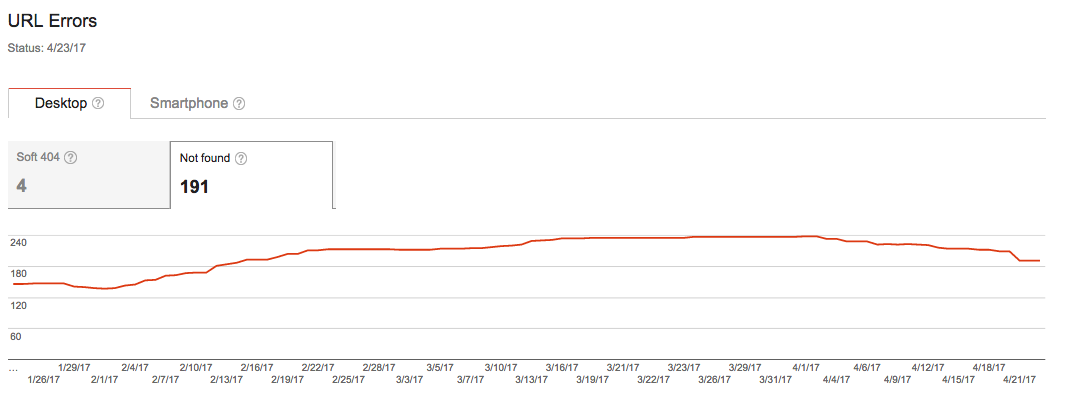
Did you know that Google crawls your site from time to time and has a list of most of the places where 404 errors occur?

How to Find Them:

  • Open Search Console and select your website
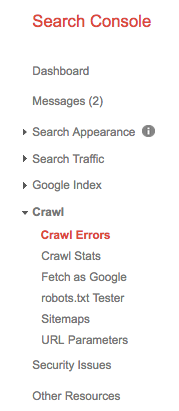
  • Select “Crawl” from the left-hand menu, and select “Crawl Errors”
  • Select the “Not found” tab
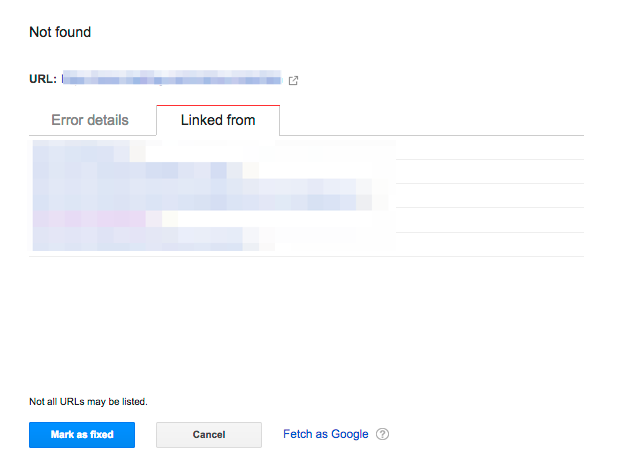
  • Click on one of the links in the found set, and then click on the “Linked from” tab

You now have a list of places on the site where the broken link appears. If the list of pages is massive, it could be that the broken link is part of a menu item or something site-wide.

Now, you need to seek out the place where the link exists and fix it, or remove the link.

Keep in mind that 404 errors on their own are not inherently detrimental to ranking on Google. At least that’s what Google tells us. The caveat to this is user experience. If you have a number of links from search results leading users to inaccessible pages on your website, Google will eventually stop displaying your results. The likelihood of users sticking around the website after they arrive at a 404 error is pretty low. So, the tendency is to “bounce” or “pogo-stick” back to the search result to find a better answer to our question. If enough of this activity is going on, it could be detrimental to your SEO.

The above exercise is a good way to do some spring cleaning on your website. Maybe you’ve been adding webpages over the past few years, changing links, taking pages down. Unless you’ve kept a very detailed record of all this activity, and maintained a process for fixing these things, you may have a bunch of dangling 404 errors haunting you.

Search Console is a good way to keep on top of this. There’s also a ton of other features it offers that most content marketers are unaware of. And the best thing is, it’s a free tool.

If you have questions about anything you’ve come across in Search Console or other SEO tools, let us know!

close up of power button
Digital Marketing, Web Design & Development

My Website Is Live! So Where Is It?

What you need to know about how Google indexes your website

After the Frogs push the Big Red Button and a client’s brand new website goes live, it’s only a matter of time before the client calls and asks why they can’t see their beautiful, new site. It’s not that the site isn’t there; it’s that the Internet, like all technology, works in mysterious ways. Or maybe it’s not so mysterious if you understand a couple of key technical concepts.

When dealing with any kind of technology, particularly the types that are related to the Internet, patience is definitely a virtue. For reasons we’ll get into shortly, it can take up to 48 hours before everyone online will be able to see your new website.

TTL and DNS and caches, oh my!

There’s a common perception that when a new site goes live, it creeps out over the Internet like pond scum over a lake until it’s completely covered the cyber-ether. Not that we want to compare your awesome, new site to pond scum, but that’s the general belief out there as to how the Internet works. It’s not reality, though.

Not to get too technical, but there’s a concept called Time To Live (TTL) (that’s “live” as in “live on stage” or “going live,” not “live” as in “I live in an expensive condo”). TTL can take up to 48 hours, although some Internet users will be able to see your new site much sooner. The reason has to do with domain names and server addresses.

Think of your domain name like a licence plate and your server like the licence plate number. Someone out there wants to find you on the Internet. They punch in your domain name, but their browser doesn’t know where it is. Your browser has to check with the Domain Name System (DNS), a vast database of all the domain names out there, to get your server’s coordinates. Servers are, of course, found on the Net by a string of numbers, also known as your IP (Internet Protocol) address. Then the DNS tells your browser what the domain name’s server numbers are, and voila, that someone has just been pointed to your website.

Because this takes a few seconds to do (ever notice when you first visit a website that it takes longer to load than subsequent visits?), computers store the information in a DNS cache so the browser doesn’t have to keep pinging the Internet Powers That Be each time you want to visit a website. The cache stores the information for whatever the tech guy has set it to, or more likely, the default of almost all DNS systems, which is – you guessed it – 48 hours.

With changes in servers, this means it’ll take up to 48 hours before someone can find your new website.

Flushing the cache

There is a little trick that will empty your DNS cache so you can instantly see your new website. A DNS cache flush requires some serious technical knowledge, but the Frogs can walk you through the process if you find your patience is wearing thin.

The Google problem

Another question related to websites going live the Frogs often get asked is, “Why is my site not listed on Google?”

If you think 48 hours is a long time to wait, consider that Google may not find your new website for six to eight weeks. Google attempts to query the whole internet every day, which is an impossible task. So it takes them a little bit of time to come around to your neighbourhood, knock on your door, and start spidering your website.

Spidering is a technique used by search engines to spread out across the Web to find every site out there. The main way it does this, though, is by finding links on pages it already knows. A brand new domain name isn’t likely to be linked anywhere, so it can take Google quite some time to find it. There are no links or pathways that lead to your website. Add to that that Google adds a “cooling off” period to make sure you aren’t a spammer or nere’do’well, and your website might take months to get indexed. In fact, new sites will take longer, where older sites will get picked up much faster.

While it’s usually best to let Google find your site through spidering, there are sometimes reasons that clients need their new sites to be found as soon as possible. New domain names can be submitted to Google manually, but even then, it takes about a week before Google gets around to checking it out. Keep this in mind when formulating any marketing plans that revolve around a new site.

Not sure if your site has been indexed yet by Google? Try This!

Go to www.google.com and type in “site:www.yourcompanydomain.com” in the search field. If your site appears in the search, then congratulations! …you’ve been indexed! If it does not, you have a little while longer to wait. Sorry! Try sending Matt Cutts a box of chocolates or something to see if he’ll come around to visit sooner.

Another Tip: Try having another website link to you. Oftentimes we find that this speeds up the process a bit as well, as it creates a pathway to your site from another site that Google has already indexed.

Patience is a virtue

It would be nice if as soon as the Frogs pushed the Big Red Button that everyone could suddenly find it and you’d have a million visitors instantaneously, but the reality of the Internet is that everything takes time.

For a variety of technical reasons mentioned above, your website will not be instantly found by visitors or Google. Have some patience and take some advice from Douglas Adams: Don’t panic.

Close up of a hand holding a computer tablet
Digital Marketing, Web Design & Development

Is Your Website Mobile-Friendly?

Mobile device usage is more prominent today than traditional desktop computing. If your site doesn’t provide an enticing mobile experience, you will lose business

Are you reading this article on a mobile device? If you are, then you already know what the No. 1 benefit is of visiting a website that is responsive: you can easily view, navigate, and interact with it regardless of the computing device you’re using.

That’s the gist of what’s known as responsive web design. Whenever someone surfs to your website on a mobile device, the site automatically optimizes its appearance to conform to the size of the screen accessing it. For sites that feature e-commerce capabilities, a responsive website is all the more important given m-commerce (mobile commerce) is gaining traction year-over-year. For instance, during the 2015 festive holiday season stateside, consumers’ mobile sales (58.9%) trumped desktop-based sales (41.1%). From a global perspective, consultancy Research and Markets forecast the mobile wallet market will grow at a compound annual growth rate of 34.58% by revenue through to 2020, and that one of its key drivers will be high m-commerce transaction volumes.

“The future is mobile computing – smartphones and tablets are just elements of it. The industry is on the verge of a whole new paradigm.”
– THORSTEN HEINS

Regrettably, Statistics Canada data shows a dismal 19% of Canadian companies have responsive websites. According to research conducted by technology and networking solution provider Cisco Systems, responsive web design has become increasingly important as the amount of global mobile traffic now accounts for more than half of total internet traffic. Moreover, the number of global mobile devices that connected to the ’net in 2015 grew to 7.9 billion, up from 7.3 billion in 2014. Of those estimated 563 million new mobile devices, smartphones accounted for most of the growth.

Think about that for a moment. In all likelihood, your customers and potential customers aren’t visiting your website using a laptop or a desktop computer, but a smartphone or a tablet.

Why You Need a Responsive Website

There are four primary benefits of having a responsive website:

  1. Increased visibility. When it comes to local searches, 50% of consumers who do so on a smartphone visit the business within 24 hours, and local mobile-based searches lead to more sales (18%) than non-local searches (7%).
  2. M-commerce is the future. Currently, mobile phones are the most widely used computing devices on Earth. As more people access the internet via a phone or tablet, more people are using them to purchase goods and services. Additionally, solution provider mporium (formerly MoPowered) estimates 30% of mobile shoppers will abandon a transaction if the shopping experience is not optimized for a mobile device.
  3. It will juice your SEO ranking. In the ongoing effort to up or maintain your site’s search engine optimization (SEO) ranking, a responsive site has to factor into the equation. Google favours responsive sites. In fact, responsive design is Google’s recommended design pattern.
  4. A lack of speed kills. Page load times and streamlined experiences on mobile devices are extremely important. According to a Google/Ipsos study, an estimated 29% of smartphone users will immediately switch to another site or app if they can’t find the information they want or if the site loads too slowly.

Interested in knowing what percentage of your website traffic is mobile? Call us for a complimentary review.

Geometric metal ceiling
Web Design & Development

What is Web Design?

Design is the process of collecting ideas, and aesthetically arranging and implementing them, guided by certain principles for a specific purpose. Web design is a similar process of creation, with the intention of presenting the content on electronic web pages, which the end-users can access through the internet with the help of a web browser.

Elements of Web Design

Web design uses many of the same key visual elements as all types of design such as:

Layout: This is the way the graphics, ads and text are arranged. In the web world, a key goal is to help the view find the information they seek at a glance. This includes maintaining the balance, consistency, and integrity of the design.

Colour: The choice of colours depends on the purpose and clientele; it could be simple black-and-white to multi-coloured design, conveying the personality of a person or the brand of an organization, using web-safe colours.

Graphics: Graphics can include logos, photos, clipart or icons, all of which enhance the web design. For user friendliness, these need to be placed appropriately, working with the colour and content of the web page, while not making it too congested or slow to load.

Fonts:  The use of various fonts can enhance a website design. Most web browsers can only read a select number of fonts, known as “web-safe fonts”, so your designer will generally work within this widely accepted group.

Content: Content and design can work together to enhance the message of the site through visuals and text. Written text should always be relevant and useful, so as not to confuse the reader and to give them what they want so they will remain on the site. Content should be optimized for search engines and be of a suitable length, incorporating relevant keywords.

Creating User-Friendly Web Design

Besides the basic elements of web design that make a site beautiful and visually compelling, a website must also always consider the end user. User-friendliness can be achieved by paying attention to the following factors.

Navigation: Site architecture, menus and other navigation tools in the web design must be created with consideration of how users browse and search. The goal is to help the user to move around the site with ease, efficiently finding the information they require.

Multimedia: Relevant video and audio stimuli in the design can help users to grasp the information, developing understanding in an easy and quick manner. This can encourage visitors to spend more time on the webpage.

Compatibility: Design the webpage, to perform equally well on different browsers and operating systems, to increase its viewing.

Technology: Advancements in technology give designers the freedom to add movement and innovation, allowing for web design that is always fresh, dynamic and professional.

Interactive: Increase active user participation and involvement, by adding comment boxes and opinion polls in the design. Convert users from visitors to clients with email forms and newsletter sign-ups.

Treefrog’s Toronto web design professionals create excellent User Interface (UI) Design for a satisfying web experience. They use critical planning and analysis for the design and they pay attention to individual client specifications, converting the intricate process into a simple and elegant piece of art.

Scroll to Top