
Technology Strategy

Your CRM, automation, data, reporting and web platforms, connected and actually working. Articles on web design and development, eCommerce, ERP integration and AI.

Close up of an office table covered in brainstorming notes. Several people are leaning over the notes.
Technology Strategy

The Importance of Scoping

“If you don’t know where you’re going, you’ll end up somewhere else”
– Yogi Berra

At Treefrog, we value client success

As a digital transformation agency, our specialty is helping organizations tap into their full potential in the digital space; whether it’s underdeveloped or underutilized resources to drive change in the company or industry space.

Often when we start the conversation, there are so many unknowns that it can be hard to put a plan in place. For example, if you want to take your product or services online to sell, there are several things to consider:

  • What will the shipping be? By Weight? Location?
  • How will you handle taxes?
  • What about International currencies?
  • Inventory Management?
  • Discounts? Specials?

So the list goes on. Having a trusted partner to guide you through the process is essential. Whether it is an e-commerce system, ERP integration, building a customer portal, app development, augment Reality, or otherwise, we know the pain and uncertainty that can come with a project of this magnitude. Thus, we want to help you identify and reduce risk as much as possible.

To help reduce your risk, Scoping is extremely important in leading us in the proper direction. However, have you ever started a project with a plan and realized a stronger approach along the way? Digital projects can never be planned from start to finish, and they have several unknown variables in the early stages.  So, the best option is to prepare for a goal and make changes along the way to produce ample results.

If you have done renovations to your home, you may be familiar with this concept. At the start of the project, you explain to the contractor your vision, and a blueprint is created. However, once the renovations have begun changes must be made for a perfect result.

Most digital agencies will manage projects using a top-down approach (also known as the waterfall method). This fixed approach can cause projects to be unsuccessful as the plan is so set in stone there is no room for improvement along the way. The scope is often made at the start, with little room for change without a high cost. Often clients will be disappointed when great ideas are ignored to adhere to the timeline and budget. We find this is due to the three constraints faced by any project: Budget, Timeline, and Resources.

Typically referred to as the iron triangle, these constraints faced by project managers are the scope, schedule, and cost. They work interdependently together, and none of them can be adjusted without affecting the other.  For example, if the deadline of a project is moved up, the scope will be changed, as goals may not be achieved.

At Treefrog, we believe following a top-down approach often leads to disappointment and a lack of success. These fixed plans at the start of projects lead to distress, as there is a strict goal to maintain a scope, budget, and time constraints. However, like most things in life, it takes getting your hands dirty to figure out the best solution.

We have found that the following method reduces uncertainties based on continuous collaboration. The Scope/Discovery Process is unique to each client and includes some part of:

  •  Understanding the clients business goals
  • Defining the client’s target audience
  • Creating a list of tasks that will assist the client in achieving goals
  • Outlining in detail what we can offer the client

Although the discovery process helps the initial scope, there is always a cone of uncertainty when starting a new project.  This idea emerged from the engineering industry in the 1950s, but it is highly applicable to today’s digital world. The basic premise of this is that all projects have a large number of uncertainties in the early stages. However, as more hours are put in, and great ideas begin to flow masterpieces are created. The reason for this is, no two projects ever have:

  • The same requirements
  • The same people
  • The same technology
  • The same user audience
  • The same priorities & constraints
  • The same business strategy

We have learned to be agile in our creative process. Thus going through the initial scope and wireframing of a project increases the depth of knowledge, available technologies, budgets, and resources. This gives all involved the time to unpack uncertainties, brainstorm on the grand scope of the project, be upfront and honest with the expectations. Much like an actual Treefrog, we are highly adaptable to change. We want our clients to love what we produce for them— and we want to brag about it too.

Do you have an idea or project that you haven’t fully conceptualized yet? Are you looking for some grounded feedback? Give us a call; we’d love to hear about your idea(s).


Female owner of a small business packing her product in boxes, and preparing it for delivery.
Technology Strategy

Don’t Make These 5 E-commerce Business Mistakes

Owning an e-commerce business can be challenging (to say the least), as many factors that can damage a reputation, a brand, and an end product.

If you wish to be successful online, look like a credible business, and be known worldwide, it is important to avoid making these five e-commerce business mistakes:

1. Under Researching Your Competition

Research, research, and more research is key to starting any business. Understanding the market and studying up on your competition will get you one step closer to owning a successful online brand.

Reading case studies on other e-commerce businesses in your market to see what you may want to do better or differently is a good start. In this process, we suggest that you learn how to conduct a competitive analysis.

What is a competitive analysis?

A competitive analysis is an evaluation of what makes you unique when compared to other competing brands. This process will allow you to more clearly differentiate yourself from the competition and make more informed decisions in your marketing strategy.

How To Conduct A Competitive Analysis

2. Avoiding SEO

Search Engine Optimization helps to generate more organic traffic to your website. Before building an online store, you should understand how search engine optimization works and how to use it to your advantage.

When a website is created with Google and other search engines in mind, it is more successful. In other words, it will have a better chance of being found, viewed, and enjoyed.

The higher your website appears organically on a Google results page, the better and more relevant it has been ranked.

Learning how to use the right keywords for your site is a good start when studying and writing for SEO. At Treefrog, we can help you to improve your SEO with a suite of strategies and best practices. We will also help you create, organize, and optimize your web content so that you will be visible when it matters – when your potential customers are looking for services you provide.

3. Choosing The Wrong Web Platform

When starting a business, it is often confusing which website platform to use. If you use a website platform that fits with your business requirements, it must also be reputable and good quality.

The landing page of a website is the first thing users will see when they enter your site. Some elements a website should have to keep potential customers on your site include:

  • Appealing Design: This will ensure your e-commerce business looks like a professional store, as some web users feel uneasy when shopping online.
  • Easy Navigation
  • Category Pages: If you sell a large variety of products in your e-commerce business, this will organize the items so users can find exactly what they are looking for

At Treefrog, we work in many platforms to ensure our clients receive the best website for their specific needs. Some of these include; WordPress, Shopify, Wix, Magento, Drupal, Leap, and custom systems.

4. Neglecting To Optimize Your Site For Mobile Users

Many people have ditched desktop and laptop computers for their mobile devices, which are easier to handle and use on the go. Therefore, it should be of no surprise that mobile commerce is vastly growing.

A research study conducted through Think with Google states that if people have a negative online experience from a mobile device, they are 62% less likely to purchase from your e-commerce store in the future.

As more people are using their phones or tablets when looking to order furniture, clothing, or the latest gadget, it is essential to make sure your website is responsive (mobile-friendly). Mobile optimization will create a more frictionless buyer’s experience.

5. Settling For Slow

We live in an age where everyone is in a rush; we can now order coffee from our phone, we can choose a self checkout lane at the grocery store, and we expect packages to be shipped in a day.

The quickness of technology may be convenient at times, but we’d argue it has created some very impatient people. This is especially true when it comes to your website.

For example, if someone is waiting more than three seconds for your website’s page to load, it is highly likely they will close the page and look for information elsewhere. Therefore, a slow loading page can profoundly impact a website’s conversion rate, engagement, and brand reputation.

Why is page speed so critical?

It is vital to have a fast-loading page so users can get to where they want to go quickly.

Amazon stated that just one second of leg load time on their website would cause a loss of $1.6 billion in sales each year. That’s billion with a B!

Google has the same issue, stating an addition of 0.5 seconds of loading to its search pages causes traffic to drop by 20%.

The Importance of Page Speed

Connect With Treefrog Inc. Today!

At Treefrog Inc., we understand that starting an e-commerce business is hard and we want to help! Our Frogs are experts in many fields that can be beneficial to your online marketplace.

Visit our website at www.treefrog.ca for more information, or give us a call at 905-836-4442.

Illustration of interconnecting points
Technology Strategy

Why Your Business Should Always Renew Your Domain Name With a Reputable Company

A cautionary tale in domains

You wake up in the middle of the night with a fabulous new business idea. You now need a website! First things first, you look for a domain name. The domain name is an essential piece of your brand and may involve your keywords, your company’s name or is possibly is just memorable by the name itself.

As the months pass and your website is live, your business is running and you are now working 18-hour days running your business. The small little thing, like a domain name, is farthest from your mind now thinking of what’s it’s doing or how it’s working for you. Until it happens…the renewal!

Have you ever thought of what happens if you don’t renew you domain name?

If you own a domain (unless you have purchased it for 5 or 10 year increments) you will receive an annual renewal notice, they are typically sent out at 90 days, 60 days, and 30 days, depending on your registrar. The desire is that this will prompt you to renew with adequate notice. But should you miss the renew date it does expire and enters a grace period.

For 0 – 40 days, depending on the kind of domain name you have (.com, .ca, .uk etc.), past that expiry date your domain name sits waiting for you to change your mind. All in the hopes that it was possibly a mistake and you will pay the fee and return it to its former glory, housing your website!

During this grace period all services associated with your domain name stop working. That means, all of your email addresses associated with that domain name will no longer receive email, and your website on that domain name will be inaccessible.

After the grace period has come and gone the domain name finally does one of two things. It either enters a redemption period where you can still get your domain name back one more time (for an additional fee on top of the renewal), or it fully expires. Finally, it’s then publicly listed with other “to be released” domains and sold to the highest bidder. There are a lot of people out there reading those lists of domains in search of domains to purchase, but that’s a whole other subject for another time.

Can you imagine if your domain name was sold off to the highest bidder?

For an example, let’s take the current mayor of Toronto who owned robford.ca. This domain housed the website which was home of everything Rob Ford when he was city councillor before becoming mayor. He would update it with council votes, council expenses and the site held information for you to contact him. But since becoming mayor, someone along the way either forgot to renew it  (possibly wherever he was hosting the domain, or they never let him know?). Or possibly just deemed robford.ca not necessary anymore and let it completely, totally expire.

It sat for the 0 – 40 day grace period and was then released back into the pool and sold off to the highest bidder. Now Mr Mayor Rob Ford’s domain name is in the hands of someone else, who’s having it re-direct to the Toronto Star, or posting “Rob Ford (January 31, 1862 – June 8, 1892) was an American outlaw best known for killing his own gang leader Jesse James in 1882” and now taking suggestions on what to do next. Who knows the eventual fate now of robford.ca, but whatever happens now isn’t controlled by Rob Ford.

The Mayor Rob Ford now uses http://www.robfordformayor.ca and http://www.toronto.ca/mayor_ford, but to let a domain he was using for years lapse is a costly move for him, and would be a costly move for any business.

If your business is online, then you have a domain name! It’s connected to your website and possibly your email. It’s how you tell prospective clients and current clients where you are, how they get in contact with you and is part of your brand. Your business is important and your domain is the most important piece to that online identity.

Ensure your domain name is renewed yearly or better yet purchase it for 10-years, show stability to the search engines and put your mind at ease.

One of the best practices at Treefrog is that we renew every domain in our account for our clients and each domain is checked over by trained staff who know the value of keeping that domain. Even if you do finally choose to let your domain go, we follow up with you personally to ensure this is what you want. So make sure your domains are with a reputable company and are renewed so, unlike Rob Ford, you will control your  domain for many years to come.

A hand holds a credit card, while the other types on a laptop keyboard
Technology Strategy

Now’s The Time To Spruce Up Your Ecommerce

Is your online business holiday ready? Now’s the perfect time to spruce up your ecommerce site before the pre-holiday shopping season sneaks up on you!

You may be shaking your head and saying “Are you crazy! It’s only June!”

But trust us. Fixing, updating, and crafting content takes time, and any company using ecommerce to sell products over the holidays needs to start addressing their site’s pain points now.

“But how do you identify pain points?”

We’re glad you asked!

Common pain points for ecommerce sites can range from too little content to too much content, to terrible photo quality, and beyond. So, to help you to identify all the things needing to be addressed within the framework of your ecommerce site, we’ve developed the following checklist of questions that need answering.

Are you using the right platform for your brand?

As the popularity of ecommerce continues to rise, it can be overwhelming to choose which platform will work best to sell your products. That’s why we at Treefrog meet with our clients to understand their goals, the product(s) they’re selling, and then suggest the platform we know will best match their specific needs.

Should a client want to change their online store from one platform to another, we can help with that too!

Have you lost track of the last time you updated your online store?

In competitive markets, it’s essential to refresh and revitalize your retail offerings, especially as the seasons change. Forgetting to update your site could cause you to oversell products (without having enough stock), or cause fans of your brand to get bored, seeing the ‘same old’ each time they come to your site looking for something new.

At Treefrog Inc., we offer training sessions that teach you how to enter your ecommerce site and edit your material quickly and easily. This knowledge allows you to remove products you no longer sell and add new ones that you’d like to feature. We can also provide guidance on what to write in your descriptions, how to position your content messaging, and how to leverage social media to create brand awareness!

Is your content helpful and clear?

Strong and descriptive content can be the push an interested customer needs to follow through with their purchase. Without helpful details about sizes, or materials, or product quality, potential customers may feel they don’t have enough information to commit to their order, especially when having to pay for shipping.

How can we help? Our content marketing team uses their expertise to conduct content audits on websites that need improving. By analyzing each page of your site, including every image and description, we develop a detailed document that provides suggestions for growth, editing, and expansion. Should a client then hire us to work on developing their content, we’ll collaborate with them to apply the suggestions we made, update content that needs to be refreshed, and improve the message they’re articulating.

Are your pictures professional?

If your pictures are outdated and blurry, odds are your user experience is being tainted. The modern customer values professionalism, and to stay competitive, your images need to not only sell your products but also needs to communicate the value of your brand.

Our department of graphic designers and photographers can help. With professional equipment and a key eye for lighting, balance, and detail, our team ensures the images our clients use are consistent and brand appropriate.

Have you thought about SEO?

While the above items are important steps in ensuring your website is ready for the holiday rush, they’re irrelevant unless people are able to find your site! This is where our SEO team comes in.

Our team of Search Engine Optimization Specialists make sure that navigation links are accessible, that webpages have unique titles, URLs, and meta descriptions, that page headings are appropriate (in terms of keyword searching), and more. Each of these additions naturally increases success by enhancing site visibility to new and existing customers online. So, while we know it’s hard to start thinking about the holidays already, we can promise you’ll thank us for giving you this little push to start working on improving and updating your site now. Getting a head start will reduce your holiday stress and will undoubtedly help you to secure more sales from happily returning customers.

Once your site is polished to perfection, it will be time to think about how you want to promote it, via social media, email marketing, and other viable channels.

For more information on how our team can help ensure that your ecommerce site is holiday ready, give us a call today at 905.836.4442!

A rocky waterfall
Technology Strategy

Increase Your Google PageSpeed Score Part 2: Web Development & Optimization

For the second part of our Google PageSpeed blog post series, we’ll be taking a look at more advanced techniques to adhere to Google’s recommendations. If you haven’t had a chance to read the first part to increasing your Google PageSpeed score, start now! Recalling on the Google PageSpeed insight rules, the speed rules include the following:

  • Avoid Landing Page Redirects
  • Enable Compression
  • Improve Server Response Time
  • Leverage Browser Caching
  • Minify Resources
  • Optimize Images
  • Optimize CSS Delivery
  • Prioritize Visible Content
  • Remove Render-Blocking JavaScript
  • Use Asynchronous Scripts

We’ve already covered avoiding landing page redirects, enabling compression, optimizing CSS delivery and removing render-blocking JavaScript in our first part. In this blog post, we’ll be taking a look at prioritizing visible content, minifying resources and optimizing images.

Note: The following recommendations below assume you fully understand web development best practices as well as server software programming, HTML, JavaScript and CSS programming. If you aren’t too sure of these techniques described, give us a shout and we’ll help you out!

1. Prioritize Visible Content

Putting an emphasis on giving users a high quality mobile experience, Google states “having a mobile-friendly website has become a critical part of having an online presence”. As such, they recommend ensuring that the above-the-fold content of the page is rendered quickly and efficiently.

Above-the-fold is the portion of the webpage that is visible without the need to scroll down. Ensuring the above-the-fold content displays quickly, prevents waiting time for the user. However, if the data exceeds the initial congestion window (a self-imposed variable that limits the amount of data that can be sent), then additional back and forth data transmission between your server and the user’s browsers will occur. This in turn creates a slower and delayed page load for the user.

In other words, if the above-the-fold content isn’t loading quickly enough, users are more likely to leave. The above-the-fold content is the first touch point for most users and they are less likely to stick around for the rest of the webpage to load if the above-the-fold content can’t even load quickly and properly.

What to do:

  • Structure your HTML to load the critical content first:
  1. Identify the critical content of your webpage. For example, if the page is an article, the body text and images are the most critical content. Third-party widgets may fall as secondary items that can be deferred.
  2. Ensure the critical content of your webpage loads first. Structure your HTML such that the critical content is rendered immediately. For example, you may want to inline a portion of the CSS into the HTML file to ensure the styling of the critical content is rendered first, while the rest of the page is styled after the CSS file is rendered later.
  • Reduce the amount of data used by enabling compression and/or minifying resources:
  1. Reduce the size of your HTML, CSS and JavaScript files by enabling compression. As discussed in our previous post, to enable compression you will need to make updates to your .htaccess file.
  2. Minify your HTML, CSS and JavaScript files, which is discussed in detail below

2. Minify Your Resources

Ensure the sizes of your resources are reduced to allow faster transferring of data. Reducing the size of your files will require less data to be transferred from your server to the user’s browser, thereby making the above-the-fold as well as the entire page load much quicker.

What to do:

After writing your HTML, CSS and JavaScript code, you can look at ways to reduce the file size by removing unnecessary or redundant code, unused code and applying shorter variable and function names. Although it may be against code-writing best practices, you can also remove commenting, formatting and removing whitespace altogether. For example, the following CSS code is 953 bytes and has commenting, formatting, whitespace as well as redundant code:

/* ## Headings

——————————————— */

h1 {

      font-size: 36px;

      font-size: 3.6rem;

      color: #333;

      font-family: Lato, sans-serif;

      font-weight: 400;

      line-height: 1.2;

      margin: 0 0 10px;

}

h2 {

      font-size: 30px;

      font-size: 3rem;

      color: #333;

      font-family: Lato, sans-serif;

      font-weight: 400;

      line-height: 1.2;

      margin: 0 0 10px;

}

h3 {

      font-size: 24px;

      font-size: 2.4rem;

      color: #333;

      font-family: Lato, sans-serif;

      font-weight: 400;

      line-height: 1.2;

      margin: 0 0 10px;

}

h4 {

      font-size: 20px;

      font-size: 2rem;

      color: #333;

      font-family: Lato, sans-serif;

      font-weight: 400;

      line-height: 1.2;

      margin: 0 0 10px;

}

h5 {

      font-size: 18px;

      font-size: 1.8rem;

      color: #333;

      font-family: Lato, sans-serif;

      font-weight: 400;

      line-height: 1.2;

      margin: 0 0 10px;

}

h6 {

      font-size: 16px;

      font-size: 1.6rem;

      color: #333;

      font-family: Lato, sans-serif;

      font-weight: 400;

      line-height: 1.2;

      margin: 0 0 10px;

}

This code can be significantly reduced to 311 bytes by removing the redundant code, comments, formatting, and white space:

h1,h2,h3,h4,h5,h6{color:#333;font-family:Lato,sans-serif;font-weight:400;line-height:1.2;margin:0 0 10px}h1{font-size:36px;font-size:3.6rem}h2{font-size:30px;font-size:3rem}h3{font-size:24px;font-size:2.4rem}h4{font-size:20px;font-size:2rem}h5{font-size:18px;font-size:1.8rem}h6{font-size:16px;font-size:1.6rem}

It may become taxing to minify all your resources manually, especially if you have a large website. Luckily, there are free tools available online to minify your resources for you. A simple search for “HTML minify”, “CSS minify” or “JavaScript minify”, will result in various tools you can use. The fall back with using these tools as well as minifying these resources yourself is that the code needs to be minified again whenever you make any updates or changes. As an alternative and depending on the CMS you use, you can automate the process by leveraging plugins. For WordPress and Drupal sites, there are many minify plugins available that can minify HTML, CSS and JavaScript individually or all at once.

As a last alternative, you may also want to use Google’s PageSpeed Module if your server is Apache or Nginx. There are various filters that help optimize your website’s page speed inclusive of reducing resources sizes such as Minify JavaScript. Take a look at their mod_pagespeed documentation for more information.

3. Optimize Images

Ensure the file size of images is reduced without significantly impacting their visual quality. Reducing the size of your image files will require less data to be transferred from your server to the user’s browser, thereby making the above-the-fold as well as the entire page load much quicker.

This may require its own blog post in the future since there are plenty of best practices and image optimization checklists to do. It also really depends on how your website is structured: if your website is highly visual than a much more thorough optimization strategy is required. However, if your website has some images here and there, there are quick and easy things you can do.

What to do:

  • Ensure the images are served at their native dimensions and specify the width and height in the img tag to prevent “popping” when the page is loading
  • Compress your images to reduce file size. Try using PNG files as they are lossless formats and do not make any visual modifications to the image.
  • If you’re using JPEG files and are compressing the images, try to reduce the quality below 85. Past the quality of 85, the file size becomes larger but doesn’t improve visually. Compress the image as low as possible without losing visual quality.

Develop With File Size in Mind or Use Tools To Optimize

These recommendations are best executed during the designing and development stage of building the website. Arranging the structure of the content beforehand can prioritize and serve the critical content to users right from the start. Programming HTML, CSS and JavaScript and optimizing the images with the file size in mind ensures a quicker page load right when the website goes live.

In most cases however, these items may be overlooked or unnoticed during the development stage. To act on these recommendations long after a website has been live, we can leverage: enabling compression, minifying resources and image compression.

As noted in Part 1, every website is different and there are little nuances that make your website unique. It’s very important you test these recommendations first before implementing them.

As always, if you have any questions or comments regarding these recommendations, feel free to comment below. We’d love to hear your thoughts, feedback and/or grievances. Thanks for reading!

Resources

A rocky waterfall
Technology Strategy

Increase Your Google Page Speed Score Part 1: Start With The Basics!

With Google putting an emphasis on high quality content for users in the last few years, there’s been a big push to focus strictly on content marketing. Where the first optimizers started off by taking advantage of search engine algorithms through pure coding, nowadays, producing high quality content has been the primary goal.

And absolutely…content really is important. A website without high quality content is just an empty shell with no pearls. However, as search engine optimizers, it is essential that we don’t lose focus on the technical aspects either and that we also give this side of SEO the attention it deserves.

…which brings us to PageSpeed.

Speedy Content

Part of producing high quality content includes delivering it to users with lightning speed. No one likes clicking on a link only to wait for more than 5 to 10 seconds for the page to load in full. By then, they would probably have left your site: increasing your bounce rate, reducing time on site and affecting your overall user engagement. All these things can impact your keyword ranking.

With more “Google searches taking place on mobile devices”, ensuring your website operates with lightning speed is essential.

Google PageSpeed Insights

There are many page speed test tools out there that can help ensure your website performs optimally in speed. Tools such as KeyCDN, pingdom and GTmetrix are great for really analyzing and optimizing your website. But for the purposes of this blog post, we’ll be taking a look at Google PageSpeed Insights.

There are various differences to how Google PageSpeed Insights work versus other page speed tools. For one, it doesn’t actually measure loading time. Rather Google PageSpeed analyzes several different components of your page and gives recommendation on how to improve its performance based on time to above-the-fold load and time to full page load.

As such, there is much debate within the SEO community on whether or not it’s even worth achieving a high PageSpeed score. Some trade offs may occur when trying to achieve a high score (i.e. certain techniques to decrease render time can actually decrease your PageSpeed score). We’ll save the usability and reliability of Google PageSpeed Insights for a later post as this topic requires a much more thorough discussion.

Having said that, Google has the largest market share in search engines. It’s still a good idea to consider these recommendations in conjunction with using other speed tools to compare loading/rending and server response time measurements.

Google PageSpeed Insights Rules

Google PageSpeed Insights is split into two rules: speed rules and usability rules. Since our focus is on speed, we’ll take a look at the speed rules exclusively. The speed rules include the following:

  • Avoid Landing Page Redirects
  • Enable Compression
  • Improve Server Response Time
  • Leverage Browser Caching
  • Minify Resources
  • Optimize Images
  • Optimize CSS Delivery
  • Prioritize Visible Content
  • Remove Render-Blocking JavaScript
  • Use Asynchronous Scripts

Some of these recommendations will require their own blog post as there are many factors to consider before implementing. For example, improving server response time requires a much more thorough thought process. So we’ll be highlighting the items that are fairly simple to complete.

1. Avoid Landing Page Redirects

Ensure your landing page is not a redirected page. Landing page redirects can hamper the user experience if its takes too much time redirecting to multiple pages. This is especially important for ads, links, and social links pointing to a specific landing page.

What to do:

The best and easiest thing to do in this case is to update all your ads, links and social links so that they are pointed to the correct landing page (i.e. their final destination).


Note: The following recommendations below assume you fully understand server software programming, HTML, JavaScript and CSS programming. If you aren’t too sure of these techniques described, give us a shout and we’ll help you out!


2. Enable Compression

Ensure your compressible resources are served with gzip compression. “This can reduce the size of the transferred response by up to 90%”, reducing the download time for users when they visit your page.

What to do:

Most web servers in the world use Apache as their server software. There are others such as nginx and IIS. I personally have only had to deal with Apache servers so far and you are likely dealing with it too. (Tip: One way to check is to use Google Search Console’s Fetch as Google tool and look at the fetch details)

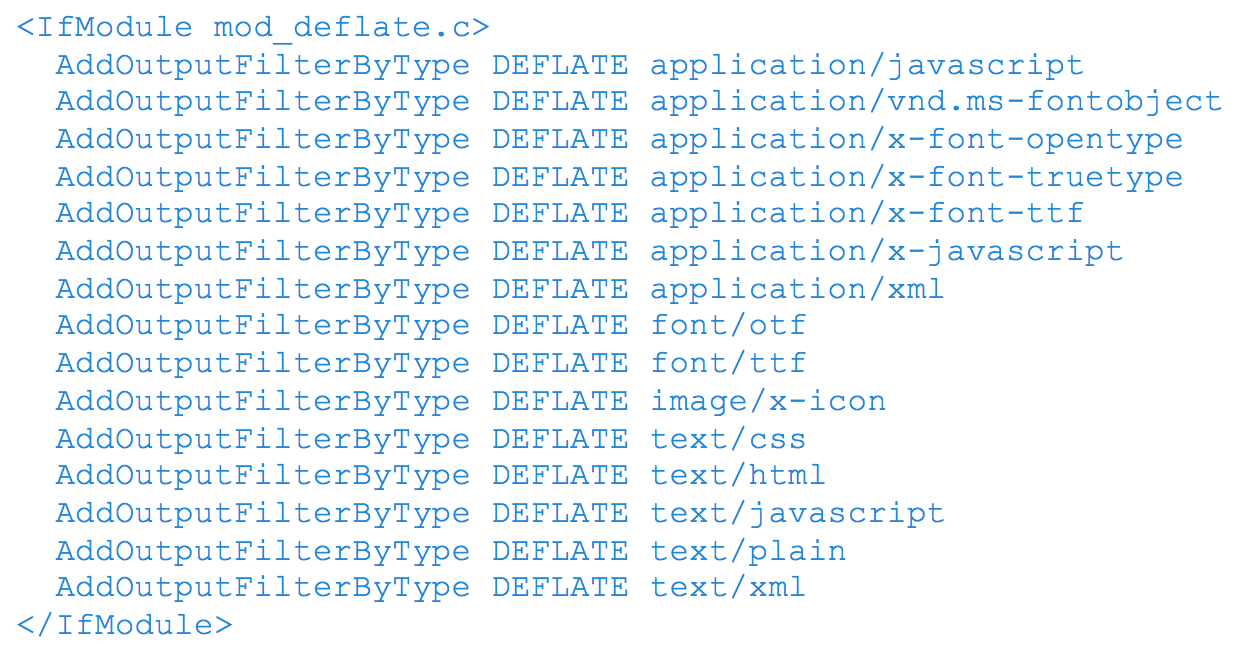
Assuming your server uses Apache, to enable gzip compression, you’ll need to use the Apache Module mod_deflate. Depending on the file types you want to compress, insert the following into your .htaccess file:

3. Remove Render Blocking JavaScript

Ensure there are no HTML references to external JavaScript files in the above-the-fold portion of your page. When your browser sees a script in the document, it pauses DOM construction and executes the script before proceeding. Therefore, your above-the-fold content can not be rendered without waiting for the JavaScript resources to load. In other words, avoid placing any JavaScript in the header as it may cause a delay in rendering your page.

What to do:

  • If the JavaScript resource is fairly small in code, you can inline the script contents into the HTML document. The drawback however is that you are now making the HTML document larger in size with extra JavaScript code.
  • You can apply asynchronous JavaScript to avoid parse blocking the DOM construction. To achieve this, mark your JavaScript with async

You can also avoid the JavaScript from running altogether until the DOM construction is complete by deferring the script. To achieve this, mark you JavaScript with defer.

Another way to defer, is to simply put your JavaScript in the footer of the HTML

4. Optimize CSS Delivery

In the same manner as removing render-blocking JavaScript, ensure there are no HTML references to external stylesheet files in the above-the-fold portion of your page. Similar to JavaScript, CSS are render-blocking resources. Therefore, your above-the-fold content cannot be rendered without waiting for the CSS resources to load.

Unlike JavaScript, defer and async do not work on CSS files.

What to do:

  • If the CSS resource is fairly small in code, you can inline the script contents into the HTML document. The drawback however is that you are now making the HTML document larger in size with extra JavaScript code.
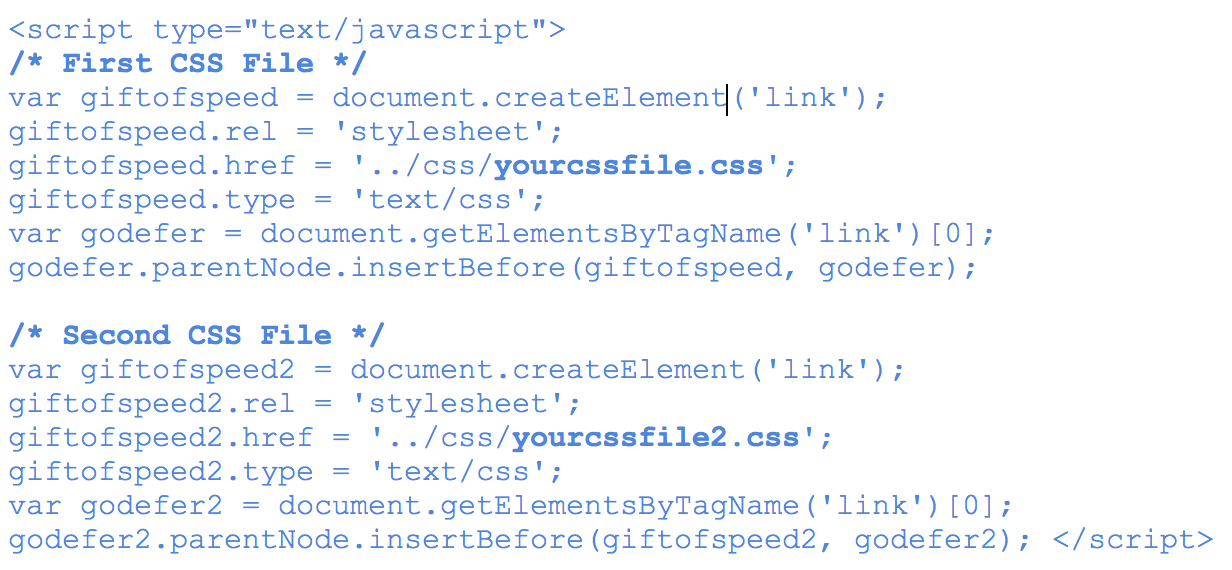
  • The one solution that’s worked for me so far is using JavaScript to defer CSS from loading. Courtesy of www.giftofspeed.com, insert the following code into your HTML footer (replace yourcssfile.css with your actual CSS file).

Place the following snippet within your HTML header. This ensures browsers that don’t support JavaScript can still load CSS files.

What Are You Waiting For? Get Started!

I’ll be saving the rest of the recommendations for a next blog, since they require a little more context and discussion. But these four recommendations are a good place to start optimizing for Google’s PageSpeed Score …assuming you have a good understanding of servers, HTML, CSS and JavaScript.

In the tests we’ve conducted, enabling compression alone increased our PageSpeed Score by 22 points for mobile and 24 for desktop – quite a big jump. Even with trying out these four recommendations, you could significantly increase your PageSpeed score right now.

As a last note, every website is different and there are little nuances that make your website unique, so its very important to test these recommendations first before implementing them right away. With that being said, try testing these recommendations and let us know how it worked out for you!

Thanks for reading! If you have any questions or comments, feel free to comment below! We’d love to hear your thoughts, feedback and/or grievances!

Resources

Geometric metal ceiling
Technology Strategy

What is Web Design?

Design is the process of collecting ideas, and aesthetically arranging and implementing them, guided by certain principles for a specific purpose. Web design is a similar process of creation, with the intention of presenting the content on electronic web pages, which the end-users can access through the internet with the help of a web browser.

Elements of Web Design

Web design uses many of the same key visual elements as all types of design such as:

Layout: This is the way the graphics, ads and text are arranged. In the web world, a key goal is to help the view find the information they seek at a glance. This includes maintaining the balance, consistency, and integrity of the design.

Colour: The choice of colours depends on the purpose and clientele; it could be simple black-and-white to multi-coloured design, conveying the personality of a person or the brand of an organization, using web-safe colours.

Graphics: Graphics can include logos, photos, clipart or icons, all of which enhance the web design. For user friendliness, these need to be placed appropriately, working with the colour and content of the web page, while not making it too congested or slow to load.

Fonts:  The use of various fonts can enhance a website design. Most web browsers can only read a select number of fonts, known as “web-safe fonts”, so your designer will generally work within this widely accepted group.

Content: Content and design can work together to enhance the message of the site through visuals and text. Written text should always be relevant and useful, so as not to confuse the reader and to give them what they want so they will remain on the site. Content should be optimized for search engines and be of a suitable length, incorporating relevant keywords.

Creating User-Friendly Web Design

Besides the basic elements of web design that make a site beautiful and visually compelling, a website must also always consider the end user. User-friendliness can be achieved by paying attention to the following factors.

Navigation: Site architecture, menus and other navigation tools in the web design must be created with consideration of how users browse and search. The goal is to help the user to move around the site with ease, efficiently finding the information they require.

Multimedia: Relevant video and audio stimuli in the design can help users to grasp the information, developing understanding in an easy and quick manner. This can encourage visitors to spend more time on the webpage.

Compatibility: Design the webpage, to perform equally well on different browsers and operating systems, to increase its viewing.

Technology: Advancements in technology give designers the freedom to add movement and innovation, allowing for web design that is always fresh, dynamic and professional.

Interactive: Increase active user participation and involvement, by adding comment boxes and opinion polls in the design. Convert users from visitors to clients with email forms and newsletter sign-ups.

Treefrog’s Toronto web design professionals create excellent User Interface (UI) Design for a satisfying web experience. They use critical planning and analysis for the design and they pay attention to individual client specifications, converting the intricate process into a simple and elegant piece of art.

Man making an online purchase on his computer tablet
Technology Strategy

Choosing the Right Small Business E-Commerce Solution

Should you integrate an out-of-the-box hosted platform with your website? Or is a customized on-premise solution a better option?

Your website is a contemporary extension of your business but with more important details about you, your employees, and how your products and services help solve your customers’ problems. In a hyperconnected world fuelled by e-commerce, the onus is on business owners and leaders to determine what the best e-commerce solution is to build into their sites.

Whether your company focuses on the business-to-consumer (B2C) or business-to-business (B2B) market (or both), the questions you need to answer are the same: Should you pick a hosted, out-of-the-box software-as-a-service (SaaS) solution? Or go for a more customizable on-premise platform?

Whichever way you choose to go, the solution should be a unified, user-friendly platform that is scalable and which integrates an online store with accounting, point-of-sale, inventory and subscription management tools, and other finance-related functions.

There are, of course, a number of elements you will need to consider, including:

  • If taxes are based on the location of the shipping warehouse or the shipment’s destination
  • Are shipping charges determined by a package’s weight, size, or destination? Or do you charge a flat fee?
  • Inventory control and management
  • Do you need to connect point-of-sale systems from bricks-and-mortar locations?
  • Cross-border customs clearance
  • Fluctuating currency exchange rates
  • Product discounts or seasonal specials
  • Overall reporting and metrics

“Here is a simple but powerful rule: Always give people more than they expect to get.”
– NELSON BOSWELL

Which E-Commerce Platform Is Best for Your Business?

When it comes to picking an e-commerce solution, the good news is there are options aplenty.

For most small businesses on tight budgets, Shopify has emerged as one of the most popular. Treefrog has integrated Shopify’s and other platforms with many of our clients’ sites, but we also provide custom-built e-commerce solutions.

Although Treefrog can integrate your site with any e-commerce platform you want, most of our clients that have selected a hosted solution have chosen one of the following platforms:

  • Shopify. Possibly the most popular and widely used e-commerce and shopping cart platform used by small- and medium-sized businesses today, this Canadian company’s solution features a broad range of options. It is easy to set up, has an intuitive user interface, add-on apps, 24/7 support, and its API integrates seamlessly with enterprise resource planning (ERP), customer relationship management (CRM), and other software.
  • Volusion. This platform features a comprehensive set of shopping tools, round-the-clock support, a user-friendly interface, extensive security features, and a mobile-responsive storefront. Volusion integrates seamlessly with Amazon and eBay, and through its social store builder tool, you can list your products on Facebook. It’s scalable, but the basic version sets a limit on the number of monthly transactions by restricting bandwidth, meaning service charges may apply if you exceed it.
  • Bigcommerce. This feature-rich solution includes many customizable templates, is easy to use and has an intuitive user interface, 24/7 support, no transaction fees, and has smooth integration with several e-newsletter services and Alibaba. It too is mobile-responsive and provides in-depth metrics and reporting.
  • Magento CE. An open source e-commerce platform that is available in four variations, the Magento Community Edition is an out-of-the-box solution that you must host on your server, or with its partnering company, Zoey. It includes bundled features including smooth integration with Google Analytics, in-depth sales reporting, and many third-party integration options but it is not PCI-compliant. Existing small business users provide community-based support.

Additional Things to Consider for Your Website

Once you’ve determined which e-commerce solution suits your business best, and taking a 360-degree view of your company and its online presence, there are other considerations to weigh:

  • A payment gateway. If you’re going to establish an online e-commerce platform, you will also need a payment gateway to facilitate online credit and debit card transactions. A payment gateway is an e-commerce enabler. It’s vital, and it provides a secure link between your site and the banking system. In essence, it provides a merchant-centric, single, automated portal to manage online financial transactions cost-effectively, quickly, and easily. It also makes it easy and flexible for your customers to buy from you online.
  • Readable, compelling content. If “content is king” then context must be queen. The importance of producing content online regularly cannot be denied, but to be regarded as a thought leader in your industry, your content needs to be persuasive, well-written, and it must provide value to your intended audience, or they will pay it no mind.
  • Search engine optimization (SEO). A widely used methodology to drive website traffic organically through the use of high-quality content, SEO maximizes your site’s content to rank well in search engines like Google, Bing, and Yahoo!.
  • High-quality images and design. There is no shortage of cheap, do-it-yourself (DIY) website builders available online promising anyone can create a professional-looking site in mere minutes for free or for only a few bucks. Lest we forget, you most often get what you pay for in this world. A well-designed website with high-quality images lends credibility to your business. A less-than-stellar online presence will hurt your business, not help it.
  • Using social media tools. More than 2 billion people use social media networks like Facebook, Twitter, YouTube, and LinkedIn on a daily basis. Since sales success requires cultivating relationships, your website should incorporate the use of social media tools, and social media marketing should be a part of your overall marketing efforts. Social tools will also help drive traffic to your website.

Do you have questions about e-commerce platforms and which one is best for your business?  Let’s talk. We can help you determine whether or not you need a custom-built solution or an off-the-shelf platform. Our expert programming team have experience customizing and integrating several e-commerce solutions with our clients’ websites.

gold ore
Technology Strategy

What’s the Best Payment Gateway Provider for Canadian Businesses?

Choosing the right online payment system for your company website can be tricky as it depends on multiple factors. Each provider’s platform and related services have benefits and drawbacks. Knowing what questions to ask as you weigh each one can make a difference and help you choose wisely

Managing a business and balancing the books each month is a particular trapeze act. To that end, ensuring your e-commerce site has the right payment gateway provider is a pivotal part of the equation. There are options aplenty, but which one suits your company and website best?

What is a payment gateway? It’s an application service provider that facilitates e-commerce transactions between you and your customers, allowing you to accept credit and debit card payments online. Think of it as the online version of a point-of-sale terminal you see in bricks-and-mortar retail shops, at restaurants, and other businesses serving the public.

32% of small businesses increased sales when they began to accept credit cards online

Your business is unique, thus, it has unique requirements when it comes to partnering with a payment gateway provider to accept online payments. Though not all businesses accept credit cards from their customers online, there’s a good argument for doing so. According to Visa Canada, 32% of small businesses in Canada experienced an increase in sales once they started to accept credit cards.

If you currently use InternetSecure’s platform, be advised that company was acquired by Elavon, and in the months ahead, you will be required to migrate to a new API.

Answers You Need to Know

If you’re seeking a new provider because you’ve become disenchanted with your current one, or if you’re simply weighing your options before launching your website, there are a few questions you need to ponder before making a selection, including:

  • What merchant rates and fees do they charge?
  • Will their platform integrate seamlessly with your e-commerce platform?
  • What will the customer’s experience be?
  • How responsive is their technical assistance?
  • Will their technical assistance team speak to a third party on your behalf?
  • How will their platform evolve with your business as it grows?

If you need to pick a new payment gateway provider, there are many worthwhile options to consider. Although Treefrog has the expertise to ensure your site is seamlessly integrated with the payment gateway provider of your choice, we have worked closely with PayPal and Moneris on behalf of many of our clients. Any one of the following reputable firms may provide you with what your company needs:

PayPal

The industry leader in third-party processors, PayPal is probably the most popular and most trusted digital wallet used by consumers worldwide. PayPal is easy to use, has transparent pricing, and good customer service support. For startups and small businesses, PayPal is a great choice. Its technical setup is quick and simple, and if you opt to go with a PayPal Pro account, you can access its API to allow transactions to be completed entirely on your website. Be aware, though, that the former eBay subsidiary’s merchant fees can sometimes be higher than other processors’ fees, and there is a waiting period for transferring monies earned into your bank account.

Moneris Solutions

Based in Toronto, Moneris is Canada’s largest processor of credit and debit card transactions providing a wide range of services for merchants. As of spring 2016, its technology also facilitates electronic business-to-business payments. The Moneris platform is reliable and secure, and the company provides customer support 24/7, a virtual terminal, shopping cart integration, and support for recurring payments. Through its partnerships with Sage Accounting, and its co-founders BMO and RBC, Moneris also provides inventory and sales tracking features. It’s important to note there are financial penalties if you decide to terminate your partnership with Moneris prematurely, and reportedly, there are significant new account setup fees.

Beanstream

Founded in Canada in 2000 and acquired in late 2015 by a Swedish payment-services firm, Beanstream provides payment, risk management, and authentication solutions. Considered a pioneer in the merchant e-commerce space, Beanstream offers monthly contracts, competitive fees, and good customer support services. There are no account setup fees, no monthly fees, no monthly sales minimum requirement, and no termination fee.

Amazon Payments

A subsidiary of Amazon.com, Amazon Payments competes directly with PayPal giving businesses the ability to accept online payments from their customers. Its platform integrates seamlessly with several e-commerce platforms including Shopify, Magento, and WooCommerce. Implementing Amazon Payments is a straightforward matter, and it provides one-click buying, so your customers don’t have to go through the online shopping cart rigamarole. The company’s user fees are viewable on its website, there are no setup or monthly fees, and no fees related to being PCI-compliant. Contracts with Amazon Payments are month-to-month, and there are no termination fees if you decide to end your contact with them. Furthermore, Amazon Payments offers extensive support services for its clients and their third-party developers.

Braintree Payment Solutions

Highly customizable and flexible, Braintree’s payments platform accepts PayPal, Apple Pay, Android Pay, Venmo, Bitcoin and most credit and debit cards, including Visa, MasterCard, American Express, Discover, JCB and Diner’s Club. It accepts payments from a website or mobile app. In general, integrating with Braintree is quick and straightforward, and it works with several shopping carts including Bigcommerce, Shopify, Magento, and Wufoo. There are no monthly fees, no PCI-compliant charges, and no minimum monthly transaction processing amount restriction. PayPal owns Braintree. You do need a PayPal Business Account to link to through Braintree’s administration panel.

Do you have questions about which online payment gateway provider is the right one for your company’s website? Get in touch via email or call us at +1-905-836-4442. We can help you make an informed decision.

water drops on leaf
Technology Strategy

Domain Registry of Canada

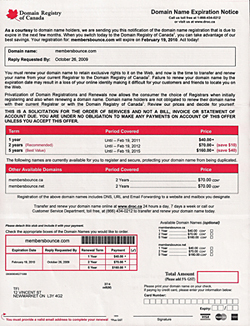
We receive calls from customers every few months asking if the letter they received from the “Domain Registry Of Canada” is a legitimate registrar… and they are!

But they prey on anyone Canadian who owns a domain name out there and hope that the customer will take their service over their current registrar and ten times out of ten you shouldn’t go through with it honestly.

We understand it looks like an official document from even the government, but it is not – this is just a registar out there preying on customers who may be unaware of this scam.

It’s very expensive alternative and they provide no service, and gives away the control of your domain to them and we’ve heard it gets even more difficult to make changes to your domain once in their control – be very careful!

If you receive a letter and have your domain with Treefrog call us immediately, do not fill out their form. Once you do we are unable to assist you and you’ll be out the cash (although we have saved a few domains because we were the admin contact and just cancelled their transfer).

This is a warning! Be careful!

(We’re not linking to them, they don’t deserve the link but you can Google their name if you’re that inclined or have received a letter – contact them, or shred the letter and burn the pieces)

Scroll to Top