Web Design & Development

2022 digital transformation agency
Technology Strategy

The Era of Advanced Digital Transformation

While Tesla made waves with the introduction of commercially available electric transportation, heralding a shift in automotive trends, Treefrog has been at the forefront of championing a different kind of revolution: the continuous journey of Digital Transformation. As we step further into 2024, this journey has evolved, adapting to post-COVID realities and the ever-changing digital landscape.

Navigating the Digital Frontier

We’ve moved far beyond the initial phases of the digital era, often compared to the transition from film cameras to digital. Today’s challenge lies in the ongoing process of transformation – a dynamic, active journey. Treefrog stands as a guide and partner for businesses, navigating through this ever-evolving digital terrain.

The Essence of Digital Transformation

The concept of ‘digital’ encompasses a vast array of changes and practices. It’s an umbrella term that includes embracing advanced technologies, engaging in digital communication, expanding global trading, and adapting to remote work. Treefrog interprets Digital Transformation as a holistic change, integral for businesses to maintain relevance and edge in the competitive market.

Challenges and Opportunities

Digital Transformation is nuanced, offering both challenges and opportunities. It redefines customer satisfaction, efficiency, and work dynamics. This transformation requires a delicate balance, merging traditional values with innovative digital practices and catering to diverse employee and customer preferences.

Digital Disruption and Organizational Change

The role of corporate strategy and organizational culture is being redefined under the influence of Digital Transformation. It’s not just a technological shift but a cultural one, impacting the very fabric of businesses. This is a new chapter in the evolution of work and industry, necessitating adaptability and forward-thinking.

Strategic Digital Integration

The current landscape is not just about adopting digital tools; it’s about embedding digital thinking into the core of business processes. This involves a comprehensive overhaul of how businesses operate and interact with customers, marking a significant shift in the approach to work and customer engagement.

Embracing the Future of Digital Transformation

In today’s world, adopting a digital-first strategy is essential for survival and growth. The transition includes embracing innovative technologies like AI, robotics, and drones. Treefrog is dedicated to guiding businesses through this transformative era, ensuring they are well-positioned to thrive in the advanced stages of the Digital Revolution.

Computer drawn keyboard with large key depicting wheelchair and word "Accessibility"
Technology Strategy

New AODA Guidelines to Make Your Website Accessible in 2021

Treefrog specializes in helping companies ensure their websites are AODA compliant.

Does your organization or business fall under any of the categories below?

  • Businesses and non-profits with 50 or more employees
  • Municipalities
  • Libraries (all public and those private libraries with 50 or more employees);
  • Public-sector organizations; and
  • Public and private-sector educational institutions (regardless of staffing)

If so, by June 30, 2021, the expectation, as outlined in AODA, is that all websites and web content must be accessible, as per WCAG 2.0 Level AA compliance metrics.

Computer drawn keyboard with large key depicting wheelchair and word "Accessibility"

Also, businesses and organizations with over 20 employees must file an accessibility compliance report with the Government of Ontario by June 30, 2021, which was recently extended from Dec 30, 2020.

Businesses and nonprofits must meet the standards of Accessibility rules in Ontario. The Province of Ontario’s website has a full list of accessibility rules and guidelines that should be followed and any critical updates.

What are the top 5 Accessibility Compliance Issues?

1. No alt-text on images

Simply stated, all images require an alt tag.

If an image discloses information that helps understand the message, you must provide alternative text that describes the information.

For more complex images, like a graphic, table, pie chart, etc, your alternative text must summarize the image’s content.

Logos are an exception, but they should have null alt text to allow adaptive technologies to skim over them.

For more information on alt text on images, you’ll find all the Accessibility rules on the Government of Ontario’s website.

2. Links without proper context

City skyline with arching lights depicting "links"

Including backlink on your website is a great way to strengthen your SEO, but with the new AODA rules, you have to be more careful. If you are using terms like “click here” or “learn more,” unfortunately, that is not enough. You now must explain where the link is going before it gets clicked. For example, an acceptable alteration would be “Learn more on how to be AODA compliant.”

You should also avoid opening links in a new window, and you should avoid having multiple links directing to different locations that share the same text.

More information regarding the proper use of links can be found on the Government of Ontario’s website.

3. Colour contrast issues

A red apple in the middle of a large number of green apples

In some cases, having a particular colour combination can be challenging for someone to see. In the case of a dark background, you need to make the fonts lighter and when you are using a light background, you need to make the fonts darker.

Your contrast ratio should be 4.5:1 for standard text and 3:1 for large text. According to WCAG 2.1, the large-scale text must have at least 18 point or 14 point bold font size.

4. Social media platforms

A woman looking at a cell phone, with icons representing social media floating past

In essence, social media platforms should be used to supplement your webpage. If you do link your social media content to your website, it must also be accessible to the best of your ability.

5. Audio and video

Close up of woman's hand using mobile phone, video controls superimposed over image

All prerecorded audio and video must have closed captions and a text transcript. The text transcript must be as descriptive as possible.

The user must have full control over the video, which means they should be able to pause, stop and rewind all audio and video files.

What’s the next step?

Do your research and make sure you are compliant. In case you aren’t taking this seriously, you could receive a fine of up to $100,000 a day if your website doesn’t align with AODA standards. This is a risk you do not want to take.

Visiting the Government of Ontario’s website can help with gathering information, but if you seem to be overwhelmed by the situation, don’t worry. Thankfully our team of web design experts can help you avoid any unforeseen charges.

Download our AODA Checklist

"*" indicates required fields

This field is for validation purposes and should be left unchanged.
Close up of an office table covered in brainstorming notes. Several people are leaning over the notes.
Technology Strategy

The Importance of Scoping

“If you don’t know where you’re going, you’ll end up somewhere else”
– Yogi Berra

At Treefrog, we value client success

As a digital transformation agency, our specialty is helping organizations tap into their full potential in the digital space; whether it’s underdeveloped or underutilized resources to drive change in the company or industry space.

Often when we start the conversation, there are so many unknowns that it can be hard to put a plan in place. For example, if you want to take your product or services online to sell, there are several things to consider:

  • What will the shipping be? By Weight? Location?
  • How will you handle taxes?
  • What about International currencies?
  • Inventory Management?
  • Discounts? Specials?

So the list goes on. Having a trusted partner to guide you through the process is essential. Whether it is an e-commerce system, ERP integration, building a customer portal, app development, augment Reality, or otherwise, we know the pain and uncertainty that can come with a project of this magnitude. Thus, we want to help you identify and reduce risk as much as possible.

To help reduce your risk, Scoping is extremely important in leading us in the proper direction. However, have you ever started a project with a plan and realized a stronger approach along the way? Digital projects can never be planned from start to finish, and they have several unknown variables in the early stages.  So, the best option is to prepare for a goal and make changes along the way to produce ample results.

If you have done renovations to your home, you may be familiar with this concept. At the start of the project, you explain to the contractor your vision, and a blueprint is created. However, once the renovations have begun changes must be made for a perfect result.

Most digital agencies will manage projects using a top-down approach (also known as the waterfall method). This fixed approach can cause projects to be unsuccessful as the plan is so set in stone there is no room for improvement along the way. The scope is often made at the start, with little room for change without a high cost. Often clients will be disappointed when great ideas are ignored to adhere to the timeline and budget. We find this is due to the three constraints faced by any project: Budget, Timeline, and Resources.

Typically referred to as the iron triangle, these constraints faced by project managers are the scope, schedule, and cost. They work interdependently together, and none of them can be adjusted without affecting the other.  For example, if the deadline of a project is moved up, the scope will be changed, as goals may not be achieved.

At Treefrog, we believe following a top-down approach often leads to disappointment and a lack of success. These fixed plans at the start of projects lead to distress, as there is a strict goal to maintain a scope, budget, and time constraints. However, like most things in life, it takes getting your hands dirty to figure out the best solution.

We have found that the following method reduces uncertainties based on continuous collaboration. The Scope/Discovery Process is unique to each client and includes some part of:

  •  Understanding the clients business goals
  • Defining the client’s target audience
  • Creating a list of tasks that will assist the client in achieving goals
  • Outlining in detail what we can offer the client

Although the discovery process helps the initial scope, there is always a cone of uncertainty when starting a new project.  This idea emerged from the engineering industry in the 1950s, but it is highly applicable to today’s digital world. The basic premise of this is that all projects have a large number of uncertainties in the early stages. However, as more hours are put in, and great ideas begin to flow masterpieces are created. The reason for this is, no two projects ever have:

  • The same requirements
  • The same people
  • The same technology
  • The same user audience
  • The same priorities & constraints
  • The same business strategy

We have learned to be agile in our creative process. Thus going through the initial scope and wireframing of a project increases the depth of knowledge, available technologies, budgets, and resources. This gives all involved the time to unpack uncertainties, brainstorm on the grand scope of the project, be upfront and honest with the expectations. Much like an actual Treefrog, we are highly adaptable to change. We want our clients to love what we produce for them— and we want to brag about it too.

Do you have an idea or project that you haven’t fully conceptualized yet? Are you looking for some grounded feedback? Give us a call; we’d love to hear about your idea(s).

Illustration of interconnecting points
Technology Strategy

Why Your Business Should Always Renew Your Domain Name With a Reputable Company

A cautionary tale in domains

You wake up in the middle of the night with a fabulous new business idea. You now need a website! First things first, you look for a domain name. The domain name is an essential piece of your brand and may involve your keywords, your company’s name or is possibly is just memorable by the name itself.

As the months pass and your website is live, your business is running and you are now working 18-hour days running your business. The small little thing, like a domain name, is farthest from your mind now thinking of what’s it’s doing or how it’s working for you. Until it happens…the renewal!

Have you ever thought of what happens if you don’t renew you domain name?

If you own a domain (unless you have purchased it for 5 or 10 year increments) you will receive an annual renewal notice, they are typically sent out at 90 days, 60 days, and 30 days, depending on your registrar. The desire is that this will prompt you to renew with adequate notice. But should you miss the renew date it does expire and enters a grace period.

For 0 – 40 days, depending on the kind of domain name you have (.com, .ca, .uk etc.), past that expiry date your domain name sits waiting for you to change your mind. All in the hopes that it was possibly a mistake and you will pay the fee and return it to its former glory, housing your website!

During this grace period all services associated with your domain name stop working. That means, all of your email addresses associated with that domain name will no longer receive email, and your website on that domain name will be inaccessible.

After the grace period has come and gone the domain name finally does one of two things. It either enters a redemption period where you can still get your domain name back one more time (for an additional fee on top of the renewal), or it fully expires. Finally, it’s then publicly listed with other “to be released” domains and sold to the highest bidder. There are a lot of people out there reading those lists of domains in search of domains to purchase, but that’s a whole other subject for another time.

Can you imagine if your domain name was sold off to the highest bidder?

For an example, let’s take the current mayor of Toronto who owned robford.ca. This domain housed the website which was home of everything Rob Ford when he was city councillor before becoming mayor. He would update it with council votes, council expenses and the site held information for you to contact him. But since becoming mayor, someone along the way either forgot to renew it  (possibly wherever he was hosting the domain, or they never let him know?). Or possibly just deemed robford.ca not necessary anymore and let it completely, totally expire.

It sat for the 0 – 40 day grace period and was then released back into the pool and sold off to the highest bidder. Now Mr Mayor Rob Ford’s domain name is in the hands of someone else, who’s having it re-direct to the Toronto Star, or posting “Rob Ford (January 31, 1862 – June 8, 1892) was an American outlaw best known for killing his own gang leader Jesse James in 1882” and now taking suggestions on what to do next. Who knows the eventual fate now of robford.ca, but whatever happens now isn’t controlled by Rob Ford.

The Mayor Rob Ford now uses http://www.robfordformayor.ca and http://www.toronto.ca/mayor_ford, but to let a domain he was using for years lapse is a costly move for him, and would be a costly move for any business.

If your business is online, then you have a domain name! It’s connected to your website and possibly your email. It’s how you tell prospective clients and current clients where you are, how they get in contact with you and is part of your brand. Your business is important and your domain is the most important piece to that online identity.

Ensure your domain name is renewed yearly or better yet purchase it for 10-years, show stability to the search engines and put your mind at ease.

One of the best practices at Treefrog is that we renew every domain in our account for our clients and each domain is checked over by trained staff who know the value of keeping that domain. Even if you do finally choose to let your domain go, we follow up with you personally to ensure this is what you want. So make sure your domains are with a reputable company and are renewed so, unlike Rob Ford, you will control your  domain for many years to come.

A rocky waterfall
Technology Strategy

Increase Your Google PageSpeed Score Part 2: Web Development & Optimization

For the second part of our Google PageSpeed blog post series, we’ll be taking a look at more advanced techniques to adhere to Google’s recommendations. If you haven’t had a chance to read the first part to increasing your Google PageSpeed score, start now! Recalling on the Google PageSpeed insight rules, the speed rules include the following:

  • Avoid Landing Page Redirects
  • Enable Compression
  • Improve Server Response Time
  • Leverage Browser Caching
  • Minify Resources
  • Optimize Images
  • Optimize CSS Delivery
  • Prioritize Visible Content
  • Remove Render-Blocking JavaScript
  • Use Asynchronous Scripts

We’ve already covered avoiding landing page redirects, enabling compression, optimizing CSS delivery and removing render-blocking JavaScript in our first part. In this blog post, we’ll be taking a look at prioritizing visible content, minifying resources and optimizing images.

Note: The following recommendations below assume you fully understand web development best practices as well as server software programming, HTML, JavaScript and CSS programming. If you aren’t too sure of these techniques described, give us a shout and we’ll help you out!

1. Prioritize Visible Content

Putting an emphasis on giving users a high quality mobile experience, Google states “having a mobile-friendly website has become a critical part of having an online presence”. As such, they recommend ensuring that the above-the-fold content of the page is rendered quickly and efficiently.

Above-the-fold is the portion of the webpage that is visible without the need to scroll down. Ensuring the above-the-fold content displays quickly, prevents waiting time for the user. However, if the data exceeds the initial congestion window (a self-imposed variable that limits the amount of data that can be sent), then additional back and forth data transmission between your server and the user’s browsers will occur. This in turn creates a slower and delayed page load for the user.

In other words, if the above-the-fold content isn’t loading quickly enough, users are more likely to leave. The above-the-fold content is the first touch point for most users and they are less likely to stick around for the rest of the webpage to load if the above-the-fold content can’t even load quickly and properly.

What to do:

  • Structure your HTML to load the critical content first:
  1. Identify the critical content of your webpage. For example, if the page is an article, the body text and images are the most critical content. Third-party widgets may fall as secondary items that can be deferred.
  2. Ensure the critical content of your webpage loads first. Structure your HTML such that the critical content is rendered immediately. For example, you may want to inline a portion of the CSS into the HTML file to ensure the styling of the critical content is rendered first, while the rest of the page is styled after the CSS file is rendered later.
  • Reduce the amount of data used by enabling compression and/or minifying resources:
  1. Reduce the size of your HTML, CSS and JavaScript files by enabling compression. As discussed in our previous post, to enable compression you will need to make updates to your .htaccess file.
  2. Minify your HTML, CSS and JavaScript files, which is discussed in detail below

2. Minify Your Resources

Ensure the sizes of your resources are reduced to allow faster transferring of data. Reducing the size of your files will require less data to be transferred from your server to the user’s browser, thereby making the above-the-fold as well as the entire page load much quicker.

What to do:

After writing your HTML, CSS and JavaScript code, you can look at ways to reduce the file size by removing unnecessary or redundant code, unused code and applying shorter variable and function names. Although it may be against code-writing best practices, you can also remove commenting, formatting and removing whitespace altogether. For example, the following CSS code is 953 bytes and has commenting, formatting, whitespace as well as redundant code:

/* ## Headings

——————————————— */

h1 {

      font-size: 36px;

      font-size: 3.6rem;

      color: #333;

      font-family: Lato, sans-serif;

      font-weight: 400;

      line-height: 1.2;

      margin: 0 0 10px;

}

h2 {

      font-size: 30px;

      font-size: 3rem;

      color: #333;

      font-family: Lato, sans-serif;

      font-weight: 400;

      line-height: 1.2;

      margin: 0 0 10px;

}

h3 {

      font-size: 24px;

      font-size: 2.4rem;

      color: #333;

      font-family: Lato, sans-serif;

      font-weight: 400;

      line-height: 1.2;

      margin: 0 0 10px;

}

h4 {

      font-size: 20px;

      font-size: 2rem;

      color: #333;

      font-family: Lato, sans-serif;

      font-weight: 400;

      line-height: 1.2;

      margin: 0 0 10px;

}

h5 {

      font-size: 18px;

      font-size: 1.8rem;

      color: #333;

      font-family: Lato, sans-serif;

      font-weight: 400;

      line-height: 1.2;

      margin: 0 0 10px;

}

h6 {

      font-size: 16px;

      font-size: 1.6rem;

      color: #333;

      font-family: Lato, sans-serif;

      font-weight: 400;

      line-height: 1.2;

      margin: 0 0 10px;

}

This code can be significantly reduced to 311 bytes by removing the redundant code, comments, formatting, and white space:

h1,h2,h3,h4,h5,h6{color:#333;font-family:Lato,sans-serif;font-weight:400;line-height:1.2;margin:0 0 10px}h1{font-size:36px;font-size:3.6rem}h2{font-size:30px;font-size:3rem}h3{font-size:24px;font-size:2.4rem}h4{font-size:20px;font-size:2rem}h5{font-size:18px;font-size:1.8rem}h6{font-size:16px;font-size:1.6rem}

It may become taxing to minify all your resources manually, especially if you have a large website. Luckily, there are free tools available online to minify your resources for you. A simple search for “HTML minify”, “CSS minify” or “JavaScript minify”, will result in various tools you can use. The fall back with using these tools as well as minifying these resources yourself is that the code needs to be minified again whenever you make any updates or changes. As an alternative and depending on the CMS you use, you can automate the process by leveraging plugins. For WordPress and Drupal sites, there are many minify plugins available that can minify HTML, CSS and JavaScript individually or all at once.

As a last alternative, you may also want to use Google’s PageSpeed Module if your server is Apache or Nginx. There are various filters that help optimize your website’s page speed inclusive of reducing resources sizes such as Minify JavaScript. Take a look at their mod_pagespeed documentation for more information.

3. Optimize Images

Ensure the file size of images is reduced without significantly impacting their visual quality. Reducing the size of your image files will require less data to be transferred from your server to the user’s browser, thereby making the above-the-fold as well as the entire page load much quicker.

This may require its own blog post in the future since there are plenty of best practices and image optimization checklists to do. It also really depends on how your website is structured: if your website is highly visual than a much more thorough optimization strategy is required. However, if your website has some images here and there, there are quick and easy things you can do.

What to do:

  • Ensure the images are served at their native dimensions and specify the width and height in the img tag to prevent “popping” when the page is loading
  • Compress your images to reduce file size. Try using PNG files as they are lossless formats and do not make any visual modifications to the image.
  • If you’re using JPEG files and are compressing the images, try to reduce the quality below 85. Past the quality of 85, the file size becomes larger but doesn’t improve visually. Compress the image as low as possible without losing visual quality.

Develop With File Size in Mind or Use Tools To Optimize

These recommendations are best executed during the designing and development stage of building the website. Arranging the structure of the content beforehand can prioritize and serve the critical content to users right from the start. Programming HTML, CSS and JavaScript and optimizing the images with the file size in mind ensures a quicker page load right when the website goes live.

In most cases however, these items may be overlooked or unnoticed during the development stage. To act on these recommendations long after a website has been live, we can leverage: enabling compression, minifying resources and image compression.

As noted in Part 1, every website is different and there are little nuances that make your website unique. It’s very important you test these recommendations first before implementing them.

As always, if you have any questions or comments regarding these recommendations, feel free to comment below. We’d love to hear your thoughts, feedback and/or grievances. Thanks for reading!

Resources

A rocky waterfall
Technology Strategy

Increase Your Google Page Speed Score Part 1: Start With The Basics!

With Google putting an emphasis on high quality content for users in the last few years, there’s been a big push to focus strictly on content marketing. Where the first optimizers started off by taking advantage of search engine algorithms through pure coding, nowadays, producing high quality content has been the primary goal.

And absolutely…content really is important. A website without high quality content is just an empty shell with no pearls. However, as search engine optimizers, it is essential that we don’t lose focus on the technical aspects either and that we also give this side of SEO the attention it deserves.

…which brings us to PageSpeed.

Speedy Content

Part of producing high quality content includes delivering it to users with lightning speed. No one likes clicking on a link only to wait for more than 5 to 10 seconds for the page to load in full. By then, they would probably have left your site: increasing your bounce rate, reducing time on site and affecting your overall user engagement. All these things can impact your keyword ranking.

With more “Google searches taking place on mobile devices”, ensuring your website operates with lightning speed is essential.

Google PageSpeed Insights

There are many page speed test tools out there that can help ensure your website performs optimally in speed. Tools such as KeyCDN, pingdom and GTmetrix are great for really analyzing and optimizing your website. But for the purposes of this blog post, we’ll be taking a look at Google PageSpeed Insights.

There are various differences to how Google PageSpeed Insights work versus other page speed tools. For one, it doesn’t actually measure loading time. Rather Google PageSpeed analyzes several different components of your page and gives recommendation on how to improve its performance based on time to above-the-fold load and time to full page load.

As such, there is much debate within the SEO community on whether or not it’s even worth achieving a high PageSpeed score. Some trade offs may occur when trying to achieve a high score (i.e. certain techniques to decrease render time can actually decrease your PageSpeed score). We’ll save the usability and reliability of Google PageSpeed Insights for a later post as this topic requires a much more thorough discussion.

Having said that, Google has the largest market share in search engines. It’s still a good idea to consider these recommendations in conjunction with using other speed tools to compare loading/rending and server response time measurements.

Google PageSpeed Insights Rules

Google PageSpeed Insights is split into two rules: speed rules and usability rules. Since our focus is on speed, we’ll take a look at the speed rules exclusively. The speed rules include the following:

  • Avoid Landing Page Redirects
  • Enable Compression
  • Improve Server Response Time
  • Leverage Browser Caching
  • Minify Resources
  • Optimize Images
  • Optimize CSS Delivery
  • Prioritize Visible Content
  • Remove Render-Blocking JavaScript
  • Use Asynchronous Scripts

Some of these recommendations will require their own blog post as there are many factors to consider before implementing. For example, improving server response time requires a much more thorough thought process. So we’ll be highlighting the items that are fairly simple to complete.

1. Avoid Landing Page Redirects

Ensure your landing page is not a redirected page. Landing page redirects can hamper the user experience if its takes too much time redirecting to multiple pages. This is especially important for ads, links, and social links pointing to a specific landing page.

What to do:

The best and easiest thing to do in this case is to update all your ads, links and social links so that they are pointed to the correct landing page (i.e. their final destination).


Note: The following recommendations below assume you fully understand server software programming, HTML, JavaScript and CSS programming. If you aren’t too sure of these techniques described, give us a shout and we’ll help you out!


2. Enable Compression

Ensure your compressible resources are served with gzip compression. “This can reduce the size of the transferred response by up to 90%”, reducing the download time for users when they visit your page.

What to do:

Most web servers in the world use Apache as their server software. There are others such as nginx and IIS. I personally have only had to deal with Apache servers so far and you are likely dealing with it too. (Tip: One way to check is to use Google Search Console’s Fetch as Google tool and look at the fetch details)

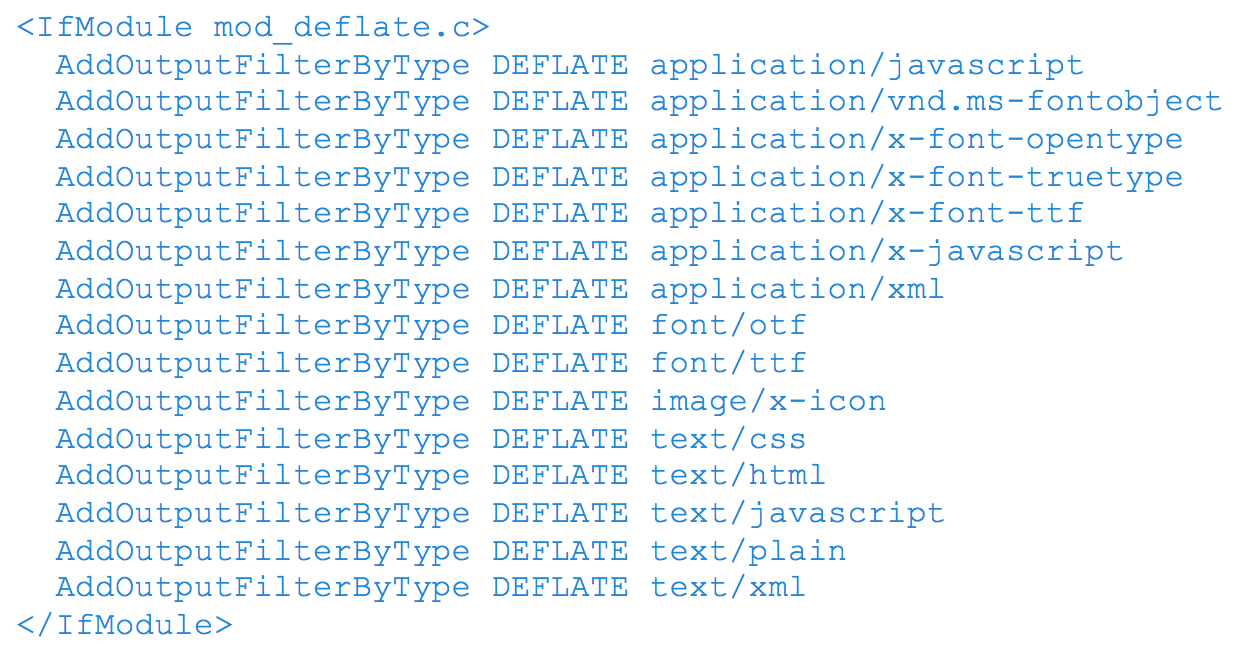
Assuming your server uses Apache, to enable gzip compression, you’ll need to use the Apache Module mod_deflate. Depending on the file types you want to compress, insert the following into your .htaccess file:

3. Remove Render Blocking JavaScript

Ensure there are no HTML references to external JavaScript files in the above-the-fold portion of your page. When your browser sees a script in the document, it pauses DOM construction and executes the script before proceeding. Therefore, your above-the-fold content can not be rendered without waiting for the JavaScript resources to load. In other words, avoid placing any JavaScript in the header as it may cause a delay in rendering your page.

What to do:

  • If the JavaScript resource is fairly small in code, you can inline the script contents into the HTML document. The drawback however is that you are now making the HTML document larger in size with extra JavaScript code.
  • You can apply asynchronous JavaScript to avoid parse blocking the DOM construction. To achieve this, mark your JavaScript with async

You can also avoid the JavaScript from running altogether until the DOM construction is complete by deferring the script. To achieve this, mark you JavaScript with defer.

Another way to defer, is to simply put your JavaScript in the footer of the HTML

4. Optimize CSS Delivery

In the same manner as removing render-blocking JavaScript, ensure there are no HTML references to external stylesheet files in the above-the-fold portion of your page. Similar to JavaScript, CSS are render-blocking resources. Therefore, your above-the-fold content cannot be rendered without waiting for the CSS resources to load.

Unlike JavaScript, defer and async do not work on CSS files.

What to do:

  • If the CSS resource is fairly small in code, you can inline the script contents into the HTML document. The drawback however is that you are now making the HTML document larger in size with extra JavaScript code.
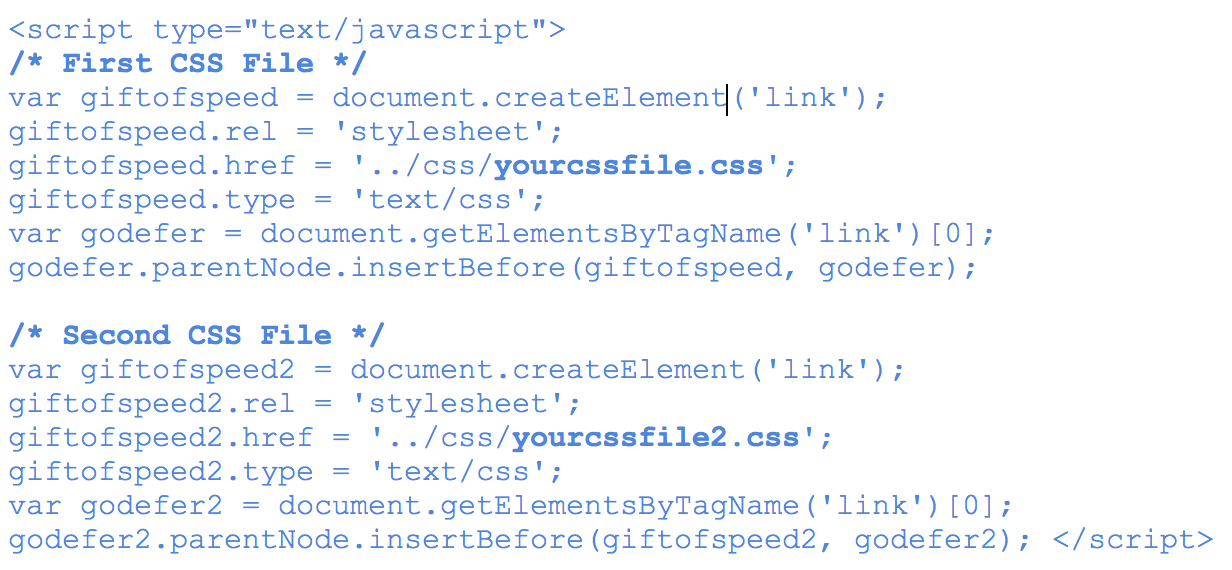
  • The one solution that’s worked for me so far is using JavaScript to defer CSS from loading. Courtesy of www.giftofspeed.com, insert the following code into your HTML footer (replace yourcssfile.css with your actual CSS file).

Place the following snippet within your HTML header. This ensures browsers that don’t support JavaScript can still load CSS files.

What Are You Waiting For? Get Started!

I’ll be saving the rest of the recommendations for a next blog, since they require a little more context and discussion. But these four recommendations are a good place to start optimizing for Google’s PageSpeed Score …assuming you have a good understanding of servers, HTML, CSS and JavaScript.

In the tests we’ve conducted, enabling compression alone increased our PageSpeed Score by 22 points for mobile and 24 for desktop – quite a big jump. Even with trying out these four recommendations, you could significantly increase your PageSpeed score right now.

As a last note, every website is different and there are little nuances that make your website unique, so its very important to test these recommendations first before implementing them right away. With that being said, try testing these recommendations and let us know how it worked out for you!

Thanks for reading! If you have any questions or comments, feel free to comment below! We’d love to hear your thoughts, feedback and/or grievances!

Resources

Geometric metal ceiling
Technology Strategy

What is Web Design?

Design is the process of collecting ideas, and aesthetically arranging and implementing them, guided by certain principles for a specific purpose. Web design is a similar process of creation, with the intention of presenting the content on electronic web pages, which the end-users can access through the internet with the help of a web browser.

Elements of Web Design

Web design uses many of the same key visual elements as all types of design such as:

Layout: This is the way the graphics, ads and text are arranged. In the web world, a key goal is to help the view find the information they seek at a glance. This includes maintaining the balance, consistency, and integrity of the design.

Colour: The choice of colours depends on the purpose and clientele; it could be simple black-and-white to multi-coloured design, conveying the personality of a person or the brand of an organization, using web-safe colours.

Graphics: Graphics can include logos, photos, clipart or icons, all of which enhance the web design. For user friendliness, these need to be placed appropriately, working with the colour and content of the web page, while not making it too congested or slow to load.

Fonts:  The use of various fonts can enhance a website design. Most web browsers can only read a select number of fonts, known as “web-safe fonts”, so your designer will generally work within this widely accepted group.

Content: Content and design can work together to enhance the message of the site through visuals and text. Written text should always be relevant and useful, so as not to confuse the reader and to give them what they want so they will remain on the site. Content should be optimized for search engines and be of a suitable length, incorporating relevant keywords.

Creating User-Friendly Web Design

Besides the basic elements of web design that make a site beautiful and visually compelling, a website must also always consider the end user. User-friendliness can be achieved by paying attention to the following factors.

Navigation: Site architecture, menus and other navigation tools in the web design must be created with consideration of how users browse and search. The goal is to help the user to move around the site with ease, efficiently finding the information they require.

Multimedia: Relevant video and audio stimuli in the design can help users to grasp the information, developing understanding in an easy and quick manner. This can encourage visitors to spend more time on the webpage.

Compatibility: Design the webpage, to perform equally well on different browsers and operating systems, to increase its viewing.

Technology: Advancements in technology give designers the freedom to add movement and innovation, allowing for web design that is always fresh, dynamic and professional.

Interactive: Increase active user participation and involvement, by adding comment boxes and opinion polls in the design. Convert users from visitors to clients with email forms and newsletter sign-ups.

Treefrog’s Toronto web design professionals create excellent User Interface (UI) Design for a satisfying web experience. They use critical planning and analysis for the design and they pay attention to individual client specifications, converting the intricate process into a simple and elegant piece of art.

water drops on leaf
Technology Strategy

Domain Registry of Canada

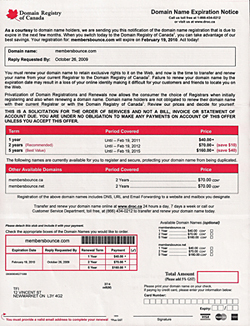
We receive calls from customers every few months asking if the letter they received from the “Domain Registry Of Canada” is a legitimate registrar… and they are!

But they prey on anyone Canadian who owns a domain name out there and hope that the customer will take their service over their current registrar and ten times out of ten you shouldn’t go through with it honestly.

We understand it looks like an official document from even the government, but it is not – this is just a registar out there preying on customers who may be unaware of this scam.

It’s very expensive alternative and they provide no service, and gives away the control of your domain to them and we’ve heard it gets even more difficult to make changes to your domain once in their control – be very careful!

If you receive a letter and have your domain with Treefrog call us immediately, do not fill out their form. Once you do we are unable to assist you and you’ll be out the cash (although we have saved a few domains because we were the admin contact and just cancelled their transfer).

This is a warning! Be careful!

(We’re not linking to them, they don’t deserve the link but you can Google their name if you’re that inclined or have received a letter – contact them, or shred the letter and burn the pieces)

Cropped close up of a woman's face
Creative Strategy

Professional Imagery: Why it is Important for Your Website

As much as we all loathe to admit it, let’s face it: appearance is everything.

Humans are visual creatures hence what others see has an undeniable impact on our success. Images transcend language and words and allow for a greater understanding of whatever is being discussed. Since first impressions are formed within seconds and since most of the information we consume and interpret is visual, quality design can make your site and your brand stick in the viewer’s mind as professional and credible. This article will discuss why we’re image based, how you can benefit from this knowledge and what constitutes as a well-designed site.

Why are we so Image Based?

Our minds react differently to visual stimuli because the human brain deciphers image elements instantly, while language is decoded in a linear, sequential manner taking more time to process. Studies tell us that 90% of information transmitted to the brain is visual, and visuals are processed 60,000 times faster in the brain than text. “Seeing comes before words. The child looks and recognizes before it can speak” (Berger, Ways of Seeing, 1972). So unless our words, concepts, ideas are hooked onto an image, they will go in one ear, sail through the brain, and go out the other ear.

How can we Benefit?

A professional, modern looking website can immediately build trust and guide visitors to take action. When it comes to web copy, people rarely read a piece of content word for word. On the other hand, images stick with readers longer and are more likely to give you a greater return on your content investment. The design of a website is significant because it affects how quickly visitors can find what they are looking for. If navigating the website is difficult or frustrating, the visitor will leave and try on another site, resulting in a lost opportunity. A good design will be easy to understand and navigate, helping potential customers find what they need and taking you one step closer to making a sale or getting in touch.

What Constitutes a Good Design?

Effective design should convey a message, tell a story, and allow anyone to understand what you’re talking about. Several factors such as consistency, colours, photos and simplicity all contribute to a well designed site.

I Want My Site to Look Like Apple

A common request we get via our design questionnaires is; “I want my site to look like Apple’s”. So many people ask this because Apple Inc. is pretty much synonymous with classy design. Why does Apple’s design work? Here are just a few reasons:

Simplicity: Take a look at Apple’s homepage and don’t think about what you see, but what you don’t see. The answer of course is visual clutter. Specifically the homepage, which simply shows off their most recent work and provides you with a few easily understood categories to help you get to the information you want to see. Even if your company is not as ubiquitous, you can still use minimal but attractive design to increase usability.

Stunning product shots: One of Apple’s principle reasons for cutting back on superfluous graphics on their site is to really showcase what’s important: their products. Just look at the shots they use; it’s nearly impossible to look at a page on the Apple site and not have your eyes focus on the products for seconds on end. There are several things that make these products look so incredible. The first is that they are obviously pristine. Chalk this one up to digital imaging experts. The combination is a mixture of photography, 3D modeling and Photoshop. The next thing they do is to make them take up a huge portion of the page, which are overwhelmingly impressive.

Consistency: Apple’s general look or “brand essence” is applied across every single thing they design. It’s quite stunning when you realize how much their software actually looks like their hardware. You can’t get much more integrated.

Details: Apple is all about attention to detail. Every little piece of their site is finessed into perfection. Never fall into the trap of saying “no one will notice” or “good enough.” It is often the margin of time spent on the tiniest details that separate the good websites from the great ones.

Strong grid: Every page on Apple’s site adheres to a strict grid structure; whether simple or complicated, it’s there. There is a ton going on, but it somehow seems attractive instead of overwhelming. Breaking sporadic information up into manageable cells drastically reduces visual clutter and confusion.

Go Pro

Professional images capture authenticity. Photographs not only show the visitor what you offer, but can also make them want to act. People no longer just want to browse a website, they want to experience it. The bakery website www.cookieitup.com is full of quality, wholesome images of fresh cookies and natural ingredients. The tantalizing photos and custom illustrations make one want to rush over and buy a box (or five). A personal touch is the result which really speaks to the handmade aspect of the products. The simplicity and consistency of the images speaks to the quality of the product.

It’s simple: the more professional, compelling and enticing your site’s photography is, the more business you’ll conduct over time. We’re not just talking about pretty pictures, we’re talking about a way to visualize information in a simple way that makes sense to the client. Using good photography of your products and services will help you market to a much larger audience. Photos open your content up to a whole new audience through giving visitors the chance to share your imagery with friends and family. Bonus: shared images are basically free advertising. Professional photos can make your visitor understand your product or service more.

Stock Photography

The key to using stock photography is searching for unique and compelling images that are relevant to your brand and your message without looking cliché. Using the site www.octacom.ca as an example, we immediately recognize what the business does, based on the images alone. Depending on your budget you can choose to use all professional, all stock imagery or a mixture of both.

Team Photos Convey Culture and Consistency

Hiring a professional to take photos of your team in action will get you authentic results that will convey company culture and consistency. Your face is part of your brand, so a professional head shot will not only look flattering, but will also make your customer see you as more trustworthy, sincere, and well-practiced. These photos can also be used in places other than your website. You can use them all over your personal and professional social media accounts, such as LinkedIn and Facebook where profile pictures matter most.

If you are striving to be professional and knowledgeable in the workplace, then your website needs to reflect that. Using great design and quality photography is a necessity in this visual world. Great design should convey a message in an easy, simple way, transcend language barriers, provide a good summary of information, support and break down complex concepts, and take a fraction of a second to understand.

The next time you’re tempted to skimp on the professional graphic design, bear in mind that images go directly into long-term memory (words are processed by our short-term memory). They can be called upon when thinking about a particular business or company. Make sure your business conjures great images along with compelling content. Recognizing the importance of visual communication for your site is key to your success.

Honeycomb with a bee
Technology Strategy

Understanding Website Hosting and Domains

Domains, hosting, registrar… you may know that these terms have something to do with a website, but what do they mean, and why should you care?

Do you know where your website is hosted? Who hosts your email? Who hosts your domain and where is that domain registered? Do you know who the administrative and technical contacts are within your company?

If you have been involved with a new website migration or build, you probably will have heard of the terms domain, hosting and registrar. But few people actually know what these things are, or why they are relevant to a website.

We’re going to try to break these things down a bit. Keep in mind that this is a complicated topic, so we’ll be using general terms and in some cases over-simplifying. Hopefully you’ll at least understand the basics once we’re done.

The main terms we’ll concentrate on are: Domain Registrar, Domain Name Server, Email and Website Hosting.

So what do these things mean? First of all, it helps to think of these terms in a hierarchical format.

Keep this structure in mind as we continue. Notice that we’ve arranged these in a top-down hierarchy.

At the top: The Registrar

It all starts at the top with the domain registrar. The domain registrar handles the registration of your website domain name, specifically what comes after the “www”.

It’s always important to make sure you know who has control of your domain, and that a reputable company is handling the renewal process. Domain names come up for renewal every few years, depending on the renewal plan. The last thing you want is to find out that you had unknowingly allowed your domain to expire.

In this same way, the registrar will handle the sale of multiple associated domains, for example .com .ca and .net versions of your website, or even similar URLs, like www.bakesale.com and www.bakesales.com

These companies have varying renewal policies for domains rentals. Keep in mind that you never actually “own” the domain, you continually rent them. Sometimes the registrar will set the renewal process to be automatic so that you don’t receive a notice every year; they’ll set it to renew automatically for 5 or 10 years. They’ll also have transfer policies in the event that you want to move your domain to another registrar.

Examples of Domain Registrar companies are: Treefrog, Tucows, GoDaddy, Network Solutions and NetFirms.

In the middle: The Domain Name Server (DNS)

Without getting too involved, a domain name server (DNS) is a massive database that stores website IP addresses and their associated “names”, in order for people to find sites on the Internet.

Brief explanation: each website has its own unique IP address, which is a set of numbers and periods. A domain name server translates those numbers into plain English. As opposed to seeing 234.543.345, we see the much prittier www.website.com.

Domain Name Servers handle website as well as email requests. Again, instead of having to remember some random string of numbers, the Domain Name Server allows you to send an email message to “somebody@website.com” and the servers handle all the necessary redirecting behind the scenes.

Examples of Domain Name Server companies are: Tucows, GoDaddy, Google, OpenDNS and Network Solutions.

At the bottom: Email/Website Hosting

Email and website hosting is on the bottom of the food chain in terms of access and control. These are on the same level in our diagram because technically they are not contingent on one another.

Email and website hosting can technically be handled by two different companies, but are often handled by the same one. A client can choose to migrate their website to another hosting company, and keep their email where it is. It is not necessary to host your website and your email in the same place.

Hosting a website basically means storing all of the website data: pages, files, images, and everything that would accept and serve up requests from users.

In the same way, email hosting entails storing all of the email messages and email files for that domain.

Even though website hosting and email hosting are on the same line in our diagram because they are not dependent on one another as far as permissions go, they are two very different entities. They operate on two completely different protocols—which is something that often confuses people, especially now that there are so many web-based email services like Gmail. Something to keep in mind: the Internet is the network; the World Wide Web and email are services used within it.

Now that we know a little bit more about the different pieces and what they are dependent on, let’s create a scenario.

“Knowing this information will help save time if you are getting into a website migration or new website build.”

Registering Your Domain

So you want to register your domain. This usually means that you have selected a website domain that you want to register (such as www.thiswebsiterules.com) and you’re ready to make it legit. By the way, don’t waste your time trying to register www.thiswebsiterules.com—it’s already taken.

Treefrog is a domain registrar, so we can handle this for you, or you can go through one of the examples of registrars listed above.

Normally you will need to assign an administrator, as well as a technical contact for your domain. Each contact is affiliated with an email address. It is very important to keep track of which email addresses are associated with these contacts. Sometimes people leave businesses and their email addresses are never changed. However this is the address that will receive notices about the domain expiration. If no one is getting those emails, then you could potentially miss the registration deadline, and your domain could legitimately be up for grabs.

The technical contact is normally the person who will handle technical questions regarding the domain. For example, someone notices that your DNS, website or email has stopped working, someone might look up your technical contact information and send that contact a notice. Again, keep track of who this person is. Sometimes critical notices are sent to this email address, and you want to make sure nothing gets missed.

Transferring domains

Some registrars will have made you confirm an agreement prior to getting on board, in which case you will need to know the details of that agreement before proceeding.

If a web agency (like Treefrog, for example) is going to be taking over as your domain registrar, then we will need access to the usernames and passwords for the accounts affiliated with your website. We’ll need to know the administrative and the technical contacts (where applicable) so that we can coordinate the transfer.

Alternatively, if we are going to be your DNS company, but you wish to remain with your current registrar, then we will need to know:

  • Who the registrar is
  • Who the administrative and technical contact are from your company for the associated domain
  • What the passwords and login information is in order to access the registrar information and properly set up the Domain Name server settings.

Hosting your Website and email

Some companies want to have their website hosted with one company, and their email hosted somewhere else. This can happen if the company is launching a new website, while their email has been with the same company for years and they are uncomfortable moving it.

Know Who is Who

In an ideal situation, Treefrog would handle all four of these components. It is only ideal in the rare case that there’s an issue, so we don’t have to go to any other source; everything is housed in one place. It’s not necessary that we handle everything, and we’re very clear about the freedom our clients have to host their email, website, or DNS anywhere they choose. The only thing is, we should know who is hosting these components at the outset of a project, to save confusion.

Knowing this information will help save time if you are getting into a website migration or new website build. We suggest compiling this information and knowing where to get access to it, in the event that there’s ever an issue with domain expiration, or hosting issue, or perhaps you have an IT person leaving and they know all this stuff; you have to be able to get access to this information efficiently.

We suggest having a quick cheat sheet somewhere accessible that contains your Domain Registrar, your DNS provider, your website and email hosting company, plus all your administrative and technical contacts, and the usernames and passwords for each level. Keep this in a safe place. Even if you personally don’t know all the technical details about your website, this will be a great starting point.


Scroll to Top