
Marketing Strategy

The plan that turns strategy into demand: channels, campaigns, funnels, targets and measurement. Articles on marketing planning, lead generation, SEO, paid media, social and email.

Close up of hands holding a mobile phone
Marketing Strategy

4 Reasons Your Email Unsubscribe Numbers Are on the Rise

Are you taking a ‘megaphone’ approach to your email marketing campaigns in an effort to reach as many people as possible? The key to keeping your customers engaged comes down to sending targeted messages at precisely the right time

It’s the winter and a weeklong cold spell has you shivering. Snow and ice are everywhere. As an icy wind freezes your face while you stand outside waiting for a bus to arrive, you feel your mobile phone vibrate in your pocket. You peel off one of your gloves to check your messages only to find you’ve received an email about ice cream, frosty milkshakes, and frozen desserts.

You wouldn’t think a company would send such an ill-timed and poorly targeted marketing message, but it happens more often than not, and it typically prompts the recipient to hit the “unsubscribe” link in fine print at the bottom of that email.

Irrelevant messaging is a significant driver of unsubscribe rates, and importantly, it’s an annoyance to your customers. According to IBM Silverpop’s annual global report on email marketing dubbed, “2015 Email Marketing Metrics Benchmark Study”, Canadian brands posted markedly lower email opening rates compared to companies in the U.S., U.K., the Asia-Pacific region, Europe, the Mideast, and Africa. It could be because of many reasons including consumers are quick to delete emails that don’t resonate with them immediately.

In addition to the content of marketing communications, the format of marketing emails may also be a factor. A study by Litmus found nearly half of emails are now opened on either a smartphone or tablet. That’s a dramatic increase from 2011 when only 8% of emails were opened on a mobile device. In light of this finding, marketers would be wise to adopt a mobile-friendly approach to the content and design of their emails, and they should reduce the number of calls-to-action to one or two per email.

When Email Open Rates Slide and Unsubscribes Spike

Though your email open rates data shouldn’t be used as a sole indicator of a marketing campaign’s success or failure, it is a useful metric to measure. Your email subscribers are valuable. Reducing email list churn is dependent upon understanding why existing and prospective customers unsubscribe from your communications.

After spending the effort (and money) to get your customers to opt-in or subscribe to your marketing emails and to keep them engaged, it is disheartening and frustrating to see unsubscribe levels increase. Outside of irrelevant messaging, there are four primary reasons why people are unsubscribing from your email lists:

  • You’re emailing them too often. When was the last time you heard someone complain they don’t receive enough email? Determining what the right frequency is to send your subscribers an email is multifaceted, but it comes down to the size of your list, the quality of your email content, and the unknowable: how receptive your subscribers truly are to reading your emails.
  • Your emails aren’t smartphone-friendly. Email remains the most effective and affordable digital marketing tool at your disposal to reach your customers, but are you crafting and designing your marketing emails for mobile device readers? With an estimated 68% of all emails in 2015 opened on a mobile device (tablets comprise about 16% of that total) versus on a desktop, it’s wise to assume your emails will be read on a smartphone.
  • All you do is try to sell to them. Are you hitting people over the head with an unending stream of “buy this!” type of content? It’s good to make your customers aware of current and upcoming promotions, but if all you’re doing with your email marketing content is pushing your recipients to purchase something, they’ll start to tune you out.
  • Your content is repetitive and uninteresting. If your email content triggers déjà vu in your audience, or it’s merely uninspiring drivel that serves no real purpose, all you’re succeeding at is inviting people to hit the unsubscribe button.

“The aim of marketing is to know and understand the customer so well the product or service fits him (or her) and sells itself.”
– PETER DRUCKER

Zeroing in on Targeted Messaging

Not all of your marketing communications will be relevant to all of your customers, so choose smartly, and don’t lose sight of your marketing campaign objectives. Keep these key points in mind before you hit the “send” button:

  • Define your target audience. Knowing who to market to and why will dictate the success of your email campaigns. You need to understand who has a need for your product or service, who is most likely to purchase it, and what’s most appealing about it to them.
  • Be specific. Your brand is at the heart of your messaging, so narrow down what it is you’re trying to tell your audience and clearly state it. Are you trying to get them to purchase something new? Are you attempting to provide advice? Or are you wanting to draw attention to something your company has done for the betterment of the local community? Avoid emailing mixed messages; they only lead to confusion (and the virtual trash bin).
  • Tailor your messages per channel. Don’t clone your marketing messages. In other words, whatever messaging you use in an email, shouldn’t be the same messaging you have on your website, use on your social media channels, or have printed on brochures. Particularly now in the age of mobile computing, you need to strategize how best to reach your targeted audiences via varying avenues or mediums and customize your content accordingly.
  • Timing is everything. Use your customer data to determine the best time of day to send your marketing emails. If you do, in all likelihood you’ll see a high number of emails opened, and the links within it clicked. Moreover, you won’t annoy your recipients by sending them an email in the winter about ice cream.
  • Get permission first. The most important point to remember is to make sure you have every recipient’s permission orally or in writing (electronic consent is acceptable) before you send them any marketing-related email. Moreover, take steps to protect your customers’ privacy. You should also make it simple for anyone to unsubscribe from or opt-out of your emails. Nobody likes to be spammed. And lest we forget, Canada’s Anti-Spam Legislation (CASL) expressly forbids companies and marketers from engaging in such shady practices. CASL applies to all forms of commercial electronic messaging, not only email.

One last noteworthy point on the subject of CASL: According to the Canadian Marketing Association, July 1, 2016, marks CASL’s two-year anniversary, and it’s the deadline for two-year implied consent agreements to expire. That means you need to ensure you have permission for all of your electronic messages (emails, texts, etc.) from your list of recipients unless you have an existing business relationship with them. It’s also important to be mindful that as of July 1, 2017, Canadian citizens will have the legal right to sue organizations for CASL violations.

Want to learn how to create more sales leads via email marketing? Let’s talk. We can help you create meaningful content for your subscribers, develop a strategy for cultivating an effective email list, and analyze the performance of your campaigns.


Dandelion puffs being blown away
Marketing Strategy

Do Keywords Still Matter?

Anyone who’s been following developments in the SEO world may be quick to say things like “keywords are dead.” Well, that’s just ludicrous. How can content be king and keywords not matter? Keywords  are, in fact, words.  Is content not made from words?

You know what is dead? Keyword stuffing and gaming search engines. Search engines surpassed human intelligence like… two years ago. SEO’s don’t game the system anymore. Those that do are beheaded by Google. And then Bing comes along afterwards and gives their beheaded corpses a kick in the bum.

There’s a fundamental difference between keywords for search engines’ sake, and keywords for users’ sake. But there shouldn’t be. Content should be created for users first, there’s no doubt. But there’s also no reason that content can’t also perform well from a search engine ranking standpoint.

Keyword Optimization: The Modern Filing System

Here’s an extremely basic explanation.  Think of  a search engine as a database, and your  website as a file within that database. If your website doesn’t contain the words that someone is searching for, how will it ever be found?

Even more basic: what do you do when you file papers into folders and put them in a filing cabinet? You’d organize the papers by topic, and then label the folders with that topic, right?  Think of including keywords and optimizing your webpage somewhat like labeling the topic so that it’s easier to find. On the other hand, if you’re like me you just stack everything together and dump it into the filing cabinet in a huge papery mass. If I need that piece of paper later, I simply try to forget the reason I needed it in the first place, and then move on with my life.

Don’t be Stuffy: Write for User’s Sake

Back in the day, SEOs used to beat the keyword/labeling concept to death. They’d repeat a select keyword numerous times on a page — to the point of annoyance — rendering the page text unreadable. Well, this doesn’t cut it anymore. Actually, it didn’t cut it in 2011.

So what can you do?  Luckily, there are still some tried and true tactics to content building that you can employ to help with search engine visibility. Search engines still pay attention to your META page title. They still pay attention to headings and on-page content that is relevant to your topic. They still pay attention to the intended visibility of your webpage; that is, whether you have it  prominently  displayed and/or linked from a site-wide menu. They  pay attention to whether that page is distributed on social media, and whether people click on it and read it. They care about how many other websites are linked to your content, and whether those websites are relevant to the topic.  Search engines also  care about relevance, and user engagement. Actually they care about this last one most of all.

You need to also keep  competition in mind. For example, do your competitors have a page on their website that is ranking well for the topic you’re planning to write? Are those competitor pages written well? Do your competitors have a large social media presence? If so, then it will be much more difficult for your content to rank. It’s not that your content isn’t as good or better, it’s just that your competitors may have been at the game longer.

“Play the Long Game: Think Like the Mighty Tortoise”

Will your new webpage take a long time to start performing well? Sure it will. In some cases, it will take six months or longer. You can jump-start the page’s visibility by sharing it on social media. If you have a  client  e-mail list (people who have opted-in, of course!) then throw a teaser blurb about your content in there and link to it. Link to it from other pages on your website, and make the anchor text in-line with the topic heading.

All of the above tactics can be factored into your content, and you’ve not had to stuff one keyword. You’ve simply selected a relevant topic to write about, and you’ve done all the right things to make sure it will eventually rank well when someone researches that topic. The fact that the topic contains what could be defined as a “keyword” is merely coincidental.

So, do keywords still matter? They certainly do, if they are used for the right reason. Keep in mind: users first. Organizing the keywords and optimizing the page is really only making the job of the search engine less difficult. But the whole reason you’re doing this is to get more eyes on your content, and then get those eyes to convert into sales.

Actually, you want the people to convert into sales. Actually,  you want the people to remain people, and buy stuff from you willingly.  You get the idea.

Need help? It just so happens that  Treefrog is in the business of getting your users to convert  into sales.  We’re here for you!

Decorative technology illustration
Marketing Strategy

How to Use META Data In Your Facebook Posts

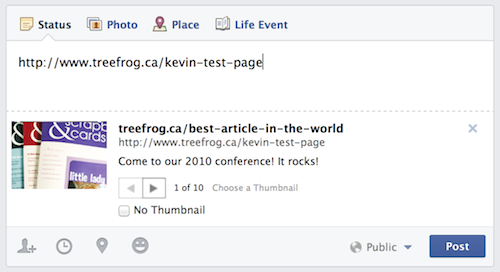
A client called in recently with a conundrum about Facebook. They asked us how Facebook managed to find information about one of their old conferences and apply it to their new post.

They had created a web page on their site and posted the link as a status update on Facebook. The problem was, the link appeared to be grabbing old information from somewhere and attributing it to their post.

Where was this old information coming from?

Take a look at the image above. When you drop a link into Facebook, it pulls data from that webpage.

What the… That’s totally not the information we have on our page. Where is it getting that title and description from? 2010 is over, isn’t it?

You’ve spent all this time creating a great webpage, and then Facebook goes and pulls some arbitrary title and description from out of nowhere. You’ll have to change that on your Facebook post if you want to make it current and relevant.

It turns out, the key to setting up your page correctly before posting it on Facebook, or any social network for that matter, is META data.

Never META Data I Didn’t Like

The mysterious thing about META data is that it is invisible to the naked eye. In fact, you can’t even see it if your eye has clothes on. It lives behind the curtain with the wizard.

META data consists of three main parts: Page title, Page keywords and page description.

Page title
Your page title is the text that appears at the top of a browser window. The page title is not to be confused with your page’s URL (link). The page title should describe the content on your page in an engaging way. The page title gets pulled as the title of your Facebook post.

Page Description
The page description should be a brief paragraph describing the content of your page.
For Facebook posts, the META description will end up being pulled into the post description. If you set this up on your webpage’s META data, you don’t have to worry about re-entering or editing it on Facebook, which will save you time and headache.

Keywords
META Keywords are not used by Facebook. In fact there are varying opinions about the validity of keywords as a whole, but that’s not for the scope of this article. For some extra reading on the relevance of populating the keyword field, you should visit this link.

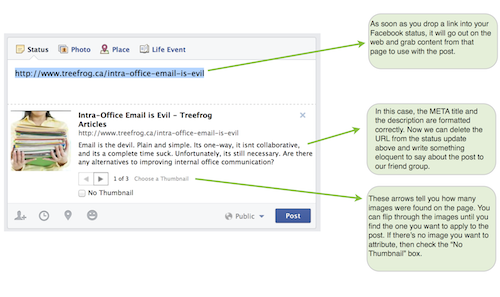
As per the photo above, as soon as you drop a link into your Facebook status, it will go out to the web and collect what it thinks is relevant data to use with the post.

in the above case, the META title and description are formatted correctly. Once that’s done, you can delete the link itself from your status update and write something attention-grabbing about the content you’re posting.

The arrows near the bottom of the post dialog box tell you how many images Facebook found on the page. You can flip through the images until you find the one you want to apply to the post. If there’s no image you want to attribute, simply check the “No Thumbnail” box.

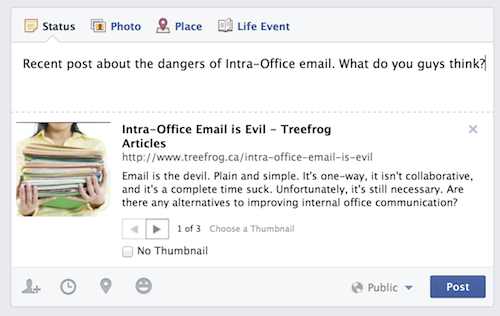
Above is an example of the post with the actual URL removed and a little intro written, ready to post to the Facebook world.

Tip: If you’re planning on posting this same content to multiple social networks, you should customize your intro. When it comes to posting something on Twitter, brevity is your friend. Your “Likes” on Facebook may prefer a more playful, jovial intro, whereas your followers on LinkedIn could be more serious. The point is: change it up, don’t just cut and paste the same intro across the board.

As part of your web page creating process, you should make sure it contains the proper META data. It’s just good practice. It will also save you time, add relevance and increase search engine optimization.

LEAP™ Makes META Insertion Easy

The META data on your page can be a very powerful tool. It is also what Google will most often use to display when your page comes up in a search result. The information should be precise and engaging. It should make people want to click on the story and read it.

Treefrog’s custom Content Management System (LEAP™) allows users to hop into the back end of their site easily and update the META content. It’s as easy as “leaping” to the administration side of the site, clicking the META button, making your edits and clicking “Update”.

Now, when you plug the link to your beautiful new web page into a Facebook status, all of that information will pull into your post. Voilà! Saves you time, and keeps things consistent.

If you still have questions about META data, let us know, we’d love to hear from you!

pen drawing digital lines
Marketing Strategy

Five Essential Parts of SEO

What is SEO?

SEO (Search Engine Optimization) is a magical art, created in the center of an active volcano by a colony of friendly yet mischievous gnomes.

SEO can’t be seen, it’s hard to quantify, it’s not altogether tangible, and it’s constantly shifting and moving around like the smoky essence of the universal ether.

SEO has had a tainted history. In the past few years, snake oil salespeople have been pulling their wagons into town and offloading their wares on the unassuming villagers. SEO was packaged and sold as the way to get to number one on Google. In the past, there were some questionable ways of making this happen. Evil SEOs of old employed backlinking magic, keyword stuffing, and various other wayward tactics to fool the poor Google. And it worked. But then the Google woke up, and it was angry.

With the release of several major upgrades to its algorithm, Google changed the rules for SEOs everywhere. Instead of ranking well for using dark tactics, sites were penalized. Some companies woke up one morning to find their websites had completely fallen off the radar. Since these major shifts in the industry, the world of SEO has become a completely different place.

The Google Effect

You may be aware of the fact that Google changes its algorithm over 500 times a year. Let me put that in perspective. Think of doing something 499 times this year. Google changes its algorithm more than that. That’s more often than some people shower. Every time this happens, the SEO industry feels it. Sometimes the changes are subtle. Sometimes they are major. Either way, a big part of SEO is ensuring your website makes the grade—that is, stays in line with Google’s ranking criteria. There are forums on the Internet where SEO engineers do nothing but debate what Google is going to do next, and what it means. Deciphering Google is a full time job.

Google gets over 60% of search engine traffic

Also, let me clarify. I use the term “Google”, but what I really mean is “search engine”. Everyone knows there are other search engines out there. I think. There’s also Bing, and there’s… Bing. Fact: Google gets over 60% of the search engine traffic on the web, so for the purpose of expedience, I’ll probably just keep saying Google when referring to search engines.

As for the explanation of SEO, I have come to think of it in five distinct sections.

Technical

Technical SEO deals with applying attributes to web pages which happen on the back end, where most mild-mannered content creators choose not to venture. Technical SEO changes can include improving page load times, applying microformatting, validating the W3C markup, and various other techniques.

Search engines acknowledge the effectiveness of a website from a technical perspective, so it’s an important aspect to improved SEO. But once those technical changes are applied, they don’t keep awarding your site points with Google. Even though these updates are important, the SEO work is really only just beginning.

Content/Creative

This is the most important part of SEO. Content should be at the core of your SEO strategy. Whether it’s articles, images, videos, infographs or a collection of all of these, the more relevant and helpful your content is, the better your chances of it being found on the web.

Tactical

Tactical SEO refers to optimizing websites on a page-by-page basis, in order to ensure they make the grade for popular search engines.

Tactical SEO involves the effective insertion of keywords into on-page content throughout a website. This may sound simple enough, but keywords are different for every industry, every company, and every individual.

The wrong keywords will draw the wrong kind of traffic to a website. If the keyword is too broad, you’ll get tire-kickers. If it’s too specific and exclusionary, you may be cutting out part of your audience. Keywords use a balance, and it’s ongoing. Basically, tactical SEO involves strategic content insertion on a continual basis.

Social

Social is a great way to pull traffic to your website organically. It stems from having great content and staying engaged with your audience. Ideally your audience will share your content, comment about it, and give you feedback. All of this activity drives traffic and calls attention to your web presence.

Reporting

This is the science of SEO. Through custom reporting, SEO managers can determine whether a strategy is working. Because one client’s goals are different from the next, SEO strategies should be tailored to fit specific needs. It isn’t all about getting to number one on Google (something we’ll cover more in depth soon), it’s about identifying a client’s key performance indicators and doing everything you can to meet expectations.

As SEO Manager at Treefrog, this will not be the only article I write about SEO. It’s such an involved topic, there are hundreds of angles to cover. In fact, many of the topics brought in this article are grounds for more explanation, which I plan to provide as we go forward. In the meantime, please feel free to email your questions or flag me down on Facebook/Twitter/LinkedIn and I’ll be happy to help however I can.

I hope that you will enjoy following along this incredible journey as we learn and experience together. In the meantime, I’ll be hanging’ with the gnomes.

Scroll to Top